Solved Problems with my card driver and some USB drivers, unable to fix!

sundevilrach

New member
Local time
7:02 PM
Messages
26
I am a total newbie here and looking for some help with PC problems I seem to have developed that my simple PC skills don't quite grasp.

I started having problems with my phone software recognising my smart phone and thought the phone was the problem. All other USB equipment (speakers, web cam, wifi booster) are working fine so I thought the phone was the problem.

My restore points seem to have vanished (another issue!!) and I think when I last backed up my phone 2 months ago I tried to free up space and might have deleted something important in error :cry:

So I checked this morning and the USB ports that are failing and showing under Portable Devices rather than USB controllers are HS - CF card, HS - MS Card, HS - SD card and HS - XD/Sm. I think this woud seem to be a problem with the media card? Or am I wrong?

I have tried to uninstall and reinstall the drivers and used trouble shooting and this morning tried going through server clean up via control management. No issues came up via the control manamagement but the trouble shooting is identifying a problem with the drivers but cannot seem to reinstall them and they just come up with the red cross next to them after trouble shooting.

Apologies if this does not make sense, I only really know the basics and have relied on system restore in the past but it does not have any restore points at the moment.

Any help would be very much appreciated as I now have a phone with nothing on it and a back up on this PC I can't link it with.

Sorry I am not too clued up with the specifications of my PC - I have had it for years. It is an Intel and it is Windows 7 Home Premium.
 

My Computer My Computer

At a glance

Windows 7
Computer type
PC/Desktop
Computer Manufacturer/Model Number
Dell
OS
Windows 7
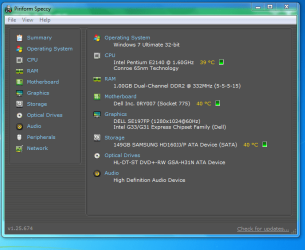
Hi mate, welcome to Seven Forums. Right, first thing's first, we could do with knowing your system information (most importantly your motherboard and chipset) as this will help in identifying drivers for your system. To get this information easily download Piriform Speccy, once installed and run please take a shot of the window containing your information using the Snipping Tool. Then upload and post the screenshot following this tutorial.

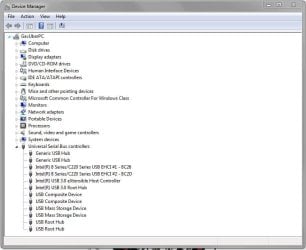
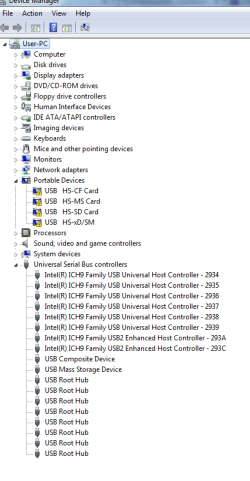
Also, we could do with seeing your Device Manager. Right click on Computer (either the desktop icon or on the right of your Start Menu), click Properties, click Device Manager, then expand the Universal Serial Bus controllers section (an example is shown below). Then take a shot with the snipping tool and upload it to your post. This will show if there are any issues with your installed hardware at present.

Capture 3.JPG
 

My Computer My Computer

At a glance

W7 Pro x64 SP1 | W10 Pro IP x64 | W8.1 Pro x6...i7-4790k @ 4GHz (4.4GHz Boost)16GB DDR3 Kingston HyperX Fury @ 1600MHz CL 9...EVGA GTX 980 Classified
Computer type
PC/Desktop
Computer Manufacturer/Model Number
Custom Build
OS
W7 Pro x64 SP1 | W10 Pro IP x64 | W8.1 Pro x64 VM | Linux Mint VM
CPU
i7-4790k @ 4GHz (4.4GHz Boost)
Motherboard
ASUS Sabertooth Z87 (BIOS Rev 2004)
Memory
16GB DDR3 Kingston HyperX Fury @ 1600MHz CL 9-9-9-27
Graphics Card(s)
EVGA GTX 980 Classified
Sound Card
Realtek Onboard
Monitor(s) Displays
Samsung S27D390
Screen Resolution
1920 x 1080
Hard Drives
240GB Intel 520 Series SSD |
Samsung 850 EVO 120GB SSD |
2TB WD Caviar Black |
2TB WD Caviar Green
PSU
Corsair HX850-80 Gold Modular
Case
Cooler Master Silencio 650
Cooling
Corsair H80i w/2 x Corsair SP120 | 2 x 120mm Noctua NF-S12B
Keyboard
Microsoft Sidewinder X4
Mouse
Gigabyte M6900 optical
Internet Speed
152mb
Antivirus
F-Secure
Browser
Firefox 38.0
Other Info
Backup Rig: Win 7 Pro 64-bit | AMD A10-5800k | ASUS F2A85-V Pro | 8GB Samsung DDR3 @1600MHz | 120GB Toshiba SDD | 2TB Seagate HDD | Cooler Master Silencio 550
Thanks so much for getting back to me. Just home from work and so far so good and I have got the snipping tool to work so here is my running system.

Capture.PNG
 

My Computer My Computer

At a glance

Windows 7
Computer type
PC/Desktop
Computer Manufacturer/Model Number
Dell
OS
Windows 7
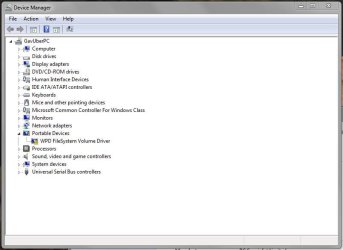
Now for the USB ports, as you will see it seems that certain ones are fine which but the media ones seem to be the problem. Well to my amateur. I honestly think I have removed something I shoudn't have which has stopped them running! :confused: So when I plug in my phone it appears alongside all those other symbols with the exlamation mark as a portable device. I think this is the crux of the problem and I don't seem to be having any joy updating them.

Capture2.PNG
 

My Computer My Computer

At a glance

Windows 7
Computer type
PC/Desktop
Computer Manufacturer/Model Number
Dell
OS
Windows 7
Are your cards connected through a card reader or are they connected through USB adaptors?
 

My Computer My Computer

At a glance

W7 Pro x64 SP1 | W10 Pro IP x64 | W8.1 Pro x6...i7-4790k @ 4GHz (4.4GHz Boost)16GB DDR3 Kingston HyperX Fury @ 1600MHz CL 9...EVGA GTX 980 Classified
Computer type
PC/Desktop
Computer Manufacturer/Model Number
Custom Build
OS
W7 Pro x64 SP1 | W10 Pro IP x64 | W8.1 Pro x64 VM | Linux Mint VM
CPU
i7-4790k @ 4GHz (4.4GHz Boost)
Motherboard
ASUS Sabertooth Z87 (BIOS Rev 2004)
Memory
16GB DDR3 Kingston HyperX Fury @ 1600MHz CL 9-9-9-27
Graphics Card(s)
EVGA GTX 980 Classified
Sound Card
Realtek Onboard
Monitor(s) Displays
Samsung S27D390
Screen Resolution
1920 x 1080
Hard Drives
240GB Intel 520 Series SSD |
Samsung 850 EVO 120GB SSD |
2TB WD Caviar Black |
2TB WD Caviar Green
PSU
Corsair HX850-80 Gold Modular
Case
Cooler Master Silencio 650
Cooling
Corsair H80i w/2 x Corsair SP120 | 2 x 120mm Noctua NF-S12B
Keyboard
Microsoft Sidewinder X4
Mouse
Gigabyte M6900 optical
Internet Speed
152mb
Antivirus
F-Secure
Browser
Firefox 38.0
Other Info
Backup Rig: Win 7 Pro 64-bit | AMD A10-5800k | ASUS F2A85-V Pro | 8GB Samsung DDR3 @1600MHz | 120GB Toshiba SDD | 2TB Seagate HDD | Cooler Master Silencio 550
I have a card reader, well it is just a plate on the front of the PC that has the card slots plus several USB ports and ports for headphones and microphone. That is a card reader right lol - I am a novice!
 

My Computer My Computer

At a glance

Windows 7
Computer type
PC/Desktop
Computer Manufacturer/Model Number
Dell
OS
Windows 7
It is a card reader mate. I'm going to have a look into your system specs and see what I can come up with. Does Device Manager show the cards and the warnings under portable devices if you remove the cards or is it only when they're inserted?
 

My Computer My Computer

At a glance

W7 Pro x64 SP1 | W10 Pro IP x64 | W8.1 Pro x6...i7-4790k @ 4GHz (4.4GHz Boost)16GB DDR3 Kingston HyperX Fury @ 1600MHz CL 9...EVGA GTX 980 Classified
Computer type
PC/Desktop
Computer Manufacturer/Model Number
Custom Build
OS
W7 Pro x64 SP1 | W10 Pro IP x64 | W8.1 Pro x64 VM | Linux Mint VM
CPU
i7-4790k @ 4GHz (4.4GHz Boost)
Motherboard
ASUS Sabertooth Z87 (BIOS Rev 2004)
Memory
16GB DDR3 Kingston HyperX Fury @ 1600MHz CL 9-9-9-27
Graphics Card(s)
EVGA GTX 980 Classified
Sound Card
Realtek Onboard
Monitor(s) Displays
Samsung S27D390
Screen Resolution
1920 x 1080
Hard Drives
240GB Intel 520 Series SSD |
Samsung 850 EVO 120GB SSD |
2TB WD Caviar Black |
2TB WD Caviar Green
PSU
Corsair HX850-80 Gold Modular
Case
Cooler Master Silencio 650
Cooling
Corsair H80i w/2 x Corsair SP120 | 2 x 120mm Noctua NF-S12B
Keyboard
Microsoft Sidewinder X4
Mouse
Gigabyte M6900 optical
Internet Speed
152mb
Antivirus
F-Secure
Browser
Firefox 38.0
Other Info
Backup Rig: Win 7 Pro 64-bit | AMD A10-5800k | ASUS F2A85-V Pro | 8GB Samsung DDR3 @1600MHz | 120GB Toshiba SDD | 2TB Seagate HDD | Cooler Master Silencio 550
Nothing is inserted that is the strange thing. At moment only my web cam and WIFi booster are in my USB's and no cards at all are inserted so I am not sure why they are showing as portable devices. Likewise when I put my phone in a USB it shows as a portable device regardless of what USB I put it in rather than under USB drivers.

Thanks so so much
 

My Computer My Computer

At a glance

Windows 7
Computer type
PC/Desktop
Computer Manufacturer/Model Number
Dell
OS
Windows 7
Coincidentally I have exactly the same problem with a portable device showing up in my Device Manager when nothing is inserted. I've still to get to the bottom of that one although I believe it's related to software specific to my motherboard.

Can you tell me if the cards work OK when they're inserted? And do they show at all in Device Manager or in Computer?
 

My Computer My Computer

At a glance

W7 Pro x64 SP1 | W10 Pro IP x64 | W8.1 Pro x6...i7-4790k @ 4GHz (4.4GHz Boost)16GB DDR3 Kingston HyperX Fury @ 1600MHz CL 9...EVGA GTX 980 Classified
Computer type
PC/Desktop
Computer Manufacturer/Model Number
Custom Build
OS
W7 Pro x64 SP1 | W10 Pro IP x64 | W8.1 Pro x64 VM | Linux Mint VM
CPU
i7-4790k @ 4GHz (4.4GHz Boost)
Motherboard
ASUS Sabertooth Z87 (BIOS Rev 2004)
Memory
16GB DDR3 Kingston HyperX Fury @ 1600MHz CL 9-9-9-27
Graphics Card(s)
EVGA GTX 980 Classified
Sound Card
Realtek Onboard
Monitor(s) Displays
Samsung S27D390
Screen Resolution
1920 x 1080
Hard Drives
240GB Intel 520 Series SSD |
Samsung 850 EVO 120GB SSD |
2TB WD Caviar Black |
2TB WD Caviar Green
PSU
Corsair HX850-80 Gold Modular
Case
Cooler Master Silencio 650
Cooling
Corsair H80i w/2 x Corsair SP120 | 2 x 120mm Noctua NF-S12B
Keyboard
Microsoft Sidewinder X4
Mouse
Gigabyte M6900 optical
Internet Speed
152mb
Antivirus
F-Secure
Browser
Firefox 38.0
Other Info
Backup Rig: Win 7 Pro 64-bit | AMD A10-5800k | ASUS F2A85-V Pro | 8GB Samsung DDR3 @1600MHz | 120GB Toshiba SDD | 2TB Seagate HDD | Cooler Master Silencio 550
I just put my SD camera card in, it did not now in portable devices but under the E drive in my computer. Let me view the photos and files no problem! Not problem at all. Also put a USB stick in with photos, again no issues and showing under my computer.

So it is the mobile phone that has me stumped and these exclamation marks which don't seem to affect the PC! Surely the USB named SD relates to the SD card so I am unsure how it is reading it fine!
 

My Computer My Computer

At a glance

Windows 7
Computer type
PC/Desktop
Computer Manufacturer/Model Number
Dell
OS
Windows 7
It's the same as my 'problem', the device shows as a portable device but whenever I plug a flash drive in it works fine. You can ignore the portable devices for your cards as they will work fine, if you can put up with the annoyance of them showing like that in Device Manager that is. It won't stop anything working properly. I've included a screenshot of my Device Manager below so you can see the same problem.

As for your phone, I'm a bit stumped. What make/model do you have? And what happens when you plug it in?

Capture.JPG
 

My Computer My Computer

At a glance

W7 Pro x64 SP1 | W10 Pro IP x64 | W8.1 Pro x6...i7-4790k @ 4GHz (4.4GHz Boost)16GB DDR3 Kingston HyperX Fury @ 1600MHz CL 9...EVGA GTX 980 Classified
Computer type
PC/Desktop
Computer Manufacturer/Model Number
Custom Build
OS
W7 Pro x64 SP1 | W10 Pro IP x64 | W8.1 Pro x64 VM | Linux Mint VM
CPU
i7-4790k @ 4GHz (4.4GHz Boost)
Motherboard
ASUS Sabertooth Z87 (BIOS Rev 2004)
Memory
16GB DDR3 Kingston HyperX Fury @ 1600MHz CL 9-9-9-27
Graphics Card(s)
EVGA GTX 980 Classified
Sound Card
Realtek Onboard
Monitor(s) Displays
Samsung S27D390
Screen Resolution
1920 x 1080
Hard Drives
240GB Intel 520 Series SSD |
Samsung 850 EVO 120GB SSD |
2TB WD Caviar Black |
2TB WD Caviar Green
PSU
Corsair HX850-80 Gold Modular
Case
Cooler Master Silencio 650
Cooling
Corsair H80i w/2 x Corsair SP120 | 2 x 120mm Noctua NF-S12B
Keyboard
Microsoft Sidewinder X4
Mouse
Gigabyte M6900 optical
Internet Speed
152mb
Antivirus
F-Secure
Browser
Firefox 38.0
Other Info
Backup Rig: Win 7 Pro 64-bit | AMD A10-5800k | ASUS F2A85-V Pro | 8GB Samsung DDR3 @1600MHz | 120GB Toshiba SDD | 2TB Seagate HDD | Cooler Master Silencio 550
It happens with both phones I have handy - The Sony Xperia Z1 shows up under portable devices with the exclamation mark as you have there too. When I plug it in a prompt comes up saying your Sony Xperia has been detected launch the PC companion (their version of Itunes) but it won't detect the phone at all. All their assistance says it is a driver issue and to uninstall and reinstall but it won't work.

However my PC also won't detect my old Iphone through itunes and it comes up with the exclamation mark too but this time under USB's.

I am out the house most of the day as have a visitor but I will try and get shots of what is happening. It seems strange it is happening with both!

Thanks so much for your help so far.
 

My Computer My Computer

At a glance

Windows 7
Computer type
PC/Desktop
Computer Manufacturer/Model Number
Dell
OS
Windows 7
When I was using an Xperia T I removed the PC Companion virtually straight away, I hated it. I used Windows Explorer to navigate the phone and copy and move files. Does the phone show up in Computer when you connect it?
 

My Computer My Computer

At a glance

W7 Pro x64 SP1 | W10 Pro IP x64 | W8.1 Pro x6...i7-4790k @ 4GHz (4.4GHz Boost)16GB DDR3 Kingston HyperX Fury @ 1600MHz CL 9...EVGA GTX 980 Classified
Computer type
PC/Desktop
Computer Manufacturer/Model Number
Custom Build
OS
W7 Pro x64 SP1 | W10 Pro IP x64 | W8.1 Pro x64 VM | Linux Mint VM
CPU
i7-4790k @ 4GHz (4.4GHz Boost)
Motherboard
ASUS Sabertooth Z87 (BIOS Rev 2004)
Memory
16GB DDR3 Kingston HyperX Fury @ 1600MHz CL 9-9-9-27
Graphics Card(s)
EVGA GTX 980 Classified
Sound Card
Realtek Onboard
Monitor(s) Displays
Samsung S27D390
Screen Resolution
1920 x 1080
Hard Drives
240GB Intel 520 Series SSD |
Samsung 850 EVO 120GB SSD |
2TB WD Caviar Black |
2TB WD Caviar Green
PSU
Corsair HX850-80 Gold Modular
Case
Cooler Master Silencio 650
Cooling
Corsair H80i w/2 x Corsair SP120 | 2 x 120mm Noctua NF-S12B
Keyboard
Microsoft Sidewinder X4
Mouse
Gigabyte M6900 optical
Internet Speed
152mb
Antivirus
F-Secure
Browser
Firefox 38.0
Other Info
Backup Rig: Win 7 Pro 64-bit | AMD A10-5800k | ASUS F2A85-V Pro | 8GB Samsung DDR3 @1600MHz | 120GB Toshiba SDD | 2TB Seagate HDD | Cooler Master Silencio 550
If I might also try to assist.

Disconnect any USB Mass Storage device (flash, USB CD/DVD, USB Hard Disk). OK to leave in your speakers, web cam, wifi booster (they're USB but not USB storage). Disconnect allphones.
> In post #4, there were 4 Portable devices. How many right now?
> For each portable device still there with a yellow icon, right click Properties->Details. Use the pull down tab to select Hardware IDs. Copy/paste the IDs you see into your next post

/* EDIT */
One more thing, for each portable still there with a yellow icon, right click Properties. Look for the device status code under Device Status? If yes, is it code=10? If not, what code #

/* EDIT2 */
Insert a memory card, does one of the Portable devices w/yellow icon go away? Does anything different appear in its place? If the device still shows an error, click and open Computer. Does it display a new device with a drive letter assigned? If no, go to Disk Management, look at the disks
> Are all the disks formatted? Give a screen shot
 
Last edited:

My Computer My Computer

At a glance

Desk 1: Win 7 Pro x32; Desk 2: Windows 10 x64
Computer type
PC/Desktop
Computer Manufacturer/Model Number
Dell Optiplex 360 and Optiplex 755
OS
Desk 1: Win 7 Pro x32; Desk 2: Windows 10 x64
Hard Drives
500GB Crucial SSD in both Desktops
Other Info
Buffalo 6TB NAS, Raid 1
When I was using an Xperia T I removed the PC Companion virtually straight away, I hated it. I used Windows Explorer to navigate the phone and copy and move files. Does the phone show up in Computer when you connect it?

Yes it shows up in Computer but with the yellow exclamation mark next to it.

Today I tried to use a USB stick (different to the one that worked yesterday) and it won't read hat USB. When I tried to install the driver for it through device manage it does the same as it does with the phone, it detects a driver, goes to install it and then says 'access denied'!

Both are classified as mass storage devices - could this be part of the problem?
 

My Computer My Computer

At a glance

Windows 7
Computer type
PC/Desktop
Computer Manufacturer/Model Number
Dell
OS
Windows 7
If I might also try to assist.

Disconnect any USB Mass Storage device (flash, USB CD/DVD, USB Hard Disk). OK to leave in your speakers, web cam, wifi booster (they're USB but USB storage). Disconnect allphones.
> In post #4, there were 4 Portable devices. How many right now?

There are still 4 devices. I have nothing plugged in other than my speakers and wifi booster, nothing at all.

Still says 4!! :(
 

My Computer My Computer

At a glance

Windows 7
Computer type
PC/Desktop
Computer Manufacturer/Model Number
Dell
OS
Windows 7
If I might also try to assist.

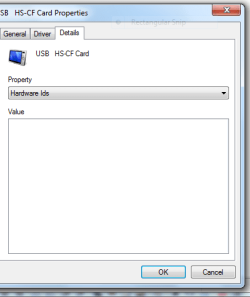
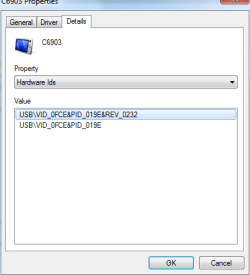
> For each portable device still there with a yellow icon, right click Properties->Details. Use the pull down tab to select Hardware IDs. Copy/paste the IDs you see into your next post


Ok bizarely none of them have any description in the Hardware Id's - it is just blank.

This is what it looks like

Capture3.PNG


Capture4.PNG
 

My Computer My Computer

At a glance

Windows 7
Computer type
PC/Desktop
Computer Manufacturer/Model Number
Dell
OS
Windows 7
Re: Access denied

As luck would have it, i was just recently in a thread with a user who had a similar "access denied" problem when connecting on USB Mass Storage devices. Another member suggested it could be malware. His advice worked! both for the original poster and a couple others too who posted to say it also worked for them.!

Try the scans posted HERE http://www.sevenforums.com/hardware...not-successfully-installed-2.html#post2754870

Then try your flash drive again. And we'll take it from there
 

My Computer My Computer

At a glance

Desk 1: Win 7 Pro x32; Desk 2: Windows 10 x64
Computer type
PC/Desktop
Computer Manufacturer/Model Number
Dell Optiplex 360 and Optiplex 755
OS
Desk 1: Win 7 Pro x32; Desk 2: Windows 10 x64
Hard Drives
500GB Crucial SSD in both Desktops
Other Info
Buffalo 6TB NAS, Raid 1
If I might also try to assist.

/* EDIT */
One more thing, for each portable still there with a yellow icon, right click Properties. Look for the device status code under Device Status? If yes, is it code=10? If not, what code #

/* EDIT2 */
Insert a memory card, does one of the Portable devices w/yellow icon go away? Does anything different appear in its place? If the device still shows an error, click and open Computer. Does it display a new device with a drive letter assigned? If no, go to Disk Management, look at the disks
> Are all the disks formatted? Give a screen shot

sorry to have broken it down so much with my replies but easier to keep track of what you suggested.

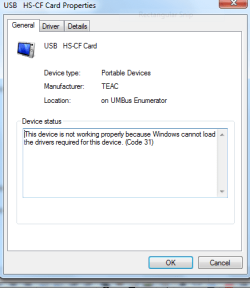
Ok for the device status code number it is 31 for them all as per my last screen shot - all four of them are 31 and when I connect my phone it is also code 31 but it has details under the hardware ID


Capture5.PNG


For Edit 2 when I insert the memory card, nothing changes and all the icons are still with exclamation marks. It shows under my Computer as Disc I. Works fine from there.
 

My Computer My Computer

At a glance

Windows 7
Computer type
PC/Desktop
Computer Manufacturer/Model Number
Dell
OS
Windows 7
OK. Good info.

1. We posted about the same time. So, in case you missed it, note my last post and run the malware scans listed. I think your flash drive issue may be separate from 4 devices you keep seeing. But in any case, run the scans, report back on both problems and can go from there

2. Also, tell me exact make/model of your computer.
 

My Computer My Computer

At a glance

Desk 1: Win 7 Pro x32; Desk 2: Windows 10 x64
Computer type
PC/Desktop
Computer Manufacturer/Model Number
Dell Optiplex 360 and Optiplex 755
OS
Desk 1: Win 7 Pro x32; Desk 2: Windows 10 x64
Hard Drives
500GB Crucial SSD in both Desktops
Other Info
Buffalo 6TB NAS, Raid 1
Back
Top