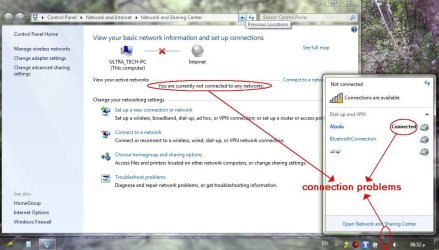
problems with network icon and in network and sharing center

TruthSeeker

New member
whenever i connect to the internet through dial up connection the network icon in the notification area still displays (not connected ) and when i go to the network and sharing it says not connected, ALTHOUGH i can surf the internet with no problems , AND when i insert the Ethernet cable it doesn't connect !!!!???????
please i need your help
 

Attachments

  • 1311350214-clip-117kb.jpg
    1311350214-clip-117kb.jpg
    116.8 KB · Views: 94

My Computer

OS
Windows 7 Ultimate x64
Welcome to Seven Forums TruthSeeker.
Click on the big red X in the Network window and see what it shows. You might have to clone a MAC address, looks like you have several net adapters.
 

My Computer

Computer type
PC/Desktop
Computer Manufacturer/Model Number
Home Built Desktop By DataTech
OS
Windows 7 Ultimate X64 SP1
CPU
Intel i5-2550K, Differing ~4.4-4.8GHz No built in GPU
Motherboard
ASUS P8Z68-V PRO/GEN3
Memory
16GB G.Skill Sniper 1866MHz @ 2133MHz 2x8GB
Graphics Card(s)
ASUS GTX650TIB-DC2OC-2GD5, (650TI Boost)
Sound Card
Onboard Realtek 5-1
Monitor(s) Displays
Samsung P2570HD
Screen Resolution
1920x1080
Hard Drives
Samsung 840 Pro 256GB SSD for OS, 500GB Seagate Constellation (Enterprise drive) for Data
PSU
Corsair HX650W
Case
Inwin Dragon Rider
Cooling
Hyper 212 EVO w/two Noctua fans, push-pull, @1300 RPM
Keyboard
E-Z Eyes, bright yellow keys with large characters
Mouse
steelseries SENSEI Laser Pro Gaming
Internet Speed
48-51Mbs Mbs down, 11 Mbs up Xfinity Cable
Antivirus
Norton Internet Security 2013
Browser
IE 10, Opera, Pale Moon if needed
Other Info
4 case fans, LG BluRay-RE, ASUS DVD-RW, Mr. Fusion power supply, 1.21 gigawatts.
Welcome to Seven Forums TruthSeeker.
Click on the big red X in the Network window and see what it shows. You might have to clone a MAC address, looks like you have several net adapters.


did u follow that advise?
 

My Computer

Computer Manufacturer/Model Number
Windows 7 Ultimate 64-bit
OS
Windows 7 Ultimate N 64-bit
CPU
AMD Black Edition - AMD Phenom X4 2.5 GHz Processor
Motherboard
Bio Star
Memory
8GB DDR2 800MHZ BRANDED
Graphics Card(s)
Palti NVIDIA GeForce GTX 460
Monitor(s) Displays
3D 23.6" & 22"
Screen Resolution
1920x1080@120Hz
Hard Drives
313GB SAMSUNG SAMSUNG HD321KJ
PSU
OCZ 600W StealthXStream PSU, PowerWhisper, Active PFC
Internet Speed
22793
Welcome to Seven Forums TruthSeeker.
Click on the big red X in the Network window and see what it shows. You might have to clone a MAC address, looks like you have several net adapters.


did u follow that advise?
i am on dial -up connection using USB data fax modem currently i deleted all connections and made only one new connection
troubleshooting couldn't find the problem
when i restart the service (network location awareness ) the icon become connected and the network and sharing center says i am connected
i need to solve this problem for this dial-up connection now i am currently in an area where no broadband is available
by the way my laptop is Dell Inspiron 1564
 
Last edited:

My Computer

OS
Windows 7 Ultimate x64
have you tried to disable wifi/lan to make windows see only 1 network connection.
 

My Computer

Computer Manufacturer/Model Number
Windows 7 Ultimate 64-bit
OS
Windows 7 Ultimate N 64-bit
CPU
AMD Black Edition - AMD Phenom X4 2.5 GHz Processor
Motherboard
Bio Star
Memory
8GB DDR2 800MHZ BRANDED
Graphics Card(s)
Palti NVIDIA GeForce GTX 460
Monitor(s) Displays
3D 23.6" & 22"
Screen Resolution
1920x1080@120Hz
Hard Drives
313GB SAMSUNG SAMSUNG HD321KJ
PSU
OCZ 600W StealthXStream PSU, PowerWhisper, Active PFC
Internet Speed
22793
Back
Top