Solved Problems with Office 2010 Mini-Translator

ManGFx64

New member
Local time
1:55 PM
Messages
13
Hello everyone,
Yesterday, i got the new office 2010 on my laptop, and i have a small problem. I tried removing and reinstalling office, but it didnt work.
When i turn on the Mini-translator feature under the review tab, set the desired "Translate To" language, highlight and hover over a word, i get the following message:
"The service could not respond. The service may not be installed. Running repair may help. If this problem persists, repair your product from within the Control Panel."
It happens mainly between French and another language. For example, when i try to translate from english to arabic, it works fine, but from english to french, or arabic to french, it doesnt work.
I also ran the repair option from control panel (before removing and reinstalling it), it still did not work.

Any ideas why and/or how to fix?
Any help's appreciated
Thanks
 

My Computer

OS
Windows 7 Home Premium x64
That's probably because proof reading and other language specific goodies like dictionaries are not installed for French language.

Click Review - Translate - Translate selected text.

In the Research bar click Translation Options...
In your case most likely French is NOT among Available language pairs.

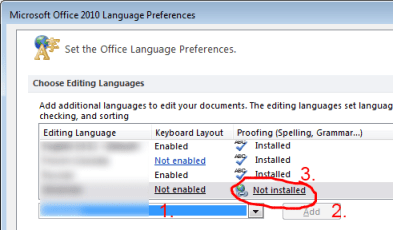
If it is not, go to Start- All programs - Microsoft Office 2010 - Microsoft Office 2010 Tools - Microsoft Office 2010 language preferences. Add French by selecting French in drop down menu and clicking Add button. It will show you that Proof reading is not installed.

Click on "Not installed". It is a link. Download required language. After installation of that language-specific features you should get dictionaries to and from French , which exist for Office 2010 (I think for French that would be about 4 local language pairs/dictionaries).
 

Attachments

  • language.png
    language.png
    14.8 KB · Views: 15

My Computer

Computer type
PC/Desktop
OS
Windows 8.1 ; Windows 7 x86 (Dec2008-Jan2013)
Other Info
"The scale icon at the top right of a post or tutorial is how you can give rep to the member."
That's probably because proof reading and other language specific goodies like dictionaries are not installed for French language.

Click Review - Translate - Translate selected text.

In the Research bar click Translation Options...
In your case most likely French is NOT among Available language pairs.

If it is not, go to Start- All programs - Microsoft Office 2010 - Microsoft Office 2010 Tools - Microsoft Office 2010 language preferences. Add French by selecting French in drop down menu and clicking Add button. It will show you that Proof reading is not installed.

Click on "Not installed". It is a link. Download required language. After installation of that language-specific features you should get dictionaries to and from French , which exist for Office 2010 (I think for French that would be about 4 local language pairs/dictionaries).

ok, i did all that, but it says that "Proofing (Spelling, grammar...)" is installed, although the "keyboard layout" is not enabled, but i have actually enabled it long time ago.. i can switch to the french keyboard from the taskbar (language bar)
 

My Computer

OS
Windows 7 Home Premium x64
There are six options for French:
Belgium,
Canada,
France,
Luxembourg,
Monaco,
Switzerland.

Probably you have enabled one for keyboard and another for spelling.
Make sure one from the language bar is the same French as in Microsoft Office 2010 language preferences.
 

My Computer

Computer type
PC/Desktop
OS
Windows 8.1 ; Windows 7 x86 (Dec2008-Jan2013)
Other Info
"The scale icon at the top right of a post or tutorial is how you can give rep to the member."
There are six options for French:
Belgium,
Canada,
France,
Luxembourg,
Monaco,
Switzerland.

Probably you have enabled one for keyboard and another for spelling.
Make sure one from the language bar is the same French as in Microsoft Office 2010 language preferences.

well i have enabled the Canadian French spelling AND keyboard. they still dont work
 

My Computer

OS
Windows 7 Home Premium x64
well i have enabled the Canadian French spelling AND keyboard. they still dont work
Click Review - Translate - Translate selected text.
In the Research bar click Translation Options...
What French related language pairs do you have there?

Also, please post screenshot of this folder
C:\Program Files\Common Files\microsoft shared\TRANSLAT
 

My Computer

Computer type
PC/Desktop
OS
Windows 8.1 ; Windows 7 x86 (Dec2008-Jan2013)
Other Info
"The scale icon at the top right of a post or tutorial is how you can give rep to the member."
well i have enabled the Canadian French spelling AND keyboard. they still dont work
Click Review - Translate - Translate selected text.
In the Research bar click Translation Options...
What French related language pairs do you have there?

Also, please post screenshot of this folder
C:\Program Files\Common Files\microsoft shared\TRANSLAT
Arabic to French (France)
English U.S. to French (France)
French (France) to Arabic
French (France) to English U.S.

and thats the screenshot
 

Attachments

  • Capture.PNG
    Capture.PNG
    38.6 KB · Views: 33

My Computer

OS
Windows 7 Home Premium x64
At this point, I do not have any ideas other than reinstalling from a different media.

Or I can send you files from my folder
C:\Program Files\Common Files\microsoft shared\TRANSLAT
 

My Computer

Computer type
PC/Desktop
OS
Windows 8.1 ; Windows 7 x86 (Dec2008-Jan2013)
Other Info
"The scale icon at the top right of a post or tutorial is how you can give rep to the member."
At this point, I do not have any ideas other than reinstalling from a different media.

Or I can send you files from my folder
C:\Program Files\Common Files\microsoft shared\TRANSLAT

Alright that would be great if u send me yours
 

My Computer

OS
Windows 7 Home Premium x64
Before using files from my archive back up your files first.
 

My Computer

Computer type
PC/Desktop
OS
Windows 8.1 ; Windows 7 x86 (Dec2008-Jan2013)
Other Info
"The scale icon at the top right of a post or tutorial is how you can give rep to the member."
it still shows the same message..
 

My Computer

OS
Windows 7 Home Premium x64
Go to Control panel - Programs and Features - Right click Office 2010 - Change - Add features.

Make sure that under Office Shared features Proofing Tools- French Proofing tools. Make sure everthing is selected, as well as Translation Core files.
 

My Computer

Computer type
PC/Desktop
OS
Windows 8.1 ; Windows 7 x86 (Dec2008-Jan2013)
Other Info
"The scale icon at the top right of a post or tutorial is how you can give rep to the member."
I've already checked that before even posting. I also confirmed that they were enabled when I was actually installing office 2010 for the first time (I did custom installation)
 

My Computer

OS
Windows 7 Home Premium x64
Only idea that comes after all of that is something went wrong with this particular copy of Office. So, you might want to try another media/ office copy.

Other than that, I do not know.
Je donne ma langue au chat.
 

My Computer

Computer type
PC/Desktop
OS
Windows 8.1 ; Windows 7 x86 (Dec2008-Jan2013)
Other Info
"The scale icon at the top right of a post or tutorial is how you can give rep to the member."
hmmm.... i removed it, then reinstalled it with express settings, and its now working fine, although ive removed and reinstalled it before but with costume settings (i checked the proofing languages, etc.. though)

anyway, thanks for your help!
 

My Computer

OS
Windows 7 Home Premium x64
Back
Top