problems with older programs

thomas340

New member
Local time
8:53 PM
Messages
4
Hi All

As you can see I’m new.

Just got my upgrade disc w7 pro 64 bit.

I just got new PC with vista 64 bit system. And can not run some old programs I use for FS2004. Gauges and more. They all ran sweet on my laptop vista 32 bit.

Moving over to w7 pro 64 will this solve the problem. Haven't had chance to see if the new W7 pro disc has 32 and 64 bit versions on i9t as I’m in work. If not will W7 64 run my old programs?

Thank for all your help.
 

My Computer

OS
windows por 64
If they ran on Vista they should run on 7.

Always supposing you're going from 64 bit to 64 bit.
 

My Computer

Computer Manufacturer/Model Number
Home build.
OS
Vista Ultimate 32 bit, Win 7 Pro 32 bit, Win 7 Pro 64 bit
CPU
Intel i5 CPU 750 @ 2.67 GHZ, OC 3.7 GHZ
Motherboard
Asus P7P55D
Memory
4 Gig
Graphics Card(s)
Nvidia GeForce GTS450
Monitor(s) Displays
Acer 24"
Screen Resolution
1440 x 900
Hard Drives
1000 GIG
1000 GIG
PSU
650
Case
Antec Nine Hundred Two
Internet Speed
14 MB (APPROX)
If I understood the OP correctly, he is saying that he has apps he wants to run on W7 that don't run on Vista x64 but ran fine on Vista x86.

32 and 64 bit versions of W7 come on separate disks. So, if you only got one disk as an upgrade for a 64 bit vista system, it is probably going to be only W7 x64. If your programs won't run on Vista x64, it is highly unlikely they will run on W7 x64.
Your W7 x64 key, (if you got a key) is supposed to be good for both 32 and 64 bit versions of W7. So if you could download 32 bit media from some other source, you could do a clean install of the 32 bit version and activate it with the key for the x64 disk (again, assuming you got a key for it, as I'm not sure how these OEM upgrade versions are activated).
 

My Computer

Computer Manufacturer/Model Number
HP DV8t quad
OS
Windows 7 Ultimate x64 (Retail)
CPU
i7-Q 720
Motherboard
Motherboard Chipset Intel Ibex Peak-M PM55, Intel Lynnfield
Memory
6 GB
Graphics Card(s)
nVidia GeForce GT 230M (1GB)
Sound Card
IDT High Definition Audio CODEC
Monitor(s) Displays
18.4 inch HP Infinity FHD (Samsung 184HT03-001)
Screen Resolution
1920 x 1080
Hard Drives
Hitachi 500GB 7200 rpm (x2)
Seagate FreeAgent 1.5 TB External USB (x2)
Thermaltake BlacX eSATA/USB 2.0 3.5/2.5 HD dock
Cooling
Zalman NC-2000 notebook cooling pad
Keyboard
laptop
Mouse
Logitech VX Revolution
Other Info
Backup Unit: Lenovo T61p
Yep i have the Key so it looks as if i need to get a x32 windows 7 from some where. Will i need to buy this or is it a free down load as i have the key.
 

My Computer

OS
windows por 64
The company i got my new PC from are going to send me a 32bit version of windows 7 pro for free they say the same key will work.

If at a latter date i wish to change to 64bit can i do this with the same key as i have the 64 bit disc.
 

My Computer

OS
windows por 64
Hi All

As you can see I’m new.

Just got my upgrade disc w7 pro 64 bit.

I just got new PC with vista 64 bit system. And can not run some old programs I use for FS2004. Gauges and more. They all ran sweet on my laptop vista 32 bit.

Moving over to w7 pro 64 will this solve the problem. Haven't had chance to see if the new W7 pro disc has 32 and 64 bit versions on i9t as I’m in work. If not will W7 64 run my old programs?

Thank for all your help.

Hello thomas340,

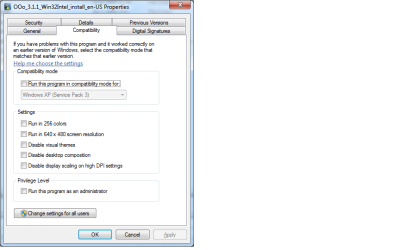
You could try to execute your older (installation) programs in compatibility mode.
For this to work, you can right click the executable and you can select the compatibility tab. see the image below.
install-compatibility.png

From there you can select the method Windows 7 executes your program.

Have a nice day,

zx81
 

My Computer

Computer Manufacturer/Model Number
Dell Inpspiron 1720
OS
Windows 7 Home Premium x64
CPU
Intel 1720 Core 2 Duo 2.00GHz,800,2M
Memory
4GB 667MHz DDR2 SDRAM (2x2048)
Graphics Card(s)
NVIDIA Geforce Go 8600M GT 256MB DDR2
Sound Card
SigmaTel
Monitor(s) Displays
17.0" Widescreen WXGA+ (1440x900) TFT with TrueLife
Screen Resolution
1440x900
Hard Drives
2x160GB 5400RPM Serial ATA
Mouse
Logitech
thanks everyone i'm now a/w new windows 7 pro 32 bit disc As some of the fs2004 programs i have will not work in 64bit.

i will let you know how i get on.
 

My Computer

OS
windows por 64
Back
Top