Problems with ram

RAMMAN

New member
Local time
9:27 PM
Messages
7
hey ppl i am new to these forums so hey.

well i got 4gb of 1066MHZ ram yesterday and when i installed it windows was saying only 2gb was useable so i unticked the 'use max mem' in msconfig and then all seemed fine.

the issue is that altho i have enabled memory re-map in my bios W7 is still not using all 4gb.onboard GPU is disabled

the avialable Ram i have is about 3111mb as ime typing this and 2349mb is free

i am competly stumped at this as i do not no what else to try,also yes i have 64bit

thanks
 

My Computer

OS
windows 7 ultimate 64bit
CPU
AMD PHENOM 2 940
Motherboard
ASUS M3N-HT DELUXE
Memory
4GB CORSAIR DOMINATOR 1066
Graphics Card(s)
XFX 5770
Hard Drives
SEAGATE 160 (OS)

SEAGATE 250 (STORAGE)
PSU
XIGMATEK NRP 850W
Case
COOLERMASTER CM690
Cooling
NOCTUA FLZ
When you boot if you have a screen that shows how much memory your BIOS see's what does it show? If you don't see this screen you need to go into the BIOS to see it, generally f2 will get you there. If it shows 3.2 or less then your BIOS is reassigning portions of the memory and it need to be turned off in your BIOS Memory Mapping.
 

My Computer

Computer Manufacturer/Model Number
DELL XPS Studio 435T
OS
Vista 64 Ultimate, Windows 7 64 Ultimate, Ubuntu 9.10
CPU
i7 975 3.3 GHz Extreme (Factory OC'd to 3.6 GHz)
Motherboard
DELL provided
Memory
18 Gb Tri-Channel 1066
Graphics Card(s)
ATI 5970 2048 Mb
Sound Card
X-Fi Extreme Gamer
Monitor(s) Displays
Vizio 37" HD-TV
Screen Resolution
1920 x 1080
Hard Drives
1.5 Tb HDD
1.5 Tb HDD
2.0 Tb Network Drive
512 Gb Crucial SSD
PSU
DELL Provided 475 watts
Case
DELL
Cooling
3 fans
Keyboard
Logitech Performance K350 Wireless
Mouse
Logitech Performance MX Wireless
Internet Speed
3 Mb up 750 Kb down
Other Info
Bamboo Fun Tablet, Belkin N+ Wireless router, Pioneer Dolby System Wireless Headphones, Bose 5.1 Dolby Surround Sound System, LifeCam VX 3000 Webcam, Blu-Ray/Hi Def DVD +RW combo and Blu-ray +RW,l 15 in 1 media card reader, Logitech Rumblepad 2, Hauppauge 2250 DTV Tuner with MS Media Center Remote

Laptop:Alienware M17x, Q9100 CPU, 8Gb RAM, 1920x1200 WUXGA LCD driven by 4870's in CrossFireX, Bl
in the bios it shows all 4gb

1mb less usable as always
 

My Computer

OS
windows 7 ultimate 64bit
CPU
AMD PHENOM 2 940
Motherboard
ASUS M3N-HT DELUXE
Memory
4GB CORSAIR DOMINATOR 1066
Graphics Card(s)
XFX 5770
Hard Drives
SEAGATE 160 (OS)

SEAGATE 250 (STORAGE)
PSU
XIGMATEK NRP 850W
Case
COOLERMASTER CM690
Cooling
NOCTUA FLZ
Check your video card, probably sharing memory
 

My Computer

Computer Manufacturer/Model Number
Self Built
OS
Win 7 Ultimate 32bit
CPU
C2D E6600 2.4Ghz
Motherboard
Intel D965WH
Memory
4G Kingston KHX5400D2
Graphics Card(s)
EVGA GTX 570 HD SC (012-P3-1573-KR)
Sound Card
On-Board
Monitor(s) Displays
Samsung 226BW
Screen Resolution
1680 x 1050
Hard Drives
2 x 250 Seagate Barracuda
2 x 500 Seagate Barracuda (Raid1)
PSU
Corsair TX750W
Case
In-Win C589
Cooling
Stock Intel Cooling
my vid card has its own dedicated memory and thats 1gb

but i ran system requirements lab it showed that i had 2.7gb of video ram whitch is odd

how would i check to see if my GPU is takin my RAM?
 

My Computer

OS
windows 7 ultimate 64bit
CPU
AMD PHENOM 2 940
Motherboard
ASUS M3N-HT DELUXE
Memory
4GB CORSAIR DOMINATOR 1066
Graphics Card(s)
XFX 5770
Hard Drives
SEAGATE 160 (OS)

SEAGATE 250 (STORAGE)
PSU
XIGMATEK NRP 850W
Case
COOLERMASTER CM690
Cooling
NOCTUA FLZ
Because all modern GPU's share system memory.
 

My Computer

Computer Manufacturer/Model Number
Self Built
OS
Win 7 Ultimate 32bit
CPU
C2D E6600 2.4Ghz
Motherboard
Intel D965WH
Memory
4G Kingston KHX5400D2
Graphics Card(s)
EVGA GTX 570 HD SC (012-P3-1573-KR)
Sound Card
On-Board
Monitor(s) Displays
Samsung 226BW
Screen Resolution
1680 x 1050
Hard Drives
2 x 250 Seagate Barracuda
2 x 500 Seagate Barracuda (Raid1)
PSU
Corsair TX750W
Case
In-Win C589
Cooling
Stock Intel Cooling
ok but how would i check this and also how would i change it?
 

My Computer

OS
windows 7 ultimate 64bit
CPU
AMD PHENOM 2 940
Motherboard
ASUS M3N-HT DELUXE
Memory
4GB CORSAIR DOMINATOR 1066
Graphics Card(s)
XFX 5770
Hard Drives
SEAGATE 160 (OS)

SEAGATE 250 (STORAGE)
PSU
XIGMATEK NRP 850W
Case
COOLERMASTER CM690
Cooling
NOCTUA FLZ
if you can remove shared memory, can you also add RAM to shared memory? I've looked into this a little before but have had no luck finding hard results. Logically you should be able to go both away with this subject.
 

My Computer

Computer Manufacturer/Model Number
HP DV6 1280-us
OS
Windows 7 Ultimate (x64)
CPU
AMD Turion X2 Ultra Dual-Core Mobile ZM-87 2.40 GHz
Memory
6GB DDR2
Graphics Card(s)
ATI Mobility Radeon HD 4650
Sound Card
HD Built-in
Monitor(s) Displays
Generic 'PnP'
Screen Resolution
1366x786
Hard Drives
FUJITSU 500GB 5600RPM.
Case
Generic.
Cooling
No
Keyboard
Yes
Mouse
Synaptics Touch-pad
Internet Speed
leaching ;]
No,,, You can not add shared memory to your GPU.

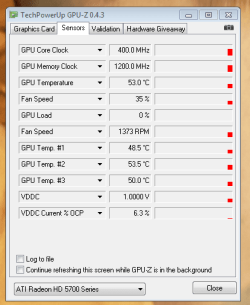
You can view the Shared Memory in the Video Card Utility Info. Or maybe use an app like GPU-Z
 

My Computer

Computer Manufacturer/Model Number
Self Built
OS
Win 7 Ultimate 32bit
CPU
C2D E6600 2.4Ghz
Motherboard
Intel D965WH
Memory
4G Kingston KHX5400D2
Graphics Card(s)
EVGA GTX 570 HD SC (012-P3-1573-KR)
Sound Card
On-Board
Monitor(s) Displays
Samsung 226BW
Screen Resolution
1680 x 1050
Hard Drives
2 x 250 Seagate Barracuda
2 x 500 Seagate Barracuda (Raid1)
PSU
Corsair TX750W
Case
In-Win C589
Cooling
Stock Intel Cooling
Hmm, interesting but mind if I ask why? Or, have a nifty little post about why? Also, if you RAM load it, it shouldn't particularly matter, IMO.
 

My Computer

Computer Manufacturer/Model Number
HP DV6 1280-us
OS
Windows 7 Ultimate (x64)
CPU
AMD Turion X2 Ultra Dual-Core Mobile ZM-87 2.40 GHz
Memory
6GB DDR2
Graphics Card(s)
ATI Mobility Radeon HD 4650
Sound Card
HD Built-in
Monitor(s) Displays
Generic 'PnP'
Screen Resolution
1366x786
Hard Drives
FUJITSU 500GB 5600RPM.
Case
Generic.
Cooling
No
Keyboard
Yes
Mouse
Synaptics Touch-pad
Internet Speed
leaching ;]
Because it is set by the manufacturer in the Firmware and the device itself.

if you RAM load it, it shouldn't particularly matter, IMO.

That depends. Speed of RAM and Front Side Bus, how much dedicated memory is on the video card all makes a difference in how good the card will handle Video Games, etc.
 

My Computer

Computer Manufacturer/Model Number
Self Built
OS
Win 7 Ultimate 32bit
CPU
C2D E6600 2.4Ghz
Motherboard
Intel D965WH
Memory
4G Kingston KHX5400D2
Graphics Card(s)
EVGA GTX 570 HD SC (012-P3-1573-KR)
Sound Card
On-Board
Monitor(s) Displays
Samsung 226BW
Screen Resolution
1680 x 1050
Hard Drives
2 x 250 Seagate Barracuda
2 x 500 Seagate Barracuda (Raid1)
PSU
Corsair TX750W
Case
In-Win C589
Cooling
Stock Intel Cooling
ok well the FSB is 200Mhz (AMD quadcore and AMD mobo)
my GPU (ATI 5770) has 1gb of dedicated VRAM

and the speed of the RAM is 1066Mhz

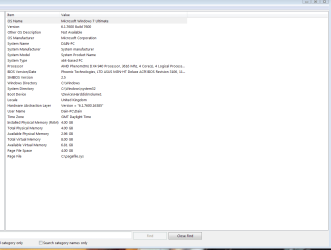
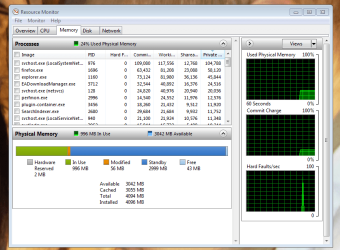
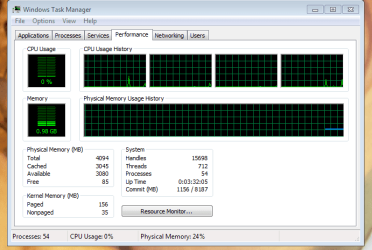
i have just gone into ATI CCC and i cant find any info on if memory is being shared with the GPU

i will post some screen shots as to what i have found and i hope they will help.

cheers
 

Attachments

  • Capture.PNG
    Capture.PNG
    19.7 KB · Views: 4
  • Capture 2.PNG
    Capture 2.PNG
    36.3 KB · Views: 7
  • Capture 3.PNG
    Capture 3.PNG
    16.9 KB · Views: 5
  • Capture 4.PNG
    Capture 4.PNG
    13.9 KB · Views: 4
  • Capture 5.PNG
    Capture 5.PNG
    12 KB · Views: 2

My Computer

OS
windows 7 ultimate 64bit
CPU
AMD PHENOM 2 940
Motherboard
ASUS M3N-HT DELUXE
Memory
4GB CORSAIR DOMINATOR 1066
Graphics Card(s)
XFX 5770
Hard Drives
SEAGATE 160 (OS)

SEAGATE 250 (STORAGE)
PSU
XIGMATEK NRP 850W
Case
COOLERMASTER CM690
Cooling
NOCTUA FLZ
ok so am i using all 4gb?
 

My Computer

OS
windows 7 ultimate 64bit
CPU
AMD PHENOM 2 940
Motherboard
ASUS M3N-HT DELUXE
Memory
4GB CORSAIR DOMINATOR 1066
Graphics Card(s)
XFX 5770
Hard Drives
SEAGATE 160 (OS)

SEAGATE 250 (STORAGE)
PSU
XIGMATEK NRP 850W
Case
COOLERMASTER CM690
Cooling
NOCTUA FLZ
awsome i thought i wasent ha ha

thanks alot people
 

My Computer

OS
windows 7 ultimate 64bit
CPU
AMD PHENOM 2 940
Motherboard
ASUS M3N-HT DELUXE
Memory
4GB CORSAIR DOMINATOR 1066
Graphics Card(s)
XFX 5770
Hard Drives
SEAGATE 160 (OS)

SEAGATE 250 (STORAGE)
PSU
XIGMATEK NRP 850W
Case
COOLERMASTER CM690
Cooling
NOCTUA FLZ
Back
Top