
Solved Problems with reformatting pen drives

Northerner

New member
Member
Local time
5:23 AM
Messages
31
I purchased a new Verbatam 32gb mini pen drive with the intention of using it as a boot option for Ubuntu 12.04. Reformatted to NTFC and loaded Ubuntu on to it (27.01gb primary & 2.81 gb swap area), anyway proved too slow so I tried to delete each section and reformat back to fat 32. Problem is the delete option will not highlight to allow me to proceed, therefore I am stuck with an new unusable 32gb pen drive.Disc Drives.JPG
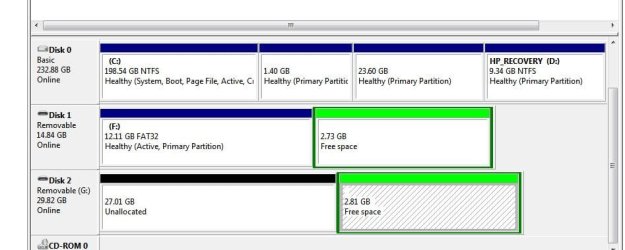
Any help please in rectifying the problem.

Regards.
Northerner
 

My Computer

Computer Manufacturer/Model Number
HP DV5 111em
OS
Windows 7 Home Premium 32bit.
Start/Computer/right click on the drive, in my case travel guide G and select format. Remove the pen drive when done.
Make sure you select the correct drive.
 

My Computer

Computer type
PC/Desktop
Computer Manufacturer/Model Number
Home made Desktop
OS
Windows 10 Pro. 64/ version 1709 Windows 7 Pro/64
CPU
Intel i7-6800K @ 4.3
Motherboard
ASUS X-99 Deluxe II
Memory
Corsair Platinum 16 gig @2400
Graphics Card(s)
EVGA GTX 1070 OC
Monitor(s) Displays
Asus 27" LED LCD/VE278Q
Screen Resolution
1920-1080 or 1280-720 HDMI
Hard Drives
INTEL SSD 730-240 Gb Sata 3.0/
PSU
EVGA Platium 1200W
Case
Phanteks Luxe Tempered Glass 8 fans/ one radiator
Cooling
XSPC/ Water Cooled CPU
Keyboard
Das 4 Professional
Mouse
Logitech M705/MX Anywhere 2-S
Internet Speed
100 mbits
Antivirus
Microsoft Security Essentials/ Malwarebytes Premium 3.0/ SAS
Browser
I.E. 11 default/Firefox/ ISP Time Warner Cable/Spectrum
Other Info
LG BluRay Burner/
Sound system-KLipsch-THX/
Icy Dock ssd Hot Swap bays.
Will not let me do this ?
Comes up "Unknown capacity", when I press form a message appears saying window unable to complete format.
Regards
Northerner
 

My Computer

Computer Manufacturer/Model Number
HP DV5 111em
OS
Windows 7 Home Premium 32bit.
Northener,

PREPARE UFD (USB FLASH DRIVE)

Run CMD.EXE as administrator
Type following commands and hit ENTER key after each command.
· DISKPART starts the DiskPart program
· LIST DISK shows numeral assigned to disks
note the numeral assigned to your usb stick
The numeral 2 will be used in this example
· SELECT DISK 2
· DETAIL DISK the info shown will confirm the correctness of your selection
· CLEAN ALL the entire usb stick will be overwritten with zeros
· CREATE PARTITION PRIMARY create a primary partition on the USB stick
· FORMAT FS=NTFS format the partition
· ACTIVE the partition can contain operating system startup files
· ASSIGN the next available letter is assigned to the USB stick
· EXIT exit from the DISKPART program
· EXIT exit from the command shell
 

My Computer

Computer Manufacturer/Model Number
Toshiba Satellite S875D-S7239 laptop
OS
MS Windows 7 Ultimate SP1 64-bit
CPU
AMD A10-4600M
Motherboard
AMD Pumori (Socket FT1)
Memory
6.00 GB Dual-Channel DDR3 @ 798MHz (11-11-12-28)
Graphics Card(s)
AMD Radeon HD 7660G
Sound Card
High Definition Audio Device
Monitor(s) Displays
Generic PnP Monitor (1600x900@60Hz)
Screen Resolution
1600x900@60Hz
Hard Drives
SSD 119GB Corsair CSSD-V128GB2 ATA Device
Keyboard
Standard PS/2 Keyboard
Mouse
HP Wireless Optical Mobile Mouse Model FHA-3410
Internet Speed
What the local pub, local coffee shop offers.
Other Info
Optical Drive:MATSHITA BD-CMB UJ160B ATA Device


Also have an Asus ha1002xp netbook with Win 7 Ultimate installed.
Thanks, worked a treat.
Regards
Northerner (north of England).
 

My Computer

Computer Manufacturer/Model Number
HP DV5 111em
OS
Windows 7 Home Premium 32bit.
Glad to be of assistance

Karl
 

My Computer

Computer Manufacturer/Model Number
Toshiba Satellite S875D-S7239 laptop
OS
MS Windows 7 Ultimate SP1 64-bit
CPU
AMD A10-4600M
Motherboard
AMD Pumori (Socket FT1)
Memory
6.00 GB Dual-Channel DDR3 @ 798MHz (11-11-12-28)
Graphics Card(s)
AMD Radeon HD 7660G
Sound Card
High Definition Audio Device
Monitor(s) Displays
Generic PnP Monitor (1600x900@60Hz)
Screen Resolution
1600x900@60Hz
Hard Drives
SSD 119GB Corsair CSSD-V128GB2 ATA Device
Keyboard
Standard PS/2 Keyboard
Mouse
HP Wireless Optical Mobile Mouse Model FHA-3410
Internet Speed
What the local pub, local coffee shop offers.
Other Info
Optical Drive:MATSHITA BD-CMB UJ160B ATA Device


Also have an Asus ha1002xp netbook with Win 7 Ultimate installed.
Just a though: If having to use the cmd prompt to defrag would doing a sfc /scannow allow my method post #2 to work. It's always worked for me. I just did one to verify. Just curious.
 

My Computer

Computer type
PC/Desktop
Computer Manufacturer/Model Number
Home made Desktop
OS
Windows 10 Pro. 64/ version 1709 Windows 7 Pro/64
CPU
Intel i7-6800K @ 4.3
Motherboard
ASUS X-99 Deluxe II
Memory
Corsair Platinum 16 gig @2400
Graphics Card(s)
EVGA GTX 1070 OC
Monitor(s) Displays
Asus 27" LED LCD/VE278Q
Screen Resolution
1920-1080 or 1280-720 HDMI
Hard Drives
INTEL SSD 730-240 Gb Sata 3.0/
PSU
EVGA Platium 1200W
Case
Phanteks Luxe Tempered Glass 8 fans/ one radiator
Cooling
XSPC/ Water Cooled CPU
Keyboard
Das 4 Professional
Mouse
Logitech M705/MX Anywhere 2-S
Internet Speed
100 mbits
Antivirus
Microsoft Security Essentials/ Malwarebytes Premium 3.0/ SAS
Browser
I.E. 11 default/Firefox/ ISP Time Warner Cable/Spectrum
Other Info
LG BluRay Burner/
Sound system-KLipsch-THX/
Icy Dock ssd Hot Swap bays.
Will not let me do this ?
Comes up "Unknown capacity", when I press form a message appears saying window unable to complete format.
Regards
Northerner

If you are familiar with Linux, this is easy with a live CD distro, you can boot it up, and run Linux fdisk, and remove the partitions...
 

My Computer

Computer Manufacturer/Model Number
iBuyPower
OS
windows seven
CPU
Phenom II x2 3.1
Motherboard
asus
Memory
4 gigs
Graphics Card(s)
Nvidia GTS 250
Monitor(s) Displays
23in Acre
Thanks for the replies. I'm not sure I understand but I will work on it.
 

My Computer

Computer type
PC/Desktop
Computer Manufacturer/Model Number
Home made Desktop
OS
Windows 10 Pro. 64/ version 1709 Windows 7 Pro/64
CPU
Intel i7-6800K @ 4.3
Motherboard
ASUS X-99 Deluxe II
Memory
Corsair Platinum 16 gig @2400
Graphics Card(s)
EVGA GTX 1070 OC
Monitor(s) Displays
Asus 27" LED LCD/VE278Q
Screen Resolution
1920-1080 or 1280-720 HDMI
Hard Drives
INTEL SSD 730-240 Gb Sata 3.0/
PSU
EVGA Platium 1200W
Case
Phanteks Luxe Tempered Glass 8 fans/ one radiator
Cooling
XSPC/ Water Cooled CPU
Keyboard
Das 4 Professional
Mouse
Logitech M705/MX Anywhere 2-S
Internet Speed
100 mbits
Antivirus
Microsoft Security Essentials/ Malwarebytes Premium 3.0/ SAS
Browser
I.E. 11 default/Firefox/ ISP Time Warner Cable/Spectrum
Other Info
LG BluRay Burner/
Sound system-KLipsch-THX/
Icy Dock ssd Hot Swap bays.
When formatted the stick (Disk2 below) had a Primary first partition and Logical second one.

So when it had the partitions deleted in Disk mgmt the first partition became (Primary) Unallocated Space, while the second partition became (Logical) Free Space.

You only need to delete the Logical Free space by right clicking on it again to Delete Volume. Then you can format the stick as desired.

Partition Wizard views both types of deleted space the same for all purposes,

 
Thanks Greg for the information. I guess because I don't use things like Partition Wizard I get lost. I seldom partition or format but when I do I use Windows 7 to do it. So I'm thinking once things get a little out of kilter one can use the cmd/prompt or a program like Partition Wizard. Thanks again.
 

My Computer

Computer type
PC/Desktop
Computer Manufacturer/Model Number
Home made Desktop
OS
Windows 10 Pro. 64/ version 1709 Windows 7 Pro/64
CPU
Intel i7-6800K @ 4.3
Motherboard
ASUS X-99 Deluxe II
Memory
Corsair Platinum 16 gig @2400
Graphics Card(s)
EVGA GTX 1070 OC
Monitor(s) Displays
Asus 27" LED LCD/VE278Q
Screen Resolution
1920-1080 or 1280-720 HDMI
Hard Drives
INTEL SSD 730-240 Gb Sata 3.0/
PSU
EVGA Platium 1200W
Case
Phanteks Luxe Tempered Glass 8 fans/ one radiator
Cooling
XSPC/ Water Cooled CPU
Keyboard
Das 4 Professional
Mouse
Logitech M705/MX Anywhere 2-S
Internet Speed
100 mbits
Antivirus
Microsoft Security Essentials/ Malwarebytes Premium 3.0/ SAS
Browser
I.E. 11 default/Firefox/ ISP Time Warner Cable/Spectrum
Other Info
LG BluRay Burner/
Sound system-KLipsch-THX/
Icy Dock ssd Hot Swap bays.
Back
Top