
Solved Problems with remote connection.

binks

New member
Local time
9:03 PM
Messages
62
Location
UK
When I've installed Win7 on my home pc few years back I do remember than I was playing around with Group Policy Editor but the thing is that now I just don't remember what I have activated there and what did i deactivated and now whenever I try to connect from my other pc all I have is massage that remote desktop(this one from Windows) can't connect to the remote computer. I do have static IP from my ISP so as an address I'm typing that, but is there any software that would tell me what I did and which option I should have enable or disable on my home pc for RC work?

Edit: I forgot to mention that I also have latest KIS running on my work laptop and on my home pc, so maybe that is blocking RC somehow.
 
Last edited:

My Computer

Computer type
Laptop
Computer Manufacturer/Model Number
Dell XPS M1530
OS
Windows 7 Professional 64bit
CPU
Core2Duo T8100
Motherboard
Dell
Memory
3GB DDR2
Graphics Card(s)
GForce 8600M GT
Monitor(s) Displays
LG W2361
Screen Resolution
1920x1080
Are you trying to connect from other computers in the same network? Or over internet from away your home?

If it's from LAN, your ISP address is irrelevant, and you should use your local IP address or even the computer name will suffice. From outside, make sure you have done the correct port forwarding at the router.

In any case, KIS may have its own firewall blocking the connection, make sure you allow an incoming connection on port 3389, from either the LAN or any IP.
 

My Computer

Computer type
Laptop
Computer Manufacturer/Model Number
Toshiba Sattelite A665-S6092
OS
Windows 7 Ultimate x64
CPU
Intel Core i7-740QM
Memory
8 GB DDR3
Graphics Card(s)
NVIDIA GeForce 330GT
Screen Resolution
1366x768
Hard Drives
Samsung 840 SSD 500GB
1TB USB3 external HD
Cooling
Coolermaster Notepal U3 notebook cooling pad
Internet Speed
3mbps ASDL
Antivirus
ClamWin 0.98.7
Browser
Opera 12.17 x86 (main), Firefox 38 (sec), IE11 (last resort)
Thanks for that, so assuming that I'll be connecting my laptop to my pc over the internet (I'm sitting now few inches away from my router, but for the purpose of RC I'll disconnect from my WiFi and connect to my phone so I can use my static IP) I need to forward port 3389 on my router and check if KIS not blocking the same port. Is there anything else I should do?
 

My Computer

Computer type
Laptop
Computer Manufacturer/Model Number
Dell XPS M1530
OS
Windows 7 Professional 64bit
CPU
Core2Duo T8100
Motherboard
Dell
Memory
3GB DDR2
Graphics Card(s)
GForce 8600M GT
Monitor(s) Displays
LG W2361
Screen Resolution
1920x1080
Yes, that's correct, just port forward and open firewall for incoming connections on 3389.

However, for the purpose of testing, I would start by using the wifi (hence the LAN connection). Over LAN, try using the local IP. This connection will help testing the firewall is open without the router messing.
When that succeds, do as you say and connect over internet, there you just need to configure the port forwarding on the router.
I think that's easier to do in parts rather trying to setup all at once.
 

My Computer

Computer type
Laptop
Computer Manufacturer/Model Number
Toshiba Sattelite A665-S6092
OS
Windows 7 Ultimate x64
CPU
Intel Core i7-740QM
Memory
8 GB DDR3
Graphics Card(s)
NVIDIA GeForce 330GT
Screen Resolution
1366x768
Hard Drives
Samsung 840 SSD 500GB
1TB USB3 external HD
Cooling
Coolermaster Notepal U3 notebook cooling pad
Internet Speed
3mbps ASDL
Antivirus
ClamWin 0.98.7
Browser
Opera 12.17 x86 (main), Firefox 38 (sec), IE11 (last resort)
Hmmm... I'm a little bit confused now as I've tried to connect over LAN first as suggested, and went to admin panel of my router(I thought that there would be local IP shown for sure) but there as my pc's IP address was 80.229.xx.xx which is as far as I know, static IP visible outside LAN. I've always thought that local addresses range starts at 192.168.x.xxx
How could I check what my local IP address is then?
 
Last edited:

My Computer

Computer type
Laptop
Computer Manufacturer/Model Number
Dell XPS M1530
OS
Windows 7 Professional 64bit
CPU
Core2Duo T8100
Motherboard
Dell
Memory
3GB DDR2
Graphics Card(s)
GForce 8600M GT
Monitor(s) Displays
LG W2361
Screen Resolution
1920x1080
Local IP addresses aren't in the router, you get it within each computer plugged into it.
With Windows, the ipconfig command gets can show the local IP (and yes, it's likely to be 192.168.XXX.XXX, but can also be 10.XXX.XXX.XXX). Of course, to perform the port forwarding afterwards you need to set it to be static, as you need to specify a fixed IP when forwarding.
You can set the IP address in control panel => network center => adapter settings in the latteral menu => properties in the network card.
 

My Computer

Computer type
Laptop
Computer Manufacturer/Model Number
Toshiba Sattelite A665-S6092
OS
Windows 7 Ultimate x64
CPU
Intel Core i7-740QM
Memory
8 GB DDR3
Graphics Card(s)
NVIDIA GeForce 330GT
Screen Resolution
1366x768
Hard Drives
Samsung 840 SSD 500GB
1TB USB3 external HD
Cooling
Coolermaster Notepal U3 notebook cooling pad
Internet Speed
3mbps ASDL
Antivirus
ClamWin 0.98.7
Browser
Opera 12.17 x86 (main), Firefox 38 (sec), IE11 (last resort)
Found it. I felt kind of stupid asking this as I've done it couple times already but maybe due to late hour or lack of sleep or just my stupidity I was repeatedly writing in command prompt
Code:
 ip config
instead of
Code:
 ipconfig
and the understandable system response was that
Code:
ip
is not recognized as an internal or external command...
Anyway, I found my internal IP and tried to connect, but with no result. Response was as previously - can't connect to the remote computer. I've typed in user box in RC user name as is on my home pc, checked in KIS firewall settings - there is application rule for Remote Desktop Connection that says that this app is trusted, so i assume that all the network traffic is let trough the firewall, I've checked in mu router admin panel, port 3389 is forwarded to my pc. So everything appears to be ok, but yet, I can't connect for some reason. I've also tried to connect with a method as I've described earlier, using my phone network but the result was the same.
Now I've tried TeamViewer, it connects without a problem. The issue there is that with TeamViewer there has to be interaction with the pc I'm connecting to as you have to enter the password.
So what are your ideas? What else can I do to be able to connect to my pc with windows RC. The whole point of me buying static IP from my ISP was to be able to connect with my home pc from work.
 
Last edited:

My Computer

Computer type
Laptop
Computer Manufacturer/Model Number
Dell XPS M1530
OS
Windows 7 Professional 64bit
CPU
Core2Duo T8100
Motherboard
Dell
Memory
3GB DDR2
Graphics Card(s)
GForce 8600M GT
Monitor(s) Displays
LG W2361
Screen Resolution
1920x1080
Hi

Sorry to ask a stupid question but if you right click on Computer>Properties>Remote settings, can you confirm what Remote Desktop option is selected?

Regards
UKMedia
 

My Computer

Computer Manufacturer/Model Number
Self Build
OS
Windows 7 Ultimate 64Bit (SP 1)
CPU
Intel Core i7 4770K OC
Motherboard
ASUS Maximus VII Ranger
Memory
32GB 1600Mhz DDR3
Graphics Card(s)
MSI GTX580 Twin Frozr II/OC and NVIDIA GTX 970
Sound Card
On-Board and Soundblaster Recon 3 D headset
Monitor(s) Displays
x2 Flat screen 21" LG displays + x1 LG W2363D (3D)
Hard Drives
5 internal Hard Drives:
1 x WD 120GB Solid State
4 x WD 1TB (CAVIAR BLACK 1TB 32MB 7200 SATA) as Raid 5 array
PSU
Dark Power Pro 10 1200W
Case
CoolerMaster HAF 932 Case - Black
Cooling
Thermaltake Contac21 cooler
Keyboard
Cyborg
Mouse
Razor Mamba
Internet Speed
0.5 Mb - (Benefits of rural location!) & 24 MB Sat
Antivirus
MSE
Other Info
Teaming 2 GB network connection to Wired 1GB switch.
Connected to 37TB (Raid 5) of network storage on a wired 1GB lan.
(Mixture of internal hard drives, 1TB, 2TB, 4TB & 16TB Terastations)
There are no stupid questions just stupid answers and mine could be one of those :) Frankly I've got no idea, just don't remember that and now I've just can't check it out as I've just got biggere HDD and I'm installing fresh copy of W7 on it. This time I'll try not to fiddle with group manager and maybe then RC will work:)
 

My Computer

Computer type
Laptop
Computer Manufacturer/Model Number
Dell XPS M1530
OS
Windows 7 Professional 64bit
CPU
Core2Duo T8100
Motherboard
Dell
Memory
3GB DDR2
Graphics Card(s)
GForce 8600M GT
Monitor(s) Displays
LG W2361
Screen Resolution
1920x1080
The default is blocked, so worth checking :D
 

My Computer

Computer Manufacturer/Model Number
Self Build
OS
Windows 7 Ultimate 64Bit (SP 1)
CPU
Intel Core i7 4770K OC
Motherboard
ASUS Maximus VII Ranger
Memory
32GB 1600Mhz DDR3
Graphics Card(s)
MSI GTX580 Twin Frozr II/OC and NVIDIA GTX 970
Sound Card
On-Board and Soundblaster Recon 3 D headset
Monitor(s) Displays
x2 Flat screen 21" LG displays + x1 LG W2363D (3D)
Hard Drives
5 internal Hard Drives:
1 x WD 120GB Solid State
4 x WD 1TB (CAVIAR BLACK 1TB 32MB 7200 SATA) as Raid 5 array
PSU
Dark Power Pro 10 1200W
Case
CoolerMaster HAF 932 Case - Black
Cooling
Thermaltake Contac21 cooler
Keyboard
Cyborg
Mouse
Razor Mamba
Internet Speed
0.5 Mb - (Benefits of rural location!) & 24 MB Sat
Antivirus
MSE
Other Info
Teaming 2 GB network connection to Wired 1GB switch.
Connected to 37TB (Raid 5) of network storage on a wired 1GB lan.
(Mixture of internal hard drives, 1TB, 2TB, 4TB & 16TB Terastations)
Well I've just had to do fresh install of W7 professional and did not mess with policy editor this time at all:) Did enable RC as @UKMedia suggested, forwarded relevant ports on my router, checked KIS - RC is enabled there as well, but I still can't connect from my work pc:( Work laptop running Windows Ultimate if it's any help.
 
Last edited:

My Computer

Computer type
Laptop
Computer Manufacturer/Model Number
Dell XPS M1530
OS
Windows 7 Professional 64bit
CPU
Core2Duo T8100
Motherboard
Dell
Memory
3GB DDR2
Graphics Card(s)
GForce 8600M GT
Monitor(s) Displays
LG W2361
Screen Resolution
1920x1080
Well I've just had to do fresh install of W7 professional and did not mess with policy editor this time at all:) Did enable RC as @UKMedia suggested, forwarded relevant ports on my router, checked KIS - RC is enabled there as well, but I still can't connect from my work pc:( Work laptop running Windows Ultimate if it's any help.

Is the work machine running inside a work network? Your connection may be blocking from within your work network. Typically most organisations do and what I typically do when designing a network is to restrict port 3389 as RDP can be seen as a security risk.

Possibly try from a friend or family's internet connection? This will remove the possibility for your organisation to be blocking the connection...

Josh :)
 

My Computer

Computer type
PC/Desktop
Computer Manufacturer/Model Number
Custom Built
OS
Windows 7 Professional x64 SP1 ; Windows Server 2012 R2 Standard
CPU
Intel Core i5 2400 @ 3.10GHz
Motherboard
Foxconn H67MP-S/-V/H67MP
Memory
8.0GB DDR3 @ 665MHz (2GBx4)
Graphics Card(s)
AMD Radeon HD 6870
Sound Card
Realtek High Definition Audio
Monitor(s) Displays
AOC 2243W & SMB1930NW
Screen Resolution
1440x900 & 1920x1080
Hard Drives
977GB Seagate ST31000524AS ATA Drive (SATA)
250GB WD iSCSI attached Drive
PSU
750W Gaming PSU
Case
Novatech Night
Cooling
Fan
Keyboard
Dell Standard PS/2 Keyboard
Mouse
R.A.T 07 Gaming Mouse
Internet Speed
Download: 10 Mbps Ping: 30ms Upload: 0.81 Mbps
Browser
Google Chrome
Other Info
Optiarc DVD RW AD-5260S ATA Device
Well I've just had to do fresh install of W7 professional and did not mess with policy editor this time at all:) Did enable RC as @UKMedia suggested, forwarded relevant ports on my router, checked KIS - RC is enabled there as well, but I still can't connect from my work pc:( Work laptop running Windows Ultimate if it's any help.

Is the work machine running inside a work network? Your connection may be blocking from within your work network. Typically most organisations do and what I typically do when designing a network is to restrict port 3389 as RDP can be seen as a security risk.

Possibly try from a friend or family's internet connection? This will remove the possibility for your organisation to be blocking the connection...

Josh :)
Yes, I do know that some company's blocking RC but I've just tried to connect with my laptop that I'll be taking with me. Laptop is next to me at home and it's connected to the same Wifi that my desktop uses. Beside, I'll be working in school and I don't think that they would block this. If they will I would use my mobile connection from my phone, this won't be blocked(i hope:) )
Edit: Now I did tried to connect typing in RD of my laptop static IP I bought from my ISP - 80.xxx.xx.xx. Should I be using that or something else?
 
Last edited:

My Computer

Computer type
Laptop
Computer Manufacturer/Model Number
Dell XPS M1530
OS
Windows 7 Professional 64bit
CPU
Core2Duo T8100
Motherboard
Dell
Memory
3GB DDR2
Graphics Card(s)
GForce 8600M GT
Monitor(s) Displays
LG W2361
Screen Resolution
1920x1080
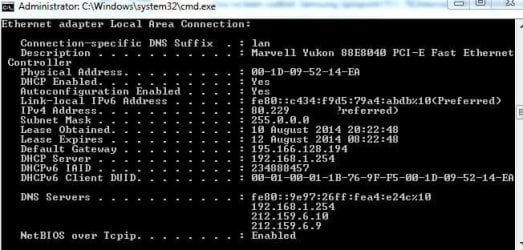
I'm a little bit confused now. It was mentioned here that I should try to connect typing in my work laptop my internal IP. I wanted to check what it it and apart static IP from my ISP(80.229.xx.xx) I can't see here what is my internal IP. Could you clear it up for me please? Which one is it? 192.xxx.x.254?
 

Attachments

  • icpconfig-.jpg
    icpconfig-.jpg
    38.6 KB · Views: 8

My Computer

Computer type
Laptop
Computer Manufacturer/Model Number
Dell XPS M1530
OS
Windows 7 Professional 64bit
CPU
Core2Duo T8100
Motherboard
Dell
Memory
3GB DDR2
Graphics Card(s)
GForce 8600M GT
Monitor(s) Displays
LG W2361
Screen Resolution
1920x1080
My issue is solved now. For anyone else - you just have to change in KIS settings->configure packet rules strings when it says Remote desktop to "Allow" as by default it's set to block.
 

My Computer

Computer type
Laptop
Computer Manufacturer/Model Number
Dell XPS M1530
OS
Windows 7 Professional 64bit
CPU
Core2Duo T8100
Motherboard
Dell
Memory
3GB DDR2
Graphics Card(s)
GForce 8600M GT
Monitor(s) Displays
LG W2361
Screen Resolution
1920x1080
Back
Top