
Hi everyone,
I have read through quite a few posts and guides but unfortunately I'm unable to get XP to boot after installing Win7.
I'll try and explain the situation.
I have a laptop that came with Vista pre-installed. I found this operating system to be very slow and sluggish. I then installed XP on the same drive under a different folder name.
Afterwards I was unable to log into Vista (can't remember the error code) however this wasn't an issue as we weren't planning on using it again.
I have now been asked to download and install Win7 onto the laptop. I created a separate partition of around 30GB and successfully installed Win7, during the course of the installation it was able repair the problem I was having with Vista. This is all well and good but now I am unable to log into our XP operating system.
The hard drive is set out as follows:
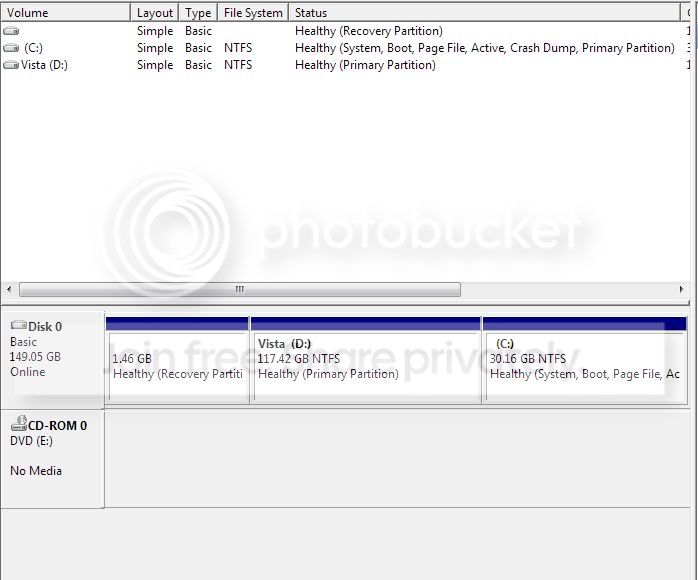
Drive D: called "Vista" has XP and Vista installed on it. Vista is installed in a folder called "Windowsv" and XP is installed in a folder called "Windows".
Drive C: just simply has Windows 7 installed.
I have tried using EasyECD 1.7.2 to add the XP entry but I get an error message stating that there is a problem with "\nltdr" when I try and boot into windows.
Here is the information listed in the EasyBCD Window:
There are a total of 3 entries listed in the Vista Bootloader.
Bootloader Timeout: 15 seconds.
Default OS: Windows 7
Entry #1
Name: Windows 7
BCD ID: {current}
Drive: C:\
Bootloader Path: \Windows\system32\winload.exe
Windows Directory: \Windows
Entry #2
Name: Windows Vista (TM) Business (recovered)
BCD ID: {06772280-ca61-11de-a3fb-f558a868a8ba}
Drive: D:\
Bootloader Path: \Windowsv\system32\winload.exe
Windows Directory: \Windowsv
Entry #3
Name: windows XP
BCD ID: {ntldr}
Drive: D:\
Bootloader Path: \ntldr
Can anyone offer any help? I'm sorry if this question has been asked many times before but I couldn't find the answer I was looking for.
Thanks in advance.
I have read through quite a few posts and guides but unfortunately I'm unable to get XP to boot after installing Win7.
I'll try and explain the situation.
I have a laptop that came with Vista pre-installed. I found this operating system to be very slow and sluggish. I then installed XP on the same drive under a different folder name.
Afterwards I was unable to log into Vista (can't remember the error code) however this wasn't an issue as we weren't planning on using it again.
I have now been asked to download and install Win7 onto the laptop. I created a separate partition of around 30GB and successfully installed Win7, during the course of the installation it was able repair the problem I was having with Vista. This is all well and good but now I am unable to log into our XP operating system.
The hard drive is set out as follows:
Drive D: called "Vista" has XP and Vista installed on it. Vista is installed in a folder called "Windowsv" and XP is installed in a folder called "Windows".
Drive C: just simply has Windows 7 installed.
I have tried using EasyECD 1.7.2 to add the XP entry but I get an error message stating that there is a problem with "\nltdr" when I try and boot into windows.
Here is the information listed in the EasyBCD Window:
There are a total of 3 entries listed in the Vista Bootloader.
Bootloader Timeout: 15 seconds.
Default OS: Windows 7
Entry #1
Name: Windows 7
BCD ID: {current}
Drive: C:\
Bootloader Path: \Windows\system32\winload.exe
Windows Directory: \Windows
Entry #2
Name: Windows Vista (TM) Business (recovered)
BCD ID: {06772280-ca61-11de-a3fb-f558a868a8ba}
Drive: D:\
Bootloader Path: \Windowsv\system32\winload.exe
Windows Directory: \Windowsv
Entry #3
Name: windows XP
BCD ID: {ntldr}
Drive: D:\
Bootloader Path: \ntldr
Can anyone offer any help? I'm sorry if this question has been asked many times before but I couldn't find the answer I was looking for.
Thanks in advance.
My Computer
- OS
- Windows XP, Windows Vista, Windows 7

