Problems with Windows Pictures Library

dlwmacgregor

New member
Member
Local time
9:45 PM
Messages
76
Hello.
I am having a strange problem with my Windows 7 Picture Library.
The locations of the Library are very similar but not the same - see attachment. Which one is correct?
Both locations sorted by Folder show the same files and folders - nothing is missing.

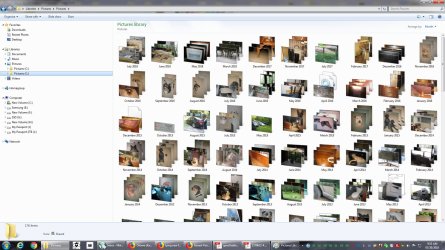
The first location when sorted by Month says it's empty.
The second one shows the folders by month but there are some months missing (I used Windows Photo Gallery to double-check) and some picture files missing as well.
See the related attachments.
I have re-indexed the entire volume and also run SFC /SCANNOW with no errors.
Any idea what's going on here?
Thanks
 

Attachments
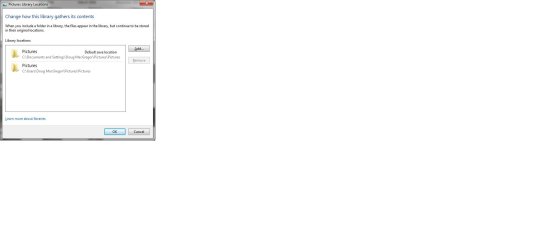
  • Library Locations.jpg
    Library Locations.jpg
    30.1 KB · Views: 4
  • Pictures Library Contents By Month 1.jpg
    Pictures Library Contents By Month 1.jpg
    63 KB · Views: 4
  • Pictures Library Contents By Month 2.jpg
    Pictures Library Contents By Month 2.jpg
    218.8 KB · Views: 1

My Computer

Computer type
PC/Desktop
Computer Manufacturer/Model Number
Custom
OS
Windows 7 Pro 64-bit SP1/Windows 10 Dual Boot
CPU
AMD FX-8350
Motherboard
ASUS 970 Pro Gaming Aura
Memory
Corsair Vengeance 8GBx2 1866
Graphics Card(s)
Sapphire RX-580 Nitro + 4GB
Sound Card
On-board HD Audio
Monitor(s) Displays
Acer P236H
Screen Resolution
1920x1080
Hard Drives
WD 500GB Blue x 2
WD 500GB Green
Samsung 850 EVO 500 GB
PSU
Corsair RM750
Case
Antec 1100
Keyboard
Kensington Washable
Mouse
Logitech M510
Internet Speed
LTE 30Mbps down/10Mbps up
Antivirus
BitDefender Anti Virus Plus 2019 Paid version
Browser
Firefox, Chrome
My thought is that your computer was upgraded from XP to Windows 7. And it was a simple upgrade, not a "wipe the drive" clean install. For this reason you have the two locations for your pictures, because Windows left the old folder alone and simply created a new folder for the pictures.

There is no harm in keeping both entries in the Pictures Library. In fact, these entries are merely shortcuts to the actual folders. If you delete one of the entries, the corresponding folder will still be there; but you will no longer have the shortcut to it.

I don't recall for sure, but I believe that the "C:\Users\...\pictures" shortcut is the Windows 7 way of storing the pictures, while the "C:\Documents and Settings\...\Pictures" shortcut is the XP way of storing the pictures. Open File Explorer and look for both. You will probably be able to figure out which is which, just by looking at the dates on the contents of each pictures folder.

If you want, you can keep both folders. Or, you can move everything from the old pictures folder to the new, then delete the shortcut to the old pictures folder. But I wouldn't delete the old folder itself unless you are certain you have moved everything in that folder to another location.
 

My Computer

Computer type
PC/Desktop
Computer Manufacturer/Model Number
Dell
OS
Linux Mint 18.2 xfce 64-bit (VMWare host) / Windows 8.1 Pro 32-bit (VMWare guest)
CPU
Haswell
Memory
4 GB
Monitor(s) Displays
Acer 23"
Screen Resolution
1920 x 1080
Hard Drives
Two hard drives, 1TB each: One for Linux, one for my data.
Keyboard
IBM Model M
Antivirus
Sophos (Linux), Trend Micro (Windows)
Browser
Firefox, Opera
Other Info
I use Samba to share my data drive with the other computers at my house and with my guest session in VMWare Workstation Player.
Thanks for the reply.
It was a clean install of Windows 7 in 2014.
 

My Computer

Computer type
PC/Desktop
Computer Manufacturer/Model Number
Custom
OS
Windows 7 Pro 64-bit SP1/Windows 10 Dual Boot
CPU
AMD FX-8350
Motherboard
ASUS 970 Pro Gaming Aura
Memory
Corsair Vengeance 8GBx2 1866
Graphics Card(s)
Sapphire RX-580 Nitro + 4GB
Sound Card
On-board HD Audio
Monitor(s) Displays
Acer P236H
Screen Resolution
1920x1080
Hard Drives
WD 500GB Blue x 2
WD 500GB Green
Samsung 850 EVO 500 GB
PSU
Corsair RM750
Case
Antec 1100
Keyboard
Kensington Washable
Mouse
Logitech M510
Internet Speed
LTE 30Mbps down/10Mbps up
Antivirus
BitDefender Anti Virus Plus 2019 Paid version
Browser
Firefox, Chrome
When you did the clean install, did you tell it to wipe the drive, or did you tell it to put the new Windows in a different folder than the old one?

The only way you can have both "C:\Users\...\pictures" and "C:\Documents and Settings\...\Pictures" in the same Windows install is if something is still hanging around from the previous install. Windows doesn't use both locations for one single install; the fact that both locations are in use on your computer tells me that there is still something hanging around from a previous install.

At any rate, the way to fix it is to move everything into one folder or the other (I believe you should stick with the C:\users\... folders), and then from that point forward use only the folder you moved everything into. And then delete the no-longer valid shortcut from the Pictures Library.
 

My Computer

Computer type
PC/Desktop
Computer Manufacturer/Model Number
Dell
OS
Linux Mint 18.2 xfce 64-bit (VMWare host) / Windows 8.1 Pro 32-bit (VMWare guest)
CPU
Haswell
Memory
4 GB
Monitor(s) Displays
Acer 23"
Screen Resolution
1920 x 1080
Hard Drives
Two hard drives, 1TB each: One for Linux, one for my data.
Keyboard
IBM Model M
Antivirus
Sophos (Linux), Trend Micro (Windows)
Browser
Firefox, Opera
Other Info
I use Samba to share my data drive with the other computers at my house and with my guest session in VMWare Workstation Player.
I used the XP Migration Tool from XP (on my old computer) which is probably why I have the XP-related folder.
The contents of both locations are identical (files and folders) right down to the pictures I took yesterday.
 

My Computer

Computer type
PC/Desktop
Computer Manufacturer/Model Number
Custom
OS
Windows 7 Pro 64-bit SP1/Windows 10 Dual Boot
CPU
AMD FX-8350
Motherboard
ASUS 970 Pro Gaming Aura
Memory
Corsair Vengeance 8GBx2 1866
Graphics Card(s)
Sapphire RX-580 Nitro + 4GB
Sound Card
On-board HD Audio
Monitor(s) Displays
Acer P236H
Screen Resolution
1920x1080
Hard Drives
WD 500GB Blue x 2
WD 500GB Green
Samsung 850 EVO 500 GB
PSU
Corsair RM750
Case
Antec 1100
Keyboard
Kensington Washable
Mouse
Logitech M510
Internet Speed
LTE 30Mbps down/10Mbps up
Antivirus
BitDefender Anti Virus Plus 2019 Paid version
Browser
Firefox, Chrome
OK. I removed the Document and Settings location from the Library.
There are still Folders and Files missing from the BY Month View.
Should I try and re-index again?
 

My Computer

Computer type
PC/Desktop
Computer Manufacturer/Model Number
Custom
OS
Windows 7 Pro 64-bit SP1/Windows 10 Dual Boot
CPU
AMD FX-8350
Motherboard
ASUS 970 Pro Gaming Aura
Memory
Corsair Vengeance 8GBx2 1866
Graphics Card(s)
Sapphire RX-580 Nitro + 4GB
Sound Card
On-board HD Audio
Monitor(s) Displays
Acer P236H
Screen Resolution
1920x1080
Hard Drives
WD 500GB Blue x 2
WD 500GB Green
Samsung 850 EVO 500 GB
PSU
Corsair RM750
Case
Antec 1100
Keyboard
Kensington Washable
Mouse
Logitech M510
Internet Speed
LTE 30Mbps down/10Mbps up
Antivirus
BitDefender Anti Virus Plus 2019 Paid version
Browser
Firefox, Chrome
I'm guessing that the two folders are somehow synchronized. If you delete the "XP" style folder, then everything will be only in the folder that you didn't delete. But before I deleted anything, I would copy the entire contents of both folders to a separate location, just to make sure that I didn't lose anything when I deleted the folder.

Keep in mind that there other folders which could be affected when you do the delete -- Documents, Desktop, Music, Videos, etc. I suggest that you back up both C:\Users\<yourname>\*.* and C:\Documents and Settings\<yourname.\*.* to an external drive, then delete C:\Documents and Settings\<yourname>\*.*.

("*.*" tells Windows to copy everything)

Then after doing that, make sure that all of your stuff is in C:\Users\<yourname>. If not, then copy it from the external drive into that folder structure.

Finally, delete the entry to C:\Documents and Settings from your Pictures Library.

Update: I typed the above before I saw your last entry. I wouldn't use the Library shortcuts to access the files; I would drill down to them starting on C:\. Then copy everything that I listed above to an external drive.
 

My Computer

Computer type
PC/Desktop
Computer Manufacturer/Model Number
Dell
OS
Linux Mint 18.2 xfce 64-bit (VMWare host) / Windows 8.1 Pro 32-bit (VMWare guest)
CPU
Haswell
Memory
4 GB
Monitor(s) Displays
Acer 23"
Screen Resolution
1920 x 1080
Hard Drives
Two hard drives, 1TB each: One for Linux, one for my data.
Keyboard
IBM Model M
Antivirus
Sophos (Linux), Trend Micro (Windows)
Browser
Firefox, Opera
Other Info
I use Samba to share my data drive with the other computers at my house and with my guest session in VMWare Workstation Player.
I deleted the C:\document and Settings pictures folder and nothing showed up in the Library sorted by Month and the Gallery app didn't like it either. It said the C:\Users\.... Folder was missing even though that wasn't the one I deleted.
I restored the Documents and Settings... from my nightly backup and everything was back to where it was before - still screwy.
I will check my Windows 10, since that was updated from this Windows 7. I don't use Windows 10 it's just there for Backup and future use (when I upgrade my CPU).
 

My Computer

Computer type
PC/Desktop
Computer Manufacturer/Model Number
Custom
OS
Windows 7 Pro 64-bit SP1/Windows 10 Dual Boot
CPU
AMD FX-8350
Motherboard
ASUS 970 Pro Gaming Aura
Memory
Corsair Vengeance 8GBx2 1866
Graphics Card(s)
Sapphire RX-580 Nitro + 4GB
Sound Card
On-board HD Audio
Monitor(s) Displays
Acer P236H
Screen Resolution
1920x1080
Hard Drives
WD 500GB Blue x 2
WD 500GB Green
Samsung 850 EVO 500 GB
PSU
Corsair RM750
Case
Antec 1100
Keyboard
Kensington Washable
Mouse
Logitech M510
Internet Speed
LTE 30Mbps down/10Mbps up
Antivirus
BitDefender Anti Virus Plus 2019 Paid version
Browser
Firefox, Chrome
When I said to back up the folders, I meant to suggest a simple copy of the files and folders, rather than doing a backup with backup software. Then copy them back, once you have deleted the old folder structure.

My thought is that you, not the backup software, will manage the copy process. Therefore, hopefully this will strip out whatever is causing the folders and files to synchronize.
 

My Computer

Computer type
PC/Desktop
Computer Manufacturer/Model Number
Dell
OS
Linux Mint 18.2 xfce 64-bit (VMWare host) / Windows 8.1 Pro 32-bit (VMWare guest)
CPU
Haswell
Memory
4 GB
Monitor(s) Displays
Acer 23"
Screen Resolution
1920 x 1080
Hard Drives
Two hard drives, 1TB each: One for Linux, one for my data.
Keyboard
IBM Model M
Antivirus
Sophos (Linux), Trend Micro (Windows)
Browser
Firefox, Opera
Other Info
I use Samba to share my data drive with the other computers at my house and with my guest session in VMWare Workstation Player.
I didn't do a Backup from Backup Software.
I deleted the folder structure and then restored it from a Backup.
 

My Computer

Computer type
PC/Desktop
Computer Manufacturer/Model Number
Custom
OS
Windows 7 Pro 64-bit SP1/Windows 10 Dual Boot
CPU
AMD FX-8350
Motherboard
ASUS 970 Pro Gaming Aura
Memory
Corsair Vengeance 8GBx2 1866
Graphics Card(s)
Sapphire RX-580 Nitro + 4GB
Sound Card
On-board HD Audio
Monitor(s) Displays
Acer P236H
Screen Resolution
1920x1080
Hard Drives
WD 500GB Blue x 2
WD 500GB Green
Samsung 850 EVO 500 GB
PSU
Corsair RM750
Case
Antec 1100
Keyboard
Kensington Washable
Mouse
Logitech M510
Internet Speed
LTE 30Mbps down/10Mbps up
Antivirus
BitDefender Anti Virus Plus 2019 Paid version
Browser
Firefox, Chrome
I found the answer - in a roundabout sort of way.
In addition to my usual Windows 7 drive I also have a "backup" Windows 7 drive using a separate and legitimate copy of Windows.
I use it to troubleshoot any problems on my main windows 7 drive and test stuff out.
I booted into it and had the same problem with Libraries with missing Folders and Files.
In one case when Arranged by Month said "empty folder" I knew something basic was wrong.
As a hunch I "took ownership" of the root picture folder and voila!, everything started to appear. I gave it a few minutes and Arranged by Month and everything was there.
Thanks to the Take Ownership shortcut i got from Seven Forums a few years ago, it's all fixed.
 

My Computer

Computer type
PC/Desktop
Computer Manufacturer/Model Number
Custom
OS
Windows 7 Pro 64-bit SP1/Windows 10 Dual Boot
CPU
AMD FX-8350
Motherboard
ASUS 970 Pro Gaming Aura
Memory
Corsair Vengeance 8GBx2 1866
Graphics Card(s)
Sapphire RX-580 Nitro + 4GB
Sound Card
On-board HD Audio
Monitor(s) Displays
Acer P236H
Screen Resolution
1920x1080
Hard Drives
WD 500GB Blue x 2
WD 500GB Green
Samsung 850 EVO 500 GB
PSU
Corsair RM750
Case
Antec 1100
Keyboard
Kensington Washable
Mouse
Logitech M510
Internet Speed
LTE 30Mbps down/10Mbps up
Antivirus
BitDefender Anti Virus Plus 2019 Paid version
Browser
Firefox, Chrome
Back
Top