Process (can't be) terminated

MPREv

New member
Member
VIP
Local time
11:55 PM
Messages
136
It is not the first time but now i want to know.
Sometimes there are processes that can't be terminated.
I think that it is not OK, the system should do what I am want it to do.

This time I tried.
Taskmanager > right click > end Process > OK
Taskmanager > right click > end Processstructure > OK
on the comandline: taskkill /F /IM <processname>
here a message is returned, that the process is terminated, but still found in Taskmanager ...

This time for example it was opera.exe

But I don't care what process it is.
I had to e terminated.
So what is the problem?
Is there another way to kill a process more successfull?
 

My Computer

OS
Windows 7
Hi MPREv,

When do you get this message?

Regards,
JDobbsy1987
 

My Computer

Computer type
PC/Desktop
Computer Manufacturer/Model Number
Self Built
OS
Windows 8.1 Pro x64
CPU
Intel Core i5-2500K @ 3.30GHz - S1155
Motherboard
Asus P8P67 LE Rev3, Intel P67, S115
Memory
8GB Corsair DDR3 XMS3, PC3-12800
Graphics Card(s)
NVIDIA GeForce GTX 650
Sound Card
On-Board
Monitor(s) Displays
3 x 24" {Extended Display}
Screen Resolution
1920 x 1080
Hard Drives
300GB Seagate Barracuda 7200
PSU
550W Coolermaster GX550
Case
Silverstone Precision PS04B
Cooling
Stock
Keyboard
Logitech K120
Mouse
World of Warcraft Cataclysm MMO Gaming Mouse
Internet Speed
80 MB
Antivirus
MSE / Windows Defender
Browser
Chrome
I beleive if you click show all processes (highlighted in yellow) that gives you Administrator rights for listings and may allow ending the stubborn items.
I am not 100% sure but worth a try.

Mike
 

My Computer

Computer Manufacturer/Model Number
Hopalong/ Godzilla
OS
Windows7 Pro 64bit SP-1; Windows XP Pro 32bit
CPU
Intel Core i7-870 Lynnfield 2.93GHz LGA 1156 95W Quad-Core
Motherboard
ASUS P7P55D-E PRO
Memory
8GB@1400MHz Crucial Ballistix DDR3-1600 4x2GB
Graphics Card(s)
ASUS ENGTX460 DirectCU/2DI/1GD5 1GB 256-bit GDDR5
Sound Card
VIA Onboard
Monitor(s) Displays
Asus VS248H-P 24"; Samsung SyncMaster 941BW 19"ws
Screen Resolution
1920x1080; 1440x900
Hard Drives
Samsung 830 120GB SSD
Intel 320 120GB SSD
Western Digital Caviar Black WD7501AALS 750GB 7200 RPM SATA 3.0Gb/s
Western Digital Caviar Black WD6401AALS 640GB 7200 RPM SATA 3.0Gb/s
PSU
COOLER MASTER Silent Pro RS850-AMBAJ3-US 850W Modular
Case
COOLER MASTER HAF 932 RC-932-KKN5-GP Black
Cooling
Scythe "Mugen-2 Rev.B" (2 ScytheKaze-Jyuni PWM fans)
Keyboard
Logitech K-320
Mouse
Kensington
Antivirus
Avast Inernet Suite
Browser
IE 9 ; Chrome
He meant the message you see when can't stop a process, the problem you are having. you might post a screenshot of the exact message.
You need to be logged into an Admin account too. Many processes are needed for Windows or the network to run and cannot be stopped, unless you want the system to crash.
What are you wanting to stop and why?
 

My Computer

Computer type
PC/Desktop
Computer Manufacturer/Model Number
Home Built Desktop By DataTech
OS
Windows 7 Ultimate X64 SP1
CPU
Intel i5-2550K, Differing ~4.4-4.8GHz No built in GPU
Motherboard
ASUS P8Z68-V PRO/GEN3
Memory
16GB G.Skill Sniper 1866MHz @ 2133MHz 2x8GB
Graphics Card(s)
ASUS GTX650TIB-DC2OC-2GD5, (650TI Boost)
Sound Card
Onboard Realtek 5-1
Monitor(s) Displays
Samsung P2570HD
Screen Resolution
1920x1080
Hard Drives
Samsung 840 Pro 256GB SSD for OS, 500GB Seagate Constellation (Enterprise drive) for Data
PSU
Corsair HX650W
Case
Inwin Dragon Rider
Cooling
Hyper 212 EVO w/two Noctua fans, push-pull, @1300 RPM
Keyboard
E-Z Eyes, bright yellow keys with large characters
Mouse
steelseries SENSEI Laser Pro Gaming
Internet Speed
48-51Mbs Mbs down, 11 Mbs up Xfinity Cable
Antivirus
Norton Internet Security 2013
Browser
IE 10, Opera, Pale Moon if needed
Other Info
4 case fans, LG BluRay-RE, ASUS DVD-RW, Mr. Fusion power supply, 1.21 gigawatts.
As written in my first post i tried to stop "opera.exe" this time.
Last time it was for example it was "TerraTec Home".
No System services or something like that.

When i realize that they are not working i want to stop them.
Opera sometimes don't stop correct.
There is now window on the Desktop, but the process is stll found in the task manager.
If this happens I can't start a new Instance of opera.

So I want to kill the process.

Procedure 1 I tried:
- Open Task manager
- View Tasks of all users
- right click on the process.
- select end/kill process (don't have English version don't know what is written there)
- Accept warning dialog (Yes I want to stop the process)
- nothing happens

Procedure 2 I tried:
- Open Task manager
- View Tasks of all users
- right click on the process.
- select end/kill process tree (don't have English version don't know what is written there exactly)
- Accept warning dialog (Yes I want to stop the process)
- nothing happens

Procedure 3 I tried:
- open the commandline
- taskkill /F /IM <process name> (opera.exe)
- See MSG like: "Successful: The process "opera.exe" with PID 3836 was terminated."
- nothing happens

All using admin privileges.


He meant the message you see when can't stop a process, the problem you are having. you might post a screenshot of the exact message.
There is no special message. Just the normal Dialog box when you’r using the Taskmanager killing a process. There is no error message. Just nothing happens.
You need to be logged into an Admin account too. Many processes are needed for Windows or the network to run and cannot be stopped, unless you want the system to crash.
I’m administrator, when I want the system to crash it hast to ;)

What are you wanting to stop and why?
Some processes no matter what. They just should stop! ;)
 

My Computer

OS
Windows 7
Maybe the main event here is not that the programs won't respond to an end request, but that you are regularly required to end them at all. Have you checked your event viewer for critical errors? You may also want to post something in the Crashes and Debugging forum.

James
 

My Computer

OS
Win7U 64 RTM
CPU
Q9550
Motherboard
GA-EP45-UD3R
Memory
8GB Gskill
Graphics Card(s)
ASUS|EAH4850/HTDI/1GD3/A
Sound Card
xfi Plat
Monitor(s) Displays
Dell 2405fpw
Screen Resolution
1920x1200
Hard Drives
Seagate & WD sata Drives
PSU
Antec
Case
Antec
Keyboard
MS Natural Ergonomic 4000
Mouse
Logitech MX610 USB Cordless
Just a thought MPEv, try powering off, restarting and try to stop the process(es) again.
Have you scanned for viruses? Some will not let a process stop.
Also:

A program hanging can cause your computer to become very slow or even unresponsive. When encountering such situation, what you normally do is to go to task manager, look for the culprit program that eats up huge CPU usage and kill it. However, sometimes you may not able to do so. No matter how many times you have tried to kill the process, the process still continues to run and doesn’t leave any CPU cycle for other tasks processing, ended up that you need to hard reboot your computer. This could be very irritating and inefficient, even worst is you may lost the data that cannot be recovered completely. Now here is a utility that can kill and terminate the stubborn processes without having you to reboot your computer system.

The utility is known as PsKill from Microsoft Sysinternals. PsKill is an executable file that doesn’t required any installation. It is not only able to kill processes locally, but also able to kills processes on remote computers. To use PsKill to kill hang process, follow below instructions:
More Here
 

My Computer

Computer type
PC/Desktop
Computer Manufacturer/Model Number
Home Built Desktop By DataTech
OS
Windows 7 Ultimate X64 SP1
CPU
Intel i5-2550K, Differing ~4.4-4.8GHz No built in GPU
Motherboard
ASUS P8Z68-V PRO/GEN3
Memory
16GB G.Skill Sniper 1866MHz @ 2133MHz 2x8GB
Graphics Card(s)
ASUS GTX650TIB-DC2OC-2GD5, (650TI Boost)
Sound Card
Onboard Realtek 5-1
Monitor(s) Displays
Samsung P2570HD
Screen Resolution
1920x1080
Hard Drives
Samsung 840 Pro 256GB SSD for OS, 500GB Seagate Constellation (Enterprise drive) for Data
PSU
Corsair HX650W
Case
Inwin Dragon Rider
Cooling
Hyper 212 EVO w/two Noctua fans, push-pull, @1300 RPM
Keyboard
E-Z Eyes, bright yellow keys with large characters
Mouse
steelseries SENSEI Laser Pro Gaming
Internet Speed
48-51Mbs Mbs down, 11 Mbs up Xfinity Cable
Antivirus
Norton Internet Security 2013
Browser
IE 10, Opera, Pale Moon if needed
Other Info
4 case fans, LG BluRay-RE, ASUS DVD-RW, Mr. Fusion power supply, 1.21 gigawatts.
From task manager or otherwise open up an elevated command prompt for a fallback in case all else does not recover.

Then in task manager, kill all of the running explorer process trees. Occasionally this takes task manager down too. Then restart taskmgr if necessary, and check if the unkillable process is still running and try to kill it - if it remains, it is unlikely to die without a reboot, and then restart explorer as an administrator.

I too have had the problem with Opera - try to report it to them, or else they may not know that it is a repeatable problem.
 

My Computer

Computer Manufacturer/Model Number
Acer 7520, Packard Bell dot se, Acer travelmate 2423
OS
Win 7 Ult + Starter, XP Pro +Home, 2kAS, Linux Mint 8, SuperOS
CPU
AMD 64 Athlon X2 , Intel Atom N450, Intel Celeron M 1.50 Ghz
Motherboard
Acer Fuquene
Memory
2.5GB ; 1GB; 2GB
Graphics Card(s)
Nvidia GeForce7000m; Intel; Intel
Sound Card
Realtek AC57
Monitor(s) Displays
17" ;10.1"; 19"
Screen Resolution
1440x900;1024x600;1440x900;
Hard Drives
WD 80, WD 320;
PSU
19v
Case
Laptop
Cooling
Air
Internet Speed
9.7Mb/s down 0.99Mb/s up
Other Info
ISP VIRGINMEDIA 10M cable broadband - D-Link DIR615 wireless router, 3Com OfficeConnect ASDL router used as wireless extender switch
Maybe the main event here is not that the programs won't respond to an end request, but that you are regularly required to end them at all.
Sorry, I do not know what you mean. (Maybe my English?)

Have you checked your event viewer for critical errors? You may also want to post something in the Crashes and Debugging forum.

I've checked the event viewer. But I found nothing what I would see in correlation with the not ending process.


Just a thought MPEv, try powering off, restarting and try to stop the process(es) again.
Have you scanned for viruses? Some will not let a process stop.
Also:

The utility is known as PsKill ...
If I reboot the process is stopped for sure. (there ar no process at all ;) )
Than the problem doesn't occur immediately. Just sometimes it happens.
Also scanned for viruses etc usually using stinger, HijackThis, MS Security Essentials and if needed with a LiveCD (BitDefender or Kasprsky). Nothing found.
Will gif PsKill a try.

From task manager or otherwise open up an elevated command prompt for a fallback in case all else does not recover.

Then in task manager, kill all of the running explorer process trees. Occasionally this takes task manager down too. Then restart taskmgr if necessary, and check if the unkillable process is still running and try to kill it - if it remains, it is unlikely to die without a reboot, and then restart explorer as an administrator.
Hmm hard work 

I too have had the problem with Opera - try to report it to them, or else they may not know that it is a repeatable problem.
The problem is how to reproduce the problem …
And as I found it is also a Windows Problem as the System owner should be able to kill “any” process …
 

My Computer

OS
Windows 7
Maybe the main event here is not that the programs won't respond to an end request, but that you are regularly required to end them at all.

Sorry, I do not know what you mean. (Maybe my English?)

Sometimes there are processes that can't be terminated...

...This time for example it was opera.exe


To clarify, perhaps you should be investigating why the applications are crashing. You mention that there are many processes that you have to end (but can't).

Why are there so many app crashes? If you solve the problem of why the applications are crashing, you solve the "can't end processes' problem.


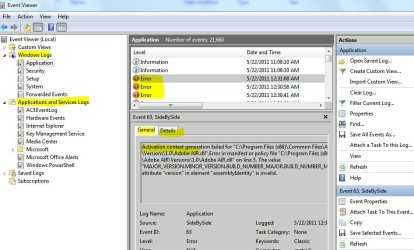
The following screenshot is an example using the Event Viewer to view application errors. It can help you compile a 'list' of what apps are producing errors and how often they are. There may be an underlying cause, which those in the Crashes and Debugging - Windows 7 Forums forum could likely help you resolve. The errors shown here are generated by Adobe Flash:


EventViewr Errors.JPG


Is there another way to kill a process more successfull?

You could try using the command prompt, as outlined here. Look for a heading title "Stop a Process Using Taskkill":

Command Prompt - Advanced Commands for System Information & Managing Active Tasks | Windows 7 Tutorials

But again, if I were having these issues, I would want to fix the 'crashing problem', rather than finding a way to successfully end the problem process(es).

If you find a way to effectively end the processes, you still have the application crashes.

That's rather like looking for a way to quickly bandage a dog bite instead of finding a way to avoid being bitten.


James
 

My Computer

OS
Win7U 64 RTM
CPU
Q9550
Motherboard
GA-EP45-UD3R
Memory
8GB Gskill
Graphics Card(s)
ASUS|EAH4850/HTDI/1GD3/A
Sound Card
xfi Plat
Monitor(s) Displays
Dell 2405fpw
Screen Resolution
1920x1200
Hard Drives
Seagate & WD sata Drives
PSU
Antec
Case
Antec
Keyboard
MS Natural Ergonomic 4000
Mouse
Logitech MX610 USB Cordless
To clarify, perhaps you should be investigating why the applications are crashing. You mention that there are many processes that you have to end (but can't).
No. I don't say many!
I say some!

Why are there so many app crashes? If you solve the problem of why the applications are crashing, you solve the "can't end processes' problem.
I don't think so. For example I find the reason why opera is crashing; perhaps TeraTec Cinema Home is still crashing caused by another reason (atm I don’t use it cause I don’t need it and don’t have the needed HW any more). And in the future if another app crashes ... still the same.
The "ending" problem will still remain, also if I find the reason of one crashing app.

The following screenshot is an example using the Event Viewer to view application errors. It can help you compile a 'list' of what apps are producing errors and how often they are. There may be an underlying cause, which those in the Crashes and Debugging - Windows 7 Forums forum could likely help you resolve. The errors shown here are generated by Adobe Flash:
Thanks, next time I will take more time to investigate with the event viewer.

You could try using the command prompt, as outlined here. Look for a heading title "Stop a Process Using Taskkill":
Command Prompt - Advanced Commands for System Information & Managing Active Tasks | Windows 7 Tutorials
as mentioned, I already tried this.

But again, if I were having these issues, I would want to fix the 'crashing problem', rather than finding a way to successfully end the problem process(es).
If you find a way to effectively end the processes, you still have the application crashes.

That's rather like looking for a way to quickly bandage a dog bite instead of finding a way to avoid being bitten.
Yes, I'm also interested in why the apps crashed, but thats still another problem.
If an app crashes I want to be able to kill that process.
If the crashing is fixed i'll still have the problem that I can't kill a process that would crash by another reason. (Not meaning that I know that it will happen son, but theoretical it can happen every second ;) )

It is better to know how first aid is done, than thinking, that this dog can't bite me any more, but the next one is still ahead. (I hope this metaphor shows what I mean)
 

My Computer

OS
Windows 7
Yes, I'm also interested in why the apps crashed, but thats still another problem.
If an app crashes I want to be able to kill that process.
If the crashing is fixed i'll still have the problem that I can't kill a process that would crash by another reason.

More likely, it is the apps that are not responding to the end request rather than Windows sending the request improperly, so, while you may assume that there are 2 separate issues here (1. apps crashing, 2. process not ending), it may indeed be one issue.

Regardless, the Crashes and Debugging forum exists for these types of issues. You would serve yourself well to copy your original post there. Be sure to include a link to this thread.

I'm not sure I understand why you are resistant to the most helpful course to resolve your issue. Good luck.

James
 

My Computer

OS
Win7U 64 RTM
CPU
Q9550
Motherboard
GA-EP45-UD3R
Memory
8GB Gskill
Graphics Card(s)
ASUS|EAH4850/HTDI/1GD3/A
Sound Card
xfi Plat
Monitor(s) Displays
Dell 2405fpw
Screen Resolution
1920x1200
Hard Drives
Seagate & WD sata Drives
PSU
Antec
Case
Antec
Keyboard
MS Natural Ergonomic 4000
Mouse
Logitech MX610 USB Cordless
You might want to try Process Explorer, see what it tells you about the app you can't kill (any). Right click on the app and launch Depends, see what it tells you.
 

My Computer

Computer type
PC/Desktop
Computer Manufacturer/Model Number
Lenovo IdeaCenter 450
OS
Windows 10 Pro X64
CPU
Intel Quad Core i7-4770 @ 3.4Ghz
Memory
16.0GB PC3-12800 DDR3 SDRAM 1600 MHz
Graphics Card(s)
Intel Integrated HD Graphics
Sound Card
Realtek HD Audio
Monitor(s) Displays
HP 22" LCD
Screen Resolution
1680 x 1050
Hard Drives
250GB Samsung EVO SATA-3 SSD
2TB Seagate ST2000DM001 SATA-2
1.5TB Seagate ST3150041AS SATA
Keyboard
Dell USB
Mouse
Lenovo USB
Internet Speed
Cable via Road Runner 3MB Upload, 30MB Download
Antivirus
Windows Defender, MBAM Pro, MBAE
Browser
Seamonkey
Other Info
UEFI/GPT
PLDS DVD-RW DH16AERSH
Can you stop those process in safe mode? I have found browser add on's that will not allow you to stop them or remove them in normal mode.
 

My Computer

Computer type
PC/Desktop
Computer Manufacturer/Model Number
Home made Desktop
OS
Windows 10 Pro. 64/ version 1709 Windows 7 Pro/64
CPU
Intel i7-6800K @ 4.3
Motherboard
ASUS X-99 Deluxe II
Memory
Corsair Platinum 16 gig @2400
Graphics Card(s)
EVGA GTX 1070 OC
Monitor(s) Displays
Asus 27" LED LCD/VE278Q
Screen Resolution
1920-1080 or 1280-720 HDMI
Hard Drives
INTEL SSD 730-240 Gb Sata 3.0/
PSU
EVGA Platium 1200W
Case
Phanteks Luxe Tempered Glass 8 fans/ one radiator
Cooling
XSPC/ Water Cooled CPU
Keyboard
Das 4 Professional
Mouse
Logitech M705/MX Anywhere 2-S
Internet Speed
100 mbits
Antivirus
Microsoft Security Essentials/ Malwarebytes Premium 3.0/ SAS
Browser
I.E. 11 default/Firefox/ ISP Time Warner Cable/Spectrum
Other Info
LG BluRay Burner/
Sound system-KLipsch-THX/
Icy Dock ssd Hot Swap bays.
Back
Top