Processes not shutting down

lebrocoli

New member
Member
Local time
6:04 PM
Messages
36
Hi all,

I am running Windows 7 64 Bits, installed from scratch and all is not too bad EXCEPT that processes do not terminate. What a pain in the nuts.

Often, when I shutdown an application, the application window closes but the process remains in Task Manager. Killing the process does not do anything. It seems to affect any programs, no one in particular. The only cure is to reboot the system.

1. Anybody else having this mega problem?

2. Is it 64 Bits problem only? Is it fine under Windows 7 32 Bits?

3. Any other way to kill the tasks?

Please help before I throw my laptop by the window!
Thanks
 

My Computer

OS
Windows 7 Ultimate 64 Bits
This is not a Windows problem, it is a problem with the programs involved. Open the Task Manager and find the process for the program involved, and kill it there. See if the programs have W7 x64 versions available.
 

My Computer

Computer Manufacturer/Model Number
DIY
OS
W7x64 Pro, SuSe 12.1/** W7 x64 Pro, XP MCE
CPU
Phenom II 1090T w/Noctua NH-D14 /**4400+ X2 w/CM Hyper TX 3
Motherboard
ASRock 890FX Deluxe 4/**A8N-SLI
Memory
2 x 2GB Patriot PGS34g1600LLKA/**4x1GB Corsair VS
Graphics Card(s)
EVGA GTX460 SC/**EVGA 8800GTS
Sound Card
Asus Xonar D2X/**Xonar D1
Monitor(s) Displays
Acer X233H, Dell E152FPc /**LG M237-WD
Screen Resolution
1920x1080 & 1024x768/**1980x1080
Hard Drives
WDC 2TB, 1.5TB, 1TB, 500GB,Seagate 500GB , Maxtor 80GB /**500GB Seagate & WDC 1TB Black
PSU
CM RS600 w/ APC BX1000G/**Antec 500 TP w/ APC BX1000
Case
HAF922/**Antec 1040IIB
Cooling
3x200mm, 1x140 and 1x120mm/**5x80mm fans
Keyboard
Logitech Media USB/**Saitek Eclipse
Mouse
Cordless Trackman Wheel/**Ditto
Internet Speed
3.3Mbps
Other Info
SB 560 5.1 w/ Sennheiser RS140/**Creative T20 speakers, Dvico FusionHDTV7 Gold RT, Cisco E3000, HP 5510V AIO, Linksys E3000, Belkin F5U237 hub and **F5D8055 adapter
(** = 2nd rig)
I do not think, it is a problem with the programs involved. It happens with any programs, Itune, firefox, Outlook 2007, Word 2007, Visio 2007, does not matter which program.

I googled up this issue and seems like many people have the exact same problem.
 

My Computer

OS
Windows 7 Ultimate 64 Bits
It's a known issue with Outlook 2007 according to Microsoft it happens because of the Anti Spam plugin. Can you tell me how long it stays in the Task Manager ? Because sometime it might take a while to End the process.

Hope this helps,
Captain
 

My Computer

Computer Manufacturer/Model Number
Samsung NP550P5C-S02IN
OS
Windows 7 Ultimate - 64-bit | Windows 8 Pro - 64-bit
CPU
Intel® Core™ i7 Processor 3,610QM (2.30Hz, 6MB L3 Cach
Memory
8 GB
Graphics Card(s)
NVIDIA® GeForce® GT 650M 2GB Graphics, Optimus™ techno
Sound Card
SoundAlive™ JBL 3 Speakers (With sub-Woofer)
Monitor(s) Displays
39.62cm (15.6) SuperBright 300nit HD+ LED Display
Screen Resolution
1,600 x 900, Anti-Reflective
Hard Drives
1TB S-ATA II Hard Drive (5,400RPM)
It stays forever. That it very annoying.

Thanks
 

My Computer

OS
Windows 7 Ultimate 64 Bits

My Computer

Computer Manufacturer/Model Number
Self-Built
OS
Vista Ultimate X64/ Windows 7 Dual-boot
CPU
Q6600
Motherboard
ASUS P5K
Memory
4G OCZ PC2 8500 Platinum
Graphics Card(s)
EVGA 8800GTS Vid Card
Hard Drives
500G Seagate SATA
200G Seagate SATA
100G WD Caviar SATA
80G WD Caviar IDE
PSU
OCZ Elite 800W PSU
Case
RaidMax Smilodon Case
Do these processes any CPU time? If not, they are just cached - their roots repectively. They will be thrown out as soon as the RAM is needed. This may explain it better SuperFetch: How it Works & Myths
 

My Computer

Computer Manufacturer/Model Number
HP, Dell, Gateway, Toshiba - 4 laptops and 2 desktops
OS
Vista, Windows7, Mint Mate, Zorin, Windows 8
CPU
from 1.6GHz Duo to i7
Monitor(s) Displays
2x HP w2207
Hard Drives
5x HDD, 7x SSD, 12x Externals
Keyboard
with trackball - no mices
Mouse
Trackball mice
Internet Speed
DSL 6000
If a process was simply cached, shouldn't a cache app be able to remove the process? The reason that I ask, is because I do have O&O's CleverCache installed, and I still have had problems at times with processes that remain until I reboot.
 

My Computer

Computer Manufacturer/Model Number
DIY
OS
W7x64 Pro, SuSe 12.1/** W7 x64 Pro, XP MCE
CPU
Phenom II 1090T w/Noctua NH-D14 /**4400+ X2 w/CM Hyper TX 3
Motherboard
ASRock 890FX Deluxe 4/**A8N-SLI
Memory
2 x 2GB Patriot PGS34g1600LLKA/**4x1GB Corsair VS
Graphics Card(s)
EVGA GTX460 SC/**EVGA 8800GTS
Sound Card
Asus Xonar D2X/**Xonar D1
Monitor(s) Displays
Acer X233H, Dell E152FPc /**LG M237-WD
Screen Resolution
1920x1080 & 1024x768/**1980x1080
Hard Drives
WDC 2TB, 1.5TB, 1TB, 500GB,Seagate 500GB , Maxtor 80GB /**500GB Seagate & WDC 1TB Black
PSU
CM RS600 w/ APC BX1000G/**Antec 500 TP w/ APC BX1000
Case
HAF922/**Antec 1040IIB
Cooling
3x200mm, 1x140 and 1x120mm/**5x80mm fans
Keyboard
Logitech Media USB/**Saitek Eclipse
Mouse
Cordless Trackman Wheel/**Ditto
Internet Speed
3.3Mbps
Other Info
SB 560 5.1 w/ Sennheiser RS140/**Creative T20 speakers, Dvico FusionHDTV7 Gold RT, Cisco E3000, HP 5510V AIO, Linksys E3000, Belkin F5U237 hub and **F5D8055 adapter
(** = 2nd rig)
If a process was simply cached, shouldn't a cache app be able to remove the process? The reason that I ask, is because I do have O&O's CleverCache installed, and I still have had problems at times with processes that remain until I reboot.


Suggest you read what I linked above and also the link given on the bottom of that page to the Mark Russinovich blog. There is a detailed explanation how it works.

But those processe do no harm. They are just sitting there idle and give way whenever the RAM is needed.
 

My Computer

Computer Manufacturer/Model Number
HP, Dell, Gateway, Toshiba - 4 laptops and 2 desktops
OS
Vista, Windows7, Mint Mate, Zorin, Windows 8
CPU
from 1.6GHz Duo to i7
Monitor(s) Displays
2x HP w2207
Hard Drives
5x HDD, 7x SSD, 12x Externals
Keyboard
with trackball - no mices
Mouse
Trackball mice
Internet Speed
DSL 6000
Clever Cache may well be the culprit here...
 

My Computer

Computer Manufacturer/Model Number
Self-Built
OS
Vista Ultimate X64/ Windows 7 Dual-boot
CPU
Q6600
Motherboard
ASUS P5K
Memory
4G OCZ PC2 8500 Platinum
Graphics Card(s)
EVGA 8800GTS Vid Card
Hard Drives
500G Seagate SATA
200G Seagate SATA
100G WD Caviar SATA
80G WD Caviar IDE
PSU
OCZ Elite 800W PSU
Case
RaidMax Smilodon Case
Clever Cache may well be the culprit here...

It is never a good idea to try to outsmart the system with those "wonder programs".
 

My Computer

Computer Manufacturer/Model Number
HP, Dell, Gateway, Toshiba - 4 laptops and 2 desktops
OS
Vista, Windows7, Mint Mate, Zorin, Windows 8
CPU
from 1.6GHz Duo to i7
Monitor(s) Displays
2x HP w2207
Hard Drives
5x HDD, 7x SSD, 12x Externals
Keyboard
with trackball - no mices
Mouse
Trackball mice
Internet Speed
DSL 6000
Like right now, eventhough Visio 2007 is closed, I have 2 Visio processes stuck in task manager. One use 0% CPU and but uses 33Meg RAM but the other one uses 5% CPU and uses 6 Meg RAM.

I tried to kill the one that used 5% CPU and it worked. I tried to kill the other one and nothing happens.
 

My Computer

OS
Windows 7 Ultimate 64 Bits
I also just tried pskill and it did not do anything.
 

My Computer

OS
Windows 7 Ultimate 64 Bits
Can you fill in your system specs?
 

My Computer

Computer Manufacturer/Model Number
Sony Vaio Z46GDU
OS
Windows 7 Ultimate x86-64
CPU
[email protected] 1066MHz FSB
Motherboard
Sony branded
Memory
6GB DDR3 1066MHz
Graphics Card(s)
9300M GS 256MB Dedicated (Speed) + Intel4500MHD (Stamina)
Sound Card
Realtek HD Audio
Monitor(s) Displays
13.1' WXGA
Screen Resolution
1600x900
Hard Drives
320GB 7200RPM w/ 16MB cache
Internet Speed
1MB/s
Like right now, eventhough Visio 2007 is closed, I have 2 Visio processes stuck in task manager. One use 0% CPU and but uses 33Meg RAM but the other one uses 5% CPU and uses 6 Meg RAM.

I tried to kill the one that used 5% CPU and it worked. I tried to kill the other one and nothing happens.

You can only kill running processes. The one that is not running has just the root lingering in the RAM - but don't worry about it. As soon as this space is needed for something else, it will disappear. The RAM space it occupies is actually tagged as "available".
 

My Computer

Computer Manufacturer/Model Number
HP, Dell, Gateway, Toshiba - 4 laptops and 2 desktops
OS
Vista, Windows7, Mint Mate, Zorin, Windows 8
CPU
from 1.6GHz Duo to i7
Monitor(s) Displays
2x HP w2207
Hard Drives
5x HDD, 7x SSD, 12x Externals
Keyboard
with trackball - no mices
Mouse
Trackball mice
Internet Speed
DSL 6000
Laptop HP Pavilion with AMD Turion 64 X2 with 4 Meg RAM.
 

My Computer

OS
Windows 7 Ultimate 64 Bits

My Computer

Computer Manufacturer/Model Number
Samsung NP550P5C-S02IN
OS
Windows 7 Ultimate - 64-bit | Windows 8 Pro - 64-bit
CPU
Intel® Core™ i7 Processor 3,610QM (2.30Hz, 6MB L3 Cach
Memory
8 GB
Graphics Card(s)
NVIDIA® GeForce® GT 650M 2GB Graphics, Optimus™ techno
Sound Card
SoundAlive™ JBL 3 Speakers (With sub-Woofer)
Monitor(s) Displays
39.62cm (15.6) SuperBright 300nit HD+ LED Display
Screen Resolution
1,600 x 900, Anti-Reflective
Hard Drives
1TB S-ATA II Hard Drive (5,400RPM)
So is it a 64 bits only issue?
 

My Computer

OS
Windows 7 Ultimate 64 Bits
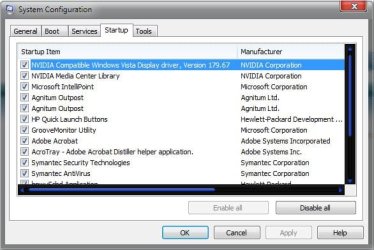
No, its not x64, can you post a screenshot of the msconfig startup tab - search for snip in the start menu - update all your drivers from the manufacturer's website too.
 

My Computer

Computer Manufacturer/Model Number
Sony Vaio Z46GDU
OS
Windows 7 Ultimate x86-64
CPU
[email protected] 1066MHz FSB
Motherboard
Sony branded
Memory
6GB DDR3 1066MHz
Graphics Card(s)
9300M GS 256MB Dedicated (Speed) + Intel4500MHD (Stamina)
Sound Card
Realtek HD Audio
Monitor(s) Displays
13.1' WXGA
Screen Resolution
1600x900
Hard Drives
320GB 7200RPM w/ 16MB cache
Internet Speed
1MB/s
Here you go.
 

Attachments

  • msconfig.jpg
    msconfig.jpg
    40.4 KB · Views: 26

My Computer

OS
Windows 7 Ultimate 64 Bits
Back
Top