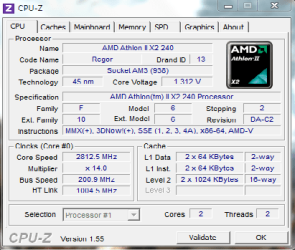
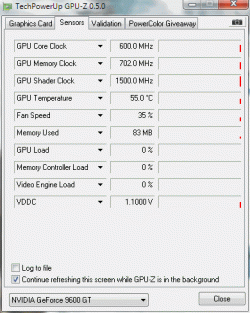
processor over heating

dorian hawkmoon

New member
Member
VIP
Local time
9:47 AM
Messages
398
i changed my processor twice, so the thermal gel may have dried up...my pc began to shut down suddenly, after that I underclocked it to 0.075v (I think) instead of the normal and replaced the OEM cooler with Hyper TX3. PC runs fine now...any way to tell if its ok, or just seems ok and waiting for a disaster :sarc: ?

let me know if I can provide more information.

Thanks :) !
 

Attachments

  • HWMonitor.txt
    HWMonitor.txt
    18.2 KB · Views: 14
  • cpuz.png
    cpuz.png
    15.5 KB · Views: 12
  • 1.gif
    1.gif
    13.4 KB · Views: 9
  • speedfan.png
    speedfan.png
    9.9 KB · Views: 8

My Computer

Computer type
PC/Desktop
Computer Manufacturer/Model Number
Self built
OS
Windows 10 Pro (x64)
CPU
AMD RYZEN 7 1700+Stock Wraith Spire
Motherboard
ASUS PRIME B350M-A
Memory
Corsair 8GB (1 x 8 GB) DDR4 Vengeance LPX 2400Mhz
Graphics Card(s)
SAPPHIRE RX 470 4GB (Platinum Edition)
Monitor(s) Displays
BenQ VZ2250H
Screen Resolution
1920x1080
Hard Drives
120GB Samsung 750 Evo (OS/Programs)+1TB ST Firecuda (Games/Creative Applications)+1TB WD Green (Storage)
PSU
Antec VP650PM
Case
Coolermaster K380 Mid-Tower
Cooling
Side:Antec F19 120mm+Rear:Tt ISGC Fan12
Keyboard
Logitech K200
Mouse
Dragonwar Ele-G9 Thor
Internet Speed
Slow by 21st Century Standards :(
Antivirus
Bitdefender Internet Security and MBAM
Browser
Firefox
Other Info
Creative Inspire T3130
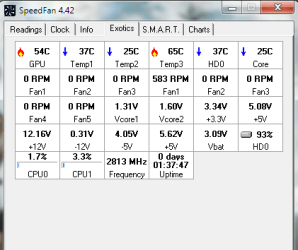
Am I understanding you correctly? Have you replaced the heat sinks without cleaning the old grease and putting down some new?

If that's what you've done, then that is a definite no-no and would surely explain a way too hot CPU temp of 65C. (I presume Temp3 is your CPU?)

That CPU should idle at 40C with stock cooling.

My CPU was idling at around 48C until I did my monthly dust removal which dropped it by 10C to a very comfortable ~38C.

I'd really, really get some new grease laid down- right away.
 

My Computer

Computer Manufacturer/Model Number
OEM - Me
OS
Windows 7 Home Premium x64
CPU
AMD Phenom II X6 1600T
Motherboard
GigaByte GZ-990FXA-UD3
Memory
16GB PC3-10700 (1342MHz)
Graphics Card(s)
ATI Radeon 5770 HD (x2) CrossFire
Sound Card
On-board RealTek chipset
Monitor(s) Displays
3x Hanns-G 1920x1080 Monitors
Screen Resolution
3x Hanns-G 1920x1080 Monitors
Hard Drives
Intel 25-V SSD 40GB: 218 MB/s AT: 0.1ms
Intel X-25M SSD 80GB: 230MB/s AT: 0.1ms
Seagate 750GB: 133 MB/s AT: 13ms (perpendicular storage)
Buffalo HD-PCTU3 1TB External drive
PSU
OCZ Stealth X Stream 750W
Case
Cheap (unknown)
Cooling
Stock
Keyboard
HP USB
Mouse
LogiTech USB
Internet Speed
1.5 Mbps - Slow - At the tail-end of a rural network
Other Info
Printer: Epson Stylus C-84
Scanner: HP 3500C Flatbed
DVD-RW: Plextor
DVD-ROM: Unknown
WEI: 7.4
Have you tried RMClock utility and undervolt your processor?
 

My Computer

OS
Windows 7 Ultimate 32bit
CPU
Intel Pentium E2200 2.2ghz
Motherboard
ECS P43G
Memory
Kingston 2GB DDR2
Graphics Card(s)
NVidia GeForce 8400GS
Sound Card
Integrated
Monitor(s) Displays
AOC 17" LCD Display
Screen Resolution
1024x768
Hard Drives
Seagate 320GB
Cooling
Stock
Am I understanding you correctly? Have you replaced the heat sinks without cleaning the old grease and putting down some new?

If that's what you've done, then that is a definite no-no and would surely explain a way too hot CPU temp of 65C. (I presume Temp3 is your CPU?)
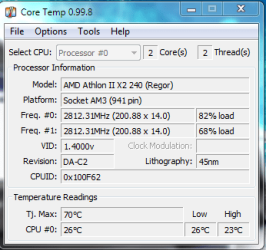
No, no... it's my fault really temp 3 is HDD temp, not core temp. Core Temp shows it at 30-40 [summer] @ idle and 40-49 (avg.) under load (India is a very hot country :confused:), this is as best as winter gets in our country, so it idles @25 now. I have shaved off the old grease and replaced it with the grease Cooler Master provided with Hyper TX3. My concern is the voltage all parts are getting, are they all ok?
 

Attachments

  • Core Temp.png
    Core Temp.png
    13.7 KB · Views: 3
Last edited:

My Computer

Computer type
PC/Desktop
Computer Manufacturer/Model Number
Self built
OS
Windows 10 Pro (x64)
CPU
AMD RYZEN 7 1700+Stock Wraith Spire
Motherboard
ASUS PRIME B350M-A
Memory
Corsair 8GB (1 x 8 GB) DDR4 Vengeance LPX 2400Mhz
Graphics Card(s)
SAPPHIRE RX 470 4GB (Platinum Edition)
Monitor(s) Displays
BenQ VZ2250H
Screen Resolution
1920x1080
Hard Drives
120GB Samsung 750 Evo (OS/Programs)+1TB ST Firecuda (Games/Creative Applications)+1TB WD Green (Storage)
PSU
Antec VP650PM
Case
Coolermaster K380 Mid-Tower
Cooling
Side:Antec F19 120mm+Rear:Tt ISGC Fan12
Keyboard
Logitech K200
Mouse
Dragonwar Ele-G9 Thor
Internet Speed
Slow by 21st Century Standards :(
Antivirus
Bitdefender Internet Security and MBAM
Browser
Firefox
Other Info
Creative Inspire T3130
guys?
 

My Computer

Computer type
PC/Desktop
Computer Manufacturer/Model Number
Self built
OS
Windows 10 Pro (x64)
CPU
AMD RYZEN 7 1700+Stock Wraith Spire
Motherboard
ASUS PRIME B350M-A
Memory
Corsair 8GB (1 x 8 GB) DDR4 Vengeance LPX 2400Mhz
Graphics Card(s)
SAPPHIRE RX 470 4GB (Platinum Edition)
Monitor(s) Displays
BenQ VZ2250H
Screen Resolution
1920x1080
Hard Drives
120GB Samsung 750 Evo (OS/Programs)+1TB ST Firecuda (Games/Creative Applications)+1TB WD Green (Storage)
PSU
Antec VP650PM
Case
Coolermaster K380 Mid-Tower
Cooling
Side:Antec F19 120mm+Rear:Tt ISGC Fan12
Keyboard
Logitech K200
Mouse
Dragonwar Ele-G9 Thor
Internet Speed
Slow by 21st Century Standards :(
Antivirus
Bitdefender Internet Security and MBAM
Browser
Firefox
Other Info
Creative Inspire T3130
No, no... it's my fault really temp 3 is HDD temp, not core temp.

I know nothing about AMD processors and I can't comment on your voltages.

But 65 is VERY hot for a hard drive.

Mine run in the high 30s or low 40s when the ambient temperature is about 27.

That is--10 to 15 degrees above ambient.

I'd consider more fans, most likely on the front side to blow a bit of air into the case, flowing over the hard drive if possible. A quiet low to medium speed fan should do it.
 

My Computer

Computer type
PC/Desktop
Computer Manufacturer/Model Number
Ignatz Special; 4 speed manual gearbox; factory air conditioning; one of one
OS
Windows 7 Home Premium SP1, 64-bit
CPU
Intel Skylake i5-6600K, not overclocked
Motherboard
AsRock Z170M Extreme 4, micro ATX
Memory
8 GB HyperX DDR4-2666 (2 x 4 GB)
Graphics Card(s)
none; graphics are integrated on CPU
Sound Card
onboard: Realtek ALC1150; external: USB Behringer UF0-202
Monitor(s) Displays
Dell S2340M 23 inch IPS
Screen Resolution
1600 x 900
Hard Drives
System: Crucial MX100 series SSD, 128 GB;
Data: Samsung Spinpoint 103SJ, 1 TB;
Backup: WD Caviar Green WD30EZRX-00D8PB0, 3 TB
PSU
Rosewill SilentNight 500 watt fanless, semi-modular
Case
Antec Solo II
Cooling
Noctua NH-U12S; Noctua F12 intake, Noctua S12A exhaust
Keyboard
Microsoft 200 6JH-00001 USB
Mouse
Dell or Microsoft optical wired; USB
Antivirus
Microsoft Security Essentials and Malwarebytes Premium
Browser
Pale Moon
Other Info
All fans PWM; speeds at idle: CPU circa 500 rpm; intake circa 600 rpm; exhaust circa 600 rpm; CPU temps 27 idle and 47 C load in a warm room (27 C/81 F) when running Intel Extreme Tuning Utility stress test.
Back
Top