
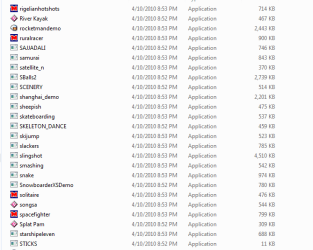
Processor temp high, while opening Flash Games folder.

NRT

New member
Power User
Local time
1:59 PM
Messages
375
Location
Kerala, India
hi,

While I open Flash Games folder in my computer, processor temp are high as 65 C. It takes some time to completely build the Flash Games Icons... plz hav a look at my screenshots... thank u...
 

Attachments

  • Capture.PNG
    Capture.PNG
    10.9 KB · Views: 17

My Computer

Computer Manufacturer/Model Number
Assembled
OS
Windows 7 Ultimate 64-bit SP1
CPU
AMD Athlon II X2 260 @ 3.2 Ghz
Motherboard
Gigabyte Technology Co., Ltd. M68MT-S2 (Socket M2)
Memory
Kingston 8.0GB Dual-Channel DDR3 @ 669MHz (9-9-9-24)
Graphics Card(s)
ASUS EAH 5450 - 1 GB
Sound Card
Realtek HD Audio
Monitor(s) Displays
23 Inch - DELL SP2309W
Screen Resolution
2048 x 1152
Hard Drives
488GB Seagate ST3500418AS ATA Device (SATA)
PSU
450W
Case
Iball - Standard Form - i8190
Cooling
Stock Cooling
Keyboard
Logitech
Mouse
Logitech
Internet Speed
1 MB/Sec
Other Info
Creative Inspire 2.1 Speakers, LITEON 24x DVD Writer
I have 155 Flash Games in the folder...
 

My Computer

Computer Manufacturer/Model Number
Assembled
OS
Windows 7 Ultimate 64-bit SP1
CPU
AMD Athlon II X2 260 @ 3.2 Ghz
Motherboard
Gigabyte Technology Co., Ltd. M68MT-S2 (Socket M2)
Memory
Kingston 8.0GB Dual-Channel DDR3 @ 669MHz (9-9-9-24)
Graphics Card(s)
ASUS EAH 5450 - 1 GB
Sound Card
Realtek HD Audio
Monitor(s) Displays
23 Inch - DELL SP2309W
Screen Resolution
2048 x 1152
Hard Drives
488GB Seagate ST3500418AS ATA Device (SATA)
PSU
450W
Case
Iball - Standard Form - i8190
Cooling
Stock Cooling
Keyboard
Logitech
Mouse
Logitech
Internet Speed
1 MB/Sec
Other Info
Creative Inspire 2.1 Speakers, LITEON 24x DVD Writer
That is "high" but not "too high". Simply means your processor is working at max while flash preloads frames from all the flash files in order to build icons.

Nothing to worry about unless it hits 70 or above really. (Assuming you are still using the core 2 duo proc listed in your specs)
 

My Computer

Computer Manufacturer/Model Number
Scratch built
OS
Windows 7 x64 Ultimate
CPU
i7 960
Motherboard
Asus P6X58D
Memory
12 Gig Corsair Dominator
Graphics Card(s)
Nvidia 480
Sound Card
Maudio Delta 44 + breakout box
Monitor(s) Displays
Dell UltraSharp U2410 24in and Samsung 21 dual monitors
Screen Resolution
1920x1200 and 1280x1024
Hard Drives
Primary: Intel X-25M G2 160G SSD
Secondary: Segate baracuda 1.0 TB
HDs in AHCI mode.
PSU
Corasair TX850
Case
Cooler Master HAF
Cooling
Corsair H50
Keyboard
Logitech G15 + N52 game pad
Mouse
Logitech MX518
Internet Speed
15kbs down 4.5kbps up
Other Info
WEI 7.6
CPU & RAM 7.6
Graphics 7.9
Hard disk 7.7
  • Like
Reactions: NRT
That is "high" but not "too high". Simply means your processor is working at max while flash preloads frames from all the flash files in order to build icons.

Nothing to worry about unless it hits 70 or above really. (Assuming you are still using the core 2 duo proc listed in your specs)

thnk u fseal.... and also, whn the icons get built, after two or three restarts, the icons disappear and processor needs to built it again, and taking 2 mins to completely build it..... wat cud be the fault ???
 
Last edited:

My Computer

Computer Manufacturer/Model Number
Assembled
OS
Windows 7 Ultimate 64-bit SP1
CPU
AMD Athlon II X2 260 @ 3.2 Ghz
Motherboard
Gigabyte Technology Co., Ltd. M68MT-S2 (Socket M2)
Memory
Kingston 8.0GB Dual-Channel DDR3 @ 669MHz (9-9-9-24)
Graphics Card(s)
ASUS EAH 5450 - 1 GB
Sound Card
Realtek HD Audio
Monitor(s) Displays
23 Inch - DELL SP2309W
Screen Resolution
2048 x 1152
Hard Drives
488GB Seagate ST3500418AS ATA Device (SATA)
PSU
450W
Case
Iball - Standard Form - i8190
Cooling
Stock Cooling
Keyboard
Logitech
Mouse
Logitech
Internet Speed
1 MB/Sec
Other Info
Creative Inspire 2.1 Speakers, LITEON 24x DVD Writer

My Computer

Computer Manufacturer/Model Number
Dell and Custom
OS
Systems 1 and 2: Windows 7 Enterprise x64, Win 8 Developer
CPU
System 1: i7 [email protected], System 2: AMD FX-4100 Zambezi 3.6G
Motherboard
System 1:Dell 06NWYK System 2: ASUS M5A97 AM3+
Memory
System 1: 8GB System 2: 8GB
Graphics Card(s)
System 1: ATI FirePro V4800 System 2: Radeon HD 6850
Sound Card
System 1: onboard System 2: onboard
Monitor(s) Displays
System1: Viewsonic HDMI 24"
Screen Resolution
System 1: 1920x1080 System 2: 1920x1080
Hard Drives
System 1: Mirrored .5B drives System 2: Seagate Barracuda ST1000DM003 1TB 7200 RPM 64MB Cache SATA 6.0Gb/s
Case
System 1: Dell System 2: Cooler Master
Internet Speed
10 MBPS
  • Like
Reactions: NRT
Look, that is normal to take the cpu some time to load that all games. Bit that should not be more than 3-5 sec.
What are your temps before opening that folder ? Also my suggestion will be to make a scan on that folder, I don't beleive much in that flash games, maybe you are infected. Scan with Malwarebytes and your antivirus. (Malwarebytes link in my signature)
 

My Computer

Computer type
PC/Desktop
Computer Manufacturer/Model Number
Custom Build
OS
Windows 10 Pro x64
CPU
Intel Core i5 4440 @Stock
Motherboard
Gigabyte Z97 D3H
Memory
4 x 4GB HyperX Fury DDR3
Graphics Card(s)
Gigabyte GTX 1050Ti O4G
Sound Card
Integrated
Monitor(s) Displays
Dell P2417H
Screen Resolution
1920 x 1080
Hard Drives
Samsung EVO 850 120GB / Toshiba DT01ACA050 1TB 7200prm 32MB
PSU
Riotoro Onyx 750W
Case
NZXT H500 Black-Red
Cooling
Stock CPU + NZXT 120mm + 2x120mm red fans
Keyboard
Modecom Volcano Lanparty
Mouse
Asus ROG Gladius / DeepCool E-Pad Plus
Internet Speed
DOCSIS 50/3 Mbit
Browser
Google Chrome
Other Info
Asus K55VJ(i5 3210M, GT635M / 2GB, 8GB DDR3, 500GB HDD)
Look, that is normal to take the cpu some time to load that all games. Bit that should not be more than 3-5 sec.
What are your temps before opening that folder ? Also my suggestion will be to make a scan on that folder, I don't beleive much in that flash games, maybe you are infected. Scan with Malwarebytes and your antivirus. (Malwarebytes link in my signature)

before opening the folder, it is 50 C... after that almost 65 C... let me scan with malwarebytes :)
 

My Computer

Computer Manufacturer/Model Number
Assembled
OS
Windows 7 Ultimate 64-bit SP1
CPU
AMD Athlon II X2 260 @ 3.2 Ghz
Motherboard
Gigabyte Technology Co., Ltd. M68MT-S2 (Socket M2)
Memory
Kingston 8.0GB Dual-Channel DDR3 @ 669MHz (9-9-9-24)
Graphics Card(s)
ASUS EAH 5450 - 1 GB
Sound Card
Realtek HD Audio
Monitor(s) Displays
23 Inch - DELL SP2309W
Screen Resolution
2048 x 1152
Hard Drives
488GB Seagate ST3500418AS ATA Device (SATA)
PSU
450W
Case
Iball - Standard Form - i8190
Cooling
Stock Cooling
Keyboard
Logitech
Mouse
Logitech
Internet Speed
1 MB/Sec
Other Info
Creative Inspire 2.1 Speakers, LITEON 24x DVD Writer
Well, that 15C + is not good for opening one folder. Let the scan finish, and let us know for the results.
 

My Computer

Computer type
PC/Desktop
Computer Manufacturer/Model Number
Custom Build
OS
Windows 10 Pro x64
CPU
Intel Core i5 4440 @Stock
Motherboard
Gigabyte Z97 D3H
Memory
4 x 4GB HyperX Fury DDR3
Graphics Card(s)
Gigabyte GTX 1050Ti O4G
Sound Card
Integrated
Monitor(s) Displays
Dell P2417H
Screen Resolution
1920 x 1080
Hard Drives
Samsung EVO 850 120GB / Toshiba DT01ACA050 1TB 7200prm 32MB
PSU
Riotoro Onyx 750W
Case
NZXT H500 Black-Red
Cooling
Stock CPU + NZXT 120mm + 2x120mm red fans
Keyboard
Modecom Volcano Lanparty
Mouse
Asus ROG Gladius / DeepCool E-Pad Plus
Internet Speed
DOCSIS 50/3 Mbit
Browser
Google Chrome
Other Info
Asus K55VJ(i5 3210M, GT635M / 2GB, 8GB DDR3, 500GB HDD)
Well, that 15C + is not good for opening one folder. Let the scan finish, and let us know for the results.

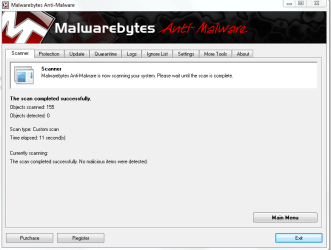
malwarebytes reports 0 infections...
 

Attachments

  • Capture1.PNG
    Capture1.PNG
    26.4 KB · Views: 10

My Computer

Computer Manufacturer/Model Number
Assembled
OS
Windows 7 Ultimate 64-bit SP1
CPU
AMD Athlon II X2 260 @ 3.2 Ghz
Motherboard
Gigabyte Technology Co., Ltd. M68MT-S2 (Socket M2)
Memory
Kingston 8.0GB Dual-Channel DDR3 @ 669MHz (9-9-9-24)
Graphics Card(s)
ASUS EAH 5450 - 1 GB
Sound Card
Realtek HD Audio
Monitor(s) Displays
23 Inch - DELL SP2309W
Screen Resolution
2048 x 1152
Hard Drives
488GB Seagate ST3500418AS ATA Device (SATA)
PSU
450W
Case
Iball - Standard Form - i8190
Cooling
Stock Cooling
Keyboard
Logitech
Mouse
Logitech
Internet Speed
1 MB/Sec
Other Info
Creative Inspire 2.1 Speakers, LITEON 24x DVD Writer
Make sure all your fans are dust-free. Check inside your case (unplug computer).
What are you using to determine cpu temp?
 

My Computer

Computer Manufacturer/Model Number
Dell and Custom
OS
Systems 1 and 2: Windows 7 Enterprise x64, Win 8 Developer
CPU
System 1: i7 [email protected], System 2: AMD FX-4100 Zambezi 3.6G
Motherboard
System 1:Dell 06NWYK System 2: ASUS M5A97 AM3+
Memory
System 1: 8GB System 2: 8GB
Graphics Card(s)
System 1: ATI FirePro V4800 System 2: Radeon HD 6850
Sound Card
System 1: onboard System 2: onboard
Monitor(s) Displays
System1: Viewsonic HDMI 24"
Screen Resolution
System 1: 1920x1080 System 2: 1920x1080
Hard Drives
System 1: Mirrored .5B drives System 2: Seagate Barracuda ST1000DM003 1TB 7200 RPM 64MB Cache SATA 6.0Gb/s
Case
System 1: Dell System 2: Cooler Master
Internet Speed
10 MBPS
Make sure all your fans are dust-free. Check inside your case (unplug computer).
What are you using to determine cpu temp?

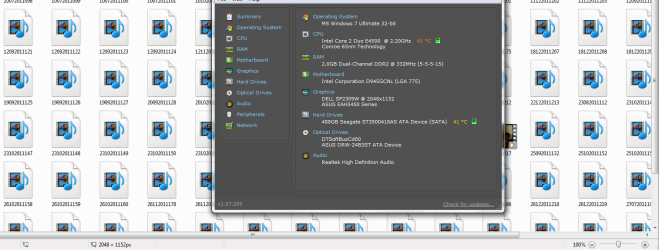
Piriform Speccy
 

My Computer

Computer Manufacturer/Model Number
Assembled
OS
Windows 7 Ultimate 64-bit SP1
CPU
AMD Athlon II X2 260 @ 3.2 Ghz
Motherboard
Gigabyte Technology Co., Ltd. M68MT-S2 (Socket M2)
Memory
Kingston 8.0GB Dual-Channel DDR3 @ 669MHz (9-9-9-24)
Graphics Card(s)
ASUS EAH 5450 - 1 GB
Sound Card
Realtek HD Audio
Monitor(s) Displays
23 Inch - DELL SP2309W
Screen Resolution
2048 x 1152
Hard Drives
488GB Seagate ST3500418AS ATA Device (SATA)
PSU
450W
Case
Iball - Standard Form - i8190
Cooling
Stock Cooling
Keyboard
Logitech
Mouse
Logitech
Internet Speed
1 MB/Sec
Other Info
Creative Inspire 2.1 Speakers, LITEON 24x DVD Writer
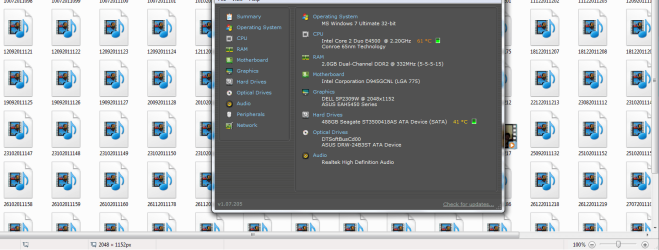
while opening videos folder, pictures folder in thumbnail view, it takes 1 minute to fully built the thumbnail ....
 

Attachments

  • Capture3.PNG
    Capture3.PNG
    51.6 KB · Views: 6
Last edited:

My Computer

Computer Manufacturer/Model Number
Assembled
OS
Windows 7 Ultimate 64-bit SP1
CPU
AMD Athlon II X2 260 @ 3.2 Ghz
Motherboard
Gigabyte Technology Co., Ltd. M68MT-S2 (Socket M2)
Memory
Kingston 8.0GB Dual-Channel DDR3 @ 669MHz (9-9-9-24)
Graphics Card(s)
ASUS EAH 5450 - 1 GB
Sound Card
Realtek HD Audio
Monitor(s) Displays
23 Inch - DELL SP2309W
Screen Resolution
2048 x 1152
Hard Drives
488GB Seagate ST3500418AS ATA Device (SATA)
PSU
450W
Case
Iball - Standard Form - i8190
Cooling
Stock Cooling
Keyboard
Logitech
Mouse
Logitech
Internet Speed
1 MB/Sec
Other Info
Creative Inspire 2.1 Speakers, LITEON 24x DVD Writer
Windows frequently rebuilds it's icon cache for various reasons that are a bit of a mystery :)

I think that in this case you are unusual for having so many flash files in one place. If you want to stop it from doing that you can select the "Always show icons not thumbnails" and Windows will stop trying to open the files and render them to get a thumbnail...

Your idle temp of 50C is a bit high to start with. 15C in crease for rendering 150 flash files to get an icon I would expect to be normal. But you should be idling around 30 something I would think. As others have suggested, make sure your fan is clean and that there is airflow through your case. Including around your case (If your case is under the desk it may be re-breathing it's own exhaust and that'll keep the temps high.
 

My Computer

Computer Manufacturer/Model Number
Scratch built
OS
Windows 7 x64 Ultimate
CPU
i7 960
Motherboard
Asus P6X58D
Memory
12 Gig Corsair Dominator
Graphics Card(s)
Nvidia 480
Sound Card
Maudio Delta 44 + breakout box
Monitor(s) Displays
Dell UltraSharp U2410 24in and Samsung 21 dual monitors
Screen Resolution
1920x1200 and 1280x1024
Hard Drives
Primary: Intel X-25M G2 160G SSD
Secondary: Segate baracuda 1.0 TB
HDs in AHCI mode.
PSU
Corasair TX850
Case
Cooler Master HAF
Cooling
Corsair H50
Keyboard
Logitech G15 + N52 game pad
Mouse
Logitech MX518
Internet Speed
15kbs down 4.5kbps up
Other Info
WEI 7.6
CPU & RAM 7.6
Graphics 7.9
Hard disk 7.7
Capture3.PNG

is this normal??
 

My Computer

Computer Manufacturer/Model Number
Assembled
OS
Windows 7 Ultimate 64-bit SP1
CPU
AMD Athlon II X2 260 @ 3.2 Ghz
Motherboard
Gigabyte Technology Co., Ltd. M68MT-S2 (Socket M2)
Memory
Kingston 8.0GB Dual-Channel DDR3 @ 669MHz (9-9-9-24)
Graphics Card(s)
ASUS EAH 5450 - 1 GB
Sound Card
Realtek HD Audio
Monitor(s) Displays
23 Inch - DELL SP2309W
Screen Resolution
2048 x 1152
Hard Drives
488GB Seagate ST3500418AS ATA Device (SATA)
PSU
450W
Case
Iball - Standard Form - i8190
Cooling
Stock Cooling
Keyboard
Logitech
Mouse
Logitech
Internet Speed
1 MB/Sec
Other Info
Creative Inspire 2.1 Speakers, LITEON 24x DVD Writer

My Computer

Computer Manufacturer/Model Number
Dell and Custom
OS
Systems 1 and 2: Windows 7 Enterprise x64, Win 8 Developer
CPU
System 1: i7 [email protected], System 2: AMD FX-4100 Zambezi 3.6G
Motherboard
System 1:Dell 06NWYK System 2: ASUS M5A97 AM3+
Memory
System 1: 8GB System 2: 8GB
Graphics Card(s)
System 1: ATI FirePro V4800 System 2: Radeon HD 6850
Sound Card
System 1: onboard System 2: onboard
Monitor(s) Displays
System1: Viewsonic HDMI 24"
Screen Resolution
System 1: 1920x1080 System 2: 1920x1080
Hard Drives
System 1: Mirrored .5B drives System 2: Seagate Barracuda ST1000DM003 1TB 7200 RPM 64MB Cache SATA 6.0Gb/s
Case
System 1: Dell System 2: Cooler Master
Internet Speed
10 MBPS
Windows frequently rebuilds it's icon cache for various reasons that are a bit of a mystery :)

I think that in this case you are unusual for having so many flash files in one place. If you want to stop it from doing that you can select the "Always show icons not thumbnails" and Windows will stop trying to open the files and render them to get a thumbnail...

Your idle temp of 50C is a bit high to start with. 15C in crease for rendering 150 flash files to get an icon I would expect to be normal. But you should be idling around 30 something I would think. As others have suggested, make sure your fan is clean and that there is airflow through your case. Including around your case (If your case is under the desk it may be re-breathing it's own exhaust and that'll keep the temps high.

fan is cleaned by a techie one week back... :sarc:
 

My Computer

Computer Manufacturer/Model Number
Assembled
OS
Windows 7 Ultimate 64-bit SP1
CPU
AMD Athlon II X2 260 @ 3.2 Ghz
Motherboard
Gigabyte Technology Co., Ltd. M68MT-S2 (Socket M2)
Memory
Kingston 8.0GB Dual-Channel DDR3 @ 669MHz (9-9-9-24)
Graphics Card(s)
ASUS EAH 5450 - 1 GB
Sound Card
Realtek HD Audio
Monitor(s) Displays
23 Inch - DELL SP2309W
Screen Resolution
2048 x 1152
Hard Drives
488GB Seagate ST3500418AS ATA Device (SATA)
PSU
450W
Case
Iball - Standard Form - i8190
Cooling
Stock Cooling
Keyboard
Logitech
Mouse
Logitech
Internet Speed
1 MB/Sec
Other Info
Creative Inspire 2.1 Speakers, LITEON 24x DVD Writer

My Computer

Computer Manufacturer/Model Number
Assembled
OS
Windows 7 Ultimate 64-bit SP1
CPU
AMD Athlon II X2 260 @ 3.2 Ghz
Motherboard
Gigabyte Technology Co., Ltd. M68MT-S2 (Socket M2)
Memory
Kingston 8.0GB Dual-Channel DDR3 @ 669MHz (9-9-9-24)
Graphics Card(s)
ASUS EAH 5450 - 1 GB
Sound Card
Realtek HD Audio
Monitor(s) Displays
23 Inch - DELL SP2309W
Screen Resolution
2048 x 1152
Hard Drives
488GB Seagate ST3500418AS ATA Device (SATA)
PSU
450W
Case
Iball - Standard Form - i8190
Cooling
Stock Cooling
Keyboard
Logitech
Mouse
Logitech
Internet Speed
1 MB/Sec
Other Info
Creative Inspire 2.1 Speakers, LITEON 24x DVD Writer
Did this problem always exist, or suddenly crop up? And did it crop up after the tech worked on your pc?
 

My Computer

Computer Manufacturer/Model Number
Dell and Custom
OS
Systems 1 and 2: Windows 7 Enterprise x64, Win 8 Developer
CPU
System 1: i7 [email protected], System 2: AMD FX-4100 Zambezi 3.6G
Motherboard
System 1:Dell 06NWYK System 2: ASUS M5A97 AM3+
Memory
System 1: 8GB System 2: 8GB
Graphics Card(s)
System 1: ATI FirePro V4800 System 2: Radeon HD 6850
Sound Card
System 1: onboard System 2: onboard
Monitor(s) Displays
System1: Viewsonic HDMI 24"
Screen Resolution
System 1: 1920x1080 System 2: 1920x1080
Hard Drives
System 1: Mirrored .5B drives System 2: Seagate Barracuda ST1000DM003 1TB 7200 RPM 64MB Cache SATA 6.0Gb/s
Case
System 1: Dell System 2: Cooler Master
Internet Speed
10 MBPS
Did this problem always exist, or suddenly crop up? And did it crop up after the tech worked on your pc?

Did this problem always exist = yes

And did it crop up after the tech worked on your pc? = no
 

My Computer

Computer Manufacturer/Model Number
Assembled
OS
Windows 7 Ultimate 64-bit SP1
CPU
AMD Athlon II X2 260 @ 3.2 Ghz
Motherboard
Gigabyte Technology Co., Ltd. M68MT-S2 (Socket M2)
Memory
Kingston 8.0GB Dual-Channel DDR3 @ 669MHz (9-9-9-24)
Graphics Card(s)
ASUS EAH 5450 - 1 GB
Sound Card
Realtek HD Audio
Monitor(s) Displays
23 Inch - DELL SP2309W
Screen Resolution
2048 x 1152
Hard Drives
488GB Seagate ST3500418AS ATA Device (SATA)
PSU
450W
Case
Iball - Standard Form - i8190
Cooling
Stock Cooling
Keyboard
Logitech
Mouse
Logitech
Internet Speed
1 MB/Sec
Other Info
Creative Inspire 2.1 Speakers, LITEON 24x DVD Writer

My Computer

Computer Manufacturer/Model Number
Dell and Custom
OS
Systems 1 and 2: Windows 7 Enterprise x64, Win 8 Developer
CPU
System 1: i7 [email protected], System 2: AMD FX-4100 Zambezi 3.6G
Motherboard
System 1:Dell 06NWYK System 2: ASUS M5A97 AM3+
Memory
System 1: 8GB System 2: 8GB
Graphics Card(s)
System 1: ATI FirePro V4800 System 2: Radeon HD 6850
Sound Card
System 1: onboard System 2: onboard
Monitor(s) Displays
System1: Viewsonic HDMI 24"
Screen Resolution
System 1: 1920x1080 System 2: 1920x1080
Hard Drives
System 1: Mirrored .5B drives System 2: Seagate Barracuda ST1000DM003 1TB 7200 RPM 64MB Cache SATA 6.0Gb/s
Case
System 1: Dell System 2: Cooler Master
Internet Speed
10 MBPS
Back
Top