Program Compatibility Assistant - Enable or Disable

How to Enable or Disable Program Compatibility Assistant in Vista, Windows 7, and Windows 8

   Information
The Program Compatibility Assistant (PCA) runs in the background and monitors user initiated programs for known compatibility issues at run time. Whenever a potential issue with an application is detected, the PCA will prompt the user with pointers to recommended solutions.

This tutorial will show you how to enable or disable Program Compatibility Assistant (PCA) for all or specific users in Vista, Windows 7, and Windows 8.

Turning off PCA is useful for system administrators who require faster performance and are aware of the compatibility of the applications they are using.
   Note
With the PCA turned off, users will not be presented with solutions to known compatibility issues when running applications.
   Warning
The Diagnostic Policy Service (DPS) and Program Compatibility Assistant Service must be set to Started and Automatic in Services for the PCA to be able to be enabled and to execute.

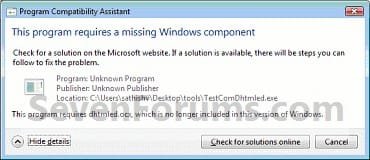
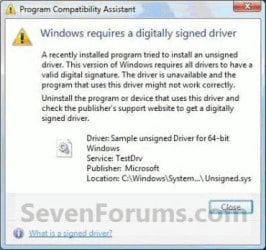
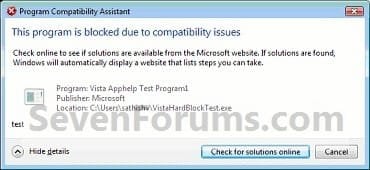
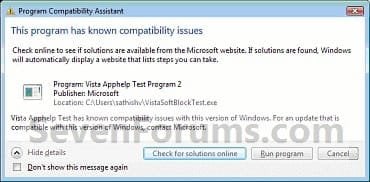
EXAMPLE: Program Compatibility Assistant Warnings
NOTE: These are some examples of the warnings that PCA may give you if it detects a compatibility issue with a program. You can read more about these here: Application Compatibility: Program Compatibility Assistant (PCA)
Bb756937_AC_PCA_10(en-us,MSDN_10).jpgBb756937_AC_PCA_11(en-us,MSDN_10).jpg
Bb756937_AC_PCA_12(en-us,MSDN_10).jpgBb756937_AC_PCA_15(en-us,MSDN_10).jpg
Bb756937_AC_PCA_16(en-us,MSDN_10).jpgBb756937_AC_PCA_17(en-us,MSDN_10).jpg
Bb756937_AC_PCA_18(en-us,MSDN_10).jpg


OPTION ONE

To Enable or Disable Program Compatibility Assistant using a REG File


1. Do step 2 or 3 below for what you would like to do.

2. To Enable Program Compatibility Assistant for All Users
NOTE: This is the default setting.
A) Click/tap on the Download button below to download the file below, and go to step 4 below.
Enable_Program_Compatibility_Assistant.reg

Download


3. To Disable Program Compatibility Assistant for All Users
A) Click/tap on the Download button below to download the file below, and go to step 4 below.
Disable_Program_Compatibility_Assistant.reg


Download


4. Save the .reg file to your desktop.

5. Double click/tap on the downloaded .reg file to merge it.

6. If prompted, click/tap on Run, Yes (UAC Windows 7/8) or Continue (UAC Vista), Yes, and OK to approve the merge.

7. Restart the computer to fully apply.

8. When done, you can delete the downloaded .reg file if you like.


OPTION TWO

To Enable or Disable Program Compatibility Assistant in Group Policy


1. Open the all users, specific users or groups, or all users except administrators Local Group Policy Editor for how you want this policy applied.

2. In the left pane, click on to expand User Configuration, Administrative Templates, Windows Components, and Application Compatibility. (see screenshot below)
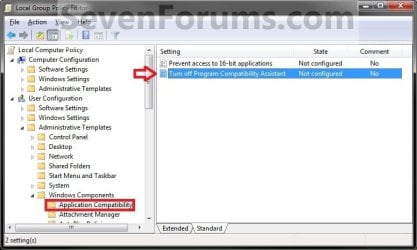
GPEDIT.jpg
3. In the right pane, double click on Turn off Program Compatibility Assistant to edit it, and go to step 4 or 5 below for what you would like to do. (see screenshot above)

4. To Enable Program Compatibility Assistant
A) Select (dot) either Not Configured or Disabled, and go to step 6 below. (see screenshot below step 6)
NOTE: Not Configured is the default setting.
5. To Disable Program Compatibility Assistant
A) Select (dot) Enabled, and go to step 6 below. (see screenshot below step 6)
6. Click/tap on OK. (see screenshot below)
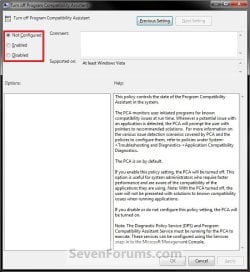
GPEDIT2.jpg
7. Close the Local Group Policy Editor window.
That's it,
Shawn


Attachments

Last edited:
Hi,

I took your reg key and made a VB script for Win7:

Dim WshShell
Set WshShell = WScript.CreateObject("WScript.Shell")
WshShell.RegWrite "HKCU\Software\Policies\Microsoft\Windows\AppCompat\DisablePCA",00000001,"REG_DWORD"


I also added to my script the program compat Flag, in my case Visual studio 2005:

WshShell.RegWrite "HKCU\Software\Microsoft\Windows NT\CurrentVersion\AppCompatFlags\{5f66dbae-cad3-468a-83d0-77ace8abc1f6}",00000004,"REG_DWORD"

as described here How to disable program fixes and Program Compatibility Assistant warnings in Windows Vista

This stopped Program Compatibility Assistant warning when installing Visual studio 2005 .

You must run the script and program as admin
 
Last edited:

My Computer

OS
vista
Going to assume the registry method is the alternative for people who don't have Windows 7 Professional, Ultimate, and Enterpise?
 

My Computer

OS
Windows 7 Home Premium x64
CPU
Phenom II X4 955 C3 @ 4.0 GHz (1.488v)
Motherboard
Gigabyte GA-790FXTA-UD5
Memory
G.Skill DDR3 1600 (2 x 2GB) [9-9-9-24-2T]
Graphics Card(s)
EVGA GTX 260 @ (700 / 1509 / 1200)
Sound Card
Realtek HD Audio ALC889 Integrated Chip
Monitor(s) Displays
Samsung SyncMaster 245BW
Screen Resolution
1920x1200
Hard Drives
OCZ Agility 60GB / Dual Seagate 7200.10 500GB
PSU
CORSAIR CMPSU-850TX 850W
Case
CM HAF 932
Cooling
Noctua NH-D14
Keyboard
SteelSeries 7G
Mouse
SteelSeries Ikari Laser
Internet Speed
20 Mbps Download / 2 Mbps Upload
I needed this script so that i could deploy windows 7 and Visual studio 2005 using MS system center.

I couldn't use group policy because the visual studio installer runs as part on a task sequence to install windows 7- group policy don't apply until after this has completed.

So the script could be used as part of windows 7 & software deployment.


Windows 7 enterprise
 

My Computer

OS
vista
Going to assume the registry method is the alternative for people who don't have Windows 7 Professional, Ultimate, and Enterpise?

Hello Woundman, and welcome to Seven Forums.

Yes, that would be correct, but either option can be used in the Windows 7 Professional, Ultimate, and Enterpise editions as well. :)
 

My Computer

Computer type
PC/Desktop
Computer Manufacturer/Model Number
Self built custom
OS
64-bit Windows 11 Pro for Workstations
CPU
Intel i7-8700K OC'd to 5 GHz
Motherboard
ASUS ROG Maximus XI Formula Z390
Memory
64 GB (4x16GB) G.SKILL TridentZ RGB DDR4 3600 MHz
Graphics Card(s)
ASUS ROG-STRIX-GTX1080TI-O11G-GAMING
Sound Card
Integrated
Monitor(s) Displays
2 x Samsung Odyssey G7 27"
Screen Resolution
2560x1440
Hard Drives
1TB Samsung 990 PRO M.2,
4TB Samsung 990 PRO PRO M.2,
TerraMaster F8 SSD Plus NAS
PSU
Seasonic Prime Titanium 850W
Case
Thermaltake Core P3
Cooling
Corsair Hydro H115i
Keyboard
Logitech wireless K800
Mouse
Logitech MX Master 4
Internet Speed
2 Gb/s Download and 100 Mb/s Upload
Antivirus
Malwarebyte Anti-Malware Premium
Browser
Google Chrome
Other Info
Logitech Z625 speaker system,
Logitech BRIO 4K Pro webcam,
HP Color LaserJet Pro MFP M477fdn,
APC SMART-UPS RT 1000 XL - SURT1000XLI,
Galaxy S23 Plus phone
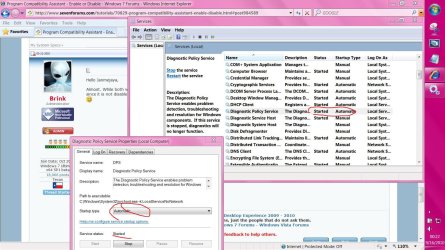
is it same as disabling "Diagnostic Policy Service"
Because i think this service is responsible for these including network problem diagnostic also.
 

My Computer

Computer Manufacturer/Model Number
HP pavillion dv2910tx
OS
windows 7
Memory
3GB
Graphics Card(s)
Nvidia Gforce 8400 series 128mb
Screen Resolution
1200x800
Hello Janmejaya,

Almost. While both will stop the Program Compatibility Assistant Warnings, disabling the "Diagnostic Policy Service" may cause unknown issues though since it is not disabled or stopped after applying any of the methods in the tutorial. I would recommend using one of the methods in the tutorial instead. :)
 

My Computer

Computer type
PC/Desktop
Computer Manufacturer/Model Number
Self built custom
OS
64-bit Windows 11 Pro for Workstations
CPU
Intel i7-8700K OC'd to 5 GHz
Motherboard
ASUS ROG Maximus XI Formula Z390
Memory
64 GB (4x16GB) G.SKILL TridentZ RGB DDR4 3600 MHz
Graphics Card(s)
ASUS ROG-STRIX-GTX1080TI-O11G-GAMING
Sound Card
Integrated
Monitor(s) Displays
2 x Samsung Odyssey G7 27"
Screen Resolution
2560x1440
Hard Drives
1TB Samsung 990 PRO M.2,
4TB Samsung 990 PRO PRO M.2,
TerraMaster F8 SSD Plus NAS
PSU
Seasonic Prime Titanium 850W
Case
Thermaltake Core P3
Cooling
Corsair Hydro H115i
Keyboard
Logitech wireless K800
Mouse
Logitech MX Master 4
Internet Speed
2 Gb/s Download and 100 Mb/s Upload
Antivirus
Malwarebyte Anti-Malware Premium
Browser
Google Chrome
Other Info
Logitech Z625 speaker system,
Logitech BRIO 4K Pro webcam,
HP Color LaserJet Pro MFP M477fdn,
APC SMART-UPS RT 1000 XL - SURT1000XLI,
Galaxy S23 Plus phone
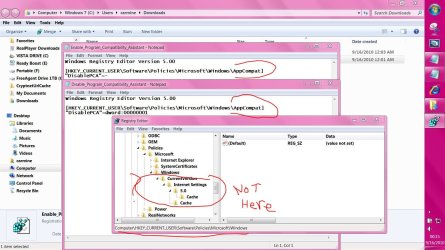
folder missing in my registry


2nd pic is after .reg file merged
 

Attachments

  • Capture.JPG
    Capture.JPG
    229.5 KB · Views: 2,326
  • Capture2.JPG
    Capture2.JPG
    281.9 KB · Views: 2,360

My Computer

Computer Manufacturer/Model Number
Gateway/NV7923u & NV79C52u Laptops
OS
windows 7 professional & ultimate 64bit laptops
CPU
2.27 boost to 2.53 & 2.53 boost to 2.80
Motherboard
Mobile Intel® HM55 Express Chipset ???
Memory
4GB
Graphics Card(s)
Intel® Graphics Media Accelerator HD
Sound Card
realtek High-definition audio support
Monitor(s) Displays
17.3 " HD 1600 x 900
Hard Drives
hatachi Travelstar 5400 500GB & west digital 500GB
Internet Speed
35MB fios
Hello Carmine,

Were you wanting to enable or disable this?

If enable, then that would be correct since the REG file removes the entry.

If disable, then refresh the Registry Editor window to see if that may be all that it is.
 

My Computer

Computer type
PC/Desktop
Computer Manufacturer/Model Number
Self built custom
OS
64-bit Windows 11 Pro for Workstations
CPU
Intel i7-8700K OC'd to 5 GHz
Motherboard
ASUS ROG Maximus XI Formula Z390
Memory
64 GB (4x16GB) G.SKILL TridentZ RGB DDR4 3600 MHz
Graphics Card(s)
ASUS ROG-STRIX-GTX1080TI-O11G-GAMING
Sound Card
Integrated
Monitor(s) Displays
2 x Samsung Odyssey G7 27"
Screen Resolution
2560x1440
Hard Drives
1TB Samsung 990 PRO M.2,
4TB Samsung 990 PRO PRO M.2,
TerraMaster F8 SSD Plus NAS
PSU
Seasonic Prime Titanium 850W
Case
Thermaltake Core P3
Cooling
Corsair Hydro H115i
Keyboard
Logitech wireless K800
Mouse
Logitech MX Master 4
Internet Speed
2 Gb/s Download and 100 Mb/s Upload
Antivirus
Malwarebyte Anti-Malware Premium
Browser
Google Chrome
Other Info
Logitech Z625 speaker system,
Logitech BRIO 4K Pro webcam,
HP Color LaserJet Pro MFP M477fdn,
APC SMART-UPS RT 1000 XL - SURT1000XLI,
Galaxy S23 Plus phone
thanks Shawn,

I'm on the vista rig now

but the 1st pic was B4 merging .reg and pic2 was after ( to enable )
 

My Computer

Computer Manufacturer/Model Number
Gateway/NV7923u & NV79C52u Laptops
OS
windows 7 professional & ultimate 64bit laptops
CPU
2.27 boost to 2.53 & 2.53 boost to 2.80
Motherboard
Mobile Intel® HM55 Express Chipset ???
Memory
4GB
Graphics Card(s)
Intel® Graphics Media Accelerator HD
Sound Card
realtek High-definition audio support
Monitor(s) Displays
17.3 " HD 1600 x 900
Hard Drives
hatachi Travelstar 5400 500GB & west digital 500GB
Internet Speed
35MB fios
Yeah, but I need to know which REG file you used. Enable or Disable? ;)
 

My Computer

Computer type
PC/Desktop
Computer Manufacturer/Model Number
Self built custom
OS
64-bit Windows 11 Pro for Workstations
CPU
Intel i7-8700K OC'd to 5 GHz
Motherboard
ASUS ROG Maximus XI Formula Z390
Memory
64 GB (4x16GB) G.SKILL TridentZ RGB DDR4 3600 MHz
Graphics Card(s)
ASUS ROG-STRIX-GTX1080TI-O11G-GAMING
Sound Card
Integrated
Monitor(s) Displays
2 x Samsung Odyssey G7 27"
Screen Resolution
2560x1440
Hard Drives
1TB Samsung 990 PRO M.2,
4TB Samsung 990 PRO PRO M.2,
TerraMaster F8 SSD Plus NAS
PSU
Seasonic Prime Titanium 850W
Case
Thermaltake Core P3
Cooling
Corsair Hydro H115i
Keyboard
Logitech wireless K800
Mouse
Logitech MX Master 4
Internet Speed
2 Gb/s Download and 100 Mb/s Upload
Antivirus
Malwarebyte Anti-Malware Premium
Browser
Google Chrome
Other Info
Logitech Z625 speaker system,
Logitech BRIO 4K Pro webcam,
HP Color LaserJet Pro MFP M477fdn,
APC SMART-UPS RT 1000 XL - SURT1000XLI,
Galaxy S23 Plus phone
enable
 

My Computer

Computer Manufacturer/Model Number
Gateway/NV7923u & NV79C52u Laptops
OS
windows 7 professional & ultimate 64bit laptops
CPU
2.27 boost to 2.53 & 2.53 boost to 2.80
Motherboard
Mobile Intel® HM55 Express Chipset ???
Memory
4GB
Graphics Card(s)
Intel® Graphics Media Accelerator HD
Sound Card
realtek High-definition audio support
Monitor(s) Displays
17.3 " HD 1600 x 900
Hard Drives
hatachi Travelstar 5400 500GB & west digital 500GB
Internet Speed
35MB fios
Ah, ok. The enable option removes the DisablePCA registry entry since the registry entry and data value will disable it. The AppCompat key is not there by default and is only added when you use the disable REG file.
 

My Computer

Computer type
PC/Desktop
Computer Manufacturer/Model Number
Self built custom
OS
64-bit Windows 11 Pro for Workstations
CPU
Intel i7-8700K OC'd to 5 GHz
Motherboard
ASUS ROG Maximus XI Formula Z390
Memory
64 GB (4x16GB) G.SKILL TridentZ RGB DDR4 3600 MHz
Graphics Card(s)
ASUS ROG-STRIX-GTX1080TI-O11G-GAMING
Sound Card
Integrated
Monitor(s) Displays
2 x Samsung Odyssey G7 27"
Screen Resolution
2560x1440
Hard Drives
1TB Samsung 990 PRO M.2,
4TB Samsung 990 PRO PRO M.2,
TerraMaster F8 SSD Plus NAS
PSU
Seasonic Prime Titanium 850W
Case
Thermaltake Core P3
Cooling
Corsair Hydro H115i
Keyboard
Logitech wireless K800
Mouse
Logitech MX Master 4
Internet Speed
2 Gb/s Download and 100 Mb/s Upload
Antivirus
Malwarebyte Anti-Malware Premium
Browser
Google Chrome
Other Info
Logitech Z625 speaker system,
Logitech BRIO 4K Pro webcam,
HP Color LaserJet Pro MFP M477fdn,
APC SMART-UPS RT 1000 XL - SURT1000XLI,
Galaxy S23 Plus phone
thanks Shawn, still playing with my vista laptop
 

My Computer

Computer Manufacturer/Model Number
Gateway/NV7923u & NV79C52u Laptops
OS
windows 7 professional & ultimate 64bit laptops
CPU
2.27 boost to 2.53 & 2.53 boost to 2.80
Motherboard
Mobile Intel® HM55 Express Chipset ???
Memory
4GB
Graphics Card(s)
Intel® Graphics Media Accelerator HD
Sound Card
realtek High-definition audio support
Monitor(s) Displays
17.3 " HD 1600 x 900
Hard Drives
hatachi Travelstar 5400 500GB & west digital 500GB
Internet Speed
35MB fios
You're welcome Carmine. :)
 

My Computer

Computer type
PC/Desktop
Computer Manufacturer/Model Number
Self built custom
OS
64-bit Windows 11 Pro for Workstations
CPU
Intel i7-8700K OC'd to 5 GHz
Motherboard
ASUS ROG Maximus XI Formula Z390
Memory
64 GB (4x16GB) G.SKILL TridentZ RGB DDR4 3600 MHz
Graphics Card(s)
ASUS ROG-STRIX-GTX1080TI-O11G-GAMING
Sound Card
Integrated
Monitor(s) Displays
2 x Samsung Odyssey G7 27"
Screen Resolution
2560x1440
Hard Drives
1TB Samsung 990 PRO M.2,
4TB Samsung 990 PRO PRO M.2,
TerraMaster F8 SSD Plus NAS
PSU
Seasonic Prime Titanium 850W
Case
Thermaltake Core P3
Cooling
Corsair Hydro H115i
Keyboard
Logitech wireless K800
Mouse
Logitech MX Master 4
Internet Speed
2 Gb/s Download and 100 Mb/s Upload
Antivirus
Malwarebyte Anti-Malware Premium
Browser
Google Chrome
Other Info
Logitech Z625 speaker system,
Logitech BRIO 4K Pro webcam,
HP Color LaserJet Pro MFP M477fdn,
APC SMART-UPS RT 1000 XL - SURT1000XLI,
Galaxy S23 Plus phone
Program compatibility assistant in windows 7 home premium 64 bit

Is any way to do the same thing with W 7 home premium? I want to install xp in a dell inspiron n5010 with W7 home premium. I have the slipstream cd with xp but now every time I want to install it the Program compatibility assistant pops up and not allow me to run the installation. Any advice?

ps. I already try to script and did not work.
 

My Computer

OS
Windows & home premium 64 bit
Hello Peter, and welcome to Seven Forums.

If you are trying to install XP from within Windows 7, then this is the problem. It needs to be installed from boot instead. The tutorial below may be able to help you some with this for now. Since this seems like a OS installation issue, you might consider posting this issue in the Installation & Setup forum area instead to get more specific help on it.

http://www.sevenforums.com/tutorials/8057-dual-boot-installation-windows-7-xp.html

Hope this helps for now,
Shawn
 

My Computer

Computer type
PC/Desktop
Computer Manufacturer/Model Number
Self built custom
OS
64-bit Windows 11 Pro for Workstations
CPU
Intel i7-8700K OC'd to 5 GHz
Motherboard
ASUS ROG Maximus XI Formula Z390
Memory
64 GB (4x16GB) G.SKILL TridentZ RGB DDR4 3600 MHz
Graphics Card(s)
ASUS ROG-STRIX-GTX1080TI-O11G-GAMING
Sound Card
Integrated
Monitor(s) Displays
2 x Samsung Odyssey G7 27"
Screen Resolution
2560x1440
Hard Drives
1TB Samsung 990 PRO M.2,
4TB Samsung 990 PRO PRO M.2,
TerraMaster F8 SSD Plus NAS
PSU
Seasonic Prime Titanium 850W
Case
Thermaltake Core P3
Cooling
Corsair Hydro H115i
Keyboard
Logitech wireless K800
Mouse
Logitech MX Master 4
Internet Speed
2 Gb/s Download and 100 Mb/s Upload
Antivirus
Malwarebyte Anti-Malware Premium
Browser
Google Chrome
Other Info
Logitech Z625 speaker system,
Logitech BRIO 4K Pro webcam,
HP Color LaserJet Pro MFP M477fdn,
APC SMART-UPS RT 1000 XL - SURT1000XLI,
Galaxy S23 Plus phone
Thanks Brink!
 

My Computer

Computer type
PC/Desktop
Computer Manufacturer/Model Number
Custom Build
OS
Windows 7 x64 Ultimate
CPU
Intel 4770k
Motherboard
Asus Maximus VI Formula
Memory
Corsair Vengance DDR3 (2x8) 16GB
Graphics Card(s)
Zotac 580 GTX (nVidia)
Sound Card
Onboard
Monitor(s) Displays
Samsung XL2370
Screen Resolution
1920x1080p
Hard Drives
1 SSD Corsair Neutron
1 WD Blue
1 Seagate
PSU
Thermaltake 1000W
Case
NZXT Phantom 530
Cooling
4 case coolers, Zalman 9900MAX CPU and GPU stock cooler
Keyboard
Microsoft X4 Sidewinder
Mouse
G700 wireless Logitech
Internet Speed
10mb/s
Antivirus
Kaspersky PURE 3
Browser
Firefox and Thor
Other Info
DVD-ROM Sony Opticarc OEM
You're most welcome too. :)
 

My Computer

Computer type
PC/Desktop
Computer Manufacturer/Model Number
Self built custom
OS
64-bit Windows 11 Pro for Workstations
CPU
Intel i7-8700K OC'd to 5 GHz
Motherboard
ASUS ROG Maximus XI Formula Z390
Memory
64 GB (4x16GB) G.SKILL TridentZ RGB DDR4 3600 MHz
Graphics Card(s)
ASUS ROG-STRIX-GTX1080TI-O11G-GAMING
Sound Card
Integrated
Monitor(s) Displays
2 x Samsung Odyssey G7 27"
Screen Resolution
2560x1440
Hard Drives
1TB Samsung 990 PRO M.2,
4TB Samsung 990 PRO PRO M.2,
TerraMaster F8 SSD Plus NAS
PSU
Seasonic Prime Titanium 850W
Case
Thermaltake Core P3
Cooling
Corsair Hydro H115i
Keyboard
Logitech wireless K800
Mouse
Logitech MX Master 4
Internet Speed
2 Gb/s Download and 100 Mb/s Upload
Antivirus
Malwarebyte Anti-Malware Premium
Browser
Google Chrome
Other Info
Logitech Z625 speaker system,
Logitech BRIO 4K Pro webcam,
HP Color LaserJet Pro MFP M477fdn,
APC SMART-UPS RT 1000 XL - SURT1000XLI,
Galaxy S23 Plus phone
Can I disable Program Compatibility Assistant from services.msc? Which method is better? Downloading the .reg or disabling from Services?
 

My Computer

Computer type
PC/Desktop
Computer Manufacturer/Model Number
Less is more
OS
Windows 7 Ultimate x64 SP1
CPU
Core i7 2600k (4.6GHz)
Motherboard
ASUS P8Z68 Deluxe (3603)
Memory
16GB G.SKILL Ares 1600MHz
Graphics Card(s)
MSI R6970 Lightning
Sound Card
Asus Xonar Essence ST (UNi drivers 1.41)
Monitor(s) Displays
Samsung P2570, CrossOver 27Q LED-P
Screen Resolution
1920*1080, 2560*1440
Hard Drives
256GB OCZ Vector, 2x Hitachi 4TB (7K4000), Hitachi 3TB (7K3000 & 5K3000)
PSU
Seasonic X750
Case
Lian-Li PC-P80N
Cooling
NZXT HAVIK 140 (2x GELID Wing12PL Push/Pull)
Keyboard
CM Storm Trigger (Brown Switch)
Mouse
Logitech G400
Internet Speed
55Mbps/10Mbps
Other Info
Speakers - Klipsch ProMedia 2.1
Headphones - Sennheiser HD595
Router - ASUS RT-N66U
Webcam - Logitech C910
Back
Top