Solved Program file?

fluidmotion

New member
Member
VIP
Local time
5:41 AM
Messages
275
can i delete 'Program file' in hard disk drive?
 

My Computer

Computer Manufacturer/Model Number
MP Mini Netbook 110
OS
Win7 Starter 32 bits
More information. What is the name of it? File or folder? More the better.
 

My Computer

Computer Manufacturer/Model Number
Custom
OS
Windows 7 Pro x64 -- PCLinuxOS KDE4 FullMonty 2011
CPU
i7-875k @ Turbo - 7,6,5,5 - 3.6ghz
Motherboard
Asus P7P55D-E Deluxe
Memory
Corsair CMD8GX3M4A1600C8 8gb
Graphics Card(s)
Asus EAH5850 DirectCU/2DIS/1GD5
Sound Card
On Board
Monitor(s) Displays
Samsung SyncMaster T220 - Panasonic VT30a 50"
Screen Resolution
1680x1050 -
Hard Drives
Corsair Force 3 SSD 120GB x 2 ::
WD VelociRaptor 150GB WD1500HLFS x 2
PSU
Corsair HX-850 Power Supply
Case
Coolmaster HAF 932
Cooling
Corsair H50
Keyboard
Logitech Wireless MK700
Mouse
Logitech Wireless MX620
Internet Speed
Good enough for now
Other Info
Voip. Insanely cheap phone calls.
Program Files and Program Files (x86) are Windows system folders. A 32-bit Windows 7 stores programs and applications on Program Files, a a 64-bit Windows 7 stores 32-bit programs to Program Files (x86) and only 64-bit programs to Program Files. Notice that Program Files (x86) folder only exists on 64-bit systems.

You may not delete or remove a Windows system folder. Other system folders are Perflogs, ProgramData, Users and Windows.

Kari
 

My Computer

Computer type
Laptop
Computer Manufacturer/Model Number
HP ENVY 17-1150eg
OS
Windows 10 Pro x64 EN-GB
CPU
1.6 GHz Intel Core i7-720QM Processor
Memory
6 GB
Graphics Card(s)
ATI Mobility Radeon HD 5850 Graphics
Sound Card
Beats sound system with integrated subwoofer
Monitor(s) Displays
17" laptop display, 22" LED and 32" Full HD TV through HDMI
Screen Resolution
1600*900 (1), 1920*1080 (2&3)
Hard Drives
Internal: 2 x 500 GB SATA Hard Disk Drive 7200 rpm
External: 2TB for backups, 3TB USB3 network drive for media
Cooling
As Envy runs a bit warm, I have it on a Cooler Master pad
Keyboard
Logitech diNovo Media Desktop Laser (bluetooth)
Mouse
Logitech Performance Mouse MX
Internet Speed
50/10 Mbps VDSL
Antivirus
Windows Defender 4.3.9431.0
Browser
Maxthon 3.5.2., IE11
The system folders can be relocated and/or renamed, but it is by no means a simple process.
 

My Computer

Computer Manufacturer/Model Number
Dell Inspiron 580
OS
7 Ultimate x64/7 Home Premium x64
CPU
Intel i3 550 3.2 GHz
Motherboard
Dell/Intel H57
Memory
Corsair 16 GB DDR3 (4 X 4GB)
Graphics Card(s)
Intel HD Graphics
Sound Card
Intel P55 HD Audio
Monitor(s) Displays
LG E2360 LED
Screen Resolution
1920 X 1080
Hard Drives
Seagate 1TB X 2 Internal,
Seagate 1TB eSATA (Backup)
PSU
Dell 300W
Case
Dell Inspiron
Cooling
Dell/Intel
Keyboard
Microsoft Wireless Comfort Keyboard 5000
Mouse
Microsoft Wireless Mouse 5000
Internet Speed
4,000 Mbit DSL
Other Info
Custom Installation -
OS separate on C:
Pagefile Separate on P:
Program Files Separate on U:
Users and ProgramData separate on V:
The system folders can be relocated and/or renamed, but it is by no means a simple process.

Of course it will most likely result in other problems in installing programs. And cause you a real headache which is really not necessary.

I don't understand why anyone would want to either remove or rename the programs folder..

But then I am old and set in my ways. :banghead:

Rich
 

My Computer

Computer type
Laptop
Computer Manufacturer/Model Number
Toshiba Laptop Qosimo X870
OS
Windows 7 Pro x64 SP1
CPU
Intel Core I7
Motherboard
Toshiba Qosmio
Memory
16 Gigs
Graphics Card(s)
NVIDIA GeForce GTX 670M
Monitor(s) Displays
17.7" laptop
Screen Resolution
1600 x 900
Hard Drives
256 Gig SanDisk SSD for C
256 Gig Intel SSD for D
Internet Speed
50/25 FIOS
Antivirus
Vipre (all you can eat for 10 machines)
Browser
IE and FF
Other Info
I have dos 6.22, wfwg 3.11, win98, 2000 and xp VHD's available for testing. MS's Virtual PC works great.
The system folders can be relocated and/or renamed, but it is by no means a simple process.
Of course it will most likely result in other problems in installing programs. And cause you a real headache which is really not necessary.
Actually, the result (when done correctly) is increased system stability and security. In almost two years, I have not encountered a single problem with installing programs, Windows Updates, or any other software problems of any kind. No BSOD's, no hangs, no lockups, nada; just a quick, responsive system without issues on my desktop and two laptops.

As I said, it is not a simple process, but it only needs to be done once. And it's not for everyone, either. I recommend that only advanced users attempt it.
 

My Computer

Computer Manufacturer/Model Number
Dell Inspiron 580
OS
7 Ultimate x64/7 Home Premium x64
CPU
Intel i3 550 3.2 GHz
Motherboard
Dell/Intel H57
Memory
Corsair 16 GB DDR3 (4 X 4GB)
Graphics Card(s)
Intel HD Graphics
Sound Card
Intel P55 HD Audio
Monitor(s) Displays
LG E2360 LED
Screen Resolution
1920 X 1080
Hard Drives
Seagate 1TB X 2 Internal,
Seagate 1TB eSATA (Backup)
PSU
Dell 300W
Case
Dell Inspiron
Cooling
Dell/Intel
Keyboard
Microsoft Wireless Comfort Keyboard 5000
Mouse
Microsoft Wireless Mouse 5000
Internet Speed
4,000 Mbit DSL
Other Info
Custom Installation -
OS separate on C:
Pagefile Separate on P:
Program Files Separate on U:
Users and ProgramData separate on V:
Deleting the Progeram files is one sure way to destroy your system. Why would you want to do that.
 

My Computer

Computer Manufacturer/Model Number
HP, Dell, Gateway, Toshiba - 4 laptops and 2 desktops
OS
Vista, Windows7, Mint Mate, Zorin, Windows 8
CPU
from 1.6GHz Duo to i7
Monitor(s) Displays
2x HP w2207
Hard Drives
5x HDD, 7x SSD, 12x Externals
Keyboard
with trackball - no mices
Mouse
Trackball mice
Internet Speed
DSL 6000
You can delete files inside Program Files, for example you uninstalled CCleaner and CCleaner remains in Program Files, you can destroy the CCleaner folder but never the actual PF folder.

Remove programs if it is using disk space.
 

My Computer

Computer type
PC/Desktop
Computer Manufacturer/Model Number
Novatech iRush Pro
OS
Windows 7 Ultimate SP1 - 64 Bit
CPU
Intel Core i5 2500k
Motherboard
Foxconn H67M-S/H67M-V/H67
Memory
2x4GB DDR3 1333Hz
Graphics Card(s)
Ati Radeon 6770
Sound Card
None
Monitor(s) Displays
Samsung S22B150
Screen Resolution
1920x1080
Hard Drives
2x500GB
PSU
500W
Cooling
Fan
Keyboard
HP KU0316
Mouse
Wireless Logitech M185
Internet Speed
20MB/s
Antivirus
Avast Free
Browser
Google Chrome
Other Info
Logitech M185 Mouse
KU-M316 Keyboard
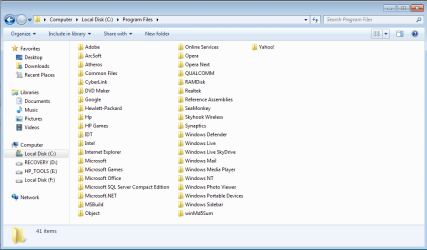
name of programs are listed in this folder,
web browsers, webcam, mc office...
does each program run from this folder?

You can delete files inside Program Files, for example you uninstalled CCleaner and CCleaner remains in Program Files, you can destroy the CCleaner folder but never the actual PF folder.

Remove programs if it is using disk space.
 

My Computer

Computer Manufacturer/Model Number
MP Mini Netbook 110
OS
Win7 Starter 32 bits
Yes, some system files run from there too.
 

My Computer

Computer type
PC/Desktop
Computer Manufacturer/Model Number
Novatech iRush Pro
OS
Windows 7 Ultimate SP1 - 64 Bit
CPU
Intel Core i5 2500k
Motherboard
Foxconn H67M-S/H67M-V/H67
Memory
2x4GB DDR3 1333Hz
Graphics Card(s)
Ati Radeon 6770
Sound Card
None
Monitor(s) Displays
Samsung S22B150
Screen Resolution
1920x1080
Hard Drives
2x500GB
PSU
500W
Cooling
Fan
Keyboard
HP KU0316
Mouse
Wireless Logitech M185
Internet Speed
20MB/s
Antivirus
Avast Free
Browser
Google Chrome
Other Info
Logitech M185 Mouse
KU-M316 Keyboard

My Computer

Computer type
PC/Desktop
Computer Manufacturer/Model Number
Novatech iRush Pro
OS
Windows 7 Ultimate SP1 - 64 Bit
CPU
Intel Core i5 2500k
Motherboard
Foxconn H67M-S/H67M-V/H67
Memory
2x4GB DDR3 1333Hz
Graphics Card(s)
Ati Radeon 6770
Sound Card
None
Monitor(s) Displays
Samsung S22B150
Screen Resolution
1920x1080
Hard Drives
2x500GB
PSU
500W
Cooling
Fan
Keyboard
HP KU0316
Mouse
Wireless Logitech M185
Internet Speed
20MB/s
Antivirus
Avast Free
Browser
Google Chrome
Other Info
Logitech M185 Mouse
KU-M316 Keyboard

My Computer

Computer Manufacturer/Model Number
MP Mini Netbook 110
OS
Win7 Starter 32 bits
Fluidmotion, would you like to make a bet with me? I'll bet €/$/£ 100 (choose your currency) that after you have deleted some stuff you think is unnecessary in Program Files (or other system folders), you will be back here within 48 hours with a new thread asking help, starting with "I deleted some files and folders from my system folders and now this and that application is no longer working...".

Please do not manually delete anything from Program Folders. If you need to free space, use Control Panel > Programs and Features to uninstall unwanted applications. If the application is correctly coded it will then remove associated folders from Program Files itself. You can also use Revo uninstaller to remove unwanted applications, it is known to better job regarding removing unnecessary folders after an application is undeleted. Revo free download: Download Revo Uninstaller Freeware

Kari
 

My Computer

Computer type
Laptop
Computer Manufacturer/Model Number
HP ENVY 17-1150eg
OS
Windows 10 Pro x64 EN-GB
CPU
1.6 GHz Intel Core i7-720QM Processor
Memory
6 GB
Graphics Card(s)
ATI Mobility Radeon HD 5850 Graphics
Sound Card
Beats sound system with integrated subwoofer
Monitor(s) Displays
17" laptop display, 22" LED and 32" Full HD TV through HDMI
Screen Resolution
1600*900 (1), 1920*1080 (2&3)
Hard Drives
Internal: 2 x 500 GB SATA Hard Disk Drive 7200 rpm
External: 2TB for backups, 3TB USB3 network drive for media
Cooling
As Envy runs a bit warm, I have it on a Cooler Master pad
Keyboard
Logitech diNovo Media Desktop Laser (bluetooth)
Mouse
Logitech Performance Mouse MX
Internet Speed
50/10 Mbps VDSL
Antivirus
Windows Defender 4.3.9431.0
Browser
Maxthon 3.5.2., IE11
Deleteing anything directly from that folder is a really bad idea and I dont think we should give you any help to screw your system up.
 

My Computer

Computer type
PC/Desktop
OS
Windows 11
You have been given good advice, do not delete anything from the 'Program Files' folder.

Your computer will likely become unusable.
 

My Computer

Computer type
PC/Desktop
Computer Manufacturer/Model Number
76~2.0
OS
Windows 7 Ult x64 - SP1/ Windows 8 Pro x64
CPU
Intel Core i5-3570K 4.6GHz
Motherboard
Gigabyte GA-Z77X UD3H, f18
Memory
8GB (2X4GB) DDR3 1600 Corsair Vengeance CL8 1.5v
Graphics Card(s)
Sapphire HD 7770 Vapor-X OC 1GB DDR5
Sound Card
Onboard VIA VT2021
Monitor(s) Displays
22" LCD Dell
Screen Resolution
1680x1050
Hard Drives
Samsung 840Pro 128GB SSD,
Seagate Barracuda 500GB SATA2 7200rpm 32MB cache, Seagate Barracuda 1TB SATA2 7200rpm 32MB cache,
PSU
Corsair HX650W
Case
Cooler Master Storm Scout
Cooling
Corsair H80 2x12cm Noctua NF P12 , 2x14cm case fans
Keyboard
Logitech Wave
Mouse
CM Sentinel
Internet Speed
Dismal
Antivirus
Avast
Browser
Opera Next
Other Info
Haswell laptop: HP Envy 17t-j, i7-4700MQ, GeForce 740M 2GB DDR3, 17.3" Full HD 1920x1080, 16GB RAM, Samsung 840 Pro 128GB, 1TB Hitachi 7200 HDD,
Desktop: eSATA ports,
External eSATA Seagate 500GB SATA2 7200rpm,
External WD USB 500GB
Unbelievable how some people insist to screw their system up. Please listen to what the guys say. If you want to get rid of programs, uninstall them. That will automatically delete the progerm folders.
 

My Computer

Computer Manufacturer/Model Number
HP, Dell, Gateway, Toshiba - 4 laptops and 2 desktops
OS
Vista, Windows7, Mint Mate, Zorin, Windows 8
CPU
from 1.6GHz Duo to i7
Monitor(s) Displays
2x HP w2207
Hard Drives
5x HDD, 7x SSD, 12x Externals
Keyboard
with trackball - no mices
Mouse
Trackball mice
Internet Speed
DSL 6000
Unbelievable how some people insist to screw their system up. Please listen to what the guys say. If you want to get rid of programs, uninstall them. That will automatically delete the progerm folders.

Some programs don't. But delete them manually only if you know what to do.
 

My Computer

Computer type
PC/Desktop
Computer Manufacturer/Model Number
Novatech iRush Pro
OS
Windows 7 Ultimate SP1 - 64 Bit
CPU
Intel Core i5 2500k
Motherboard
Foxconn H67M-S/H67M-V/H67
Memory
2x4GB DDR3 1333Hz
Graphics Card(s)
Ati Radeon 6770
Sound Card
None
Monitor(s) Displays
Samsung S22B150
Screen Resolution
1920x1080
Hard Drives
2x500GB
PSU
500W
Cooling
Fan
Keyboard
HP KU0316
Mouse
Wireless Logitech M185
Internet Speed
20MB/s
Antivirus
Avast Free
Browser
Google Chrome
Other Info
Logitech M185 Mouse
KU-M316 Keyboard
Unbelievable how some people insist to screw their system up. Please listen to what the guys say. If you want to get rid of programs, uninstall them. That will automatically delete the progerm folders.

Some programs don't. But delete them manually only if you know what to do.
If you use the Revo uninsyaller, they will be deleted.
 

My Computer

Computer Manufacturer/Model Number
HP, Dell, Gateway, Toshiba - 4 laptops and 2 desktops
OS
Vista, Windows7, Mint Mate, Zorin, Windows 8
CPU
from 1.6GHz Duo to i7
Monitor(s) Displays
2x HP w2207
Hard Drives
5x HDD, 7x SSD, 12x Externals
Keyboard
with trackball - no mices
Mouse
Trackball mice
Internet Speed
DSL 6000
Back
Top
