Solved Program Files and Program Files (x86) - any way to merge these?

That is OK if you like that. But it is counterproductive and slows down your system - defeats the purpose of the SSD.

Yeah I know, in hindsight not a great idea and I might move it back. Just a habit thing I mindlessly do as I set up windows. I'm new to the SSD thing aswell. Mind you, with 8GB RAM, I might not need it (or so much of it as windows recommends - double plus 3% I think, I did look at it today - so, just over 16GB wasted space to stop an old program having a paddy when it can't find it, doesn't seem necessary)
 

My Computer My Computer

At a glance

Windows 7 Ultimate 64bitIntel Core i5 2500k @ 3.3GHz (soon to change)8GB 1333MHz DDR3 (Generic)MSI Nvidia GTX 550 Ti 1024MB GDDR5
Computer Manufacturer/Model Number
Custom Build
OS
Windows 7 Ultimate 64bit
CPU
Intel Core i5 2500k @ 3.3GHz (soon to change)
Motherboard
ASUS P8Z 68-V LX
Memory
8GB 1333MHz DDR3 (Generic)
Graphics Card(s)
MSI Nvidia GTX 550 Ti 1024MB GDDR5
Monitor(s) Displays
Bush TV
Screen Resolution
1920x1080
Hard Drives
OCZ Agility 3 60GB SSD
Seagate Barracuda Sata 3 500GB HDD
PSU
EZCOOL Ambience 80+ 700W
Case
Coolermaster 430 Elite
Cooling
Air
Keyboard
Tesco Multimedia Keyboard
Mouse
Technika wireless mouse
I reduced my Pagefile to 2GB and I also have 8GB of RAM. Never had a problem. It is strange that it is even being used when there is usually so much RAM unused. But it is in fact being used by quite some programs and the OS.

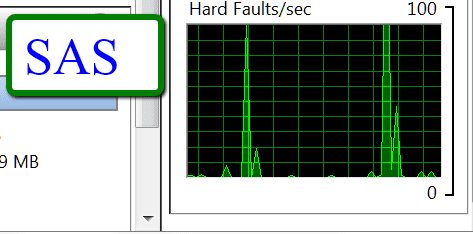
If you look at the graph bottom right in Resource Monitor > Memory tab, you will see 'Hard Faults' from time to time. And the list above will tell you which processes trigger them.
 

My Computer My Computer

At a glance

Vista, Windows7, Mint Mate, Zorin, Windows 8from 1.6GHz Duo to i7
Computer Manufacturer/Model Number
HP, Dell, Gateway, Toshiba - 4 laptops and 2 desktops
OS
Vista, Windows7, Mint Mate, Zorin, Windows 8
CPU
from 1.6GHz Duo to i7
Monitor(s) Displays
2x HP w2207
Hard Drives
5x HDD, 7x SSD, 12x Externals
Keyboard
with trackball - no mices
Mouse
Trackball mice
Internet Speed
DSL 6000
With 8GB RAM, about the only time the pagefile is being used is during bootup, when Windows pages part of the kernel that is used for bootup to disk. That bit of paging won't be used again while the system is running. With 8GB RAM the average user can actually disable the paging file and never notice the difference.

I setup a 4.5GB partition and put a 4GB pagefile on all my systems, just from old habits, but once you get past 4GB RAM the pagefile is of little use, and if it is used at all, it's definitely not causing a performance hit in any way, regardless of drive type.

The only time I see "Hard Faults" in the Memory tab of Resource Monitor is when I first open the Resource Monitor, and it's querying the pagefile; it faults because there's nothing really there. Once Resource Monitor is up and running, there are no hard faults whatsoever, regardless of what I have running.
 

My Computer My Computer

At a glance

7 Ultimate x64/7 Home Premium x64Intel i3 550 3.2 GHzCorsair 16 GB DDR3 (4 X 4GB)Intel HD Graphics
Computer Manufacturer/Model Number
Dell Inspiron 580
OS
7 Ultimate x64/7 Home Premium x64
CPU
Intel i3 550 3.2 GHz
Motherboard
Dell/Intel H57
Memory
Corsair 16 GB DDR3 (4 X 4GB)
Graphics Card(s)
Intel HD Graphics
Sound Card
Intel P55 HD Audio
Monitor(s) Displays
LG E2360 LED
Screen Resolution
1920 X 1080
Hard Drives
Seagate 1TB X 2 Internal,
Seagate 1TB eSATA (Backup)
PSU
Dell 300W
Case
Dell Inspiron
Cooling
Dell/Intel
Keyboard
Microsoft Wireless Comfort Keyboard 5000
Mouse
Microsoft Wireless Mouse 5000
Internet Speed
4,000 Mbit DSL
Other Info
Custom Installation -
OS separate on C:
Pagefile Separate on P:
Program Files Separate on U:
Users and ProgramData separate on V:
With 8GB RAM, about the only time the pagefile is being used is during bootup, when Windows pages part of the kernel that is used for bootup to disk. That bit of paging won't be used again while the system is running. With 8GB RAM the average user can actually disable the paging file and never notice the difference.

I setup a 4.5GB partition and put a 4GB pagefile on all my systems, just from old habits, but once you get past 4GB RAM the pagefile is of little use, and if it is used at all, it's definitely not causing a performance hit in any way, regardless of drive type.

The only time I see "Hard Faults" in the Memory tab of Resource Monitor is when I first open the Resource Monitor, and it's querying the pagefile; it faults because there's nothing really there. Once Resource Monitor is up and running, there are no hard faults whatsoever, regardless of what I have running.
That is not so. On my 8GB Dell XPS 8300 I opened a few programs and immediately checked in Resource Monitor. See the results in the pictures.
 

Attachments

  • 2012-04-21_1843.png
    2012-04-21_1843.png
    4.3 KB · Views: 5
  • 2012-04-21_1845.png
    2012-04-21_1845.png
    4.1 KB · Views: 4
  • 2012-04-21_1845_001.png
    2012-04-21_1845_001.png
    3.9 KB · Views: 5

My Computer My Computer

At a glance

Vista, Windows7, Mint Mate, Zorin, Windows 8from 1.6GHz Duo to i7
Computer Manufacturer/Model Number
HP, Dell, Gateway, Toshiba - 4 laptops and 2 desktops
OS
Vista, Windows7, Mint Mate, Zorin, Windows 8
CPU
from 1.6GHz Duo to i7
Monitor(s) Displays
2x HP w2207
Hard Drives
5x HDD, 7x SSD, 12x Externals
Keyboard
with trackball - no mices
Mouse
Trackball mice
Internet Speed
DSL 6000
Back
Top