Program files x86 and x64 ??

fun guy cool

New member
Local time
4:45 PM
Messages
18
I'd like to know why does 64bit operating system has two program files, one for 32bit and one for 64bit. I'm new user of 64bit and I still dont get it,.. I was asked when i was installing Photoshop to chose which version i want to install. I installed 64bit but ive noticed that i have 2 versions of every program I installed on my system and why i need 32 bit versions to waste my HD space??
Ty all in advance! :)
 

My Computer

OS
Windows 7 Ultimate x64 ®™
CPU
Core i7 920
Motherboard
Gigabyte EX-58 EXTREME
Memory
Corsair Dominator 2x2 GB DDR3 1600 MHz
Graphics Card(s)
Gigabyte GeForce GTX 280
Sound Card
Realtek onboard 7.1 HD
Monitor(s) Displays
Samsung SM 2232 BW
Screen Resolution
1680x1050
Hard Drives
Western Digital Caviar Black 1 TB (WD1001FALS)
PSU
Corsair TX750W 750W
Case
NZXT Guardian 921
Cooling
Thermalright Ultra
Keyboard
Logitech G15
Mouse
Logitech MX 1100
Internet Speed
Broadband 4Mbit
Not everything is 64bit, for example you need 32bit version of IE for extensions like Flash, the same with Windows Explorer.
 

My Computer

Computer type
PC/Desktop
Computer Manufacturer/Model Number
Alienware Aurora ALX R4
OS
Windows 10 Pro (x64)
CPU
Intel Core i7-3930K (3.2GHz - 4.5GHz)
Motherboard
Alienware Aurora-R4 x79
Memory
4x Samsung 4GB PC3-12800 DDR3 (16GB 1600MHz)
Graphics Card(s)
Nvidia Geforce GTX 690
Sound Card
SteelSeries Siberia Elite
Monitor(s) Displays
Dell UltraSharp U3011
Screen Resolution
2560x1600
Hard Drives
Samsung 850 Pro 256 GB, Seagate 1TB Desktop Hybrid HDD, 2x Western Digital 4TB Green HDD
PSU
875W Some Dell PSU <.<
Case
Alienware Aurora ALX
Cooling
Custom Liquid Cooling (EK CPU & GPU blocks) dual EK 480RAD
Keyboard
Logitech G710+ Mechanical
Mouse
Logitech G700s
Internet Speed
Verizon Fios (50 mbps average)
Other Info
Server: Intel NUC D54250WYK: i5-4250U, 16GB, 256 GB mSATA, Windows Server 2012 R2
Not everything is 64bit, for example you need 32bit version of IE for extensions like Flash, the same with Windows Explorer.

Oh ty!, I see now they are not all programs both versions but i still dont get it why 2 versions of Photoshop?, One version is about 800 mb size and the both are 1,6 gb. how can I uninstall 32 bit version if i can?
 

My Computer

OS
Windows 7 Ultimate x64 ®™
CPU
Core i7 920
Motherboard
Gigabyte EX-58 EXTREME
Memory
Corsair Dominator 2x2 GB DDR3 1600 MHz
Graphics Card(s)
Gigabyte GeForce GTX 280
Sound Card
Realtek onboard 7.1 HD
Monitor(s) Displays
Samsung SM 2232 BW
Screen Resolution
1680x1050
Hard Drives
Western Digital Caviar Black 1 TB (WD1001FALS)
PSU
Corsair TX750W 750W
Case
NZXT Guardian 921
Cooling
Thermalright Ultra
Keyboard
Logitech G15
Mouse
Logitech MX 1100
Internet Speed
Broadband 4Mbit

My Computer

Computer Manufacturer/Model Number
* BFK Customs *
OS
W 7 64-bit Ultimate
CPU
Intel Q9550 Yorkfield
Motherboard
ASUS P5Q Pro
Memory
8GB Dominator 8500C5D
Graphics Card(s)
ATI : XFX 5870
Sound Card
Realtek HD Audio 7-1
Monitor(s) Displays
1x 47" LCD HDMI & 3x 26" LCD HDMI
Screen Resolution
1920x1080P & 1920x1200
Hard Drives
1x 80GB Intel X25-M G2 SSD : 1x 500GB & 1x 640GB WD Caviar Black(s)
PSU
Corsair 620HX
Case
Cooler Master RC-690
Cooling
Tuniq Tower 120, 2x 140mm and 3x 120mm case fans
Keyboard
Microsoft 500
Mouse
Razer Diamondback 3G
Internet Speed
14 Mb/s
Other Info
1x Koutech 3Gb/s SATA HDD Hot Swap Rack
Not everything is 64bit, for example you need 32bit version of IE for extensions like Flash, the same with Windows Explorer.

Oh ty!, I see now they are not all programs both versions but i still dont get it why 2 versions of Photoshop?, One version is about 800 mb size and the both are 1,6 gb. how can I uninstall 32 bit version if i can?

In Windows Programs and Features in Control Panel, look at the installation dates. See if there's more than one copy of Photoshop. Maybe the 32 bit was already on when you upgraded? In any case if there's more than one I'd remove the oldest. If there's only one entry I'd look for a Photoshop dedicated forum. Somebody using that program likely has already been where you are now.
 

My Computer

Computer Manufacturer/Model Number
HP Media Center
OS
Windows 7 32 bit
CPU
AMD 5200+ dual core
Memory
2 GB
Graphics Card(s)
NVidia GeForce 6150SE 128 MB
Monitor(s) Displays
CRT
Screen Resolution
1280x1024
Hard Drives
500 GB Sata internal :

SIIG USB 3.0 docking stations w/WD Caviar Black 6 Gb/s drives
Keyboard
PS/2
Mouse
PS/2 Wheel Mouse
Other Info
SIIG USB 3.0 PCIexpress card.
but i still dont get it why 2 versions of Photoshop?, One version is about 800 mb size and the both are 1,6 gb. how can I uninstall 32 bit version if i can?
Hi.
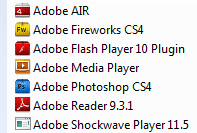
You only have one version installed, that can be run in 32 or 64bit. If you did have two of everything, they would show in Add/remove programs, but as you can see, they don't...
 

Attachments

  • Capture.PNG
    Capture.PNG
    3.3 KB · Views: 1,806

My Computer

Computer Manufacturer/Model Number
Sony Vaio FZ21Z
OS
Windows 7 Ultimate x64 ®™
CPU
Intel Core 2 Duo (2.2 GHz)
Motherboard
Sony (Intel Chipset)
Memory
2x 2GB Corsair (667 MHz)
Graphics Card(s)
NVIDIA 8600M GS (256MB)
Sound Card
Sigmatel
Monitor(s) Displays
15.4" TFT X-Black
Screen Resolution
1280x800
Hard Drives
Western Digital 300GB Scorpio Black (7200rpm)
Mouse
Logitech Anywhere MX
Internet Speed
Sky 5MB

My Computer

OS
Windows 7 Ultimate x64 ®™
CPU
Core i7 920
Motherboard
Gigabyte EX-58 EXTREME
Memory
Corsair Dominator 2x2 GB DDR3 1600 MHz
Graphics Card(s)
Gigabyte GeForce GTX 280
Sound Card
Realtek onboard 7.1 HD
Monitor(s) Displays
Samsung SM 2232 BW
Screen Resolution
1680x1050
Hard Drives
Western Digital Caviar Black 1 TB (WD1001FALS)
PSU
Corsair TX750W 750W
Case
NZXT Guardian 921
Cooling
Thermalright Ultra
Keyboard
Logitech G15
Mouse
Logitech MX 1100
Internet Speed
Broadband 4Mbit
Photoshop is one of the few programs that will give you a choice between 32 and 64 bit. I don't know if you can or want to get rid of the 32 bit. I think you may need it . You will find that most of your installs will be
x86 as that is the most common operating system.
 

My Computer

Computer type
PC/Desktop
Computer Manufacturer/Model Number
Drywallguy
OS
Windows 7 Pro x64
CPU
AMD FX 6300
Motherboard
Asus M5a99FX pro
Memory
8GB Gskill Sniper
Graphics Card(s)
Sapphire AMD HD 7770
Sound Card
On board
Monitor(s) Displays
Samsung Syncmaster 2253 & LG Flatron W2242T
Screen Resolution
1680 X 1050
Hard Drives
5 Western Digital and Seagate mix
Totaling 2.5 TB
PSU
OCZ StealthXStream 700W
Case
Coolermaster
Cooling
Air
Keyboard
Microsoft
Mouse
Microsoft Trackball Explorer

My Computer

Computer Manufacturer/Model Number
* BFK Customs *
OS
W 7 64-bit Ultimate
CPU
Intel Q9550 Yorkfield
Motherboard
ASUS P5Q Pro
Memory
8GB Dominator 8500C5D
Graphics Card(s)
ATI : XFX 5870
Sound Card
Realtek HD Audio 7-1
Monitor(s) Displays
1x 47" LCD HDMI & 3x 26" LCD HDMI
Screen Resolution
1920x1080P & 1920x1200
Hard Drives
1x 80GB Intel X25-M G2 SSD : 1x 500GB & 1x 640GB WD Caviar Black(s)
PSU
Corsair 620HX
Case
Cooler Master RC-690
Cooling
Tuniq Tower 120, 2x 140mm and 3x 120mm case fans
Keyboard
Microsoft 500
Mouse
Razer Diamondback 3G
Internet Speed
14 Mb/s
Other Info
1x Koutech 3Gb/s SATA HDD Hot Swap Rack
Not everything is 64bit, for example you need 32bit version of IE for extensions like Flash, the same with Windows Explorer.

Oh ty!, I see now they are not all programs both versions but i still dont get it why 2 versions of Photoshop?, One version is about 800 mb size and the both are 1,6 gb. how can I uninstall 32 bit version if i can?

In Windows Programs and Features in Control Panel, look at the installation dates. See if there's more than one copy of Photoshop. Maybe the 32 bit was already on when you upgraded? In any case if there's more than one I'd remove the oldest. If there's only one entry I'd look for a Photoshop dedicated forum. Somebody using that program likely has already been where you are now.

I don't have old version, i just installed windows 7 before feew hours but i didn't know why i need two program files. It's not about only photoshop i have more programs in 32 bit prog files directory, but they are 64bit originaly.
 

My Computer

OS
Windows 7 Ultimate x64 ®™
CPU
Core i7 920
Motherboard
Gigabyte EX-58 EXTREME
Memory
Corsair Dominator 2x2 GB DDR3 1600 MHz
Graphics Card(s)
Gigabyte GeForce GTX 280
Sound Card
Realtek onboard 7.1 HD
Monitor(s) Displays
Samsung SM 2232 BW
Screen Resolution
1680x1050
Hard Drives
Western Digital Caviar Black 1 TB (WD1001FALS)
PSU
Corsair TX750W 750W
Case
NZXT Guardian 921
Cooling
Thermalright Ultra
Keyboard
Logitech G15
Mouse
Logitech MX 1100
Internet Speed
Broadband 4Mbit
but i still dont get it why 2 versions of Photoshop?, One version is about 800 mb size and the both are 1,6 gb. how can I uninstall 32 bit version if i can?
Hi.
You only have one version installed, that can be run in 32 or 64bit. If you did have two of everything, they would show in Add/remove programs, but as you can see, they don't...

Yes i see in add/remove there is one version, but i was curious why i need one in 32bit folder.
 

My Computer

OS
Windows 7 Ultimate x64 ®™
CPU
Core i7 920
Motherboard
Gigabyte EX-58 EXTREME
Memory
Corsair Dominator 2x2 GB DDR3 1600 MHz
Graphics Card(s)
Gigabyte GeForce GTX 280
Sound Card
Realtek onboard 7.1 HD
Monitor(s) Displays
Samsung SM 2232 BW
Screen Resolution
1680x1050
Hard Drives
Western Digital Caviar Black 1 TB (WD1001FALS)
PSU
Corsair TX750W 750W
Case
NZXT Guardian 921
Cooling
Thermalright Ultra
Keyboard
Logitech G15
Mouse
Logitech MX 1100
Internet Speed
Broadband 4Mbit
Oh ty!, I see now they are not all programs both versions but i still dont get it why 2 versions of Photoshop?, One version is about 800 mb size and the both are 1,6 gb. how can I uninstall 32 bit version if i can?

In Windows Programs and Features in Control Panel, look at the installation dates. See if there's more than one copy of Photoshop. Maybe the 32 bit was already on when you upgraded? In any case if there's more than one I'd remove the oldest. If there's only one entry I'd look for a Photoshop dedicated forum. Somebody using that program likely has already been where you are now.

I don't have old version, i just installed windows 7 before feew hours but i didn't know why i need two program files. It's not about only photoshop i have more programs in 32 bit prog files directory, but they are 64bit originaly.


Windows needs both files to install 32-bit programs to the "Program Files (x86)" file and to install 64-bit programs into the "Program Files" folders; x86 and x64 cannot be installed and run together from the same file.
 

My Computer

Computer Manufacturer/Model Number
* BFK Customs *
OS
W 7 64-bit Ultimate
CPU
Intel Q9550 Yorkfield
Motherboard
ASUS P5Q Pro
Memory
8GB Dominator 8500C5D
Graphics Card(s)
ATI : XFX 5870
Sound Card
Realtek HD Audio 7-1
Monitor(s) Displays
1x 47" LCD HDMI & 3x 26" LCD HDMI
Screen Resolution
1920x1080P & 1920x1200
Hard Drives
1x 80GB Intel X25-M G2 SSD : 1x 500GB & 1x 640GB WD Caviar Black(s)
PSU
Corsair 620HX
Case
Cooler Master RC-690
Cooling
Tuniq Tower 120, 2x 140mm and 3x 120mm case fans
Keyboard
Microsoft 500
Mouse
Razer Diamondback 3G
Internet Speed
14 Mb/s
Other Info
1x Koutech 3Gb/s SATA HDD Hot Swap Rack
really? didnt know that.... thought it was more about organisation than compatibility good to know though :)
 

My Computer

Computer type
PC/Desktop
Computer Manufacturer/Model Number
Medion Erazer (note to self: insert model number) - with custom additions
OS
Windows 10 Pro x64
CPU
Intel Core i5 7400 @ 3.00GHz
Motherboard
OEM supllied with PC
Memory
8GB 2133Mhz DDR4 (OEM supplied)
Graphics Card(s)
Gygabyte Windforce GTX 1050Ti (Factory Overclocked)
Sound Card
Realtek
Monitor(s) Displays
Acer Al1980 + HKC
Screen Resolution
1360*768(HKC) / 1280*1024(Acer)
Hard Drives
1TB Toshiba
1TB WD Caviar Green
120GB Samsung Evo 840
PSU
OEM supplied (no power rating on case)
Case
OEM Supplied
Cooling
Stock
Keyboard
Logitech Wireless
Mouse
Logitect Wireless
Internet Speed
40Mb/s Down 10Mb/s Up
Antivirus
Defender
Browser
Firefox
really? didnt know that.... thought it was more about organisation than compatibility good to know though :)


Glad I could be helpful mate.
 

My Computer

Computer Manufacturer/Model Number
* BFK Customs *
OS
W 7 64-bit Ultimate
CPU
Intel Q9550 Yorkfield
Motherboard
ASUS P5Q Pro
Memory
8GB Dominator 8500C5D
Graphics Card(s)
ATI : XFX 5870
Sound Card
Realtek HD Audio 7-1
Monitor(s) Displays
1x 47" LCD HDMI & 3x 26" LCD HDMI
Screen Resolution
1920x1080P & 1920x1200
Hard Drives
1x 80GB Intel X25-M G2 SSD : 1x 500GB & 1x 640GB WD Caviar Black(s)
PSU
Corsair 620HX
Case
Cooler Master RC-690
Cooling
Tuniq Tower 120, 2x 140mm and 3x 120mm case fans
Keyboard
Microsoft 500
Mouse
Razer Diamondback 3G
Internet Speed
14 Mb/s
Other Info
1x Koutech 3Gb/s SATA HDD Hot Swap Rack
In Windows Programs and Features in Control Panel, look at the installation dates. See if there's more than one copy of Photoshop. Maybe the 32 bit was already on when you upgraded? In any case if there's more than one I'd remove the oldest. If there's only one entry I'd look for a Photoshop dedicated forum. Somebody using that program likely has already been where you are now.

I don't have old version, i just installed windows 7 before feew hours but i didn't know why i need two program files. It's not about only photoshop i have more programs in 32 bit prog files directory, but they are 64bit originaly.


Windows needs both files to install 32-bit programs to the "Program Files (x86)" file and to install 64-bit programs into the "Program Files" folders; x86 and x64 cannot be installed and run together from the same file.

Yeah i understand that but i'm runnung 64 bit system and installing 64bit program on it [not 32bit],. why I have sam program as a 32 and 64 bit. Whats the purpose on chosing 32 or 64 bit at the start of installing process?
Sorry on bad english, i'm not from US :)
 

My Computer

OS
Windows 7 Ultimate x64 ®™
CPU
Core i7 920
Motherboard
Gigabyte EX-58 EXTREME
Memory
Corsair Dominator 2x2 GB DDR3 1600 MHz
Graphics Card(s)
Gigabyte GeForce GTX 280
Sound Card
Realtek onboard 7.1 HD
Monitor(s) Displays
Samsung SM 2232 BW
Screen Resolution
1680x1050
Hard Drives
Western Digital Caviar Black 1 TB (WD1001FALS)
PSU
Corsair TX750W 750W
Case
NZXT Guardian 921
Cooling
Thermalright Ultra
Keyboard
Logitech G15
Mouse
Logitech MX 1100
Internet Speed
Broadband 4Mbit
First though on seeing program files x32 was like u said but only thing I was wondering is that I see program in p. files x64 with all elements [exe..] and same program with all elements again in p. files x86 folder and i needed to enter serial key and register both programs.
 

My Computer

OS
Windows 7 Ultimate x64 ®™
CPU
Core i7 920
Motherboard
Gigabyte EX-58 EXTREME
Memory
Corsair Dominator 2x2 GB DDR3 1600 MHz
Graphics Card(s)
Gigabyte GeForce GTX 280
Sound Card
Realtek onboard 7.1 HD
Monitor(s) Displays
Samsung SM 2232 BW
Screen Resolution
1680x1050
Hard Drives
Western Digital Caviar Black 1 TB (WD1001FALS)
PSU
Corsair TX750W 750W
Case
NZXT Guardian 921
Cooling
Thermalright Ultra
Keyboard
Logitech G15
Mouse
Logitech MX 1100
Internet Speed
Broadband 4Mbit
Whats the purpose on chosing 32 or 64 bit at the start of installing process?
Because some people have 32bit Windows, and some have 64bit Windows.
 

My Computer

Computer Manufacturer/Model Number
Sony Vaio FZ21Z
OS
Windows 7 Ultimate x64 ®™
CPU
Intel Core 2 Duo (2.2 GHz)
Motherboard
Sony (Intel Chipset)
Memory
2x 2GB Corsair (667 MHz)
Graphics Card(s)
NVIDIA 8600M GS (256MB)
Sound Card
Sigmatel
Monitor(s) Displays
15.4" TFT X-Black
Screen Resolution
1280x800
Hard Drives
Western Digital 300GB Scorpio Black (7200rpm)
Mouse
Logitech Anywhere MX
Internet Speed
Sky 5MB
I don't have old version, i just installed windows 7 before feew hours but i didn't know why i need two program files. It's not about only photoshop i have more programs in 32 bit prog files directory, but they are 64bit originaly.

There's a 32 bit emulator on 64 bit Windows. I don't know all the ins and outs of it yet myself.. but you do find things like registry entries that get echoed in another section of the registry and other stuff so that 32 bit stuff installed will have not only the program, but the settings work.. at least for the most part. The 32 bit shell extensions are a fly in the ointment. I made a small Hotkey program to open 32 bit instances of Explorer so that you could easily access many 32 bit shell extensions, but then I see not all hard links to explorer in the SysWow64 directory are 32 bit. Baffles me but it seems like Microsoft broke their own work-around. I can't get clear info on which versions of 64 bit Windows link to 32 bit shell and which don't. It's weird.

Most of the stuff works, so there must be a reason for it. :)
 

My Computer

Computer Manufacturer/Model Number
HP Media Center
OS
Windows 7 32 bit
CPU
AMD 5200+ dual core
Memory
2 GB
Graphics Card(s)
NVidia GeForce 6150SE 128 MB
Monitor(s) Displays
CRT
Screen Resolution
1280x1024
Hard Drives
500 GB Sata internal :

SIIG USB 3.0 docking stations w/WD Caviar Black 6 Gb/s drives
Keyboard
PS/2
Mouse
PS/2 Wheel Mouse
Other Info
SIIG USB 3.0 PCIexpress card.
Back
Top