Solved Program icon stuck in Revo Uninstaller Pro

jumanji

New member
Guru
Gold Member
VIP
Local time
8:32 PM
Messages
5,915
The otherday my wife inadvertently and without knowing the implications, downloaded some junk media players from some malicious site and my laptop got infected with some ransomware called one care (nothing to do with Windows Live one care) and hundreds of PUPs.(as seen in Revo Uninstaller Pro.)

I uninstalled the ransomware and then ran MBAM which removed all the PUPs ( some hundreds)

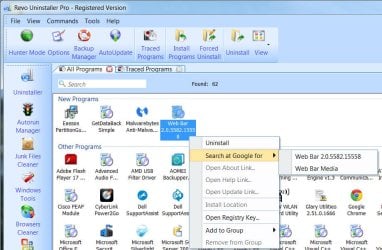
Now Revo Uninstaller seems to be stuck with one program icon Web Bar. To me it appears that the program got uninstalled completely.
5-8-2015 9-22-27 PM.jpg

Web Bar does not appear in "Uninstall or change a Program" .CCleaner also does not show it. Trying to uninstall it with Revo Uninstaller gives the message "Running the application's uninstaller failed.Invalid uninstall command". Registry search showed nothing related to Web bar 2.0.5582.15558.

I have run AdwCleaner, TDSS Killer, RKill, Junk File Remover Tool apart from MBAM. Everything found a clean PC.

Still Revo Uninstaller shows the Program Icon.A google search as indicated in Revo Uninstaller didn't give anything tangible.

How to remove it from Revo Uninstaller?

I do feel that it no longer exists in reality or am I missing something?
 

My Computer My Computer

OS
Windows 7 Home Premium 32 bit
Hello, jumanji!

From Revo:

How to uninstall a traced program with Revo Uninstaller Pro?

If you have monitored the installation of a program with Revo Uninstaller Pro, then the best way to uninstall it, is to do that using the created by Revo Uninstaller Pro log. To access it you have to open the "Traced programs" module visible as a tab when you start Revo Uninstaller Pro. Before starting to uninstall a program be sure that it is not running. So check your taskbar at the bottom of your screen and near to your system clock, if the icon of the program you want to uninstall is there so right click on its icon and select "Exit" or "Quit" or equivalent command to close it. Then select the program and start the "Uninstall" command. A window will show you the progress of the operation and when that window disappear the program will be uninstalled.

Revo Uninstaller Pro - Frequently Asked Questions


...or, have you tried uninstalling Revo, and then installing it again? It might be hung up on Web Bar. :confused:
 

My Computer My Computer

Computer type
PC/Desktop
Computer Manufacturer/Model Number
An ol' eMachines
OS
Windows 7 Home Premium
Internet Speed
Fine for me...I'm retired!
Thanks, Cottonball, I knew you are going to respond as I saw you online.:)

That Web Bar was not something I installed. It got installed during that misadventure by my wife day before yesterday. So no question of it being a traced one. I even ran a System restore to a previous point. That didn't help. All the PUPs remained. Obviously those were beyond the reach of System Restore and only MBAM removed those..I am more or less pretty sure that it is not alive and running anywhere now.

Yep, uninstalling and then reinstalling Revo Uninstaller Pro might kick out the hanger. But right now here in USA I don't have the key and download..I bought a 3PC license and it is a old version. Let me dig my gmail tomorrow and check whether I can get the key and download.

I just wanted to know whether any more search and destroy operation is required and the hanger can be kicked out without reinstalling Revo Uninstaller if it is only a stuck hanger.
 

My Computer My Computer

OS
Windows 7 Home Premium 32 bit
You might be able to remove in from Safe Mode.

Using Everything Search might also find it and remove it. If Everything Search finds it just right tick on it and select
Delete.
Just remember when you delete something using Everything Search you will never be able to get it back.

Everything Search Engine
 

My Computer My Computer

Computer type
PC/Desktop
Computer Manufacturer/Model Number
Home made Desktop
OS
Windows 10 Pro. 64/ version 1709 Windows 7 Pro/64
CPU
Intel i7-6800K @ 4.3
Motherboard
ASUS X-99 Deluxe II
Memory
Corsair Platinum 16 gig @2400
Graphics Card(s)
EVGA GTX 1070 OC
Monitor(s) Displays
Asus 27" LED LCD/VE278Q
Screen Resolution
1920-1080 or 1280-720 HDMI
Hard Drives
INTEL SSD 730-240 Gb Sata 3.0/
PSU
EVGA Platium 1200W
Case
Phanteks Luxe Tempered Glass 8 fans/ one radiator
Cooling
XSPC/ Water Cooled CPU
Keyboard
Das 4 Professional
Mouse
Logitech M705/MX Anywhere 2-S
Internet Speed
100 mbits
Antivirus
Microsoft Security Essentials/ Malwarebytes Premium 3.0/ SAS
Browser
I.E. 11 default/Firefox/ ISP Time Warner Cable/Spectrum
Other Info
LG BluRay Burner/
Sound system-KLipsch-THX/
Icy Dock ssd Hot Swap bays.
Looks as if you followed all the steps here:

Web Bar Removal Guide

I also think it may be a Revo 'hangup'.

Maybe LB's suggestion to run in Safe Mode will do the trick...
 

My Computer My Computer

Computer type
PC/Desktop
Computer Manufacturer/Model Number
An ol' eMachines
OS
Windows 7 Home Premium
Internet Speed
Fine for me...I'm retired!
Thanks Layback Bear and cottonball.

Luckily I remembered I had stored all installed program downloads and keys in the laptop itself.

So I went ahead uninstalled and then reinstalled Revo Uninstaller.

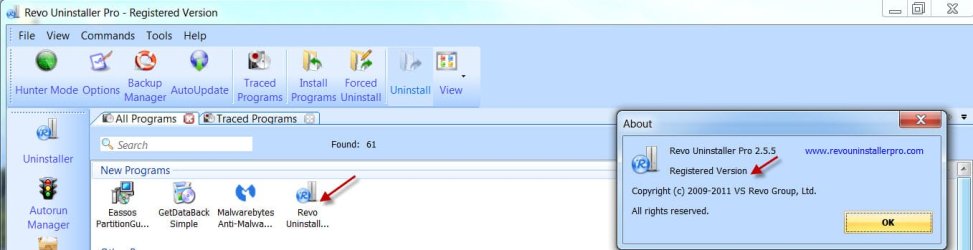
Surprisingly, though I had the key ready to input, it didn't ask for the Key and the reinstall showed it as registered. More surprises. It kept track of the recently installed programs and also the old traced installs. Fantastic.

5-8-2015 11-52-18 PM.jpg

And sure no Web Bar. The hanger has been kicked out and I can sleep peacefully :)

Thank you cottonball for refreshing my memory and thanks Layback for Everything Search Engine -something I didn't know and learnt from you now.

I am marking this thread as solved.
 

My Computer My Computer

OS
Windows 7 Home Premium 32 bit
Have a good nights rest and happy computing.
 

My Computer My Computer

Computer type
PC/Desktop
Computer Manufacturer/Model Number
Home made Desktop
OS
Windows 10 Pro. 64/ version 1709 Windows 7 Pro/64
CPU
Intel i7-6800K @ 4.3
Motherboard
ASUS X-99 Deluxe II
Memory
Corsair Platinum 16 gig @2400
Graphics Card(s)
EVGA GTX 1070 OC
Monitor(s) Displays
Asus 27" LED LCD/VE278Q
Screen Resolution
1920-1080 or 1280-720 HDMI
Hard Drives
INTEL SSD 730-240 Gb Sata 3.0/
PSU
EVGA Platium 1200W
Case
Phanteks Luxe Tempered Glass 8 fans/ one radiator
Cooling
XSPC/ Water Cooled CPU
Keyboard
Das 4 Professional
Mouse
Logitech M705/MX Anywhere 2-S
Internet Speed
100 mbits
Antivirus
Microsoft Security Essentials/ Malwarebytes Premium 3.0/ SAS
Browser
I.E. 11 default/Firefox/ ISP Time Warner Cable/Spectrum
Other Info
LG BluRay Burner/
Sound system-KLipsch-THX/
Icy Dock ssd Hot Swap bays.
 

My Computer My Computer

Computer type
PC/Desktop
Computer Manufacturer/Model Number
An ol' eMachines
OS
Windows 7 Home Premium
Internet Speed
Fine for me...I'm retired!
Back
Top