Program like TaskBar Shuffle for Windows 7 ?

simonsez9

New member
Member
Local time
10:45 AM
Messages
72
as the title say i use a program call task bar shuffle for windows xp for quite long now as i switch to win 7, so i thought to ask here if any one fimiliar with the same program for win 7 or any program which behave likes task bar shuffle ? wait for the reply's folks thanks to all
 

My Computer

Computer type
PC/Desktop
Computer Manufacturer/Model Number
Custom build
OS
Windows 7 Ultimate 64 Bit Sp1
CPU
Intel Quad Core Q9650
Motherboard
Asus P5G41T-MLX
Memory
Kingston DDR 3 8GB 1333 Mhz
Graphics Card(s)
Gigabyte 5450 1Gb DDR3
Sound Card
Mobo Built
Monitor(s) Displays
Dell 24 wm
Screen Resolution
1080 P
Hard Drives
2 Tb Sata Drive
PSU
Coolermatser GX750
Case
Cooler Master Casing
Cooling
Normal
What does it do? You may not need it because the taskbar feature set has been dramatically improved...
 

My Computer

OS
Windows 7 Ultimate x64
oh mate its amazing program i mean i can shuffle any window of fire fox from start to end, i mean i can shuffle any window which is on task bar in the way i desire it but the bad luck the fellow who made that said that he havent made the one for the win 7 and lot of ppl asked him to do that trust me it make ur life much easy then anything at all
 

My Computer

Computer type
PC/Desktop
Computer Manufacturer/Model Number
Custom build
OS
Windows 7 Ultimate 64 Bit Sp1
CPU
Intel Quad Core Q9650
Motherboard
Asus P5G41T-MLX
Memory
Kingston DDR 3 8GB 1333 Mhz
Graphics Card(s)
Gigabyte 5450 1Gb DDR3
Sound Card
Mobo Built
Monitor(s) Displays
Dell 24 wm
Screen Resolution
1080 P
Hard Drives
2 Tb Sata Drive
PSU
Coolermatser GX750
Case
Cooler Master Casing
Cooling
Normal
Does look pretty cool. Some of the features have already been added to w7, but not all. That said, I'm unaware of any similar app. You could try installing on a test system just to see if it'll work with w7. It says it works on Vista, so you may get lucky.

Post back if you try that.

On top of that there may be a tutorial here that has directions on similar customization of the taskbar. In fact I think I saw that program listed in one of the tutorials. Although it may have been referenced in a post appended to the tuturial. I'll see if I can find it.
 

My Computer

OS
Windows 7 Ultimate x64
Found it, but bad news. You'll see it mentioned in the first post appended to this tutorial...

And I went to that link you sent me... He recommends avoiding altogether on w7 due to reported problems.
 

My Computer

OS
Windows 7 Ultimate x64
yah i am already using it some how but some features are not working like xp. The reason i mention it here might soe one give chance to make it for win 7 it will defanetly help full for other and me as well :) and thx for takin the interest in the thread appreciate it :)
 

My Computer

Computer type
PC/Desktop
Computer Manufacturer/Model Number
Custom build
OS
Windows 7 Ultimate 64 Bit Sp1
CPU
Intel Quad Core Q9650
Motherboard
Asus P5G41T-MLX
Memory
Kingston DDR 3 8GB 1333 Mhz
Graphics Card(s)
Gigabyte 5450 1Gb DDR3
Sound Card
Mobo Built
Monitor(s) Displays
Dell 24 wm
Screen Resolution
1080 P
Hard Drives
2 Tb Sata Drive
PSU
Coolermatser GX750
Case
Cooler Master Casing
Cooling
Normal
You're welcome. Sorry no progress. As you say, someone may see this thread and find opportunity to create something worthwhile.
 

My Computer

OS
Windows 7 Ultimate x64
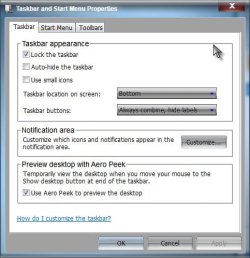
Odd, I used taskbar shuffle in XP, but never looked for it on 7 as I was able to do it natively? What is it you can do with TS that you can't do with 7 alone? My taskbar settings BTW

Clipboard01.jpg

A Guy
 

My Computer

Computer type
PC/Desktop
OS
Windows 10 Home x64
CPU
INTEL Core i5-750 Quad-Core 3.37GHz
Motherboard
ASUS P7P55D
Memory
HyperX Fury Black Series 8GB (2 x 4GB) 1866Mhz
Graphics Card(s)
EVGA GeForce GTX 750 Superclocked 1GB 128-Bit GDDR5
Monitor(s) Displays
LG 32MA68HY 32" IPS
Screen Resolution
1920 x 1080
Hard Drives
Samsung 840 Evo 120GB, SEAGATE 500GB Barracuda® 7200.12, SATA 3 Gb/s, 7200 RPM, 16MB cache
PSU
ANTEC TruePower New TP-550, 80 PLUS, 550W
Case
ANTEC Three Hundred Illusion
Cooling
COOLER MASTER Hyper 212 Plus, 4 x 120mm 1 x 140mm Noctua's
Internet Speed
85 + Mbps
Antivirus
Avast
Browser
Vivaldi
Odd, I used taskbar shuffle in XP, but never looked for it on 7 as I was able to do it natively? What is it you can do with TS that you can't do with 7 alone? My taskbar settings BTW

View attachment 211227

A Guy

Here's the link the OP sent me: Taskbar Shuffle - home of Taskbar Shuffle

Appears to be a few cool features that I'm not sure w7 can do natively. At least I've not found them. And I'm not sure how well TB Shuffle does what's advertised. When I first read the post I'm thinking "why do I want some app "shuffling" icons so that I can't find what I'm looking for". :rolleyes:
 

My Computer

OS
Windows 7 Ultimate x64
The only two things Windows 7 cannot do natively...
Reorder tasks in a grouped button's popup menu in the same way

Middle-click to close programs on your taskbar

Instead, middle-click opens a new window or instance of the application if it supports that.
 

My Computer

Computer type
PC/Desktop
Computer Manufacturer/Model Number
Alienware Aurora ALX R4
OS
Windows 10 Pro (x64)
CPU
Intel Core i7-3930K (3.2GHz - 4.5GHz)
Motherboard
Alienware Aurora-R4 x79
Memory
4x Samsung 4GB PC3-12800 DDR3 (16GB 1600MHz)
Graphics Card(s)
Nvidia Geforce GTX 690
Sound Card
SteelSeries Siberia Elite
Monitor(s) Displays
Dell UltraSharp U3011
Screen Resolution
2560x1600
Hard Drives
Samsung 850 Pro 256 GB, Seagate 1TB Desktop Hybrid HDD, 2x Western Digital 4TB Green HDD
PSU
875W Some Dell PSU <.<
Case
Alienware Aurora ALX
Cooling
Custom Liquid Cooling (EK CPU & GPU blocks) dual EK 480RAD
Keyboard
Logitech G710+ Mechanical
Mouse
Logitech G700s
Internet Speed
Verizon Fios (50 mbps average)
Other Info
Server: Intel NUC D54250WYK: i5-4250U, 16GB, 256 GB mSATA, Windows Server 2012 R2
Back
Top