Program List from the Start button

Cissy46

New member
Local time
11:46 PM
Messages
23
Location
San Jose, California
I hope this is the correct place to ask this question. I come from Window XP. I am used to see my long list of programs all spread out so I can see what I have w/o scrolling.

Is there a way to fully display my installed programs w/o scrolling in such a small window above the start button? Have I asked this clearly? LOL. Sometimes, I may not iterate what I am trying to ask.

Thanks for your time!
Ciss
 

My Computer

Computer Manufacturer/Model Number
PC clone
OS
Windows 7 Home Premium
CPU
Core 2 Duo 3.0
Motherboard
ASUS P5K/EPU
Memory
3 GB DDR2
Graphics Card(s)
Nvidia GForce 9600
Hard Drives
1 tera
Hi Cissy,

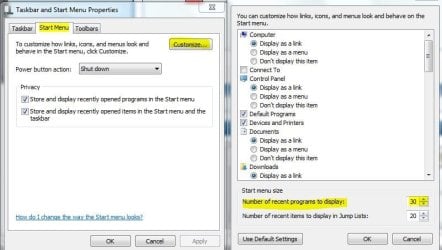
You could increase the size of the start menu from the default size if you wanted. That may help a little. Right click on the taskbar and go to properties, then here..and just raise the number to a higher one like I have here to 30.

sm.JPG

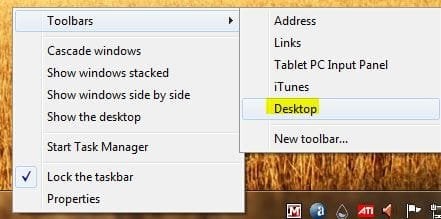
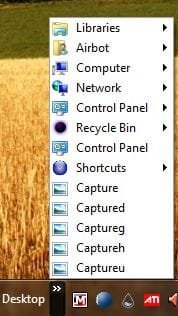
You could also add the desktop toolbar to your taskbar, that will give you a tree view of everything sort of like XP.

desktoolbar.JPGdesktopt.JPG

Just a couple ideas, may be easier ways, if someone knows, I'm sure they'll come along and post. :)
 

My Computer

Computer type
PC/Desktop
Computer Manufacturer/Model Number
Airbot 2.0
OS
Windows 7 Ultimate x64 SP1
CPU
Core i7 920 (D0) @ 4Ghz, *26c idle *65c full load on air
Motherboard
Asus P6X58D Premium - Sata 6Gb/s - USB 3.0
Memory
12GB DDR3 Corsair Dominator -CMD12GX3M6A1600C8 at 1600MHz
Graphics Card(s)
Zotac Geforce GTX 770
Sound Card
ASUS Xonar D2X
Monitor(s) Displays
1 LG 24" Flatron W2453V-PF 1 Samsung 24" P2450H both 2ms RT
Screen Resolution
1920x1080@60hz
Hard Drives
1 Samsung 250GB 840 Evo SSD
1 OCZ Vertex2 180GB SSD
1 TB Samsung Spinpoint F1 7200RPM 32MB cache
2 500GB WD Caviar Blacks 7200RPM 32MB cache (WD5001AALS)

Pioneer DVD Burner DVR-S18M
PSU
Corsair HX1000W
Case
Cooler Master HAF 932
Cooling
Case Fans *3 230mm, *1 140mm/CPU - *Tuniq Tower 120 Extreme
Keyboard
Logitech Wireless MK700
Mouse
Logitech Wireless MK700
Internet Speed
DL 15 Mbps UL 0.98 Mbps
Antivirus
None
Browser
Firefox Nightly
Other Info
Processor-7.7 *RAM- 7.9 *Graphics-7.9 *Gaming Graphics- 7.9 *SSD- 7.8 W.E.I final score= 7.7
*Phone- LG Nexus 5
I know that there are third-party tools out there that will restore the XP start menu. I cannot name it off the top of my head, but 3 minutes on Google may help immensely.
 

My Computer

Computer Manufacturer/Model Number
Custom
OS
Windows 7 Professional x64
CPU
Intel i7 2600K OC'd @ 4620 MHz
Motherboard
Asus P8Z68-V Pro
Memory
16GB GSkill Sniper 2133 Mhz (4x4GB)
Graphics Card(s)
EVGA GeForce GTX 480 SuperClocked+
Sound Card
Realtek High Definition Audio
Monitor(s) Displays
2x Acer S273HLbmii 27"
Screen Resolution
2 x 1920x1080
Hard Drives
64GB Crucial M4 SSD

Storage: Hitachi 1TB 5400RPM, Samsung 1.5TB 5400RPM
PSU
Corsair HW Series 750w (modular)
Case
Cooler Master HAF 932 Advanced Blue Edition
Cooling
CM Hyper 212+ CPU cooler, 3x 230mm + 1x 140mm case fans
Keyboard
Logitech MK320 (wireless)
Mouse
Logitech MK320 (wireless)
Internet Speed
30 Mb/s : 2 Mb/s
Thank you, Jonathan, but I don't think I want to do that.

Airbot, that's the ticket. I'll put 'Desktop' in the taskbar. Brings up the programs nicely

Thank you very much!!

Cissy
 

My Computer

Computer Manufacturer/Model Number
PC clone
OS
Windows 7 Home Premium
CPU
Core 2 Duo 3.0
Motherboard
ASUS P5K/EPU
Memory
3 GB DDR2
Graphics Card(s)
Nvidia GForce 9600
Hard Drives
1 tera
You know though, on second thought, that brings up the stuff on my desktop. It doesn't really show my programs that I do have shortcuts for. Hmm..... I miss the 'tree' appearance of my programs only.

Thank you! I'll try increasing the size thingie LOL
 

My Computer

Computer Manufacturer/Model Number
PC clone
OS
Windows 7 Home Premium
CPU
Core 2 Duo 3.0
Motherboard
ASUS P5K/EPU
Memory
3 GB DDR2
Graphics Card(s)
Nvidia GForce 9600
Hard Drives
1 tera
Ok, how about this.

Make a new folder on your desktop, name it Programs or whatever you want. Right click on the desktop -New-Folder.

Right click where it says "All Programs" in the start menu, and click on Open All Users.

Copy the contents of that, and paste it into your new folder on the desktop.

Right click on the taskbar, go to Toolbars-New Toolbar.

Put the new folder you made into there, the Documents, and Select that folder.

Now you have a Programs toolbar on your taskbar like it is in the start menu, but with the tree view.
 

My Computer

Computer type
PC/Desktop
Computer Manufacturer/Model Number
Airbot 2.0
OS
Windows 7 Ultimate x64 SP1
CPU
Core i7 920 (D0) @ 4Ghz, *26c idle *65c full load on air
Motherboard
Asus P6X58D Premium - Sata 6Gb/s - USB 3.0
Memory
12GB DDR3 Corsair Dominator -CMD12GX3M6A1600C8 at 1600MHz
Graphics Card(s)
Zotac Geforce GTX 770
Sound Card
ASUS Xonar D2X
Monitor(s) Displays
1 LG 24" Flatron W2453V-PF 1 Samsung 24" P2450H both 2ms RT
Screen Resolution
1920x1080@60hz
Hard Drives
1 Samsung 250GB 840 Evo SSD
1 OCZ Vertex2 180GB SSD
1 TB Samsung Spinpoint F1 7200RPM 32MB cache
2 500GB WD Caviar Blacks 7200RPM 32MB cache (WD5001AALS)

Pioneer DVD Burner DVR-S18M
PSU
Corsair HX1000W
Case
Cooler Master HAF 932
Cooling
Case Fans *3 230mm, *1 140mm/CPU - *Tuniq Tower 120 Extreme
Keyboard
Logitech Wireless MK700
Mouse
Logitech Wireless MK700
Internet Speed
DL 15 Mbps UL 0.98 Mbps
Antivirus
None
Browser
Firefox Nightly
Other Info
Processor-7.7 *RAM- 7.9 *Graphics-7.9 *Gaming Graphics- 7.9 *SSD- 7.8 W.E.I final score= 7.7
*Phone- LG Nexus 5
I'll give it a try! I'll post back later when I have time and let you know how that works!

BTW, I did increase the size like you suggested. That does work as right now I don't have a lot of programs. Gonna try that folder idea :)

Thanks@
 

My Computer

Computer Manufacturer/Model Number
PC clone
OS
Windows 7 Home Premium
CPU
Core 2 Duo 3.0
Motherboard
ASUS P5K/EPU
Memory
3 GB DDR2
Graphics Card(s)
Nvidia GForce 9600
Hard Drives
1 tera
Ok, how about this.

Make a new folder on your desktop, name it Programs or whatever you want. Right click on the desktop -New-Folder.

Right click where it says "All Programs" in the start menu, and click on Open All Users.

Copy the contents of that, and paste it into your new folder on the desktop.

Right click on the taskbar, go to Toolbars-New Toolbar.

Put the new folder you made into there, the Documents, and Select that folder.

Now you have a Programs toolbar on your taskbar like it is in the start menu, but with the tree view.

That's it!! Done..now I'm happy :)))

Thank you!! I am most graeful!
Cissy
 

My Computer

Computer Manufacturer/Model Number
PC clone
OS
Windows 7 Home Premium
CPU
Core 2 Duo 3.0
Motherboard
ASUS P5K/EPU
Memory
3 GB DDR2
Graphics Card(s)
Nvidia GForce 9600
Hard Drives
1 tera
You're welcome Cissy. :)
 

My Computer

Computer type
PC/Desktop
Computer Manufacturer/Model Number
Airbot 2.0
OS
Windows 7 Ultimate x64 SP1
CPU
Core i7 920 (D0) @ 4Ghz, *26c idle *65c full load on air
Motherboard
Asus P6X58D Premium - Sata 6Gb/s - USB 3.0
Memory
12GB DDR3 Corsair Dominator -CMD12GX3M6A1600C8 at 1600MHz
Graphics Card(s)
Zotac Geforce GTX 770
Sound Card
ASUS Xonar D2X
Monitor(s) Displays
1 LG 24" Flatron W2453V-PF 1 Samsung 24" P2450H both 2ms RT
Screen Resolution
1920x1080@60hz
Hard Drives
1 Samsung 250GB 840 Evo SSD
1 OCZ Vertex2 180GB SSD
1 TB Samsung Spinpoint F1 7200RPM 32MB cache
2 500GB WD Caviar Blacks 7200RPM 32MB cache (WD5001AALS)

Pioneer DVD Burner DVR-S18M
PSU
Corsair HX1000W
Case
Cooler Master HAF 932
Cooling
Case Fans *3 230mm, *1 140mm/CPU - *Tuniq Tower 120 Extreme
Keyboard
Logitech Wireless MK700
Mouse
Logitech Wireless MK700
Internet Speed
DL 15 Mbps UL 0.98 Mbps
Antivirus
None
Browser
Firefox Nightly
Other Info
Processor-7.7 *RAM- 7.9 *Graphics-7.9 *Gaming Graphics- 7.9 *SSD- 7.8 W.E.I final score= 7.7
*Phone- LG Nexus 5
Back
Top