Program needed to track/log Explorer's internet activity

Wayne Donovan

New member
Local time
9:19 PM
Messages
4
I'm trying to solve a problem that I've posted earlier but getting no responses.


The Reliability Monitor only connects to Microsoft when Explorer has full access. I'm trying to just limit its access for Reliability Monitor.


So I though maybe there is a program that can track what resources Explorer is using when it updates with Microsoft.


I tried using Windows Resource Monitor. Only explorer shows up in the network connections. Checked Explorer in the CPU category but there are an infinite amount of services it is using and I can't properly diagnose what resources it's using during the update. Maybe there is a more advanced way of using the monitor to solve this problem. I don't know.

Is there a third party software that can just track that instance of Explores activity? I did a net search but all I get is results for internet connectivity programs.


Any input is greatly appreciated.

Wayne
 

My Computer

Computer type
PC/Desktop
OS
Windows 7 Home Premium 64bit
CPU
Intel i7
I'm not sure what you're asking for, but perhaps "Process Explorer"? Process Explorer
 

My Computer

Computer type
PC/Desktop
Computer Manufacturer/Model Number
Bruce ... somewhere in his 40's
OS
Windows 7 Ultimate 32bit SP1
CPU
Intel(R) Core(TM)2 Quad CPU @ 2.40GHz, 2400 MHz
Motherboard
INTEL/D975XBX2
Memory
4 GB
Graphics Card(s)
ATI Radeon HD 2600 Pro
Monitor(s) Displays
Samsung SyncMaster 914v
Screen Resolution
1280 x 1024
Hard Drives
2/500GB each ... ST3500630AS ATA Device.
One is not connected
PSU
Rocketfish 700 W
Case
G.Skill Gigabyte Chassis
Keyboard
Standard PS/2 Keyboard
Mouse
Microsoft PS/2 Mouse
Internet Speed
DSL
Antivirus
Avira Internet Security
Browser
IE 11
Other Info
ATI HDMI Audio
Thanks for that link. Definite improvement on taskmgr.

From what I gleamed from it, it doesn't seem able to achieve what I need to accomplish.

Here is what I'm doing and maybe that will help in finding the proper program to use.

I'm starting up Reliability Monitor, then "Checking for solutions to all problems"

The only way I can get it to communicate with Microsoft is to give Windows Firewall full outbound access to Explorer without any restrictions. I'm not comfortable with Explorer having that much freedom. I've been able to limit access of windows update, so I thought I should be able to do the same with the Reliability Monitor.

There is nothing I could find on the web that explains how this can be done (and I spent a lot of time looking and trying firewall settings, my other post doesn't even come close to demonstrating the time spent). So I'm trying to trouble shoot the problem myself.

I just need a program that will track all of Explorer's actions when I press that "Checking for solutions..." link. Then maybe I can work out a solution with that information.

All thoughts are welcome.

Wayne
 

My Computer

Computer type
PC/Desktop
OS
Windows 7 Home Premium 64bit
CPU
Intel i7

My Computer

Computer type
PC/Desktop
Computer Manufacturer/Model Number
Custom
OS
Windows 7 Ultimate x64
CPU
AMD A10-7850 Quad Core 3.7 GHz
Motherboard
MSI MS-7900
Memory
16 GB
Graphics Card(s)
MSI Radeon R7 250 OC Crossfired with A10 AMD Radeon R7
Monitor(s) Displays
Samsung SyncMaster XL2370HD, ViewSonic VA1912wb
Screen Resolution
1920*1080, 1440*900
Hard Drives
128 GB SSD
512 GB SSD
500 GB HDD
PSU
Corsair CX500
Case
Rosewill THOR V2 BLACK
Keyboard
Logitech G15
Mouse
CMSTORM MS2K
Internet Speed
ATT U-Verse
Antivirus
Microsoft Security Essentials, MalwareBytes
Browser
Firefox (lastest stable) with NoScript
Other Info
Just a humdrum little system.
Hi,

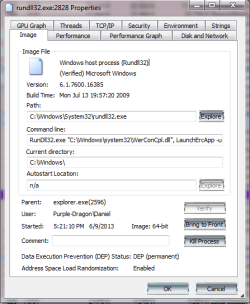
You need to allow rundll32.exe thru your firewall.
 

Attachments

  • rundll-1.PNG
    rundll-1.PNG
    21.2 KB · Views: 3

My Computer

Computer type
PC/Desktop
Computer Manufacturer/Model Number
Custom
OS
Windows 7 Ultimate x64
CPU
AMD A10-7850 Quad Core 3.7 GHz
Motherboard
MSI MS-7900
Memory
16 GB
Graphics Card(s)
MSI Radeon R7 250 OC Crossfired with A10 AMD Radeon R7
Monitor(s) Displays
Samsung SyncMaster XL2370HD, ViewSonic VA1912wb
Screen Resolution
1920*1080, 1440*900
Hard Drives
128 GB SSD
512 GB SSD
500 GB HDD
PSU
Corsair CX500
Case
Rosewill THOR V2 BLACK
Keyboard
Logitech G15
Mouse
CMSTORM MS2K
Internet Speed
ATT U-Verse
Antivirus
Microsoft Security Essentials, MalwareBytes
Browser
Firefox (lastest stable) with NoScript
Other Info
Just a humdrum little system.
Back
Top