Program Pictures Gone

green elephant

New member
Local time
3:31 AM
Messages
60
Two of my programs have lost their picture and I dont know how to get them back. The programs do still work though.
 

My Computer

Computer type
PC/Desktop
Computer Manufacturer/Model Number
lenovo v570
OS
windows 7 home premium
Memory
6gb
Hard Drives
552gb
2tb (external
500gb (external
Antivirus
microsoft security
Browser
google chrome
Try this ;)

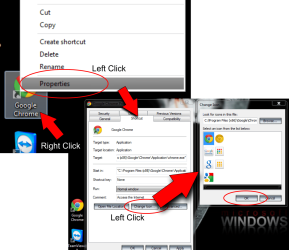
Click on the troublesome Icon with "right mouse button" click "left" on "properties" click "shortcut TAB" then "change icon" button.
Select the correct icon then click "OK" (You might have to click on a blank area of your desktop with your "right click" then "left click" "refresh" ;)
 

Attachments

  • icon change.png
    icon change.png
    119.2 KB · Views: 0

My Computer

Computer type
PC/Desktop
Computer Manufacturer/Model Number
Self Built
OS
Windows 7 Ultimate 64bit
CPU
AMD Phenom Quad core 9950 black edition
Motherboard
Gigabyte
Memory
16Gb
Graphics Card(s)
2x XFX Radeon 5850
Sound Card
PCI Express X-Fi Titanium / Logitech G35
Monitor(s) Displays
2x HP 2410i
Screen Resolution
1920x1080
Hard Drives
2x 500Gb Seagate
1x 300Gb Seagate
1x 1Tb Seagate
2x 1Tb Hitatchi
PSU
Jean Tech Storm 700W
Case
Cooler Master COSMOS S
Cooling
Akasa Evo Blue Pro
Keyboard
Logitech G15
Mouse
Mad Catz M.M.O. 7
Internet Speed
12mb
Try this ;)

Click on the troublesome Icon with "right mouse button" click "left" on "properties" click "shortcut TAB" then "change icon" button.
Select the correct icon then click "OK" (You might have to click on a blank area of your desktop with your "right click" then "left click" "refresh" ;)
no difference
 

My Computer

Computer type
PC/Desktop
Computer Manufacturer/Model Number
lenovo v570
OS
windows 7 home premium
Memory
6gb
Hard Drives
552gb
2tb (external
500gb (external
Antivirus
microsoft security
Browser
google chrome

My Computer

Computer type
PC/Desktop
Computer Manufacturer/Model Number
Self Built
OS
Windows 7 Ultimate 64bit
CPU
AMD Phenom Quad core 9950 black edition
Motherboard
Gigabyte
Memory
16Gb
Graphics Card(s)
2x XFX Radeon 5850
Sound Card
PCI Express X-Fi Titanium / Logitech G35
Monitor(s) Displays
2x HP 2410i
Screen Resolution
1920x1080
Hard Drives
2x 500Gb Seagate
1x 300Gb Seagate
1x 1Tb Seagate
2x 1Tb Hitatchi
PSU
Jean Tech Storm 700W
Case
Cooler Master COSMOS S
Cooling
Akasa Evo Blue Pro
Keyboard
Logitech G15
Mouse
Mad Catz M.M.O. 7
Internet Speed
12mb
Try this ;)

Click on the troublesome Icon with "right mouse button" click "left" on "properties" click "shortcut TAB" then "change icon" button.
Select the correct icon then click "OK" (You might have to click on a blank area of your desktop with your "right click" then "left click" "refresh" ;)
no difference

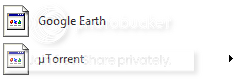
Try this. Click on Start Button, select "All Programs", scroll down to Google Earth, left click & it will open a list of Google Earth alternatives, right click on the one you normally use & from the drop down list, select "Send to," then "Desktop (create shortcut)". Or you can select from this same list "Pin to start menu".
That will create a new icon on your desktop with the right icon picture. You can then delete the old one without the picture & re-sort your desktop icons again. Repeat the process for the other program icon that has no picture.
If you want to remove the defective icon from the Start Menu list, just right click on it & select "Remove from this list."
 

My Computer

Computer type
PC/Desktop
Computer Manufacturer/Model Number
Self built using existing case
OS
Windows 7 Home Premium 64 bit sp1
CPU
Intel i5 3570 3.4Ghz Ivy Bridge SKT 1155 quad core
Motherboard
Gigabyte Z77-HD3 SKT 1155 2xSata 3, 4x USB 3.0
Memory
G-Skill Rip Jaws 16Gb (8x2) DDR3 -1600 PC3 12800 CL 10 red
Graphics Card(s)
Gigabyte NVIDIA GT610 1Gb DDR3 810/1200 PCI-E 2.0 Silent
Sound Card
NVIDIA High Definition & Realtech High Definition Audio
Monitor(s) Displays
2 x Philips 226V4L 16:9 aspect ratio
Screen Resolution
1920 x 1080 HD
Hard Drives
Samsung 840 Pro 256gb SSD, SATA 3.
Hitachi Touro Portable 1tb, USB 3.0 HDD used for image b/ups.
PSU
Corsair VS450
Case
Codeng
Cooling
PSU fan & CPU fan
Keyboard
Logitech
Mouse
Logitech Wireless trackball M570
Internet Speed
Wireless 3G. 3mg down & 550kb up.
Antivirus
Bitdefender Internet Security 2020
Browser
Opera (Current Version) & Firefox
Other Info
MS Office 2013 Pro. Davis weather station software. MGE Nova 600 avr UPS.
Back
Top