Program Sets Off Windows Defender At Launch

Nemai04

New member
Local time
5:04 PM
Messages
25
I have this old program I like to use, Freehand 7 (1995), but no matter what I do in Windows 7 I get the User Account Control Defender Box saying "Do you want the following program from an unknown publisher to make changes to this computer?"

I tried installing the program elsewhere, even in the original Program Files, and also on the top level of the hard drive. I tried running the compatibility program, and adding special permissions, but I could not change some of the settings. In the Windows Defender Tools I tried adding excluded files and folders, putting the application folder and application itself as exceptions, but it still sets off that alert before the program will start up.

The program does not have this problem in Vista.
 

My Computer

Computer Manufacturer/Model Number
Asus G73JH
OS
Windows Home 64 Bit
CPU
i7 720 1.6
Motherboard
Asus
Memory
6GB
Graphics Card(s)
ATI 5870
Hard Drives
500GB
Hi Nemai04,
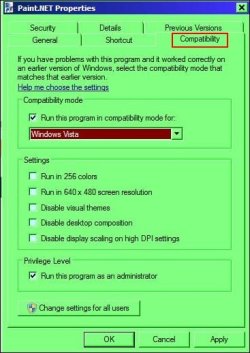
Right click the file in the start menu, then:-

RR.JPG
 

My Computer

Computer Manufacturer/Model Number
Look in my Signature.
OS
Win7 H.Prem. 32bit+SP1
Roderunner, thanks for that, however it does not work. I tried it again just to make sure. I think for some reason this old program checks something in the programs folder, or perhaps writes a temporary file or something there, which sets off defender. Both Macromedia (now defunct, bought up by Adobe) Freehand 7 and Dreamweaver 4 have the little shield icon on their icon in Windows 7, and set off that warning before they start up. I bother with Freehand 7 because it was that last competent version of the program that runs on current systems, and Adobe Illustrator has always been a clunky and stupid program in comparison to this day, and there is no better vector graphics solution for any money. See Futuristicwave.com.
 

My Computer

Computer Manufacturer/Model Number
Asus G73JH
OS
Windows Home 64 Bit
CPU
i7 720 1.6
Motherboard
Asus
Memory
6GB
Graphics Card(s)
ATI 5870
Hard Drives
500GB
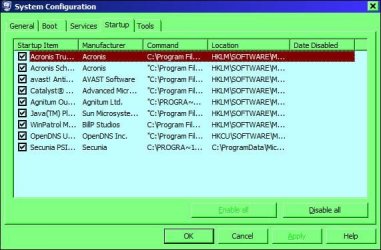
Type msconfig in start menu search box, look in startup tab. If it's there, disable it, if not, all the better. I await your reply.
 

My Computer

Computer Manufacturer/Model Number
Look in my Signature.
OS
Win7 H.Prem. 32bit+SP1
I did not understand your instructions. I am familiar with the system configuration ap.
 

My Computer

Computer Manufacturer/Model Number
Asus G73JH
OS
Windows Home 64 Bit
CPU
i7 720 1.6
Motherboard
Asus
Memory
6GB
Graphics Card(s)
ATI 5870
Hard Drives
500GB
I did not understand your instructions. I am familiar with the system configuration ap.
Neither do I having read my last post. Here's the image I forgot to add.
Type msconfig in start menu search box and press enter.

RR.JPG
 

My Computer

Computer Manufacturer/Model Number
Look in my Signature.
OS
Win7 H.Prem. 32bit+SP1
No I got that, I even have a link to it in my custom buttons folder. What are you saying to deactivate? I still want the defender up and running against attacks, otherwise I would just slide the defender security level slider down, but this is not recommended or wise.
 

My Computer

Computer Manufacturer/Model Number
Asus G73JH
OS
Windows Home 64 Bit
CPU
i7 720 1.6
Motherboard
Asus
Memory
6GB
Graphics Card(s)
ATI 5870
Hard Drives
500GB
I was referring to your program that's causing the problem.
 

My Computer

Computer Manufacturer/Model Number
Look in my Signature.
OS
Win7 H.Prem. 32bit+SP1
Okay, the problem is not that the warning alert happens at random, but when I launch the program to use it, which I do a lot. The question was how to stop that alert from happening when I launch the program.
 
Last edited:

My Computer

Computer Manufacturer/Model Number
Asus G73JH
OS
Windows Home 64 Bit
CPU
i7 720 1.6
Motherboard
Asus
Memory
6GB
Graphics Card(s)
ATI 5870
Hard Drives
500GB
If your familiar in setting it to run at start up using Task Scheduler try it.
 

My Computer

Computer Manufacturer/Model Number
Look in my Signature.
OS
Win7 H.Prem. 32bit+SP1
I do not run the program at start up. I launch the program as I need to use it. At that time, when I launch the program to use it, the alert goes off, and at no other time. The problem is, can you make it so that when you launch the program to use it, you do not get that warning dialog, asking if it is okay for the program to make changes to the computer. if you have an email I can email you a link to download the program and try it and see what I am talking about.
 

My Computer

Computer Manufacturer/Model Number
Asus G73JH
OS
Windows Home 64 Bit
CPU
i7 720 1.6
Motherboard
Asus
Memory
6GB
Graphics Card(s)
ATI 5870
Hard Drives
500GB
Okay you are clearly not understanding what I think was a very clear explanation, several times, thus I am moving on.
 

My Computer

Computer Manufacturer/Model Number
Asus G73JH
OS
Windows Home 64 Bit
CPU
i7 720 1.6
Motherboard
Asus
Memory
6GB
Graphics Card(s)
ATI 5870
Hard Drives
500GB
Hello Nemai,

If you have not already, see if adding the folder and/or .exe file of this folder in the Excluded files and folders under Tools and Options in Windows Defender to see if that may stop the alert when you launch the program.

Windows_Defender.jpg

Hope this helps,
Shawn
 

My Computer

Computer type
PC/Desktop
Computer Manufacturer/Model Number
Self built custom
OS
64-bit Windows 11 Pro for Workstations
CPU
Intel i7-8700K OC'd to 5 GHz
Motherboard
ASUS ROG Maximus XI Formula Z390
Memory
64 GB (4x16GB) G.SKILL TridentZ RGB DDR4 3600 MHz
Graphics Card(s)
ASUS ROG-STRIX-GTX1080TI-O11G-GAMING
Sound Card
Integrated
Monitor(s) Displays
2 x Samsung Odyssey G7 27"
Screen Resolution
2560x1440
Hard Drives
1TB Samsung 990 PRO M.2,
4TB Samsung 990 PRO PRO M.2,
TerraMaster F8 SSD Plus NAS
PSU
Seasonic Prime Titanium 850W
Case
Thermaltake Core P3
Cooling
Corsair Hydro H115i
Keyboard
Logitech wireless K800
Mouse
Logitech MX Master 4
Internet Speed
2 Gb/s Download and 100 Mb/s Upload
Antivirus
Malwarebyte Anti-Malware Premium
Browser
Google Chrome
Other Info
Logitech Z625 speaker system,
Logitech BRIO 4K Pro webcam,
HP Color LaserJet Pro MFP M477fdn,
APC SMART-UPS RT 1000 XL - SURT1000XLI,
Galaxy S23 Plus phone
Defender Tool Options

You can see here every folder and application possibility is included: does not affect the warning that goes off when you launch the program.

2011-12-15_060210.png
 

My Computer

Computer Manufacturer/Model Number
Asus G73JH
OS
Windows Home 64 Bit
CPU
i7 720 1.6
Motherboard
Asus
Memory
6GB
Graphics Card(s)
ATI 5870
Hard Drives
500GB
After digging and looking some more, I'm not sure that you are getting this message from Windows Defender.

First, I would clear those exclusion entries so that Windows Defender will be able to scan those locations for malware to be safe.

Next, you could use the tutorial below to disable the Open File Security Warning messages. In the example screenshots at the link below, check to see if those are the messages you are getting.

http://www.sevenforums.com/tutorials/182353-open-file-security-warning-enable-disable.html
 

My Computer

Computer type
PC/Desktop
Computer Manufacturer/Model Number
Self built custom
OS
64-bit Windows 11 Pro for Workstations
CPU
Intel i7-8700K OC'd to 5 GHz
Motherboard
ASUS ROG Maximus XI Formula Z390
Memory
64 GB (4x16GB) G.SKILL TridentZ RGB DDR4 3600 MHz
Graphics Card(s)
ASUS ROG-STRIX-GTX1080TI-O11G-GAMING
Sound Card
Integrated
Monitor(s) Displays
2 x Samsung Odyssey G7 27"
Screen Resolution
2560x1440
Hard Drives
1TB Samsung 990 PRO M.2,
4TB Samsung 990 PRO PRO M.2,
TerraMaster F8 SSD Plus NAS
PSU
Seasonic Prime Titanium 850W
Case
Thermaltake Core P3
Cooling
Corsair Hydro H115i
Keyboard
Logitech wireless K800
Mouse
Logitech MX Master 4
Internet Speed
2 Gb/s Download and 100 Mb/s Upload
Antivirus
Malwarebyte Anti-Malware Premium
Browser
Google Chrome
Other Info
Logitech Z625 speaker system,
Logitech BRIO 4K Pro webcam,
HP Color LaserJet Pro MFP M477fdn,
APC SMART-UPS RT 1000 XL - SURT1000XLI,
Galaxy S23 Plus phone
Okay thanks I will look into it.
 

My Computer

Computer Manufacturer/Model Number
Asus G73JH
OS
Windows Home 64 Bit
CPU
i7 720 1.6
Motherboard
Asus
Memory
6GB
Graphics Card(s)
ATI 5870
Hard Drives
500GB
Back
Top