Solved programme files

maurylen

New member
Local time
2:29 PM
Messages
42
Location
Tauranga
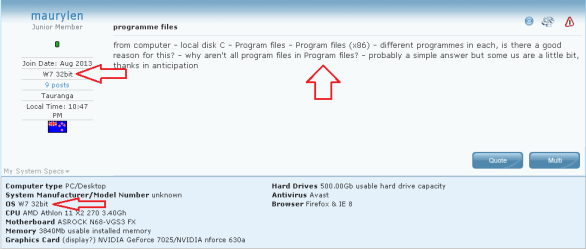
from computer - local disk C - Program files - Program files (x86) - different programmes in each, is there a good reason for this? - why aren't all program files in Program files? - probably a simple answer but some us are a little bit, thanks in anticipation
 

My Computer

Computer type
PC/Desktop
Computer Manufacturer/Model Number
unknown
OS
Windows 7 Home Premium (x64) Service Pack 1 (build 7601)
CPU
AMD Athlon 11 X2 270 3.40Gh
Motherboard
ASROCK N68-VGS3 FX
Memory
3840Mb usable installed memory
Graphics Card(s)
(display?) NVIDIA GeForce 7025/NVIDIA nforce 630a
Hard Drives
500.00Gb usable hard drive capacity
Antivirus
Avast
Browser
Firefox & IE 8
Hi, Welcome to Seven forums.

If you have Win 7 you will see these 2 folders. As Win 7 comes as 32 and 64 bit. Folder with (x86) is for those programs which are 32 bit compatible. And the other folder will contain all those programs which are available in 64 bit.
This is normal.

Hope this helps.
 

My Computer

Computer type
PC/Desktop
Computer Manufacturer/Model Number
Custom Bulid/Self made
OS
Windows 11 x64
CPU
i5 2500K @ 3.3 GHz
Motherboard
ASUS P8 Z77 V pro
Memory
16 GB DDR 3 @ 1600Mhz
Graphics Card(s)
MSI 1050TI 4GB OC version
Sound Card
On Board (Realtek HD audio)
Monitor(s) Displays
Samsung 22" LCD
Screen Resolution
1920*1080
Hard Drives
Seagate 1 TB, WD 1TB, Seagate 2 TB ( I use a lot of space)
PSU
coolermaster 750 W
Case
Coolermaster HAF912
Cooling
Coolermaster hyper 212 EVO
Keyboard
Samsung
Mouse
Dell Wireless
Internet Speed
Wireless 50 Mbps
Antivirus
AVG 2016 Internet Security
Browser
Google Chrome
thanks Archer, system W7 64 bit, i understand your reply so no worries - I knew it would be simple!! cheers Maurylen
 

My Computer

Computer type
PC/Desktop
Computer Manufacturer/Model Number
unknown
OS
Windows 7 Home Premium (x64) Service Pack 1 (build 7601)
CPU
AMD Athlon 11 X2 270 3.40Gh
Motherboard
ASROCK N68-VGS3 FX
Memory
3840Mb usable installed memory
Graphics Card(s)
(display?) NVIDIA GeForce 7025/NVIDIA nforce 630a
Hard Drives
500.00Gb usable hard drive capacity
Antivirus
Avast
Browser
Firefox & IE 8
Glad I was able to help. :)
 

My Computer

Computer type
PC/Desktop
Computer Manufacturer/Model Number
Custom Bulid/Self made
OS
Windows 11 x64
CPU
i5 2500K @ 3.3 GHz
Motherboard
ASUS P8 Z77 V pro
Memory
16 GB DDR 3 @ 1600Mhz
Graphics Card(s)
MSI 1050TI 4GB OC version
Sound Card
On Board (Realtek HD audio)
Monitor(s) Displays
Samsung 22" LCD
Screen Resolution
1920*1080
Hard Drives
Seagate 1 TB, WD 1TB, Seagate 2 TB ( I use a lot of space)
PSU
coolermaster 750 W
Case
Coolermaster HAF912
Cooling
Coolermaster hyper 212 EVO
Keyboard
Samsung
Mouse
Dell Wireless
Internet Speed
Wireless 50 Mbps
Antivirus
AVG 2016 Internet Security
Browser
Google Chrome
thanks Archer, system W7 64 bit, i understand your reply so no worries - I knew it would be simple!! cheers Maurylen
You have your answer - so I hope that I don't make things worse with a bit more info:

If the operating system is 64bit, then:
Program Files usually* holds 64bit programs
and
Program Files (x86) usually* holds 32bit programs.


If the operating system is 32bit, then:
Program Files holds 32bit programs.

This "Program Files / Program Files (x86)" folder scheme has been used since XP.

*I said usually since those writing programs can mess up and cause a 64bit app it install into the Program Files (x86) folder and/or the user can force the install to go into the wrong folder. I do not think that I've ever seen it matter if a 64bit app ends up in the Program Files (x86) folder.
 

My Computer

Computer type
Laptop
Computer Manufacturer/Model Number
Employer provided Dell Latitude
OS
W7 Pro SP1 64bit
CPU
i7
Memory
8GB
Graphics Card(s)
Intel HD Graphics
Hard Drives
crappy SSD
Antivirus
Employer mandated Symantec Endpoint Protection
Browser
Pale Moon 64bit, IE11 64bit & Chrome 64bit
from computer - local disk C - Program files - Program files (x86) - different programmes in each, is there a good reason for this? - why aren't all program files in Program files? - probably a simple answer but some us are a little bit, thanks in anticipation
You might have more than one computer or your System Spec info might need to be updated to indicate W7 64bit.

32.png

You can update your system specs via this link:
http://www.sevenforums.com/profile.php?do=extra
 

My Computer

Computer type
Laptop
Computer Manufacturer/Model Number
Employer provided Dell Latitude
OS
W7 Pro SP1 64bit
CPU
i7
Memory
8GB
Graphics Card(s)
Intel HD Graphics
Hard Drives
crappy SSD
Antivirus
Employer mandated Symantec Endpoint Protection
Browser
Pale Moon 64bit, IE11 64bit & Chrome 64bit
program files

username issues - I never noticed that 32bit entry??? - info from control panel - system - system type - 64bit OS - so i assumed it was 64 bit
 

My Computer

Computer type
PC/Desktop
Computer Manufacturer/Model Number
unknown
OS
Windows 7 Home Premium (x64) Service Pack 1 (build 7601)
CPU
AMD Athlon 11 X2 270 3.40Gh
Motherboard
ASROCK N68-VGS3 FX
Memory
3840Mb usable installed memory
Graphics Card(s)
(display?) NVIDIA GeForce 7025/NVIDIA nforce 630a
Hard Drives
500.00Gb usable hard drive capacity
Antivirus
Avast
Browser
Firefox & IE 8
The computer where you see that system type info is 64bit. I was just suggesting that you manually update the info in the forum so that members will not give you the wrong advice someday.

You can use this link http://www.sevenforums.com/profile.php?do=extra to change then save that forum info.
 

My Computer

Computer type
Laptop
Computer Manufacturer/Model Number
Employer provided Dell Latitude
OS
W7 Pro SP1 64bit
CPU
i7
Memory
8GB
Graphics Card(s)
Intel HD Graphics
Hard Drives
crappy SSD
Antivirus
Employer mandated Symantec Endpoint Protection
Browser
Pale Moon 64bit, IE11 64bit & Chrome 64bit
program files

thanks for that, updated, till next time, cheers from "Down Under"
 

My Computer

Computer type
PC/Desktop
Computer Manufacturer/Model Number
unknown
OS
Windows 7 Home Premium (x64) Service Pack 1 (build 7601)
CPU
AMD Athlon 11 X2 270 3.40Gh
Motherboard
ASROCK N68-VGS3 FX
Memory
3840Mb usable installed memory
Graphics Card(s)
(display?) NVIDIA GeForce 7025/NVIDIA nforce 630a
Hard Drives
500.00Gb usable hard drive capacity
Antivirus
Avast
Browser
Firefox & IE 8
I would just make a guess, not sure at all, but that separation may be only due to a convention only, but I don't think there is any technical limitation for such a thing. Programs may even install to any of those two folders and still they work happily. Just as a way to differentiate 32 and 64 bits programs.

The only "good" reason for that separation to exist that I can think is to easily allow a side-by-side installation of both versions of a program at the same time. In a few cases, it may be desirable to have both at the same time, and use one or another when needed. A prime example of that is the built-in IE (due to add-ins not loading in the wrong version). A media player for example might be another good candidate, since codecs need to be 32/64 bits specific too. Those cases are trivial to make with that folder separation.
 

My Computer

Computer type
Laptop
Computer Manufacturer/Model Number
Toshiba Sattelite A665-S6092
OS
Windows 7 Ultimate x64
CPU
Intel Core i7-740QM
Memory
8 GB DDR3
Graphics Card(s)
NVIDIA GeForce 330GT
Screen Resolution
1366x768
Hard Drives
Samsung 840 SSD 500GB
1TB USB3 external HD
Cooling
Coolermaster Notepal U3 notebook cooling pad
Internet Speed
3mbps ASDL
Antivirus
ClamWin 0.98.7
Browser
Opera 12.17 x86 (main), Firefox 38 (sec), IE11 (last resort)
Back
Top