
Programs and Features - Uninstall or Change a Program

How to Uninstall, Change, or Repair a Program in Windows 7 and Windows 8

   Information
You can uninstall a program from your computer if you no longer use it or if you want to free up space on your hard disk.

This will show you how to use Programs and Features in the Control Panel to view, uninstall, change, or repair programs that are currently installed in Windows 7 and Windows 8.

In Windows 8, this would be for desktop programs only, and not to uninstall Store apps.

In Windows XP, this would have been in Add and Remove Programs instead.

   Tip

  • If the program you want to uninstall is not listed in Programs and Features, then it may not have been written for this version of Windows. To uninstall the program, check the information that came with the program, or go to the program publisher's/manufacturer's website. Most programs install automatically in the C:\Program Files folder (OPTION THREE below). Look in this folder some programs also include an uninstall program that you can use.
  • Programs and features included with Windows 7 can be turned off in Windows Features.
  • If the program doesn't uninstall completely the first time, sometimes running the uninstall program a second time will succeed.
  • If the above option doesn't work, try uninstalling the program while Windows 7 is running in safe mode.
  • If you installed the program recently, you can try using System Restore to return your computer's system files to an earlier restore point dated before you installed the program.


OPTION ONE

Uninstall a Program in Programs and Features


1. Open the Control Panel (icons view) Windows 7 or Windows 8, and click/tap on Programs and Features.

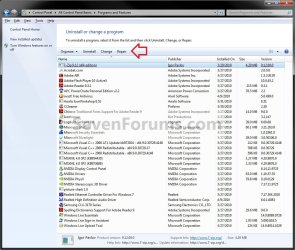
2. Select a listed program (ex: 7-Zip) to highlight it and see the available options on the toolbar for that program. (see screenshot below)

NOTE: The options will be either Uninstall, Change, Uninstall/Change, Repair, or Change/Repair. A program may not have all the options available for it.
  • If mouse is set to single click, then hover the mouse pointer over the listed program to select it.
  • If mouse is set to double click, then left click once on the listed program to select it.
Programs_and_Features.jpg
3. To Uninstall the Program
A) Click/tap on the Uninstall or Uninstall/Change (depending on the button displayed) toolbar button. (see screenshot above)
OR
B) Double click/tap on the selected program.
OR
C) Right click on the selected program, and click/tap on Uninstall or Uninstall/Change (depending on the option available).

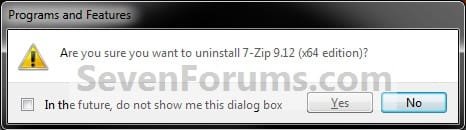
D) If you had only the Uninstall option, then you may need click/tap on Yes. (see screenshot below)
Uninstall.jpg
E) If prompted by UAC, then click/tap on Yes (if administrator) or type in the administrator's password (if standard user).

F) Follow the rest of the onscreen instructions to uninstall the program, then go to step 6.
NOTE: Some programs may require a restart afterwards.
4. To Change the Program
NOTE: This will allow you to install or uninstall optional features of the program without uninstalling it. Not all programs use the Change button, and may offer only Uninstall.
A) Click/tap on the Change or Uninstall/Change (depending on the button displayed) toolbar button. (see screenshot above)
OR
B) Right click on the selected program, and click/tap on Change or Uninstall/Change (depending on the option available).

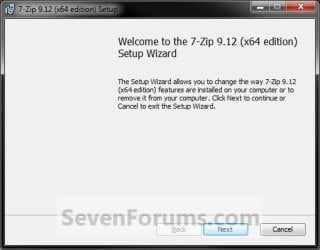
C) Follow the rest of the onscreen instructions to change the program (ex: 7-Zip), then go to step 6. (see screenshot below)
NOTE: Some programs may require a restart afterwards.
Change.jpg
5. To Repair the Program
NOTE: Repair is usually used when you want corrupted files and settings replaced with original ones from the selected program's installation program. Sometimes the entire program is just reinstalled with all files overwritten and settings returned to default for the selected program. Not all programs will have a "Repair" button, and may many offer only Uninstall.
A) Click/tap on the Repair or Change/Repair (depending on the button displayed) toolbar button. (see screenshot above)
OR
B) Right click on the selected program, and click/tap on Repair or Change/Repair (depending on the option available).

C) Follow the rest of the onscreen instructions to repair the program, then go to step 6.
NOTE: Some programs may require a restart afterwards.
6. When finished, close Program and Features.


OPTION TWO

Uninstall a Program from the Start Menu


NOTE: Some programs will add a shortcut in the Start Menu All Programs area that includes an option to uninstall it. This option is only available in Windows 7.
1. Open the Start Menu, and click on All Programs.

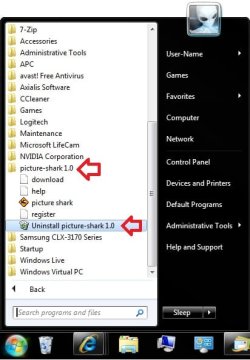
2. Click on the program's folder (ex: picture-shark) to expand it. (see screenshot below)
Start_Menu.jpg
3. If available, click on the program's uninstaller shortcut. (see screenshot above)

4. If prompted by UAC, then click on Yes (if administrator) or type in the administrator's password (if standard user).

5. Follow the rest of the onscreen instructions to uninstall the program.
NOTE: Some programs may require a restart afterwards.


OPTION THREE

Uninstall a Program from it's Program Files Folder


NOTE: If the program is not list in Programs and Features (OPTION ONE) and is not in the Start Menu (OPTION TWO), then you may be able to uninstall the program through the Program Files folder.
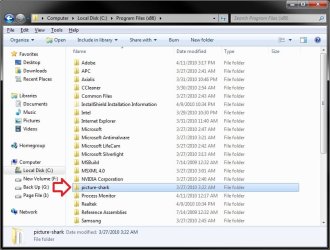
1. For 32-bit Windows 7/8, open the C:\Program Files folder, open the program's folder (ex: picture-shark), and go to step 3 below. (see screenshots below step 2)

2. For 64-bit Windows 7/8, open either the C:\Program Files folder for a installed 64-bit program or C:\Program Files (x86) folder for a installed 32-bit program, and open the program's folder (ex: picture-shark). (see screenshots below)
Program_Files-1.jpg

Program_Files-2.jpg
3. If available, click/tap on the program's uninstaller application file. (see right screenshot above)

4. If prompted by UAC, then click/tap on Yes (if administrator) or type in the administrator's password (if standard user).

5. Follow the rest of the onscreen instructions to uninstall the program.
NOTE: Some programs may require a restart afterwards.


OPTION FOUR

To Uninstall a Program in a Command Prompt


1. For how, see: How to Uninstall Programs using Command Prompt in Windows

That's it,
Shawn


Last edited:
Thanks for the info Brink - Al
 

My Computer

Computer Manufacturer/Model Number
Apple Macbook Pro (April 2009)
OS
W7 Ult. x64 | OS X
CPU
Intel Mobile Core 2 Duo 2.93Ghz [T9800 Penryn]
Motherboard
NVIDIA nForce 730i Rev. B1 [Mac-F2268EC8 (U2E1)]
Memory
4096MB Samsung DDR3 Dual Channel [PC3-8500F 1066Mhz]
Graphics Card(s)
NVIDIA GeForce 9600M GT 512MB [G96M Rev. C1]
Sound Card
SB X-Fi Surround 5.1 USB | Onboard Realtek (Disabled)
Monitor(s) Displays
Acer x223wbd 22" | Apple Anti-Glare 17" (Disabled)
Screen Resolution
{Current} 1440x900 {Acer} 1680x1050 {Apple} 1920x1200
Hard Drives
{Internal}
Seagate Momentus 320GB 2.5" 7200RPM [ST9320421AS]

{Externals}
LaCie 320GB USB 2.0 HDD [301284UR]
LaCie 750GB USB 2.0 FW400 eSATA HDD [301314U]
LaCie 1TB USB 2.0 HDD [301304UR]
PSU
Magsafe
Case
Aluminum/Unibody (MBP52)
Cooling
2 x 6000 RPM Fans
Keyboard
Logitech G-15v2 [PN 920-000379]
Mouse
Logitech G-9 [PN 910-000338]
Internet Speed
12Mbps/2.5Mbps w/ 24Mbps Speed Boost [Comcast]
Other Info
Logitech X-540 Speakers [PN 970223-0122]
Sennheiser PC-151 Headset
You're welcome Al.

I thought that it could be helpful to those that skipped Vista and are coming from Windows XP having Add and Remove Programs instead. :)
 

My Computer

Computer type
PC/Desktop
Computer Manufacturer/Model Number
Self built custom
OS
64-bit Windows 11 Pro for Workstations
CPU
Intel i7-8700K OC'd to 5 GHz
Motherboard
ASUS ROG Maximus XI Formula Z390
Memory
64 GB (4x16GB) G.SKILL TridentZ RGB DDR4 3600 MHz
Graphics Card(s)
ASUS ROG-STRIX-GTX1080TI-O11G-GAMING
Sound Card
Integrated
Monitor(s) Displays
2 x Samsung Odyssey G7 27"
Screen Resolution
2560x1440
Hard Drives
1TB Samsung 990 PRO M.2,
4TB Samsung 990 PRO PRO M.2,
TerraMaster F8 SSD Plus NAS
PSU
Seasonic Prime Titanium 850W
Case
Thermaltake Core P3
Cooling
Corsair Hydro H115i
Keyboard
Logitech wireless K800
Mouse
Logitech MX Master 4
Internet Speed
2 Gb/s Download and 100 Mb/s Upload
Antivirus
Malwarebyte Anti-Malware Premium
Browser
Google Chrome
Other Info
Logitech Z625 speaker system,
Logitech BRIO 4K Pro webcam,
HP Color LaserJet Pro MFP M477fdn,
APC SMART-UPS RT 1000 XL - SURT1000XLI,
Galaxy S23 Plus phone
Thanks for this article but i have a question and i am sorry if this is not in the correct area.

Re the program and features control panel applet, Is there a way that will prevent users (not local admins) the ability to view the installed software on their machine but not be able to unistall or change the software?

Jase
 

My Computer

OS
Windows 7 Enterprise 64bit
Hello Jase,

You can make the other user accounts to be "Standard" users. By default a standard user account will not be able to uninstall a program in "Programs & Features". When they try to, they will get a UAC prompt asking them to enter the administrator's password.

Hope this helps,
Shawn
 

My Computer

Computer type
PC/Desktop
Computer Manufacturer/Model Number
Self built custom
OS
64-bit Windows 11 Pro for Workstations
CPU
Intel i7-8700K OC'd to 5 GHz
Motherboard
ASUS ROG Maximus XI Formula Z390
Memory
64 GB (4x16GB) G.SKILL TridentZ RGB DDR4 3600 MHz
Graphics Card(s)
ASUS ROG-STRIX-GTX1080TI-O11G-GAMING
Sound Card
Integrated
Monitor(s) Displays
2 x Samsung Odyssey G7 27"
Screen Resolution
2560x1440
Hard Drives
1TB Samsung 990 PRO M.2,
4TB Samsung 990 PRO PRO M.2,
TerraMaster F8 SSD Plus NAS
PSU
Seasonic Prime Titanium 850W
Case
Thermaltake Core P3
Cooling
Corsair Hydro H115i
Keyboard
Logitech wireless K800
Mouse
Logitech MX Master 4
Internet Speed
2 Gb/s Download and 100 Mb/s Upload
Antivirus
Malwarebyte Anti-Malware Premium
Browser
Google Chrome
Other Info
Logitech Z625 speaker system,
Logitech BRIO 4K Pro webcam,
HP Color LaserJet Pro MFP M477fdn,
APC SMART-UPS RT 1000 XL - SURT1000XLI,
Galaxy S23 Plus phone
Thanks for the reply Brink.

In our corporate environmrnt we do not have UAC on. will this affect this?

Jase
 

My Computer

OS
Windows 7 Enterprise 64bit
You're welcome Jase.

A standard user will still not be able to uninstall a program with UAC turned off. They just will no longer get a UAC prompt when they try giving them a change to enter the administrator's password. That's all. :)
 

My Computer

Computer type
PC/Desktop
Computer Manufacturer/Model Number
Self built custom
OS
64-bit Windows 11 Pro for Workstations
CPU
Intel i7-8700K OC'd to 5 GHz
Motherboard
ASUS ROG Maximus XI Formula Z390
Memory
64 GB (4x16GB) G.SKILL TridentZ RGB DDR4 3600 MHz
Graphics Card(s)
ASUS ROG-STRIX-GTX1080TI-O11G-GAMING
Sound Card
Integrated
Monitor(s) Displays
2 x Samsung Odyssey G7 27"
Screen Resolution
2560x1440
Hard Drives
1TB Samsung 990 PRO M.2,
4TB Samsung 990 PRO PRO M.2,
TerraMaster F8 SSD Plus NAS
PSU
Seasonic Prime Titanium 850W
Case
Thermaltake Core P3
Cooling
Corsair Hydro H115i
Keyboard
Logitech wireless K800
Mouse
Logitech MX Master 4
Internet Speed
2 Gb/s Download and 100 Mb/s Upload
Antivirus
Malwarebyte Anti-Malware Premium
Browser
Google Chrome
Other Info
Logitech Z625 speaker system,
Logitech BRIO 4K Pro webcam,
HP Color LaserJet Pro MFP M477fdn,
APC SMART-UPS RT 1000 XL - SURT1000XLI,
Galaxy S23 Plus phone
Hiyya Shawn I am having problems with my IE9 and therefore I am trying to unistall IE9 from both my SSD - primary drive and the Seagate 1TB I have hooked up, and then reinstall as someone suggested the files may be corrupted.
Now I cannot find IE9 in Programs and Features in the SSD yet it is listed in Program files in both drives accessed by / through Computer
 

My Computer

Computer type
PC/Desktop
Computer Manufacturer/Model Number
Own build (new) Desk1 / Asus ROG Win 7 / Desk2 1st build
OS
Desk1 7 Home Prem / Desk2 10 Pro / Main lap Asus ROG 10 Pro 2 laptop Toshiba 7 Pro Asus P2520 7 & 10
CPU
Desk1 i5 3750K / Laptop i7 GTX 860M / Desk2 i5 2500
Motherboard
Desk1 Asus P877-V / Desk2 Gigabyte H67 UD3H / Laptop ?
Memory
Desk1 8GB (1866) / Desk2 16GB (1333) / Laptop 8Gb DDR3
Graphics Card(s)
Desk 1& 2NVidia GTX 650 & Laptops on board Intel
Sound Card
Desk 1 & 2 -XONAR DG Realtek High Def audio Laptop
Monitor(s) Displays
Desk 1 Benq HD 2450 / Desk2 Philips 24" / Laptop 17.5"
Screen Resolution
1920x1080 D1 & D2 & Laptop 1
Hard Drives
Desk1 Samsung 120GB 830 SSD
Asus ROG 256GB 850 Pro SSD
Desk2 Samsung 840 256 SSD
Toshiba 120GB EVO
PSU
Desk 1 Corsair HX 1050/ Laptop ? / Desk 2 Corsair HX 650
Case
Desk 1 Cooler HAF XM ? Toshiba laptop / Desk2 Coolermaster
Cooling
Fans on all Desk1 -2 Desk2 - all Coolermasters 5 Laptop ?
Keyboard
Desk 1 MS Sidewinder X6 Desk 2 MS Sidewinder X 4
Mouse
Desk 1&2 - Gigabyte MS 900 gamer - laptop - Logitec wireless
Internet Speed
ADSL2+
Other Info
One other Desktop (tester) and spare Toshba laptop both with SSD's
Running Kaspersky 2016 ISS on all machines config'd identically
Logitec audio stereo systems on each machine (x3)
Canon MG5250MFC
Router/modem TP-Link running WPA2SK

My Computer

Computer type
PC/Desktop
Computer Manufacturer/Model Number
Self built custom
OS
64-bit Windows 11 Pro for Workstations
CPU
Intel i7-8700K OC'd to 5 GHz
Motherboard
ASUS ROG Maximus XI Formula Z390
Memory
64 GB (4x16GB) G.SKILL TridentZ RGB DDR4 3600 MHz
Graphics Card(s)
ASUS ROG-STRIX-GTX1080TI-O11G-GAMING
Sound Card
Integrated
Monitor(s) Displays
2 x Samsung Odyssey G7 27"
Screen Resolution
2560x1440
Hard Drives
1TB Samsung 990 PRO M.2,
4TB Samsung 990 PRO PRO M.2,
TerraMaster F8 SSD Plus NAS
PSU
Seasonic Prime Titanium 850W
Case
Thermaltake Core P3
Cooling
Corsair Hydro H115i
Keyboard
Logitech wireless K800
Mouse
Logitech MX Master 4
Internet Speed
2 Gb/s Download and 100 Mb/s Upload
Antivirus
Malwarebyte Anti-Malware Premium
Browser
Google Chrome
Other Info
Logitech Z625 speaker system,
Logitech BRIO 4K Pro webcam,
HP Color LaserJet Pro MFP M477fdn,
APC SMART-UPS RT 1000 XL - SURT1000XLI,
Galaxy S23 Plus phone
Thanks Shawn was just a bit nonplussed by it not being in Programs & Features.:)

The fact that I have it installed on the second drive is not going to cause a problem is it?

Anyway I'll take it of this one for starters and reinstall see if that gets rid of the problem.:)
 

My Computer

Computer type
PC/Desktop
Computer Manufacturer/Model Number
Own build (new) Desk1 / Asus ROG Win 7 / Desk2 1st build
OS
Desk1 7 Home Prem / Desk2 10 Pro / Main lap Asus ROG 10 Pro 2 laptop Toshiba 7 Pro Asus P2520 7 & 10
CPU
Desk1 i5 3750K / Laptop i7 GTX 860M / Desk2 i5 2500
Motherboard
Desk1 Asus P877-V / Desk2 Gigabyte H67 UD3H / Laptop ?
Memory
Desk1 8GB (1866) / Desk2 16GB (1333) / Laptop 8Gb DDR3
Graphics Card(s)
Desk 1& 2NVidia GTX 650 & Laptops on board Intel
Sound Card
Desk 1 & 2 -XONAR DG Realtek High Def audio Laptop
Monitor(s) Displays
Desk 1 Benq HD 2450 / Desk2 Philips 24" / Laptop 17.5"
Screen Resolution
1920x1080 D1 & D2 & Laptop 1
Hard Drives
Desk1 Samsung 120GB 830 SSD
Asus ROG 256GB 850 Pro SSD
Desk2 Samsung 840 256 SSD
Toshiba 120GB EVO
PSU
Desk 1 Corsair HX 1050/ Laptop ? / Desk 2 Corsair HX 650
Case
Desk 1 Cooler HAF XM ? Toshiba laptop / Desk2 Coolermaster
Cooling
Fans on all Desk1 -2 Desk2 - all Coolermasters 5 Laptop ?
Keyboard
Desk 1 MS Sidewinder X6 Desk 2 MS Sidewinder X 4
Mouse
Desk 1&2 - Gigabyte MS 900 gamer - laptop - Logitec wireless
Internet Speed
ADSL2+
Other Info
One other Desktop (tester) and spare Toshba laptop both with SSD's
Running Kaspersky 2016 ISS on all machines config'd identically
Logitec audio stereo systems on each machine (x3)
Canon MG5250MFC
Router/modem TP-Link running WPA2SK
Anytime mate.

It could cause a issue to have IE9 installed at two different locations since it will still adds registry entries to reference where it was installed. Most likely, all references will be for the last location that you installed IE9 to.
 

My Computer

Computer type
PC/Desktop
Computer Manufacturer/Model Number
Self built custom
OS
64-bit Windows 11 Pro for Workstations
CPU
Intel i7-8700K OC'd to 5 GHz
Motherboard
ASUS ROG Maximus XI Formula Z390
Memory
64 GB (4x16GB) G.SKILL TridentZ RGB DDR4 3600 MHz
Graphics Card(s)
ASUS ROG-STRIX-GTX1080TI-O11G-GAMING
Sound Card
Integrated
Monitor(s) Displays
2 x Samsung Odyssey G7 27"
Screen Resolution
2560x1440
Hard Drives
1TB Samsung 990 PRO M.2,
4TB Samsung 990 PRO PRO M.2,
TerraMaster F8 SSD Plus NAS
PSU
Seasonic Prime Titanium 850W
Case
Thermaltake Core P3
Cooling
Corsair Hydro H115i
Keyboard
Logitech wireless K800
Mouse
Logitech MX Master 4
Internet Speed
2 Gb/s Download and 100 Mb/s Upload
Antivirus
Malwarebyte Anti-Malware Premium
Browser
Google Chrome
Other Info
Logitech Z625 speaker system,
Logitech BRIO 4K Pro webcam,
HP Color LaserJet Pro MFP M477fdn,
APC SMART-UPS RT 1000 XL - SURT1000XLI,
Galaxy S23 Plus phone
Ok Shawn got that but I ended up having to install from a stick after downloading it from my other 7 machine. Wouldn't go at all on this one.
Am going to do a full scan in a minute as I had some little nasty found this am that maybe the cause of the problem. Got rid of it with MBAM but want to do that with the security suite as well to make sure.:)
 

My Computer

Computer type
PC/Desktop
Computer Manufacturer/Model Number
Own build (new) Desk1 / Asus ROG Win 7 / Desk2 1st build
OS
Desk1 7 Home Prem / Desk2 10 Pro / Main lap Asus ROG 10 Pro 2 laptop Toshiba 7 Pro Asus P2520 7 & 10
CPU
Desk1 i5 3750K / Laptop i7 GTX 860M / Desk2 i5 2500
Motherboard
Desk1 Asus P877-V / Desk2 Gigabyte H67 UD3H / Laptop ?
Memory
Desk1 8GB (1866) / Desk2 16GB (1333) / Laptop 8Gb DDR3
Graphics Card(s)
Desk 1& 2NVidia GTX 650 & Laptops on board Intel
Sound Card
Desk 1 & 2 -XONAR DG Realtek High Def audio Laptop
Monitor(s) Displays
Desk 1 Benq HD 2450 / Desk2 Philips 24" / Laptop 17.5"
Screen Resolution
1920x1080 D1 & D2 & Laptop 1
Hard Drives
Desk1 Samsung 120GB 830 SSD
Asus ROG 256GB 850 Pro SSD
Desk2 Samsung 840 256 SSD
Toshiba 120GB EVO
PSU
Desk 1 Corsair HX 1050/ Laptop ? / Desk 2 Corsair HX 650
Case
Desk 1 Cooler HAF XM ? Toshiba laptop / Desk2 Coolermaster
Cooling
Fans on all Desk1 -2 Desk2 - all Coolermasters 5 Laptop ?
Keyboard
Desk 1 MS Sidewinder X6 Desk 2 MS Sidewinder X 4
Mouse
Desk 1&2 - Gigabyte MS 900 gamer - laptop - Logitec wireless
Internet Speed
ADSL2+
Other Info
One other Desktop (tester) and spare Toshba laptop both with SSD's
Running Kaspersky 2016 ISS on all machines config'd identically
Logitec audio stereo systems on each machine (x3)
Canon MG5250MFC
Router/modem TP-Link running WPA2SK
There was update for flash player, programs features would not let me uninstall the old version saying it was in use, but I had FF closed, nothing was opened, so I rebooted PC, it fixed problem
 

My Computer

Computer Manufacturer/Model Number
Scorpion Technology
OS
Windows 7 64 bit Home Premium
CPU
Intel Core Quad i7 870(2.93 Ghz /8MB /Quad Core
Motherboard
Gigabyte GA-P55- USB3 Intel
Memory
Kingston 4 GB Kit (2x2GB) PC-10600 (1333MHz) DDR3
Graphics Card(s)
Gainward Geforce GTS-450 (930Mhz), 1GB GDDDR5 (4000Mhz)
Sound Card
Onboard 7.1 Channel
Screen Resolution
1440x900
Hard Drives
1TB Santa111 64MB Cache 7200 RPM
PSU
Antec 750W
Back
Top