
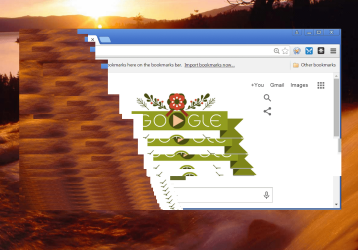
VLC and Chrome, among other programs, work fine in my virtual machine when I use extended screens (I use 3 screens). VLC and Chrome can not maintain an image on my host when I use an extended screen. Since, I know it is possible for those programs to use the extended screens I'm guessing there must be a setting on my host machine that is causing the problem, but I have no idea about what setting needs to be changed.
It seems significant to me that everything worked fine until I reinstalled Windows 7 Home Premium on my Host (HP Envy Laptop). I reinstalled the same software, but there have been updates to software, so I'm thinking some software update must have made the change. The VM image was saved so I simply moved the file back onto the host so that image didn't change.
I use MS Security Essentials.
Would appreciate help.
It seems significant to me that everything worked fine until I reinstalled Windows 7 Home Premium on my Host (HP Envy Laptop). I reinstalled the same software, but there have been updates to software, so I'm thinking some software update must have made the change. The VM image was saved so I simply moved the file back onto the host so that image didn't change.
I use MS Security Essentials.
Would appreciate help.
Attachments


Last edited:
My Computer
- OS
- 64
