Programs main execution file's changed from original, cant be seen

woomera

New member
Local time
1:09 AM
Messages
9
Recently i noticed i cannot find some of my programs main exe files while i could access their shortcuts via start menu.
From folder options i enabled showing of system files and there they were, visible again.
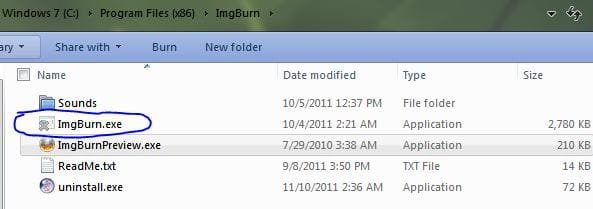
Programs like IMGBurn,Process hacker and some others.
also their icons are replaced to one of the system default ones.
i have attached an image from imgburn.exe file. anyone knows whats causing this?

thanks
 

Attachments
  • Capture.JPG
    Capture.JPG
    24.1 KB · Views: 22

My Computer

OS
Windows 7 X64

My Computer

Computer Manufacturer/Model Number
Custom
OS
Windows 7 Pro x64 -- PCLinuxOS KDE4 FullMonty 2011
CPU
i7-875k @ Turbo - 7,6,5,5 - 3.6ghz
Motherboard
Asus P7P55D-E Deluxe
Memory
Corsair CMD8GX3M4A1600C8 8gb
Graphics Card(s)
Asus EAH5850 DirectCU/2DIS/1GD5
Sound Card
On Board
Monitor(s) Displays
Samsung SyncMaster T220 - Panasonic VT30a 50"
Screen Resolution
1680x1050 -
Hard Drives
Corsair Force 3 SSD 120GB x 2 ::
WD VelociRaptor 150GB WD1500HLFS x 2
PSU
Corsair HX-850 Power Supply
Case
Coolmaster HAF 932
Cooling
Corsair H50
Keyboard
Logitech Wireless MK700
Mouse
Logitech Wireless MX620
Internet Speed
Good enough for now
Other Info
Voip. Insanely cheap phone calls.
thanks for the reply but it didnt work. this is simply annoying. :|
 

My Computer

OS
Windows 7 X64
Was any other software installed around the time this started happening?
 

My Computer

OS
XP / Win7 x64 Pro
CPU
Intel Quad-Core Q9450 @ 3.2GHz
Motherboard
Asus P5-E
Memory
2x2GB GSkill DDR2
Graphics Card(s)
NVIDIA GeForce 8600 GTS (EVGA)
Monitor(s) Displays
Dell 2408WFP
Screen Resolution
1920x1200
Hello Woomera, and welcome to Seven Forums.

You might also consider doing a system restore using a restore point dated before this happened to hopefully undo and fix this.

Hope this helps,
Shawn
 

My Computer

Computer type
PC/Desktop
Computer Manufacturer/Model Number
Self built custom
OS
64-bit Windows 11 Pro for Workstations
CPU
Intel i7-8700K OC'd to 5 GHz
Motherboard
ASUS ROG Maximus XI Formula Z390
Memory
64 GB (4x16GB) G.SKILL TridentZ RGB DDR4 3600 MHz
Graphics Card(s)
ASUS ROG-STRIX-GTX1080TI-O11G-GAMING
Sound Card
Integrated
Monitor(s) Displays
2 x Samsung Odyssey G7 27"
Screen Resolution
2560x1440
Hard Drives
1TB Samsung 990 PRO M.2,
4TB Samsung 990 PRO PRO M.2,
TerraMaster F8 SSD Plus NAS
PSU
Seasonic Prime Titanium 850W
Case
Thermaltake Core P3
Cooling
Corsair Hydro H115i
Keyboard
Logitech wireless K800
Mouse
Logitech MX Master 4
Internet Speed
2 Gb/s Download and 100 Mb/s Upload
Antivirus
Malwarebyte Anti-Malware Premium
Browser
Google Chrome
Other Info
Logitech Z625 speaker system,
Logitech BRIO 4K Pro webcam,
HP Color LaserJet Pro MFP M477fdn,
APC SMART-UPS RT 1000 XL - SURT1000XLI,
Galaxy S23 Plus phone
@Fligi
my guess is that one of the security softwares have caused this but in my few years messing with these stuffs ive never seen something like this.

@Brink
unfortunately i dont have restore points that points past this.

i currently have emsisoft AM and bitdefender IS installed which are running for on-access scans. to my knowledge none of the 2 causes such behavior.

to be honest im not really concerned about this but rather really really curious.
 

My Computer

OS
Windows 7 X64
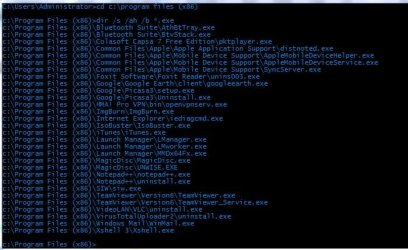
It sounds as if something changed multiple excecutables within your x86 folder? Does this imply that these directory entries were physically altered to now have these executables be hidden?

From your x86 folder, would issuing this help identify more about the problem:

dir /s /ah /b *.exe

to find all hidden files with .exe suffixes?

Maybe a pattern will emerge.
 

My Computer

Computer type
PC/Desktop
Computer Manufacturer/Model Number
Custom
OS
Windows 7
CPU
AMD Phenom II X2 (dual-core)
Motherboard
GA-MA785GM-US2H
Memory
4G
Graphics Card(s)
integrated ATI HD 4200
Sound Card
integrated
Monitor(s) Displays
Samsung 24"
Screen Resolution
1920x1080
Hard Drives
1 SSD - Samsung 840 - 500 GB - OS and DATA partitions
1 SSD - Intel 320 - 120 GB (used for backups) - Misc/BACKUP
1 SATA HD - WD, 500 GB - BACKUP
PSU
Ultra X4 500W
Case
Ultra X-blaster
Keyboard
Microsoft Digital Media Pro
Mouse
Logitech WIRED!
Internet Speed
15 Mbps FIOS
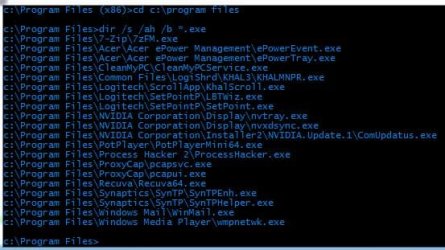
not just the x86 program files folder. have attached the result from both.
 

Attachments

  • Capture.JPG
    Capture.JPG
    65.4 KB · Views: 6
  • Capture2.JPG
    Capture2.JPG
    43.3 KB · Views: 2

My Computer

OS
Windows 7 X64
not just the x86 program files folder. have attached the result from both.

So, based on those screens, are we to assume that "all" your .exe files within OS drive \ Program Files (both 32 and 64-bit) have been alterd to now be hidden?

What if you issue the DIR command again but withOUT the *.exe part. Maybe every single file of any kind is now set to be hidden in those directories??
 

My Computer

Computer type
PC/Desktop
Computer Manufacturer/Model Number
Custom
OS
Windows 7
CPU
AMD Phenom II X2 (dual-core)
Motherboard
GA-MA785GM-US2H
Memory
4G
Graphics Card(s)
integrated ATI HD 4200
Sound Card
integrated
Monitor(s) Displays
Samsung 24"
Screen Resolution
1920x1080
Hard Drives
1 SSD - Samsung 840 - 500 GB - OS and DATA partitions
1 SSD - Intel 320 - 120 GB (used for backups) - Misc/BACKUP
1 SATA HD - WD, 500 GB - BACKUP
PSU
Ultra X4 500W
Case
Ultra X-blaster
Keyboard
Microsoft Digital Media Pro
Mouse
Logitech WIRED!
Internet Speed
15 Mbps FIOS
not just the x86 program files folder. have attached the result from both.

So, based on those screens, are we to assume that "all" your .exe files within OS drive \ Program Files (both 32 and 64-bit) have been alterd to now be hidden?

What if you issue the DIR command again but withOUT the *.exe part. Maybe every single file of any kind is now set to be hidden in those directories??

Actually no, just those. many are untouched.
 

My Computer

OS
Windows 7 X64
Actually no, just those. many are untouched.


What are the last modified/last access dates on those .exe files that are hidden?
 

My Computer

Computer type
PC/Desktop
Computer Manufacturer/Model Number
Custom
OS
Windows 7
CPU
AMD Phenom II X2 (dual-core)
Motherboard
GA-MA785GM-US2H
Memory
4G
Graphics Card(s)
integrated ATI HD 4200
Sound Card
integrated
Monitor(s) Displays
Samsung 24"
Screen Resolution
1920x1080
Hard Drives
1 SSD - Samsung 840 - 500 GB - OS and DATA partitions
1 SSD - Intel 320 - 120 GB (used for backups) - Misc/BACKUP
1 SATA HD - WD, 500 GB - BACKUP
PSU
Ultra X4 500W
Case
Ultra X-blaster
Keyboard
Microsoft Digital Media Pro
Mouse
Logitech WIRED!
Internet Speed
15 Mbps FIOS
not just the x86 program files folder. have attached the result from both.

So, based on those screens, are we to assume that "all" your .exe files within OS drive \ Program Files (both 32 and 64-bit) have been alterd to now be hidden?

What if you issue the DIR command again but withOUT the *.exe part. Maybe every single file of any kind is now set to be hidden in those directories??

Actually no, just those. many are untouched.

Woomera,

Until a cause and better solution is found, you might see if using the context menu from the tutorial below may help make it easier to unhide the ones that should not be hidden for you.

http://www.sevenforums.com/tutorials/204725-file-folder-add-hide-unhide-context-menu.html

Hope this helps,
Shawn
 

My Computer

Computer type
PC/Desktop
Computer Manufacturer/Model Number
Self built custom
OS
64-bit Windows 11 Pro for Workstations
CPU
Intel i7-8700K OC'd to 5 GHz
Motherboard
ASUS ROG Maximus XI Formula Z390
Memory
64 GB (4x16GB) G.SKILL TridentZ RGB DDR4 3600 MHz
Graphics Card(s)
ASUS ROG-STRIX-GTX1080TI-O11G-GAMING
Sound Card
Integrated
Monitor(s) Displays
2 x Samsung Odyssey G7 27"
Screen Resolution
2560x1440
Hard Drives
1TB Samsung 990 PRO M.2,
4TB Samsung 990 PRO PRO M.2,
TerraMaster F8 SSD Plus NAS
PSU
Seasonic Prime Titanium 850W
Case
Thermaltake Core P3
Cooling
Corsair Hydro H115i
Keyboard
Logitech wireless K800
Mouse
Logitech MX Master 4
Internet Speed
2 Gb/s Download and 100 Mb/s Upload
Antivirus
Malwarebyte Anti-Malware Premium
Browser
Google Chrome
Other Info
Logitech Z625 speaker system,
Logitech BRIO 4K Pro webcam,
HP Color LaserJet Pro MFP M477fdn,
APC SMART-UPS RT 1000 XL - SURT1000XLI,
Galaxy S23 Plus phone
Back
Top