Programs to change it?

Therian

New member
Local time
1:43 PM
Messages
19
Hello just curious I like 7 speed wise over Vista but I am a old fashion kinda guy I prefer the basics is there any programs out there that allow a "classic vista" look over windows 7?

I mainly ask because I dislike the below and have been trying to find ways to fix it.

Preview Tabs
Remove "glowing" on tabs (aka firefox/folders go orange/yellow and are always highlighted in a white hew)
New "idle" programs box (far right where program icons are)
Aero Shake
Aero Snap It
No old school Vista Taskbar Pin (I don't like the new taskbar pin)


I know some might be shocked but I loved Vista and I enjoyed the "Vista Classic" but sadly Windows 7 classic is very ugly/bright to use so I am trying to find ways to disable it all.

Any help would be appreciated thank you. I gave this OS about 4 weeks now and I am not warming up to much at all yet.
 

My Computer

Computer Manufacturer/Model Number
Myself
OS
Vista x64
CPU
Q6600 @ 400x8- 3.2ghz
Motherboard
GIGABYTE GA-EP45-UD3R LGA 775 (rev. 1.0)
Memory
2x2GB G-skill PC6400 DDR2 800
Graphics Card(s)
GTX 260 868mb 192 Core
Sound Card
None
Monitor(s) Displays
1400x900 19' LCD Hanns-G HW191A
Hard Drives
Seagate Barracuda 7200.12 ST3500418AS
PSU
Corsair TX750w
Case
Antec 900
Cooling
2x 120mm 1x140mm 1x240mm
Preview panes: do you mean mousing over an application on the taskbar and having a little popup show the contents? That can definitely be turned off, but I don't remember how I did it.

I don't see anything glowing in Firefox. Can you post a screen cap?

Aero Shake: I can't recall seeing that, so I must have disabled it too.

Snap it: I've heard of that, but have never been subjected to it, so I'd guess you can get rid of it. When does it supposedly work?

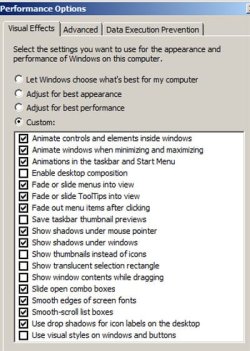
You can turn off a bunch of stuff in control panel/system/advanced system settings; and choose settings in the performance area. Here is what mine looks like.

I also got rid of all the transparency stuff. And I chose "Windows Classic" in the personalize area. I've got it pretty much like Vista now, but I can't recall all of my tweaks.
 

Attachments

  • Untitled-1.jpg
    Untitled-1.jpg
    49.4 KB · Views: 7

My Computer

Computer type
PC/Desktop
Computer Manufacturer/Model Number
Ignatz Special; 4 speed manual gearbox; factory air conditioning; one of one
OS
Windows 7 Home Premium SP1, 64-bit
CPU
Intel Skylake i5-6600K, not overclocked
Motherboard
AsRock Z170M Extreme 4, micro ATX
Memory
8 GB HyperX DDR4-2666 (2 x 4 GB)
Graphics Card(s)
none; graphics are integrated on CPU
Sound Card
onboard: Realtek ALC1150; external: USB Behringer UF0-202
Monitor(s) Displays
Dell S2340M 23 inch IPS
Screen Resolution
1600 x 900
Hard Drives
System: Crucial MX100 series SSD, 128 GB;
Data: Samsung Spinpoint 103SJ, 1 TB;
Backup: WD Caviar Green WD30EZRX-00D8PB0, 3 TB
PSU
Rosewill SilentNight 500 watt fanless, semi-modular
Case
Antec Solo II
Cooling
Noctua NH-U12S; Noctua F12 intake, Noctua S12A exhaust
Keyboard
Microsoft 200 6JH-00001 USB
Mouse
Dell or Microsoft optical wired; USB
Antivirus
Microsoft Security Essentials and Malwarebytes Premium
Browser
Pale Moon
Other Info
All fans PWM; speeds at idle: CPU circa 500 rpm; intake circa 600 rpm; exhaust circa 600 rpm; CPU temps 27 idle and 47 C load in a warm room (27 C/81 F) when running Intel Extreme Tuning Utility stress test.


This is by far the most annoying as my original theme is a dark background so it lights up like a Christmas tree.
 

My Computer

Computer Manufacturer/Model Number
Myself
OS
Vista x64
CPU
Q6600 @ 400x8- 3.2ghz
Motherboard
GIGABYTE GA-EP45-UD3R LGA 775 (rev. 1.0)
Memory
2x2GB G-skill PC6400 DDR2 800
Graphics Card(s)
GTX 260 868mb 192 Core
Sound Card
None
Monitor(s) Displays
1400x900 19' LCD Hanns-G HW191A
Hard Drives
Seagate Barracuda 7200.12 ST3500418AS
PSU
Corsair TX750w
Case
Antec 900
Cooling
2x 120mm 1x140mm 1x240mm


This is by far the most annoying as my original theme is a dark background so it lights up like a Christmas tree.

The best way to do it is by getting restorator to open the Msstyle and editing the buttons with Photoshop and then putting them back in.

This is how mine looks but I used another program called Windows Style Builder.

2009-12-09_013553.png
 

My Computer

Computer Manufacturer/Model Number
Home Brew
OS
Windows 7 Ultimate Vista Ultimate x64
CPU
Core 2 Duo E8500 3.16Ghz @ 3.8Ghz
Motherboard
eVGA 750i FTW
Memory
2x2Gigs Patriot PC2-6400 LL
Graphics Card(s)
Inno3D GeForce GTX260 216 SP
Monitor(s) Displays
ASUS VW222U 22" 2ms Response time
Screen Resolution
1680x1050
Hard Drives
SATA 150GB
SATA II 250GB
USB IDE 750GB Ext.
PSU
HYTEC 600W & Thermaltake 650W Toughpower Power Exp
Case
Thermaltake Armor LCS (Liquid Cooling System)
Cooling
Liquid Cooling System
Keyboard
Logitech G15 Gaming Keyboard
Mouse
Logitech G9 Gaming Mouse
Back
Top