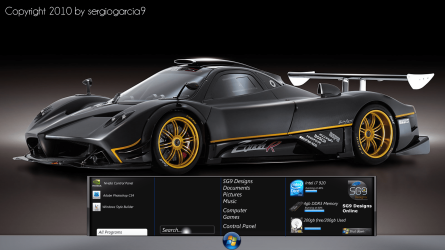
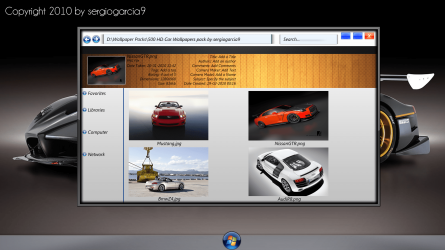
Project Zentzo [Windows Concept]

Very nice.. I wanna help! :D

Is the interface Photoshopped? Or is it an actual working UI? If not, I could probably help make a nice repositional start menu opener. ;)
 

My Computer

Computer type
PC/Desktop
Computer Manufacturer/Model Number
Custom built
OS
Windows 8 Pro 64-bit
CPU
Intel Core i7 950 @4.4GHz
Motherboard
EVGA 131-GT-E767
Memory
12GB DDR3 1333MHz @1400 (9-9-9-24)
Graphics Card(s)
2x AMD Radeon HD 6770
Sound Card
Sound Blaster Audigy
Monitor(s) Displays
Acer S231HL + Acer E19T5W
Screen Resolution
1920x1080 + 1440x900
Hard Drives
128GB Samsung 840 Pro
1TB Seagate Barracuda 7200RPM 64mb
500GB Seagate Barracuda 7200RPM 16mb
PSU
Corsair GS800
Case
Custom-made
Cooling
CM Hyper212+, lots of fans
Keyboard
NMB RT8255C+
Mouse
Func MS-3
Internet Speed
30/1.5
Antivirus
Microsoft Security Essentials/Spybot SD/Malwarebytes
Browser
Google Chrome
Other Info
Onkyo TX-27 receiver & two Realistic Optimus T100s.
It's just a mockup done in Photoshop, but i would love if it could come to life :)
 
thats a nice concept there sergiogarcia ,like the wallpaper on the install page:)
 

My Computer

Computer type
PC/Desktop
Computer Manufacturer/Model Number
self build
OS
win 7 ultimate32bit, Win8.1pro wmc 32bit
CPU
amd phenom x4 9600
Motherboard
asus m2n32-sli deluxe
Memory
corsair twinxs 2x2gb
Graphics Card(s)
2x nvidia 1gb 8500gt
Sound Card
onboard
Monitor(s) Displays
23" PB Viseo 233d
Screen Resolution
1920x1080
Hard Drives
maxtor sata 500gb
maxtor sata 320gb
fujitsu sata200gb
PSU
oryxx tornado 750w
Case
thermaltake xaser lll
Cooling
artic freezer64 pro + 7 case fans
I think I'll see if I can do this. I don't know how exactly I'll do it, but I will make it happen! :shock:
 

My Computer

Computer type
PC/Desktop
Computer Manufacturer/Model Number
Custom built
OS
Windows 8 Pro 64-bit
CPU
Intel Core i7 950 @4.4GHz
Motherboard
EVGA 131-GT-E767
Memory
12GB DDR3 1333MHz @1400 (9-9-9-24)
Graphics Card(s)
2x AMD Radeon HD 6770
Sound Card
Sound Blaster Audigy
Monitor(s) Displays
Acer S231HL + Acer E19T5W
Screen Resolution
1920x1080 + 1440x900
Hard Drives
128GB Samsung 840 Pro
1TB Seagate Barracuda 7200RPM 64mb
500GB Seagate Barracuda 7200RPM 16mb
PSU
Corsair GS800
Case
Custom-made
Cooling
CM Hyper212+, lots of fans
Keyboard
NMB RT8255C+
Mouse
Func MS-3
Internet Speed
30/1.5
Antivirus
Microsoft Security Essentials/Spybot SD/Malwarebytes
Browser
Google Chrome
Other Info
Onkyo TX-27 receiver & two Realistic Optimus T100s.
I think I'll see if I can do this. I don't know how exactly I'll do it, but I will make it happen! :shock:
Wow, that sounds like a freakin awesome idea :D Let me know mate, i am as always interested in helping where i can
 
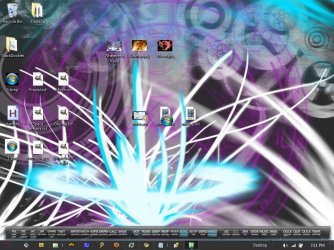
screenie.jpg

Ugly, I know, but the basic concept is working, as you can see....

I just thought of an idea. If you wanted to use an icon to do this, you could probably have it send a LWin key to the system (LWin = Left Windows key) to open the start menu.. Get an icon that looks like a start orb, then rename it to an invisible key, like ALT+0151 (—), which usually doesn't show up on the system fonts.
 

My Computer

Computer type
PC/Desktop
Computer Manufacturer/Model Number
Custom built
OS
Windows 8 Pro 64-bit
CPU
Intel Core i7 950 @4.4GHz
Motherboard
EVGA 131-GT-E767
Memory
12GB DDR3 1333MHz @1400 (9-9-9-24)
Graphics Card(s)
2x AMD Radeon HD 6770
Sound Card
Sound Blaster Audigy
Monitor(s) Displays
Acer S231HL + Acer E19T5W
Screen Resolution
1920x1080 + 1440x900
Hard Drives
128GB Samsung 840 Pro
1TB Seagate Barracuda 7200RPM 64mb
500GB Seagate Barracuda 7200RPM 16mb
PSU
Corsair GS800
Case
Custom-made
Cooling
CM Hyper212+, lots of fans
Keyboard
NMB RT8255C+
Mouse
Func MS-3
Internet Speed
30/1.5
Antivirus
Microsoft Security Essentials/Spybot SD/Malwarebytes
Browser
Google Chrome
Other Info
Onkyo TX-27 receiver & two Realistic Optimus T100s.
*Is confused by the coders language* (lol)

So, it can be done? The start menu concept can come to life?
 
With a lot more work, some cleaning on the image, and hopefully some update to the scripting language, yes. That's a lot to ask for, but I think it's possible, with workarounds.

What I meant by the icon thing is out of date, I just checked. Kinda sucks, but it doesn't matter...
 

My Computer

Computer type
PC/Desktop
Computer Manufacturer/Model Number
Custom built
OS
Windows 8 Pro 64-bit
CPU
Intel Core i7 950 @4.4GHz
Motherboard
EVGA 131-GT-E767
Memory
12GB DDR3 1333MHz @1400 (9-9-9-24)
Graphics Card(s)
2x AMD Radeon HD 6770
Sound Card
Sound Blaster Audigy
Monitor(s) Displays
Acer S231HL + Acer E19T5W
Screen Resolution
1920x1080 + 1440x900
Hard Drives
128GB Samsung 840 Pro
1TB Seagate Barracuda 7200RPM 64mb
500GB Seagate Barracuda 7200RPM 16mb
PSU
Corsair GS800
Case
Custom-made
Cooling
CM Hyper212+, lots of fans
Keyboard
NMB RT8255C+
Mouse
Func MS-3
Internet Speed
30/1.5
Antivirus
Microsoft Security Essentials/Spybot SD/Malwarebytes
Browser
Google Chrome
Other Info
Onkyo TX-27 receiver & two Realistic Optimus T100s.
A startmenu replacement is possible. I remember back in my vb.5/6 days I hooked the start button and popped my own menu. I think I even hid the real one and added my own button. Way too long ago.

You would need to code everything from scratch. Pinning, most recently used, rebuilding the apps. Gosh. A lot more than I can think of. But with WPF, you make some very cool stuff.

Bottom line....it is possible. Its just going to take hella work.
 

My Computer

OS
Windows 7 Ultimate x86
CPU
amd64
A startmenu replacement is possible. I remember back in my vb.5/6 days I hooked the start button and popped my own menu. I think I even hid the real one and added my own button. Way too long ago.

You would need to code everything from scratch. Pinning, most recently used, rebuilding the apps. Gosh. A lot more than I can think of. But with WPF, you make some very cool stuff.

Bottom line....it is possible. Its just going to take hella work.

Why not make a little script to create the button, let it be draggable, and simply open the start menu that's already there? Wouldn't that be a tad simpler to do? :confused:
 

My Computer

Computer type
PC/Desktop
Computer Manufacturer/Model Number
Custom built
OS
Windows 8 Pro 64-bit
CPU
Intel Core i7 950 @4.4GHz
Motherboard
EVGA 131-GT-E767
Memory
12GB DDR3 1333MHz @1400 (9-9-9-24)
Graphics Card(s)
2x AMD Radeon HD 6770
Sound Card
Sound Blaster Audigy
Monitor(s) Displays
Acer S231HL + Acer E19T5W
Screen Resolution
1920x1080 + 1440x900
Hard Drives
128GB Samsung 840 Pro
1TB Seagate Barracuda 7200RPM 64mb
500GB Seagate Barracuda 7200RPM 16mb
PSU
Corsair GS800
Case
Custom-made
Cooling
CM Hyper212+, lots of fans
Keyboard
NMB RT8255C+
Mouse
Func MS-3
Internet Speed
30/1.5
Antivirus
Microsoft Security Essentials/Spybot SD/Malwarebytes
Browser
Google Chrome
Other Info
Onkyo TX-27 receiver & two Realistic Optimus T100s.
A startmenu replacement is possible. I remember back in my vb.5/6 days I hooked the start button and popped my own menu. I think I even hid the real one and added my own button. Way too long ago.

You would need to code everything from scratch. Pinning, most recently used, rebuilding the apps. Gosh. A lot more than I can think of. But with WPF, you make some very cool stuff.

Bottom line....it is possible. Its just going to take hella work.

Why not make a little script to create the button, let it be draggable, and simply open the start menu that's already there? Wouldn't that be a tad simpler to do? :confused:

Hell yeah. What kind of scripts? Now you sparked my interest. Maybe I can help out.
 

My Computer

OS
Windows 7 Ultimate x86
CPU
amd64
Oooooooooooooooooooooooooh aaaaaaaaaaaaaaaaaaaaaaaaaaaaaaaaah
 

My Computer

Computer Manufacturer/Model Number
HP G50 Laptop
OS
Windows 7 Home Premium 64-bit
CPU
2.0ghz Intel Pentium Duel-Core (Merom)
Motherboard
Winston 360Bf
Memory
2x 4.0GB Centon Duel-Channel DDR2 @ 333MHz
Sound Card
High Definition Audio Device
Monitor(s) Displays
16" lcd monitor
Screen Resolution
1280x800
Hard Drives
160GB Toshiba MK1652GSX
Internet Speed
Satalite Internet. Where I live it's uber slow.
this looks better then windows 7 :D
 

My Computer

Computer Manufacturer/Model Number
Acer Aspire 5935G
OS
Windows 7 Ultimate 32 Bit and 64 bit
CPU
intel core 2 duo
Memory
3.00GB
Graphics Card(s)
Intel powersaving gpu, ATI RADEON HD 4570
Screen Resolution
15.6" HD LED LCD
Hard Drives
320 GB
The idea I had in mind was to make a GUI that adds a picture of a start orb (make it external from the executable so it can be edited by the user), make it movable, make it snap to things like the task bar, corners of the screen (this would be optional), things like that. And for opening the start menu, it would be as simple as sending either the "LWin" or "RWin" keys, left and right Windows keys, to open the start menu. My concept idea was this:

Code:
#SingleInstance, Force ; if another instance is open, force this one over it silently.
DetectHiddenWindows,on
OnMessage(0x201, "WM_LBUTTONDOWN")
WM_LBUTTONDOWN()
{
   PostMessage, 0xA1, 2
   return
}
; make it draggable


Menu,Tray,Click,1
Menu,Tray,NoStandard
Menu,Tray,DeleteAll
Menu,Tray,Add,Start Button,Nothing
Menu,Tray,Add,
Menu,Tray,Add,Move On, Move
Menu,Tray,Add,Move Off,moveoff
Menu,Tray,Add,
Menu,Tray,Add,Hide Icon,Hide
Menu,Tray,Add,
Menu,Tray,Add,E&xit,EXIT
; edit the tray right click menu


GUI:
Gui, Margin, 0, 0
Gui, Color, 000000
Gui -resize -sysmenu
Gui, +LastFound -Caption
WinSet, Region, 0-0 w40 h39 r1000-1000 E

Gui, Add, Picture, xm+0 ym+0 w38 h38 -0x200 -backgroundtrans gStart, 1.bmp
Gui,Show,Center Autosize,Start_Opener
; 1.bmp is the image to use as a start orb)
return


Start:
Send {LWin}
return

Hide: (yet to have the code added)
return

Move:
Gui +Caption
return

moveoff:
Gui -Caption
return

Nothing: (used for the tray text above, to make a place holder)
return

EXIT:
Exitapp

As you can probably see, not what you would get with advanced code...
 

My Computer

Computer type
PC/Desktop
Computer Manufacturer/Model Number
Custom built
OS
Windows 8 Pro 64-bit
CPU
Intel Core i7 950 @4.4GHz
Motherboard
EVGA 131-GT-E767
Memory
12GB DDR3 1333MHz @1400 (9-9-9-24)
Graphics Card(s)
2x AMD Radeon HD 6770
Sound Card
Sound Blaster Audigy
Monitor(s) Displays
Acer S231HL + Acer E19T5W
Screen Resolution
1920x1080 + 1440x900
Hard Drives
128GB Samsung 840 Pro
1TB Seagate Barracuda 7200RPM 64mb
500GB Seagate Barracuda 7200RPM 16mb
PSU
Corsair GS800
Case
Custom-made
Cooling
CM Hyper212+, lots of fans
Keyboard
NMB RT8255C+
Mouse
Func MS-3
Internet Speed
30/1.5
Antivirus
Microsoft Security Essentials/Spybot SD/Malwarebytes
Browser
Google Chrome
Other Info
Onkyo TX-27 receiver & two Realistic Optimus T100s.
So would it be possible to create the start menu as in the concept image?
 
Yeppers.
EDIT: Just noticed how the START MENU looked. That might take a bit more GUI work on my or Blizzaro's part, but it might be do-able. Though, you could always settle for the default. ;)
 

My Computer

Computer type
PC/Desktop
Computer Manufacturer/Model Number
Custom built
OS
Windows 8 Pro 64-bit
CPU
Intel Core i7 950 @4.4GHz
Motherboard
EVGA 131-GT-E767
Memory
12GB DDR3 1333MHz @1400 (9-9-9-24)
Graphics Card(s)
2x AMD Radeon HD 6770
Sound Card
Sound Blaster Audigy
Monitor(s) Displays
Acer S231HL + Acer E19T5W
Screen Resolution
1920x1080 + 1440x900
Hard Drives
128GB Samsung 840 Pro
1TB Seagate Barracuda 7200RPM 64mb
500GB Seagate Barracuda 7200RPM 16mb
PSU
Corsair GS800
Case
Custom-made
Cooling
CM Hyper212+, lots of fans
Keyboard
NMB RT8255C+
Mouse
Func MS-3
Internet Speed
30/1.5
Antivirus
Microsoft Security Essentials/Spybot SD/Malwarebytes
Browser
Google Chrome
Other Info
Onkyo TX-27 receiver & two Realistic Optimus T100s.
The idea I had in mind was to make a GUI that adds a picture of a start orb (make it external from the executable so it can be edited by the user), make it movable, make it snap to things like the task bar, corners of the screen (this would be optional), things like that. And for opening the start menu, it would be as simple as sending either the "LWin" or "RWin" keys, left and right Windows keys, to open the start menu. My concept idea was this:

Code:
#SingleInstance, Force ; if another instance is open, force this one over it silently.
DetectHiddenWindows,on
OnMessage(0x201, "WM_LBUTTONDOWN")
WM_LBUTTONDOWN()
{
   PostMessage, 0xA1, 2
   return
}
; make it draggable
 
 
Menu,Tray,Click,1
Menu,Tray,NoStandard
Menu,Tray,DeleteAll
Menu,Tray,Add,Start Button,Nothing
Menu,Tray,Add,
Menu,Tray,Add,Move On, Move
Menu,Tray,Add,Move Off,moveoff
Menu,Tray,Add,
Menu,Tray,Add,Hide Icon,Hide
Menu,Tray,Add,
Menu,Tray,Add,E&xit,EXIT
; edit the tray right click menu
 
 
GUI:
Gui, Margin, 0, 0
Gui, Color, 000000
Gui -resize -sysmenu
Gui, +LastFound -Caption
WinSet, Region, 0-0 w40 h39 r1000-1000 E
 
Gui, Add, Picture, xm+0 ym+0 w38 h38 -0x200 -backgroundtrans gStart, 1.bmp
Gui,Show,Center Autosize,Start_Opener
; 1.bmp is the image to use as a start orb)
return
 
 
Start:
Send {LWin}
return
 
Hide: (yet to have the code added)
return
 
Move:
Gui +Caption
return
 
moveoff:
Gui -Caption
return
 
Nothing: (used for the tray text above, to make a place holder)
return
 
EXIT:
Exitapp

As you can probably see, not what you would get with advanced code...

Im sure you can use a script to tell the task bar to align center. so the taskbar icons are in the middle. Ive always wanted to try.

Cool stuff dude. Im gonna try it.
 

My Computer

OS
Windows 7 Ultimate x86
CPU
amd64
Back
Top