Projector Bug, need help

bebo95

New member
Local time
6:43 PM
Messages
8
So what I did was plug a projector into my laptop and tried the extend feature.
But after removing the projector my laptop screen was still on extend.
Is there a way to return it to normal?
I already tried windows+p and chose computer only, and nothing happened.
 

My Computer

OS
Windows 7 Ultimate 32bit.
What do you mean "nothing happened?"
 

My Computer

Computer Manufacturer/Model Number
Custom
OS
Windows 7 Ultimate RTM (Technet)
CPU
3.00 gigahertz Intel Core2 Duo E8400
Motherboard
ASUSTeK Computer INC. P5K/EPU Rev 1.xx
Memory
4GB
Graphics Card(s)
ATI Radeon X1950 Pro
Sound Card
Built in HD Audio
Monitor(s) Displays
22" Gateway LCD
Screen Resolution
1920 x 1200
Hard Drives
ST3160023A [Hard drive] (160.04 GB) -- drive 0, rev 8.01, ST3500630AS [Hard drive] (500.11 GB) -- drive 2, rev 3.AAK
ST3500630AS [Hard drive] (500.11 GB) -- drive 1, rev 3.AAK
Keyboard
Logitech G11
Mouse
Microsoft Wireless Laser Mouse 5000
Internet Speed
13.44 Mbps

My Computer

Computer type
PC/Desktop
Computer Manufacturer/Model Number
Gateway DX4831-01e (Mid-Tower Desktop)
OS
Originally Win 7 Hm Prem x64 Ver 6.1.7600 Build 7601-SP1 | Upgraded to Windows 10 December 14, 2019
CPU
Intel i3 530 2.93GHz, 2933MHz 2 Cores 4 Logical Processors
Motherboard
Gateway H57M01 133 megahertz
Memory
6GB of 1,333MHz DDR3 SDRAM
Graphics Card(s)
32MB Intel Graphics Media Accelerator HD IGChip
Sound Card
Realtek High Definition Audio
Monitor(s) Displays
Gateway HX2000 20inch TFT active matrix TN
Screen Resolution
1600 x 900 x 59 hertz
Hard Drives
WDC WD10EADS-00M2B0 [HDD] (1000.20 GB) -- drive 0,
HL-DT-ST DVDRAM GH41N [CD-ROM dr]
Four card readers, and Four USB 2.0
PSU
300watts.
Case
Mid-Tower Desktop
Cooling
Stock from Gateway
Keyboard
Natural Ergonomic Keyboard 4000, see Other Info
Mouse
Orig. Gateway wore out now using Insignia USB wired optical
Internet Speed
Vz FIOS 10ms png 57.64Mbps down 65.53Mbps up Speedtest.org
Antivirus
Zamana Anti-logger with Anti-malware, MSE, Windows Firewall,
Browser
IE11.0.9600.19399-Upd ver11.0.135, Firefox 68.0.1 x64
Other Info
System Specs by Belarc.

BIOS: American Megatrends Inc. P01-A0 11/17/2009

Replaced the MS 'Natural' Standard PS/2 Enhanced 101-102 Keyboard with a new Natural Ergonomic Keyboard 4000 on August 1st 2014.

Canon Pixma MG3222 Printer.

Updated to IE11 on 12102015 | Fios Quantum Router g1100

Additional AV: SpywareBlaster, manual Mbam, SAS
really got to go..
 

My Computer

Computer Manufacturer/Model Number
Me
OS
Windows 7 Home Premium 64-bit (6.1, Build 7600)
CPU
Intel(R) Core(TM) i7 CPU 870 @ 2.93GHz (8 CPUs), ~2.9GHz
Memory
8192MB RAM
Graphics Card(s)
Nvidia Geforce 560 GTX Non-Ti
Sound Card
Speakers (Realtek High Definition Audio)
Monitor(s) Displays
Generic PnP Monitor
Screen Resolution
1920x1080
Hard Drives
1 TB
I already tried windows+p and chose computer only, and nothing happened.
Did you do this before or after you dis-connected the projector?

If after, re-connect the projector, and then try w+p

The only other thing I can think of for now would be to go to the display tab of your graphics card, and see if you can change it back there.


EDIT:
Try CTRL+ALT+F7 If you see a confirmation box for settings click Yes

If that works try CTRL+ALT+F8 to go back to extended.
 
Last edited:

My Computer

Computer type
PC/Desktop
Computer Manufacturer/Model Number
Gateway DX4831-01e (Mid-Tower Desktop)
OS
Originally Win 7 Hm Prem x64 Ver 6.1.7600 Build 7601-SP1 | Upgraded to Windows 10 December 14, 2019
CPU
Intel i3 530 2.93GHz, 2933MHz 2 Cores 4 Logical Processors
Motherboard
Gateway H57M01 133 megahertz
Memory
6GB of 1,333MHz DDR3 SDRAM
Graphics Card(s)
32MB Intel Graphics Media Accelerator HD IGChip
Sound Card
Realtek High Definition Audio
Monitor(s) Displays
Gateway HX2000 20inch TFT active matrix TN
Screen Resolution
1600 x 900 x 59 hertz
Hard Drives
WDC WD10EADS-00M2B0 [HDD] (1000.20 GB) -- drive 0,
HL-DT-ST DVDRAM GH41N [CD-ROM dr]
Four card readers, and Four USB 2.0
PSU
300watts.
Case
Mid-Tower Desktop
Cooling
Stock from Gateway
Keyboard
Natural Ergonomic Keyboard 4000, see Other Info
Mouse
Orig. Gateway wore out now using Insignia USB wired optical
Internet Speed
Vz FIOS 10ms png 57.64Mbps down 65.53Mbps up Speedtest.org
Antivirus
Zamana Anti-logger with Anti-malware, MSE, Windows Firewall,
Browser
IE11.0.9600.19399-Upd ver11.0.135, Firefox 68.0.1 x64
Other Info
System Specs by Belarc.

BIOS: American Megatrends Inc. P01-A0 11/17/2009

Replaced the MS 'Natural' Standard PS/2 Enhanced 101-102 Keyboard with a new Natural Ergonomic Keyboard 4000 on August 1st 2014.

Canon Pixma MG3222 Printer.

Updated to IE11 on 12102015 | Fios Quantum Router g1100

Additional AV: SpywareBlaster, manual Mbam, SAS
On most laptops, when you reboot without any external displays connected, it will revert back to the proper setting.
 

My Computer

OS
Windows 7 Ultimate x64 SP1
CPU
Intel Core i7-2600
Motherboard
Gigabyte GA-P67A-UD3P-B3
Memory
12 GB Patriot Extreme DDR3-1333
Graphics Card(s)
Nvidia GTX 470
Monitor(s) Displays
Dell UltraSharp 2209WA
Hard Drives
OCZ Agility3 240 GB, WD5001AALS, WD7501AALS
PSU
OCZ ModStream 700W
Case
CoolerMaster HAF 912 Advanced
Cooling
CoolerMaster Hyper 212 Plus
ditto with deaconfrost.. a restart should almost always solve the problem.. i use my projector from time to time ony my acer and at times the fn+f6 just would not solve it so i simply remove the data cable and restart my computer..
 

My Computer

Computer Manufacturer/Model Number
Desktop is a DIY and laptop is an Acer Aspire 4745
OS
7 all the way!
CPU
core 2 duo (desktop) i5 (laptop)
Motherboard
asus for desktop
Memory
2gb for both machines
Graphics Card(s)
nvidia 512mb GS for desktop; hd 5470 for laptop
Monitor(s) Displays
19" AOC 913fw
On most laptops, when you reboot without any external displays connected, it will revert back to the proper setting.

ditto with deaconfrost.. a restart should almost always solve the problem.. i use my projector from time to time ony my acer and at times the fn+f6 just would not solve it so i simply remove the data cable and restart my computer..
I will have to remember that if I ever use one.
 

My Computer

Computer type
PC/Desktop
Computer Manufacturer/Model Number
Gateway DX4831-01e (Mid-Tower Desktop)
OS
Originally Win 7 Hm Prem x64 Ver 6.1.7600 Build 7601-SP1 | Upgraded to Windows 10 December 14, 2019
CPU
Intel i3 530 2.93GHz, 2933MHz 2 Cores 4 Logical Processors
Motherboard
Gateway H57M01 133 megahertz
Memory
6GB of 1,333MHz DDR3 SDRAM
Graphics Card(s)
32MB Intel Graphics Media Accelerator HD IGChip
Sound Card
Realtek High Definition Audio
Monitor(s) Displays
Gateway HX2000 20inch TFT active matrix TN
Screen Resolution
1600 x 900 x 59 hertz
Hard Drives
WDC WD10EADS-00M2B0 [HDD] (1000.20 GB) -- drive 0,
HL-DT-ST DVDRAM GH41N [CD-ROM dr]
Four card readers, and Four USB 2.0
PSU
300watts.
Case
Mid-Tower Desktop
Cooling
Stock from Gateway
Keyboard
Natural Ergonomic Keyboard 4000, see Other Info
Mouse
Orig. Gateway wore out now using Insignia USB wired optical
Internet Speed
Vz FIOS 10ms png 57.64Mbps down 65.53Mbps up Speedtest.org
Antivirus
Zamana Anti-logger with Anti-malware, MSE, Windows Firewall,
Browser
IE11.0.9600.19399-Upd ver11.0.135, Firefox 68.0.1 x64
Other Info
System Specs by Belarc.

BIOS: American Megatrends Inc. P01-A0 11/17/2009

Replaced the MS 'Natural' Standard PS/2 Enhanced 101-102 Keyboard with a new Natural Ergonomic Keyboard 4000 on August 1st 2014.

Canon Pixma MG3222 Printer.

Updated to IE11 on 12102015 | Fios Quantum Router g1100

Additional AV: SpywareBlaster, manual Mbam, SAS
Ok so I did every thing you guys said but my laptop is still on extend any other ideas?
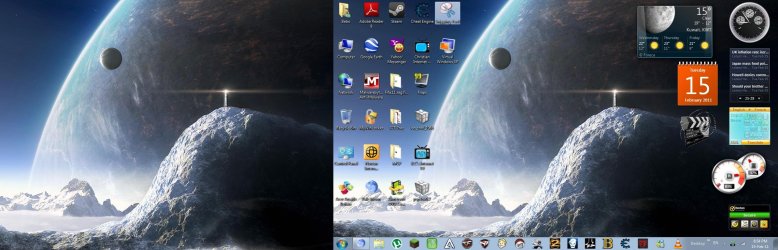
if you don't know what I mean, if I move my mouse to the left of the screen it will continue after the display.
 

My Computer

OS
Windows 7 Ultimate 32bit.
Have you tried this?
EDIT:
Try CTRL+ALT+F7 If you see a confirmation box for settings click Yes
If that does not work try CTRL+ALT+F8 to go back to extended.
~~~ ~~~ ~~~
Ok so I did every thing you guys said but my laptop is still on extend any other ideas?
if you don't know what I mean, if I move my mouse to the left of the screen it will continue after the display.
Does it re-appear at the right side of the screen or just dis-appear?

~~~ ~~~ ~~~

Not sure if this is similar to what we have already tried:

  • Right click anywhere on the desktop and select the 'settings' tab on the box that appears.
  • Left click on the monitor with '2' in it and then uncheck the 'Extend the windows desktop onto this monitor'.
  • Press 'Apply'.
  • The displays should momentarily black out an then come back on the primary monitor only.
 

My Computer

Computer type
PC/Desktop
Computer Manufacturer/Model Number
Gateway DX4831-01e (Mid-Tower Desktop)
OS
Originally Win 7 Hm Prem x64 Ver 6.1.7600 Build 7601-SP1 | Upgraded to Windows 10 December 14, 2019
CPU
Intel i3 530 2.93GHz, 2933MHz 2 Cores 4 Logical Processors
Motherboard
Gateway H57M01 133 megahertz
Memory
6GB of 1,333MHz DDR3 SDRAM
Graphics Card(s)
32MB Intel Graphics Media Accelerator HD IGChip
Sound Card
Realtek High Definition Audio
Monitor(s) Displays
Gateway HX2000 20inch TFT active matrix TN
Screen Resolution
1600 x 900 x 59 hertz
Hard Drives
WDC WD10EADS-00M2B0 [HDD] (1000.20 GB) -- drive 0,
HL-DT-ST DVDRAM GH41N [CD-ROM dr]
Four card readers, and Four USB 2.0
PSU
300watts.
Case
Mid-Tower Desktop
Cooling
Stock from Gateway
Keyboard
Natural Ergonomic Keyboard 4000, see Other Info
Mouse
Orig. Gateway wore out now using Insignia USB wired optical
Internet Speed
Vz FIOS 10ms png 57.64Mbps down 65.53Mbps up Speedtest.org
Antivirus
Zamana Anti-logger with Anti-malware, MSE, Windows Firewall,
Browser
IE11.0.9600.19399-Upd ver11.0.135, Firefox 68.0.1 x64
Other Info
System Specs by Belarc.

BIOS: American Megatrends Inc. P01-A0 11/17/2009

Replaced the MS 'Natural' Standard PS/2 Enhanced 101-102 Keyboard with a new Natural Ergonomic Keyboard 4000 on August 1st 2014.

Canon Pixma MG3222 Printer.

Updated to IE11 on 12102015 | Fios Quantum Router g1100

Additional AV: SpywareBlaster, manual Mbam, SAS
Sorry for the late reply. I was busy for a couple of days. I could browse but not afford the time to give a reply. Ditto with what Anak said. And in addition, did you remove the cable connecting to your laptop? Mine would automatically reset to its normal setting if I unplug it. Unless I turn it off, it goes back to extended mode when I plug it back again.
 

My Computer

Computer Manufacturer/Model Number
Desktop is a DIY and laptop is an Acer Aspire 4745
OS
7 all the way!
CPU
core 2 duo (desktop) i5 (laptop)
Motherboard
asus for desktop
Memory
2gb for both machines
Graphics Card(s)
nvidia 512mb GS for desktop; hd 5470 for laptop
Monitor(s) Displays
19" AOC 913fw
Press Windows key and P to return it to normal, it may require a few tries.

~Lordbob
 

My Computer

Computer Manufacturer/Model Number
Hera
OS
Windows 7 Ultimate x64, Mint 9
CPU
Intel i5-2500k
Motherboard
ASUS P8P67 Pro
Memory
2x 4Gb Corsair VENGEANCE DDR3-1600
Graphics Card(s)
NVidia GeForce N260GTX Twin Frozr
Sound Card
Realtek HD OnBoard Audio
Monitor(s) Displays
ASUS 24" Monitor
Screen Resolution
1920x1080
Hard Drives
G.SKILL Phoenix Series 60GB SATA II MLC Internal Solid State Drive (SSD)
SAMSUNG Spinpoint F3R 1TB 7200 RPM 32MB Cache SATA II
PSU
Cooler Master Real Power Pro 750W
Case
Cooler Master Haf 932
Cooling
Fans
Keyboard
Razer Tarantula
Mouse
Razer Lachesis
Internet Speed
not fast enough
Have you tried this?
EDIT:
Try CTRL+ALT+F7 If you see a confirmation box for settings click Yes
If that does not work try CTRL+ALT+F8 to go back to extended.
~~~ ~~~ ~~~
Ok so I did every thing you guys said but my laptop is still on extend any other ideas?
if you don't know what I mean, if I move my mouse to the left of the screen it will continue after the display.
Does it re-appear at the right side of the screen or just dis-appear?

~~~ ~~~ ~~~

Not sure if this is similar to what we have already tried:

  • Right click anywhere on the desktop and select the 'settings' tab on the box that appears.
  • Left click on the monitor with '2' in it and then uncheck the 'Extend the windows desktop onto this monitor'.
  • Press 'Apply'.
  • The displays should momentarily black out an then come back on the primary monitor only.

it just disappears.
 

My Computer

OS
Windows 7 Ultimate 32bit.
If none of these steps work, you may not have the proper driver or utility loaded. I would remove the video drivers, reboot, and reload the latest. I would also check for BIOS settings pertaining to video out and also for a BIOS update.

Normally, rebooting the laptop with no external display is the sure fire way of fixing the problem...as the laptop is only aware of the built-in LCD screen. That's telling me it is either a BIOS setting or a video driver problem.
 

My Computer

OS
Windows 7 Ultimate x64 SP1
CPU
Intel Core i7-2600
Motherboard
Gigabyte GA-P67A-UD3P-B3
Memory
12 GB Patriot Extreme DDR3-1333
Graphics Card(s)
Nvidia GTX 470
Monitor(s) Displays
Dell UltraSharp 2209WA
Hard Drives
OCZ Agility3 240 GB, WD5001AALS, WD7501AALS
PSU
OCZ ModStream 700W
Case
CoolerMaster HAF 912 Advanced
Cooling
CoolerMaster Hyper 212 Plus
I repeat, try pressing Windows key + P to change the setting back. It may not work, but it is worth the 5 seconds it takes to try.

~Lordbob
 

My Computer

Computer Manufacturer/Model Number
Hera
OS
Windows 7 Ultimate x64, Mint 9
CPU
Intel i5-2500k
Motherboard
ASUS P8P67 Pro
Memory
2x 4Gb Corsair VENGEANCE DDR3-1600
Graphics Card(s)
NVidia GeForce N260GTX Twin Frozr
Sound Card
Realtek HD OnBoard Audio
Monitor(s) Displays
ASUS 24" Monitor
Screen Resolution
1920x1080
Hard Drives
G.SKILL Phoenix Series 60GB SATA II MLC Internal Solid State Drive (SSD)
SAMSUNG Spinpoint F3R 1TB 7200 RPM 32MB Cache SATA II
PSU
Cooler Master Real Power Pro 750W
Case
Cooler Master Haf 932
Cooling
Fans
Keyboard
Razer Tarantula
Mouse
Razer Lachesis
Internet Speed
not fast enough
I used snipping tool and here is how my desktop looks like
 

Attachments

  • Capture.jpg
    Capture.jpg
    240.3 KB · Views: 2

My Computer

OS
Windows 7 Ultimate 32bit.
BTW i have the latest drivers and bios
 

My Computer

OS
Windows 7 Ultimate 32bit.
Back
Top