Solved Properties folder Problems???

Greenfox74

New member
Local time
10:21 AM
Messages
14
Location
South Toe River
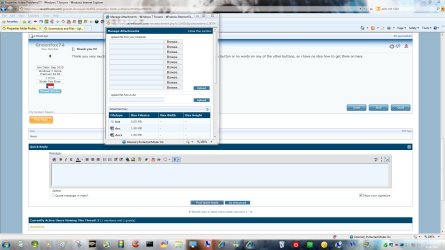
Does anyone know why when i open the properties of my folders or other things have really tiny tabs at the top? None of the options buttons have no words. The boxes where you type into are either a tiny cube or a thin line. I have searched all over and cannot find anything on this. I am running Windows 7 and the problem just started. It also does the thin type in boxes on some websites. Can anyone help or has this happened with anyone else???
 

My Computer

OS
Windows 7 Home Premium 64 bit
Motherboard
ASUS P7H55-M PRO
Memory
4 gb DDR3 1333
Sound Card
Realtek HD 7.1
Monitor(s) Displays
HP S2331
Screen Resolution
1920X1080P
Internet Speed
good ole' Netzero dial up lol
Does anyone know why when i open the properties of my folders or other things have really tiny tabs at the top? None of the options buttons have no words. The boxes where you type into are either a tiny cube or a thin line. I have searched all over and cannot find anything on this. I am running Windows 7 and the problem just started. It also does the thin type in boxes on some websites. Can anyone help or has this happened with anyone else???

Welcome to the forum,

Can you take a Screenshot and post that so we can see what you're talking about better.

http://www.sevenforums.com/tutorials/9733-screenshots-files-upload-post-seven-forums.html#post93869
 

My Computer

Computer type
PC/Desktop
Computer Manufacturer/Model Number
Self Built
OS
Win 10 Pro x64
CPU
Intel I5-2500K @3.3GHz
Motherboard
Asrock P67 Extreme4
Memory
16GB G.Skill Ripjaws X (4x4GB)
Graphics Card(s)
EVGA GeForce 750 Ti SC 2GB
Sound Card
ASUS Xonar DG 5.1 Channels 24-bit 96KHz PCI Interface Sound
Monitor(s) Displays
auria eq2367
Screen Resolution
1920 x 1080
Hard Drives
250GB Samsung 850 EVO SSD
1TB WD Blue
1TB Hitachi
PSU
SeaSonic X 650W 80 Plus Gold
Case
Corsair Obsidian 750D
Cooling
Corsair H60, Three 140mm case fans
Keyboard
Logitech Wireless Keyboard K520
Mouse
Logitech Wireless Mouse M310
Internet Speed
Wave Broadband ~ 100 dn 5 up
Antivirus
Windows Defender, Malwarebytes Premium
Browser
Edge, IE11, Chrome
Other Info
Laptop specs: HP g7-1365dx /
CPU: AMD A6-3420M APU with Radeon(tm) HD Graphics /
RAM: Crucial 8Gb (2x4Gb) /
SSD: Crucial M4-CT128M4SSD2 ATA Device/ FW 000F /
GFX: AMD Radeon HD 6520G /
OS: Windows 10 Pro x64
Thank you !!!!

Thank you very much!!! I got them on my pc but when i go to the upload part it has no browse button or no words on any of the other buttons, so i have no idea how to get them on here.
 

My Computer

OS
Windows 7 Home Premium 64 bit
Motherboard
ASUS P7H55-M PRO
Memory
4 gb DDR3 1333
Sound Card
Realtek HD 7.1
Monitor(s) Displays
HP S2331
Screen Resolution
1920X1080P
Internet Speed
good ole' Netzero dial up lol
Thank you very much!!! I got them on my pc but when i go to the upload part it has no browse button or no words on any of the other buttons, so i have no idea how to get them on here.

Are you using the paperclip?
 

Attachments

  • Untitled.jpg
    Untitled.jpg
    177 KB · Views: 26

My Computer

Computer type
PC/Desktop
Computer Manufacturer/Model Number
Self Built
OS
Win 10 Pro x64
CPU
Intel I5-2500K @3.3GHz
Motherboard
Asrock P67 Extreme4
Memory
16GB G.Skill Ripjaws X (4x4GB)
Graphics Card(s)
EVGA GeForce 750 Ti SC 2GB
Sound Card
ASUS Xonar DG 5.1 Channels 24-bit 96KHz PCI Interface Sound
Monitor(s) Displays
auria eq2367
Screen Resolution
1920 x 1080
Hard Drives
250GB Samsung 850 EVO SSD
1TB WD Blue
1TB Hitachi
PSU
SeaSonic X 650W 80 Plus Gold
Case
Corsair Obsidian 750D
Cooling
Corsair H60, Three 140mm case fans
Keyboard
Logitech Wireless Keyboard K520
Mouse
Logitech Wireless Mouse M310
Internet Speed
Wave Broadband ~ 100 dn 5 up
Antivirus
Windows Defender, Malwarebytes Premium
Browser
Edge, IE11, Chrome
Other Info
Laptop specs: HP g7-1365dx /
CPU: AMD A6-3420M APU with Radeon(tm) HD Graphics /
RAM: Crucial 8Gb (2x4Gb) /
SSD: Crucial M4-CT128M4SSD2 ATA Device/ FW 000F /
GFX: AMD Radeon HD 6520G /
OS: Windows 10 Pro x64
Yeah but the browse buttons are gone and when i drag the pic and drop it in the box the whole screen goes away.
 

My Computer

OS
Windows 7 Home Premium 64 bit
Motherboard
ASUS P7H55-M PRO
Memory
4 gb DDR3 1333
Sound Card
Realtek HD 7.1
Monitor(s) Displays
HP S2331
Screen Resolution
1920X1080P
Internet Speed
good ole' Netzero dial up lol
Yeah but the browse buttons are gone and when i drag the pic and drop it in the box the whole screen goes away.

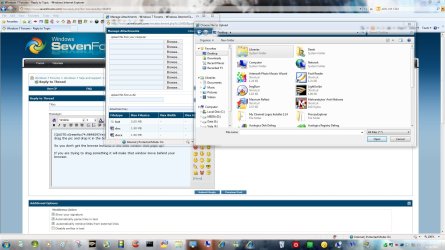
So you don't get the browse buttons in the little window that pops up?

If you are trying to drag something it will make that window move behind your browser.

You should get this,
 

Attachments

  • browse.jpg
    browse.jpg
    215.1 KB · Views: 10

My Computer

Computer type
PC/Desktop
Computer Manufacturer/Model Number
Self Built
OS
Win 10 Pro x64
CPU
Intel I5-2500K @3.3GHz
Motherboard
Asrock P67 Extreme4
Memory
16GB G.Skill Ripjaws X (4x4GB)
Graphics Card(s)
EVGA GeForce 750 Ti SC 2GB
Sound Card
ASUS Xonar DG 5.1 Channels 24-bit 96KHz PCI Interface Sound
Monitor(s) Displays
auria eq2367
Screen Resolution
1920 x 1080
Hard Drives
250GB Samsung 850 EVO SSD
1TB WD Blue
1TB Hitachi
PSU
SeaSonic X 650W 80 Plus Gold
Case
Corsair Obsidian 750D
Cooling
Corsair H60, Three 140mm case fans
Keyboard
Logitech Wireless Keyboard K520
Mouse
Logitech Wireless Mouse M310
Internet Speed
Wave Broadband ~ 100 dn 5 up
Antivirus
Windows Defender, Malwarebytes Premium
Browser
Edge, IE11, Chrome
Other Info
Laptop specs: HP g7-1365dx /
CPU: AMD A6-3420M APU with Radeon(tm) HD Graphics /
RAM: Crucial 8Gb (2x4Gb) /
SSD: Crucial M4-CT128M4SSD2 ATA Device/ FW 000F /
GFX: AMD Radeon HD 6520G /
OS: Windows 10 Pro x64
I wish i could even that, then i might be able to get it on here. No, the buttons aren't there. The upload tabs are but not the browse. The best way i can describe it is the tabs at the top of the properties window are about an eighth of an inch square. the window runs from the top of my monitor all the way past the bottom of my screen and the buttons you use to accept changes or whatever ar wordless. Like when i download a program and you have the run, save or cancel window. Those buttons have no words.
 

My Computer

OS
Windows 7 Home Premium 64 bit
Motherboard
ASUS P7H55-M PRO
Memory
4 gb DDR3 1333
Sound Card
Realtek HD 7.1
Monitor(s) Displays
HP S2331
Screen Resolution
1920X1080P
Internet Speed
good ole' Netzero dial up lol
I greatly do appreciate you even taking the time to read this. I'm lost bad on this one.
 

My Computer

OS
Windows 7 Home Premium 64 bit
Motherboard
ASUS P7H55-M PRO
Memory
4 gb DDR3 1333
Sound Card
Realtek HD 7.1
Monitor(s) Displays
HP S2331
Screen Resolution
1920X1080P
Internet Speed
good ole' Netzero dial up lol
I wish i could even that, then i might be able to get it on here. No, the buttons aren't there. The upload tabs are but not the browse. The best way i can describe it is the tabs at the top of the properties window are about an eighth of an inch square. the window runs from the top of my monitor all the way past the bottom of my screen and the buttons you use to accept changes or whatever ar wordless. Like when i download a program and you have the run, save or cancel window. Those buttons have no words.

That's alright, it probably has something to do with your original problem.

Have you tried updating your video card driver?

You can try running this,

http://www.sevenforums.com/tutorials/1538-sfc-scannow-command-system-file-checker.html

See if it finds and fixes any corrupt files.
 

My Computer

Computer type
PC/Desktop
Computer Manufacturer/Model Number
Self Built
OS
Win 10 Pro x64
CPU
Intel I5-2500K @3.3GHz
Motherboard
Asrock P67 Extreme4
Memory
16GB G.Skill Ripjaws X (4x4GB)
Graphics Card(s)
EVGA GeForce 750 Ti SC 2GB
Sound Card
ASUS Xonar DG 5.1 Channels 24-bit 96KHz PCI Interface Sound
Monitor(s) Displays
auria eq2367
Screen Resolution
1920 x 1080
Hard Drives
250GB Samsung 850 EVO SSD
1TB WD Blue
1TB Hitachi
PSU
SeaSonic X 650W 80 Plus Gold
Case
Corsair Obsidian 750D
Cooling
Corsair H60, Three 140mm case fans
Keyboard
Logitech Wireless Keyboard K520
Mouse
Logitech Wireless Mouse M310
Internet Speed
Wave Broadband ~ 100 dn 5 up
Antivirus
Windows Defender, Malwarebytes Premium
Browser
Edge, IE11, Chrome
Other Info
Laptop specs: HP g7-1365dx /
CPU: AMD A6-3420M APU with Radeon(tm) HD Graphics /
RAM: Crucial 8Gb (2x4Gb) /
SSD: Crucial M4-CT128M4SSD2 ATA Device/ FW 000F /
GFX: AMD Radeon HD 6520G /
OS: Windows 10 Pro x64
I went to the intel site and scanned my drivers there and they where up to date. Something has happened to where i have to run it as administrator to do the command prompt. Don't know why that has started happening. There has been no other user set up.
 

My Computer

OS
Windows 7 Home Premium 64 bit
Motherboard
ASUS P7H55-M PRO
Memory
4 gb DDR3 1333
Sound Card
Realtek HD 7.1
Monitor(s) Displays
HP S2331
Screen Resolution
1920X1080P
Internet Speed
good ole' Netzero dial up lol
Don't know if this makes any difference but i installed the windows 7 on another hard drive i have on here and everything works fine with it, but, on the drive i use for operating i get the problems. It's crazy. I was getting a system 32 run dll error (i think it was) for a while, not sure if that has anything to do with it.
 

My Computer

OS
Windows 7 Home Premium 64 bit
Motherboard
ASUS P7H55-M PRO
Memory
4 gb DDR3 1333
Sound Card
Realtek HD 7.1
Monitor(s) Displays
HP S2331
Screen Resolution
1920X1080P
Internet Speed
good ole' Netzero dial up lol
Ok, i got that done, it said i had corrupt files in c:\windows\Logs\CBS\CBS.log. And i haven't the slightest idea what that is. Guess i'll just have to lay another benjamin or two out there and get it fixed. I just got this thing about a month ago. I do thank you very much for your help!!!
 

My Computer

OS
Windows 7 Home Premium 64 bit
Motherboard
ASUS P7H55-M PRO
Memory
4 gb DDR3 1333
Sound Card
Realtek HD 7.1
Monitor(s) Displays
HP S2331
Screen Resolution
1920X1080P
Internet Speed
good ole' Netzero dial up lol
Ok, i got that done, it said i had corrupt files in c:\windows\Logs\CBS\CBS.log. And i haven't the slightest idea what that is. Guess i'll just have to lay another benjamin or two out there and get it fixed. I just got this thing about a month ago. I do thank you very much for your help!!!

That is just the log of the files that are or were corrupt, and you have to run that as admin by design, that is how that works.

Didn't it tell you whether or not it repaired the corrupt files, after a restart?
 

My Computer

Computer type
PC/Desktop
Computer Manufacturer/Model Number
Self Built
OS
Win 10 Pro x64
CPU
Intel I5-2500K @3.3GHz
Motherboard
Asrock P67 Extreme4
Memory
16GB G.Skill Ripjaws X (4x4GB)
Graphics Card(s)
EVGA GeForce 750 Ti SC 2GB
Sound Card
ASUS Xonar DG 5.1 Channels 24-bit 96KHz PCI Interface Sound
Monitor(s) Displays
auria eq2367
Screen Resolution
1920 x 1080
Hard Drives
250GB Samsung 850 EVO SSD
1TB WD Blue
1TB Hitachi
PSU
SeaSonic X 650W 80 Plus Gold
Case
Corsair Obsidian 750D
Cooling
Corsair H60, Three 140mm case fans
Keyboard
Logitech Wireless Keyboard K520
Mouse
Logitech Wireless Mouse M310
Internet Speed
Wave Broadband ~ 100 dn 5 up
Antivirus
Windows Defender, Malwarebytes Premium
Browser
Edge, IE11, Chrome
Other Info
Laptop specs: HP g7-1365dx /
CPU: AMD A6-3420M APU with Radeon(tm) HD Graphics /
RAM: Crucial 8Gb (2x4Gb) /
SSD: Crucial M4-CT128M4SSD2 ATA Device/ FW 000F /
GFX: AMD Radeon HD 6520G /
OS: Windows 10 Pro x64
Another one fixed!!!:D Can't thank you guys enough!!!!
 

My Computer

OS
Windows 7 Home Premium 64 bit
Motherboard
ASUS P7H55-M PRO
Memory
4 gb DDR3 1333
Sound Card
Realtek HD 7.1
Monitor(s) Displays
HP S2331
Screen Resolution
1920X1080P
Internet Speed
good ole' Netzero dial up lol
Another one fixed!!!:D Can't thank you guys enough!!!!

Glad to hear it, Thanks for posting back!

What exactly fixed it? Just so it might help others. ;)
 

My Computer

Computer type
PC/Desktop
Computer Manufacturer/Model Number
Self Built
OS
Win 10 Pro x64
CPU
Intel I5-2500K @3.3GHz
Motherboard
Asrock P67 Extreme4
Memory
16GB G.Skill Ripjaws X (4x4GB)
Graphics Card(s)
EVGA GeForce 750 Ti SC 2GB
Sound Card
ASUS Xonar DG 5.1 Channels 24-bit 96KHz PCI Interface Sound
Monitor(s) Displays
auria eq2367
Screen Resolution
1920 x 1080
Hard Drives
250GB Samsung 850 EVO SSD
1TB WD Blue
1TB Hitachi
PSU
SeaSonic X 650W 80 Plus Gold
Case
Corsair Obsidian 750D
Cooling
Corsair H60, Three 140mm case fans
Keyboard
Logitech Wireless Keyboard K520
Mouse
Logitech Wireless Mouse M310
Internet Speed
Wave Broadband ~ 100 dn 5 up
Antivirus
Windows Defender, Malwarebytes Premium
Browser
Edge, IE11, Chrome
Other Info
Laptop specs: HP g7-1365dx /
CPU: AMD A6-3420M APU with Radeon(tm) HD Graphics /
RAM: Crucial 8Gb (2x4Gb) /
SSD: Crucial M4-CT128M4SSD2 ATA Device/ FW 000F /
GFX: AMD Radeon HD 6520G /
OS: Windows 10 Pro x64
Back
Top