Properties on drive C shows less space than selecting all files.

vsub

New member
Member
Local time
11:36 PM
Messages
66
Why is that,I know the reason if it was the other way around but.
All files are visible(normal and system hidden files)

Properties on the partition

Used space: 21,387,874,304 bytes 19.9GB
Free space: 98,539,807,296 bytes 91.7GB

Capacity: 119,926,681,600 bytes 111GB
__________________________________
Properties on all files selected

Size on disk: 24.2 GB (26,051,181,595 bytes)

100,431 Files, 21.724 Folders
__________________________________
WizTree shows:
19.9 GB,99,721 files and 21,777 folders
__________________________________
Everything shows:
77,564 files and 21,766 folders

It's 128GB Samsung 840 EVO SSD

There is also a difference when I check my hdd which I used before on my old pc(with winxp)but the difference there is 200mb and here is little above 4gb.

I have plenty of free space but I'm just curious why do I get different size

The windows folder alone is 19.8gb
 

My Computer My Computer

At a glance

Windows 7 Ultimate x64 SP1i7 4771 3.5Ghz2x8GB DDR3 GEIL EVO LEGGERAPALIT GTX 750 TI StormX Duo
Computer type
PC/Desktop
Computer Manufacturer/Model Number
Custom Build
OS
Windows 7 Ultimate x64 SP1
CPU
i7 4771 3.5Ghz
Motherboard
ASUS B85 Plus
Memory
2x8GB DDR3 GEIL EVO LEGGERA
Graphics Card(s)
PALIT GTX 750 TI StormX Duo
Monitor(s) Displays
Samsung T24D390
Screen Resolution
1920x1080
Hard Drives
Samsung SSD 840 EVO 128GB
2TB Seagate SATA 3
600GB WD Blue SATA 2
PSU
Seasonic S12II 520W Bronze
Case
Cooler Master Force 500
Antivirus
Avast Free
Browser
Firefox

My Computer My Computer

At a glance

Microsoft Windows 7 Home Premium 64-bit 7601 ...AMD C-60 APU with Radeon(tm) HD Graphics4.00 GBAMD Radeon HD 6290 Graphics
Computer type
Laptop
Computer Manufacturer/Model Number
ASUS
OS
Microsoft Windows 7 Home Premium 64-bit 7601 Multiprocessor Free Service Pack 1
CPU
AMD C-60 APU with Radeon(tm) HD Graphics
Motherboard
ASUSTeK COMPUTER INC. X501U
Memory
4.00 GB
Graphics Card(s)
AMD Radeon HD 6290 Graphics
Sound Card
(1) AMD High Definition Audio Device (2) Realtek High Defi
Screen Resolution
1366 x 768 x 32 bits (4294967296 colors) @ 60 Hz
Hard Drives
Hitachi HTS545050A7E380 SATA Disk Device
Antivirus
Comodo CIS & FW, SecureAplus App Whitelisting, Threatfire
Browser
Cyberfox 64bit, Opera 64bit, Airfox
Other Info
Spy-The-Spy, HitmanPro.Alert, Norton Connect Safe, MJRegWatcher, BitDefender TrafficLight, Voodoo Shield, Zemana AntiMalware
One possible cause are the numerous hardlinks and junctions used within Windows by default. Windows Explorer is poor enough to count those twice while other tools may realize that they actually point to the same file and add them up only once.

For example, by default Windows includes junctions to "users" (named "documents and settings") and many of the dlls in system32 are actually hardlinks to files in winsxs. When requesting properties of files Explorer traverses the directories and count and adds files individually (leading to an excess) while the disk properties access NTFS data structures directly that gets the actual number of data blocks really allocated.

Another possible cause of discrepances are permissions. You only can count files that have access to list at least. An example is "system volume information" which is not readable even to admins (only to system by default), so just selecting everything will not take those into account, as no program can ever get to know what's in there without permissions. The whole disk properties account for that too.
 

My Computer My Computer

At a glance

Windows 7 Ultimate x64Intel Core i7-740QM8 GB DDR3NVIDIA GeForce 330GT
Computer type
Laptop
Computer Manufacturer/Model Number
Toshiba Sattelite A665-S6092
OS
Windows 7 Ultimate x64
CPU
Intel Core i7-740QM
Memory
8 GB DDR3
Graphics Card(s)
NVIDIA GeForce 330GT
Screen Resolution
1366x768
Hard Drives
Samsung 840 SSD 500GB
1TB USB3 external HD
Cooling
Coolermaster Notepal U3 notebook cooling pad
Internet Speed
3mbps ASDL
Antivirus
ClamWin 0.98.7
Browser
Opera 12.17 x86 (main), Firefox 38 (sec), IE11 (last resort)
System Restore(system volume information)is disabled so even if it can't access it to get the size,there is nothing inside. I disable the System Restore because I don't want to save useless things to the ssd.I only need it to be able to manually create restore points but I don't think it's possible to work that way(without auto backing up things and creating restore points)
 

My Computer My Computer

At a glance

Windows 7 Ultimate x64 SP1i7 4771 3.5Ghz2x8GB DDR3 GEIL EVO LEGGERAPALIT GTX 750 TI StormX Duo
Computer type
PC/Desktop
Computer Manufacturer/Model Number
Custom Build
OS
Windows 7 Ultimate x64 SP1
CPU
i7 4771 3.5Ghz
Motherboard
ASUS B85 Plus
Memory
2x8GB DDR3 GEIL EVO LEGGERA
Graphics Card(s)
PALIT GTX 750 TI StormX Duo
Monitor(s) Displays
Samsung T24D390
Screen Resolution
1920x1080
Hard Drives
Samsung SSD 840 EVO 128GB
2TB Seagate SATA 3
600GB WD Blue SATA 2
PSU
Seasonic S12II 520W Bronze
Case
Cooler Master Force 500
Antivirus
Avast Free
Browser
Firefox
System Volume Information

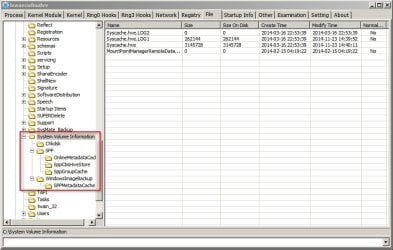
If you think that System Volume Information will remain empty because you have disabled System Restore then you are wrong. With System Restore disabled on my machine there are a fair number of folders and files inside.

SVI.jpg

I'd stop worrying. You can't just add up space used by files and expect it to equal space used.
 

My Computer My Computer

At a glance

Microsoft Windows 7 Home Premium 64-bit 7601 ...AMD C-60 APU with Radeon(tm) HD Graphics4.00 GBAMD Radeon HD 6290 Graphics
Computer type
Laptop
Computer Manufacturer/Model Number
ASUS
OS
Microsoft Windows 7 Home Premium 64-bit 7601 Multiprocessor Free Service Pack 1
CPU
AMD C-60 APU with Radeon(tm) HD Graphics
Motherboard
ASUSTeK COMPUTER INC. X501U
Memory
4.00 GB
Graphics Card(s)
AMD Radeon HD 6290 Graphics
Sound Card
(1) AMD High Definition Audio Device (2) Realtek High Defi
Screen Resolution
1366 x 768 x 32 bits (4294967296 colors) @ 60 Hz
Hard Drives
Hitachi HTS545050A7E380 SATA Disk Device
Antivirus
Comodo CIS & FW, SecureAplus App Whitelisting, Threatfire
Browser
Cyberfox 64bit, Opera 64bit, Airfox
Other Info
Spy-The-Spy, HitmanPro.Alert, Norton Connect Safe, MJRegWatcher, BitDefender TrafficLight, Voodoo Shield, Zemana AntiMalware
Another Example

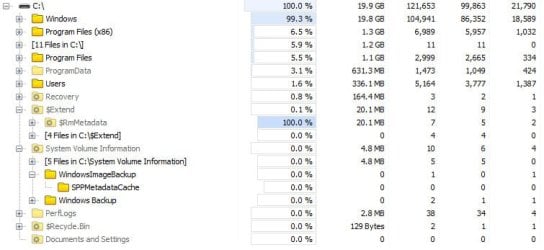
WizTree won't read C:\$Extend either!

ADS.jpg
 

My Computer My Computer

At a glance

Microsoft Windows 7 Home Premium 64-bit 7601 ...AMD C-60 APU with Radeon(tm) HD Graphics4.00 GBAMD Radeon HD 6290 Graphics
Computer type
Laptop
Computer Manufacturer/Model Number
ASUS
OS
Microsoft Windows 7 Home Premium 64-bit 7601 Multiprocessor Free Service Pack 1
CPU
AMD C-60 APU with Radeon(tm) HD Graphics
Motherboard
ASUSTeK COMPUTER INC. X501U
Memory
4.00 GB
Graphics Card(s)
AMD Radeon HD 6290 Graphics
Sound Card
(1) AMD High Definition Audio Device (2) Realtek High Defi
Screen Resolution
1366 x 768 x 32 bits (4294967296 colors) @ 60 Hz
Hard Drives
Hitachi HTS545050A7E380 SATA Disk Device
Antivirus
Comodo CIS & FW, SecureAplus App Whitelisting, Threatfire
Browser
Cyberfox 64bit, Opera 64bit, Airfox
Other Info
Spy-The-Spy, HitmanPro.Alert, Norton Connect Safe, MJRegWatcher, BitDefender TrafficLight, Voodoo Shield, Zemana AntiMalware
Don't know if this has anything to do with it(UAC is disabled)but I can access anything with WizTree
System Volume Information
$Extend
 

Attachments

  • 2014-11-23_211030.jpg
    2014-11-23_211030.jpg
    36.2 KB · Views: 0

My Computer My Computer

At a glance

Windows 7 Ultimate x64 SP1i7 4771 3.5Ghz2x8GB DDR3 GEIL EVO LEGGERAPALIT GTX 750 TI StormX Duo
Computer type
PC/Desktop
Computer Manufacturer/Model Number
Custom Build
OS
Windows 7 Ultimate x64 SP1
CPU
i7 4771 3.5Ghz
Motherboard
ASUS B85 Plus
Memory
2x8GB DDR3 GEIL EVO LEGGERA
Graphics Card(s)
PALIT GTX 750 TI StormX Duo
Monitor(s) Displays
Samsung T24D390
Screen Resolution
1920x1080
Hard Drives
Samsung SSD 840 EVO 128GB
2TB Seagate SATA 3
600GB WD Blue SATA 2
PSU
Seasonic S12II 520W Bronze
Case
Cooler Master Force 500
Antivirus
Avast Free
Browser
Firefox
Maybe you tampered with the default permissions of Windows and ran it as administrator so that it gave access to some extra areas. That can give you access to "system volume information" for example (among other places).

The issue of hardlinks and junctions still remains.
 

My Computer My Computer

At a glance

Windows 7 Ultimate x64Intel Core i7-740QM8 GB DDR3NVIDIA GeForce 330GT
Computer type
Laptop
Computer Manufacturer/Model Number
Toshiba Sattelite A665-S6092
OS
Windows 7 Ultimate x64
CPU
Intel Core i7-740QM
Memory
8 GB DDR3
Graphics Card(s)
NVIDIA GeForce 330GT
Screen Resolution
1366x768
Hard Drives
Samsung 840 SSD 500GB
1TB USB3 external HD
Cooling
Coolermaster Notepal U3 notebook cooling pad
Internet Speed
3mbps ASDL
Antivirus
ClamWin 0.98.7
Browser
Opera 12.17 x86 (main), Firefox 38 (sec), IE11 (last resort)
You can't go only by the files. You have to figure in the shadowstorage. Run this command:

vssadmin list shadowstorage

There you may find the difference (in Allocated)
 

My Computer My Computer

At a glance

Vista, Windows7, Mint Mate, Zorin, Windows 8from 1.6GHz Duo to i7
Computer Manufacturer/Model Number
HP, Dell, Gateway, Toshiba - 4 laptops and 2 desktops
OS
Vista, Windows7, Mint Mate, Zorin, Windows 8
CPU
from 1.6GHz Duo to i7
Monitor(s) Displays
2x HP w2207
Hard Drives
5x HDD, 7x SSD, 12x Externals
Keyboard
with trackball - no mices
Mouse
Trackball mice
Internet Speed
DSL 6000
$Extend

Don't know if this has anything to do with it(UAC is disabled)but I can access anything with WizTree
System Volume Information
$Extend

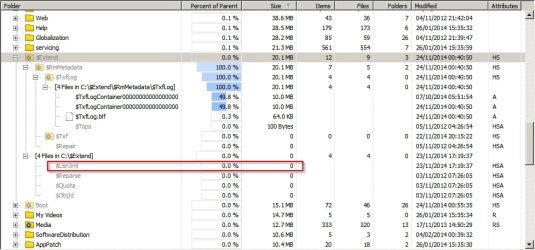
Well sure, I can view $Extend in WizTree but it doesn't show all the files - particularly a 0.5 GB $USNJrnl. When you think you've found a tool that will report all used/ slack space accurately please let us know!

Tree View.jpg

Compare the above with the following. It includes the 0.5 GB file that WizTree misses.

341323d1416760685t-properties-drive-c-shows-less-space-than-selecting-all-files-ads.jpg
 
Last edited:

My Computer My Computer

At a glance

Microsoft Windows 7 Home Premium 64-bit 7601 ...AMD C-60 APU with Radeon(tm) HD Graphics4.00 GBAMD Radeon HD 6290 Graphics
Computer type
Laptop
Computer Manufacturer/Model Number
ASUS
OS
Microsoft Windows 7 Home Premium 64-bit 7601 Multiprocessor Free Service Pack 1
CPU
AMD C-60 APU with Radeon(tm) HD Graphics
Motherboard
ASUSTeK COMPUTER INC. X501U
Memory
4.00 GB
Graphics Card(s)
AMD Radeon HD 6290 Graphics
Sound Card
(1) AMD High Definition Audio Device (2) Realtek High Defi
Screen Resolution
1366 x 768 x 32 bits (4294967296 colors) @ 60 Hz
Hard Drives
Hitachi HTS545050A7E380 SATA Disk Device
Antivirus
Comodo CIS & FW, SecureAplus App Whitelisting, Threatfire
Browser
Cyberfox 64bit, Opera 64bit, Airfox
Other Info
Spy-The-Spy, HitmanPro.Alert, Norton Connect Safe, MJRegWatcher, BitDefender TrafficLight, Voodoo Shield, Zemana AntiMalware
You can't go only by the files. You have to figure in the shadowstorage. Run this command:

vssadmin list shadowstorage

There you may find the difference (in Allocated)

Used Shadow Copy Storage space: 0 B (0%)
Allocated Shadow Copy Storage space: 0 B (0%)
Maximum Shadow Copy Storage space: 1.117 GB (1%)
 

My Computer My Computer

At a glance

Windows 7 Ultimate x64 SP1i7 4771 3.5Ghz2x8GB DDR3 GEIL EVO LEGGERAPALIT GTX 750 TI StormX Duo
Computer type
PC/Desktop
Computer Manufacturer/Model Number
Custom Build
OS
Windows 7 Ultimate x64 SP1
CPU
i7 4771 3.5Ghz
Motherboard
ASUS B85 Plus
Memory
2x8GB DDR3 GEIL EVO LEGGERA
Graphics Card(s)
PALIT GTX 750 TI StormX Duo
Monitor(s) Displays
Samsung T24D390
Screen Resolution
1920x1080
Hard Drives
Samsung SSD 840 EVO 128GB
2TB Seagate SATA 3
600GB WD Blue SATA 2
PSU
Seasonic S12II 520W Bronze
Case
Cooler Master Force 500
Antivirus
Avast Free
Browser
Firefox
So that's not it.
 

My Computer My Computer

At a glance

Vista, Windows7, Mint Mate, Zorin, Windows 8from 1.6GHz Duo to i7
Computer Manufacturer/Model Number
HP, Dell, Gateway, Toshiba - 4 laptops and 2 desktops
OS
Vista, Windows7, Mint Mate, Zorin, Windows 8
CPU
from 1.6GHz Duo to i7
Monitor(s) Displays
2x HP w2207
Hard Drives
5x HDD, 7x SSD, 12x Externals
Keyboard
with trackball - no mices
Mouse
Trackball mice
Internet Speed
DSL 6000
Back
Top