Properties pane issue

cgelici

New member
Local time
4:39 PM
Messages
19
I hope I am posting this in the right section. I think the issue occured when customizing win7 but I'm not 100% sure. Any help is appreciated though...

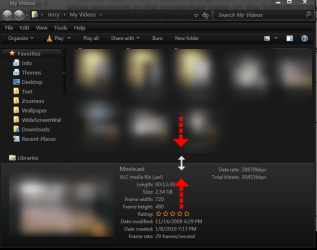
I noticed that when I select a e.g. .AVI file the properties do not show anymore in the properties pane on the bottom screen. Usually it tells the fps and such. Also, there is no icon anymore.

How can I fix this ? I checked disk for errors, performed auto-repair system files, clean junk files and registry keys using Windows 7 Manager and Regcure. Nothing helped.

I had this problem before and I had to reinstall windows....I really don't want to do that again...

Below is a screenshot.
 

Attachments

  • test.png
    test.png
    13.9 KB · Views: 6

My Computer

Computer Manufacturer/Model Number
Toshiba A300-12K
OS
Windows 7 7600
CPU
1,73 GHz Intel Core 2 Duo T2370-processor
Memory
2x1GB SO-DIMM DDR2-667
Graphics Card(s)
Intel GMA X3100 384 shared MB
Hard Drives
250GB 5400rpm
Try dragging the bottom pane up, look for the double arrow and dragging it up.
Jerry
 

Attachments

  • Region.png
    Region.png
    65.4 KB · Views: 1

My Computer

Computer type
Laptop
Computer Manufacturer/Model Number
Sager NP9170
OS
Win 7 Pro x64 / Win 10 Pro
CPU
Intel(R) Core(TM) i7-3630QM CPU @ 2.40GHz
Motherboard
CLEVO P170EM
Memory
12 GB
Graphics Card(s)
(1) Intel(R) HD Graphics 4000 (2) NVIDIA GeForce GTX 675M
Sound Card
(1) Realtek High Definition Audio (2) Intel(R) Display Aud
Monitor(s) Displays
17.3
Screen Resolution
1920x1080
Hard Drives
(1) Samsung 860 EVO 500GB(OS) (1) Samsung 860 EVO 500GB(Data)
Keyboard
Backlite
Antivirus
MSE, Malwarebytes Pro
Browser
Firefox
Other Info
DESKTOP: Custom-built.
OS: Win 10 Pro x64.
CASE: Rosewill R5.
CPU: Intel I5 4670K CPU @ 3.40GHz.
CPU COOLER: Cool Master Hyper 212 EVO.
MOTHERBOARD: Asus Z87-A.
MEMORY: Kingston HyperX 2x4 GB.
GPU: Nvidia Geforce 650 TI.
PSU: Corsair TX750.
DRIVES: (1) Samsung 840 120 GB SSD (2) Western Digital blue 500 GB 7200 RPM.
That just makes it larger....

it has to be due to a modification, I just can't figure out what.
Yesterday I reformatted my hdd and reinstalled win7 ultimate sp1 (clean install) I applied uxtheme patch, replaced explorer.exe and explorerframe.dll with the ones I had before. I replaced them with the original but no luck...
 
Last edited by a moderator:

My Computer

Computer Manufacturer/Model Number
Toshiba A300-12K
OS
Windows 7 7600
CPU
1,73 GHz Intel Core 2 Duo T2370-processor
Memory
2x1GB SO-DIMM DDR2-667
Graphics Card(s)
Intel GMA X3100 384 shared MB
Hard Drives
250GB 5400rpm
I just did sfc /scannow and it restored the patched theme files, however the properties pane issue remains. I repatched with uxtheme.

Am still open for suggestions. Anyone ...?
 

My Computer

Computer Manufacturer/Model Number
Toshiba A300-12K
OS
Windows 7 7600
CPU
1,73 GHz Intel Core 2 Duo T2370-processor
Memory
2x1GB SO-DIMM DDR2-667
Graphics Card(s)
Intel GMA X3100 384 shared MB
Hard Drives
250GB 5400rpm
I have looked at all the fold options and do not see anything, is it just the AVI file that's not showing up
Jerry
 

My Computer

Computer type
Laptop
Computer Manufacturer/Model Number
Sager NP9170
OS
Win 7 Pro x64 / Win 10 Pro
CPU
Intel(R) Core(TM) i7-3630QM CPU @ 2.40GHz
Motherboard
CLEVO P170EM
Memory
12 GB
Graphics Card(s)
(1) Intel(R) HD Graphics 4000 (2) NVIDIA GeForce GTX 675M
Sound Card
(1) Realtek High Definition Audio (2) Intel(R) Display Aud
Monitor(s) Displays
17.3
Screen Resolution
1920x1080
Hard Drives
(1) Samsung 860 EVO 500GB(OS) (1) Samsung 860 EVO 500GB(Data)
Keyboard
Backlite
Antivirus
MSE, Malwarebytes Pro
Browser
Firefox
Other Info
DESKTOP: Custom-built.
OS: Win 10 Pro x64.
CASE: Rosewill R5.
CPU: Intel I5 4670K CPU @ 3.40GHz.
CPU COOLER: Cool Master Hyper 212 EVO.
MOTHERBOARD: Asus Z87-A.
MEMORY: Kingston HyperX 2x4 GB.
GPU: Nvidia Geforce 650 TI.
PSU: Corsair TX750.
DRIVES: (1) Samsung 840 120 GB SSD (2) Western Digital blue 500 GB 7200 RPM.
No, ALL .avi files are like this (in my case).
 

My Computer

Computer Manufacturer/Model Number
Toshiba A300-12K
OS
Windows 7 7600
CPU
1,73 GHz Intel Core 2 Duo T2370-processor
Memory
2x1GB SO-DIMM DDR2-667
Graphics Card(s)
Intel GMA X3100 384 shared MB
Hard Drives
250GB 5400rpm
No I mean other file types like MOV, FLV, do you get details on JPEG's in your picture folder?
Jerry
 

My Computer

Computer type
Laptop
Computer Manufacturer/Model Number
Sager NP9170
OS
Win 7 Pro x64 / Win 10 Pro
CPU
Intel(R) Core(TM) i7-3630QM CPU @ 2.40GHz
Motherboard
CLEVO P170EM
Memory
12 GB
Graphics Card(s)
(1) Intel(R) HD Graphics 4000 (2) NVIDIA GeForce GTX 675M
Sound Card
(1) Realtek High Definition Audio (2) Intel(R) Display Aud
Monitor(s) Displays
17.3
Screen Resolution
1920x1080
Hard Drives
(1) Samsung 860 EVO 500GB(OS) (1) Samsung 860 EVO 500GB(Data)
Keyboard
Backlite
Antivirus
MSE, Malwarebytes Pro
Browser
Firefox
Other Info
DESKTOP: Custom-built.
OS: Win 10 Pro x64.
CASE: Rosewill R5.
CPU: Intel I5 4670K CPU @ 3.40GHz.
CPU COOLER: Cool Master Hyper 212 EVO.
MOTHERBOARD: Asus Z87-A.
MEMORY: Kingston HyperX 2x4 GB.
GPU: Nvidia Geforce 650 TI.
PSU: Corsair TX750.
DRIVES: (1) Samsung 840 120 GB SSD (2) Western Digital blue 500 GB 7200 RPM.
Back
Top