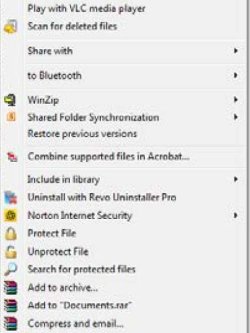
I did a right click on a folder, we'll say it is called "Documents", and one of the options is "Protect File". I decided to use this option to protect a complete folder and I was asked to save the protect key, which I did, and off the program went, encrypting the folder.
The only thing is that it took about three - four hours, and then it took me ages to find the folder. It had been renamed as just "documents" with a new icon beside it. I was going to "Unprotect File" but it looks like it will take the same three - four hours to unprotect.
The other thing is that the folder is still there in full view in "My Documents" and you don't need to use the fingerprint reader or a password to open the folder, or the files within the folder.
Could anyone explain just how "Protect" or "Unprotect" woeks, and what it is supposed to do ?
Many thanks, parkman
The only thing is that it took about three - four hours, and then it took me ages to find the folder. It had been renamed as just "documents" with a new icon beside it. I was going to "Unprotect File" but it looks like it will take the same three - four hours to unprotect.
The other thing is that the folder is still there in full view in "My Documents" and you don't need to use the fingerprint reader or a password to open the folder, or the files within the folder.
Could anyone explain just how "Protect" or "Unprotect" woeks, and what it is supposed to do ?
Many thanks, parkman
My Computer
- Computer type
- Laptop
- Computer Manufacturer/Model Number
- Toshiba Tecra
- OS
- Windows 7 Professional x64
- CPU
- i7
- Motherboard
- Toshiba
- Memory
- 8 gb
- Hard Drives
- 300gb
- Antivirus
- Norton
- Browser
- Mozilla Firefox / Internet Explorer