protect my computer from others on my network

CalebDK

New member
Local time
6:10 PM
Messages
21
Location
Des Moines, Iowa
So on my network at home there are a few others connected to it and i wanted to know how i would go about making it so they cannot access my shared docs or computer at all over the network without a password but i dont know how to go about doing this. Can anyone help me do this?
 

My Computer My Computer

At a glance

Windows Vista Home Basic x32 OEMIntel Core 2 Quad Q8400 Yorkfield 2.66GHz LGA...(2 x2GB)4GB CrucialRadeon HD 3850 512MB 256-bit GDDR3
Computer Manufacturer/Model Number
Custom Build
OS
Windows Vista Home Basic x32 OEM
CPU
Intel Core 2 Quad Q8400 Yorkfield 2.66GHz LGA 775
Motherboard
ECS P45T-AD3 Motherboard - Intel P43, Socket 775, ATX
Memory
(2 x2GB)4GB Crucial
Graphics Card(s)
Radeon HD 3850 512MB 256-bit GDDR3
Sound Card
Realtek HD Audio
Monitor(s) Displays
Acer 21.5" HDMI
Screen Resolution
1920 x 1080
Hard Drives
500GBx1
PSU
Rosewill RP600V2-S-SL-S 600W ATX12V
Case
NZXT Tempest ATX Mid-Tower Case
Cooling
Fan
Keyboard
Zboard
Internet Speed
300mps wireless card
Other Info
will be upgrading to vista home premium x64 OEM, another 500GB HDD, liquid cooling, and another 4GB of RAM
It's simple. If you're running an account that they don't have a password to, they aren't going to access your stuff. Unless the are very swift with networking. I suspect that this is not the type of person/people you're worried about, correct?

To be on the safer side, turn off file and printer sharing, unless you're sharing a printer. Turn on password protected sharing. Turn off public folder sharing. And if no printer, disable netbios in your adapter settings for IPv4. Disable IPv6 and IP Helper service.

If you are very interested in keeping anyone out, run Zone Alarm. Put you network adapter in the interenet zone and do not give server permissions to anything. Use the setting to "block all servers." (Btw, ZA has free beta available.)

If you really want to get serious, you can use group policy to deny login to desktop after x number of unsuccessful attempts. If someone attempts x amounts of times, the pc will refuse to login for y amount of time you set it for.
 

My Computer My Computer

At a glance

7600.20510 x86P4 550 3.4 GHz HT running at 3.5 GHzOCZ 2 GB(2x1GB) DDR400mHz running @ 414 mHzHIS Radeon HD 3850 IceQ 3 Turbo HDMI Dual DL-...
Computer Manufacturer/Model Number
self built
OS
7600.20510 x86
CPU
P4 550 3.4 GHz HT running at 3.5 GHz
Motherboard
MSI PM8M3-V (MS-7211 v1.x) Micro-ATX mainboard
Memory
OCZ 2 GB(2x1GB) DDR400mHz running @ 414 mHz
Graphics Card(s)
HIS Radeon HD 3850 IceQ 3 Turbo HDMI Dual DL-DVI AGP
Sound Card
MOTU Traveler firewire studio interface 192 kHz 24 bit
Monitor(s) Displays
22" widescreen Acer X223W LCD, 17" Compaq P75 CRT
Screen Resolution
1680x1050 and 1280x1024
Hard Drives
SATA I x2 WD, 400 GB and 120 GB, SATA 2 WD Caviar Black 1 TB
PSU
350W generic
Case
Cybertronpc, it glows blue
Cooling
stock cpu fan, Ice-Q 3 gpu and system, many case fans
Keyboard
Logitch Classical Keyboard 200
Mouse
Logitech Mediaplay cordless
Internet Speed
1792/448 kbits/sec
Other Info
SATA II PCI fake RAID adapter, 1 GB Readyboost, original ATI Remote Wonder (even works with WMC perfectly), Logitech Rumblepad 2 game controller x2
Also,

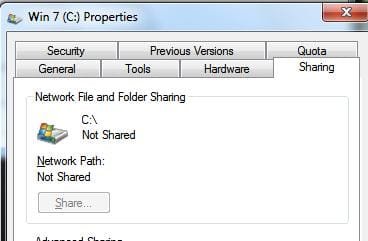
1) Open up your Compter browse, right click each drives (root) and unshare it. Then right click each drives again to make sure all is Not Shared.

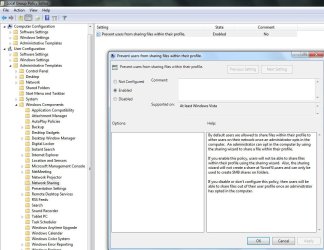
2) Local Group Policy
User config>admin template>windows components> Network sharing.
Enable it.
 

Attachments

  • Noname.jpg
    Noname.jpg
    12 KB · Views: 54
  • Noname1.jpg
    Noname1.jpg
    102.3 KB · Views: 159

My Computer My Computer

At a glance

Windows 7 Ultimate 64BitGenuineIntel Intel(R) Core(TM) DuoCore T2400 ...2.00 GBMobile Intel(R) 945 Express Chipset
Computer Manufacturer/Model Number
Lenovo ThinkPad T60
OS
Windows 7 Ultimate 64Bit
CPU
GenuineIntel Intel(R) Core(TM) DuoCore T2400 @ 1.83GHz
Motherboard
Intel(R) 82801G (ICH7 Family)
Memory
2.00 GB
Graphics Card(s)
Mobile Intel(R) 945 Express Chipset
Sound Card
SoundMAX Integrated Digital HD Audio
Monitor(s) Displays
ThinkPad Display
Screen Resolution
1400x1050
Hard Drives
100Gb SATA
Keyboard
Standard Keyboard
Mouse
HID-compliant Mouse
Internet Speed
Cable Broadband - 54Mbps
Other Info
Intel(R) PRO/1000 PL Network Connection
11a/b/g Wireless LAN Mini PCI Express Adapter
Good one Aem. +rep
 

My Computer My Computer

At a glance

7600.20510 x86P4 550 3.4 GHz HT running at 3.5 GHzOCZ 2 GB(2x1GB) DDR400mHz running @ 414 mHzHIS Radeon HD 3850 IceQ 3 Turbo HDMI Dual DL-...
Computer Manufacturer/Model Number
self built
OS
7600.20510 x86
CPU
P4 550 3.4 GHz HT running at 3.5 GHz
Motherboard
MSI PM8M3-V (MS-7211 v1.x) Micro-ATX mainboard
Memory
OCZ 2 GB(2x1GB) DDR400mHz running @ 414 mHz
Graphics Card(s)
HIS Radeon HD 3850 IceQ 3 Turbo HDMI Dual DL-DVI AGP
Sound Card
MOTU Traveler firewire studio interface 192 kHz 24 bit
Monitor(s) Displays
22" widescreen Acer X223W LCD, 17" Compaq P75 CRT
Screen Resolution
1680x1050 and 1280x1024
Hard Drives
SATA I x2 WD, 400 GB and 120 GB, SATA 2 WD Caviar Black 1 TB
PSU
350W generic
Case
Cybertronpc, it glows blue
Cooling
stock cpu fan, Ice-Q 3 gpu and system, many case fans
Keyboard
Logitch Classical Keyboard 200
Mouse
Logitech Mediaplay cordless
Internet Speed
1792/448 kbits/sec
Other Info
SATA II PCI fake RAID adapter, 1 GB Readyboost, original ATI Remote Wonder (even works with WMC perfectly), Logitech Rumblepad 2 game controller x2
I have the same question. I've tried turning off network detection and filing sharing and pretty much everything else in order to keep the other people on this network from being able to search my computer(s). However if I turn network detection on on say my lap top I can still browse all the files on my desktop and vice versa. no password required. And both computers require a password to log into their accounts. I don't know what I'm missing but I'm worried this means everyone else can view these files as well. Any ideas?
 

My Computer My Computer

At a glance

Windows 7 Homeintel
Computer type
PC/Desktop
Computer Manufacturer/Model Number
Asus
OS
Windows 7 Home
CPU
intel
Back
Top