
Solved Protected MS Office drive, why?

bawldiggle

GrayGhost2 ret.
Pro User
VIP
Local time
6:40 AM
Messages
895
Location
Australia
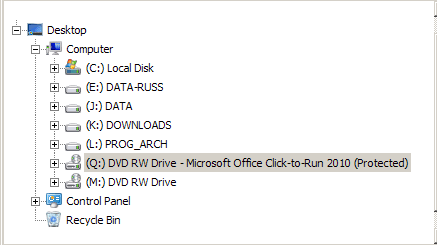
Q Drive label, Microsoft Office Click-to-Run 2010 (Protected)

I am trying to establish a new ext. HDD with multiple logical drives (for data only)

In the process of assigning letters to the new drives, I wanted to assign "Q" to the CD/DVD drive
- but this is what I get in Win-Explorer
Click to Run.PNG

I uninstalled "Microsoft Office Click-to-Run 2010" about 18 months ago (with the help of this forum)
Q1: why is Microsoft Office Click-to-Run 2010 (Protected) label-string sticking to "Q:\"
Q2: how do I remove the Microsoft Office Click-to-Run 2010 (Protected) drive label?

Thank you :)
 
Last edited:

My Computer

Computer type
PC/Desktop
Computer Manufacturer/Model Number
Toshiba, Lenovo (laptops) + 4 rigs
OS
XP Pro (x86) | 7 HP (x86) & (x64) | 7 Pro (x64)
Thanks Maxie ... ;)

Two good outcomes ...
------------
I worked out a solution for the remnant nag label Microsoft Office Click-to-Run 2010 (Protected) label affix on my "Q" drive
- (better than hiding the "Q" drive)
- searched Registry for the affix string Microsoft Office Click-to-Run 2010 (Protected)
- created a restore point as insurance (always when modifying the registry)
- and deleted two occurrences of "Q" key
In Registry
Start > Run:= regedit
HKEY_LOCAL_MACHINE\SOFTWARE\Microsoft\Windows\CurrentVersion\Explorer\DriveIcons
HKEY_CURRENT_USER\Software\Microsoft\Windows\CurrentVersion\Explorer\DriveIcons
- there is a sub-key ... "Q"
. eg, ~~\DriveIcons > Q > DefaultLabel (value)
Name:= (default)
Type:= REG_SZ
Data:= Microsoft Office Click-to-Run 2010 (Protected)
** deleted the Q keys
- do not disable, best to delete
- (I usually disable keys and value-names with "_obs" affix, then all is not lost, if I have to re-instate)
-retained the "DriveIcons" parent-keys intact.
** REBOOT
------------
Your suggestion led me to Microsoft FixIt tool ... an excellent find (thank you) :party:

Several years ago I made the mistake of installing IncrediMail
- it hijacked my browser and mail
- was a real pest to uninstall because it had also installed a separate nag msg
- The "FixIt" tool finally buried IncrediMail for good.

Yesterday (here) was 35°C, down to 26°C today. I won't rub it in ;)

SPECS:
Toshiba Satellite C665
OS:= Windows 7 Home Premium (32-bit), sp1 (Build 7601) OEM
UI:=Classic Shell Start + Classic Explorer
Windows Indexing = disabled
 
Last edited:

My Computer

Computer type
PC/Desktop
Computer Manufacturer/Model Number
Toshiba, Lenovo (laptops) + 4 rigs
OS
XP Pro (x86) | 7 HP (x86) & (x64) | 7 Pro (x64)
Most welcome ... And thanks for Posting back your solution ...
 

My Computer

Computer Manufacturer/Model Number
W530-3630QM1
OS
windows 7 home 64bit
CPU
INTEL-CORE I7
Memory
16GB
Hard Drives
750GB
Browser
Chrome
Back
Top