
Protected system fonts

tbernstein

Veteran computer geek
Power User
Local time
11:29 PM
Messages
106
Location
London
When i upgraded to Win7 I found that the Chinese etc. system fonts are still protected system fonts.
I assume that they are still part of the Windows 7 OS and not a hang over from Vista. They stiill can't be removed.
I know that Batang etc do no harm. But they annoyed me when I was using Vista and after the upgrade they are still there to annoy me.
It's not just that I'm being a bit precious about them
I fight to resist loading every font under the sun onto my system. I easily could, I love fonts.
But if I can't have every font I want I really object to having to carry ones that I will never need or want.

Why do Microsoft make them unremovable?
OK, in some parts of the world they need these.
But surely Microsoft, in their wisdom(?) could have been a bit more flexible.
 

My Computer

Computer Manufacturer/Model Number
Mesh PC
OS
Win 7
CPU
Intel core 2 duo
Memory
4 gig
Hard Drives
1 x250 gig
1 x 500 gig
Mouse
MS lasermouse 5000 -'cos it scrolls smoothly, no wheel click
Internet Speed
10mb - cable
Other Info
The mouse took most research. I hate that click on the wheel, this one has the old fashioned smooth wheel. There aren't many about.

My Computer

Computer type
PC/Desktop
Computer Manufacturer/Model Number
Self built custom
OS
64-bit Windows 11 Pro for Workstations
CPU
Intel i7-8700K OC'd to 5 GHz
Motherboard
ASUS ROG Maximus XI Formula Z390
Memory
64 GB (4x16GB) G.SKILL TridentZ RGB DDR4 3600 MHz
Graphics Card(s)
ASUS ROG-STRIX-GTX1080TI-O11G-GAMING
Sound Card
Integrated
Monitor(s) Displays
2 x Samsung Odyssey G7 27"
Screen Resolution
2560x1440
Hard Drives
1TB Samsung 990 PRO M.2,
4TB Samsung 990 PRO PRO M.2,
TerraMaster F8 SSD Plus NAS
PSU
Seasonic Prime Titanium 850W
Case
Thermaltake Core P3
Cooling
Corsair Hydro H115i
Keyboard
Logitech wireless K800
Mouse
Logitech MX Master 4
Internet Speed
2 Gb/s Download and 100 Mb/s Upload
Antivirus
Malwarebyte Anti-Malware Premium
Browser
Google Chrome
Other Info
Logitech Z625 speaker system,
Logitech BRIO 4K Pro webcam,
HP Color LaserJet Pro MFP M477fdn,
APC SMART-UPS RT 1000 XL - SURT1000XLI,
Galaxy S23 Plus phone
Yes

"the Chinese etc. system fonts are still protected system fonts."
 

My Computer

Computer Manufacturer/Model Number
Mesh PC
OS
Win 7
CPU
Intel core 2 duo
Memory
4 gig
Hard Drives
1 x250 gig
1 x 500 gig
Mouse
MS lasermouse 5000 -'cos it scrolls smoothly, no wheel click
Internet Speed
10mb - cable
Other Info
The mouse took most research. I hate that click on the wheel, this one has the old fashioned smooth wheel. There aren't many about.
OK, i just changed the ACL. Added my username and gave full permissions, changed the owner to me (instead of trusted installer) and tried to delete, i didn't get the system protected message this time but was told that the fonts are in use and cannot be deleted????
I'll keep trying for a solution.

EDIT: The changes in the ACL worked. Which font in particular where you trying to delete?
 

My Computer

Computer Manufacturer/Model Number
HP Touchsmart IQ771.uk
OS
Windows 7 Ultimate x64
CPU
AMD Turion(tm) 64 X2 Mobile Technology TL-56
Motherboard
ASUS Pheonix
Memory
3GB Nanya PC2-6400 DDR2-SDRAM SO-DIM (400MHz)
Graphics Card(s)
NVIDIA GeForce Go 7600 256MB GDDR3 SDRAM
Sound Card
High Definition Intergrated NVIDIA MCP51
Monitor(s) Displays
46" Sony Bravia HDTV
Screen Resolution
1600x1200
Hard Drives
1.5TB Samsug
320GB Seagate ST3320820AS - SATA 3Gb/s 8MB
500GB Maxtor Basics STM305003EHD301-RK
Internet Speed
↓6.32 Mb/s ↑0.35 Mb/s ↔26ms
Other Info
BIOS - American Megatrends Inc. 5.07
Ethernet Port - NVIDIA nForce 10/100/1000 Mbps
DVD Drive - TSSTcorp DVDR/RW TS-T632L
Anthing in non-latin script, like chinese or similar, that to my eyes appears as a collection of squiggles.
These are language or region specific and I'll never need them.
 

My Computer

Computer Manufacturer/Model Number
Mesh PC
OS
Win 7
CPU
Intel core 2 duo
Memory
4 gig
Hard Drives
1 x250 gig
1 x 500 gig
Mouse
MS lasermouse 5000 -'cos it scrolls smoothly, no wheel click
Internet Speed
10mb - cable
Other Info
The mouse took most research. I hate that click on the wheel, this one has the old fashioned smooth wheel. There aren't many about.
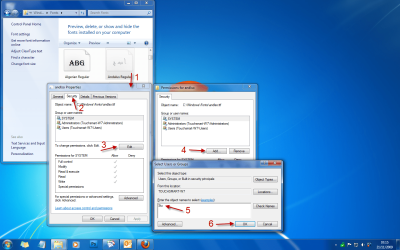
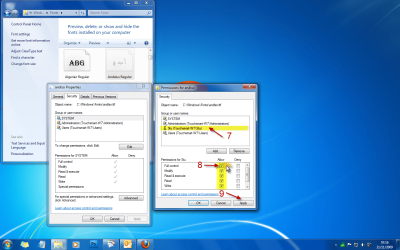
OK, i just changed the ACL. Added my username and gave full permissions, changed the owner to me (instead of trusted installer) and tried to delete, i didn't get the system protected message this time but was told that the fonts are in use and cannot be deleted????
I'll keep trying for a solution.

EDIT: The changes in the ACL worked. Which font in particular where you trying to delete?

You may have to do this with each of the fonts you want deleting.

Take Ownership of file - Vista Forums

1.png

2.png

3.png
 
Last edited by a moderator:

My Computer

Computer Manufacturer/Model Number
HP Touchsmart IQ771.uk
OS
Windows 7 Ultimate x64
CPU
AMD Turion(tm) 64 X2 Mobile Technology TL-56
Motherboard
ASUS Pheonix
Memory
3GB Nanya PC2-6400 DDR2-SDRAM SO-DIM (400MHz)
Graphics Card(s)
NVIDIA GeForce Go 7600 256MB GDDR3 SDRAM
Sound Card
High Definition Intergrated NVIDIA MCP51
Monitor(s) Displays
46" Sony Bravia HDTV
Screen Resolution
1600x1200
Hard Drives
1.5TB Samsug
320GB Seagate ST3320820AS - SATA 3Gb/s 8MB
500GB Maxtor Basics STM305003EHD301-RK
Internet Speed
↓6.32 Mb/s ↑0.35 Mb/s ↔26ms
Other Info
BIOS - American Megatrends Inc. 5.07
Ethernet Port - NVIDIA nForce 10/100/1000 Mbps
DVD Drive - TSSTcorp DVDR/RW TS-T632L
To get rid of protected system fonts:

(0) Create a System Restore Point first

(1) Copy C:\Windows\Fonts folder to Desktop, make Read Only
(2) Restart using Ubuntu 9.04 DVD to run from disc without changing your computer
(3) Use Ubuntu to delete fonts you don't want
(4) remove Ubuntu disc, restart Win7

You are the owner of any fonts you reinstall from your Desktop copy

This may also work with BartPE or Seagate Disk Wizard
 
Last edited:

My Computer

Computer Manufacturer/Model Number
Custom Desktop
OS
Win 7 32 Pro SP1
CPU
Core i3-2100
Motherboard
Intel DH67L
Memory
4 GB
That's a good idea.
I'll make a list of them first,though. Better to delete 1 too few than 1 too many.
 

My Computer

Computer Manufacturer/Model Number
Mesh PC
OS
Win 7
CPU
Intel core 2 duo
Memory
4 gig
Hard Drives
1 x250 gig
1 x 500 gig
Mouse
MS lasermouse 5000 -'cos it scrolls smoothly, no wheel click
Internet Speed
10mb - cable
Other Info
The mouse took most research. I hate that click on the wheel, this one has the old fashioned smooth wheel. There aren't many about.
Removing unwanted fonts via Ubuntu disk:

In retrospect, maybe not such a good idea.

I lost the pointer icon on the Start Menu and checkboxes and radio buttons in some apps. Not sure which font they came from.

You cannot reinstall fonts removed this way because Win thinks they're still there.

Fonts are listed in HKLM\SOFTWARE\Microsoft\Windows NT\Current Version\Fonts (maybe somewhere else as well). I'm not sure of the wisdom of removing them here.
 

My Computer

Computer Manufacturer/Model Number
Custom Desktop
OS
Win 7 32 Pro SP1
CPU
Core i3-2100
Motherboard
Intel DH67L
Memory
4 GB
In deleting Fonts in Windows 7 one-by-one, as above, I note that they are currently owned by 'TrustedInstaller'. Is there any way to - I don't know, log on or something - as 'TrustedInstaller' so the fonts can be deleted en masse?
 

My Computer

Computer Manufacturer/Model Number
DIY
OS
Windows 7
CPU
Core 2 Duo 6600
Motherboard
Asrock G31M-S
Memory
4GB
Graphics Card(s)
nVidia 8500
Sound Card
board
Monitor(s) Displays
Hazro Flat 2560x1600
Hard Drives
Maxtor 500GB x 2 RAID 1
Maxtor 200GB
Maxtor 200GB
PSU
?
Case
?
Cooling
Fan
Just to point out Fonts that are faded, are not loaded and thus are not consuming anything but HDD space (they still consume HDD space even when deleted.) Versus previous versions of Windows, 7 has builtin font management capabilities.
 

My Computer

Computer type
PC/Desktop
Computer Manufacturer/Model Number
Alienware Aurora ALX R4
OS
Windows 10 Pro (x64)
CPU
Intel Core i7-3930K (3.2GHz - 4.5GHz)
Motherboard
Alienware Aurora-R4 x79
Memory
4x Samsung 4GB PC3-12800 DDR3 (16GB 1600MHz)
Graphics Card(s)
Nvidia Geforce GTX 690
Sound Card
SteelSeries Siberia Elite
Monitor(s) Displays
Dell UltraSharp U3011
Screen Resolution
2560x1600
Hard Drives
Samsung 850 Pro 256 GB, Seagate 1TB Desktop Hybrid HDD, 2x Western Digital 4TB Green HDD
PSU
875W Some Dell PSU <.<
Case
Alienware Aurora ALX
Cooling
Custom Liquid Cooling (EK CPU & GPU blocks) dual EK 480RAD
Keyboard
Logitech G710+ Mechanical
Mouse
Logitech G700s
Internet Speed
Verizon Fios (50 mbps average)
Other Info
Server: Intel NUC D54250WYK: i5-4250U, 16GB, 256 GB mSATA, Windows Server 2012 R2
Except that they show up and consume space in software drop-down font menus - Outlook 2007, for instance, and Microsoft can have no excuse for that - clogging up the space and compelling the user to scroll up and down more than necessary. I can assure you that the fonts show up as faded in the Font folder and yet still turn up as an option for text formatting in emails.

Why do Microsoft make it so difficult for someone in England to delete, e.g., Korean fonts which are never going to be used?

The only reason for keeping them, so far as I can see, is in case they are needed to display a web page. But if I see a Google entry with Korean characters, I do exactly the same as I would if it simply displayed gobbledygook - I ignore it.

Even though I deleted some 36 protected fonts, there are a further dozen or so which I cannot delete even by taking ownership and granting myself full permissions. Batang, for example, and MingLiu.

Just one more instance of Microsoft making decisions that cause needless frustration, and never giving - if there is one - a rationale for the decision.
 

My Computer

Computer Manufacturer/Model Number
DIY
OS
Windows 7
CPU
Core 2 Duo 6600
Motherboard
Asrock G31M-S
Memory
4GB
Graphics Card(s)
nVidia 8500
Sound Card
board
Monitor(s) Displays
Hazro Flat 2560x1600
Hard Drives
Maxtor 500GB x 2 RAID 1
Maxtor 200GB
Maxtor 200GB
PSU
?
Case
?
Cooling
Fan
Precisely.
 

My Computer

Computer Manufacturer/Model Number
Mesh PC
OS
Win 7
CPU
Intel core 2 duo
Memory
4 gig
Hard Drives
1 x250 gig
1 x 500 gig
Mouse
MS lasermouse 5000 -'cos it scrolls smoothly, no wheel click
Internet Speed
10mb - cable
Other Info
The mouse took most research. I hate that click on the wheel, this one has the old fashioned smooth wheel. There aren't many about.
Except that they show up and consume space in software drop-down font menus - Outlook 2007, for instance, and Microsoft can have no excuse for that - clogging up the space and compelling the user to scroll up and down more than necessary. I can assure you that the fonts show up as faded in the Font folder and yet still turn up as an option for text formatting in emails.

Why do Microsoft make it so difficult for someone in England to delete, e.g., Korean fonts which are never going to be used?

The only reason for keeping them, so far as I can see, is in case they are needed to display a web page. But if I see a Google entry with Korean characters, I do exactly the same as I would if it simply displayed gobbledygook - I ignore it.

Even though I deleted some 36 protected fonts, there are a further dozen or so which I cannot delete even by taking ownership and granting myself full permissions. Batang, for example, and MingLiu.

Just one more instance of Microsoft making decisions that cause needless frustration, and never giving - if there is one - a rationale for the decision.

I can't seem to delete Batang either, the fact they're this well protected says that it'd be unwise to delete them. Have you actually previewed Batang, it's not Chinese characters at all, Windows must use them for something specific. If you really must delete them (which i doubt you do) do as suggested above and boot off an Ubuntu Live-CD and do the job. Beware however, that you may boot into a messed up Windows!
 

My Computer

Computer Manufacturer/Model Number
HP Touchsmart IQ771.uk
OS
Windows 7 Ultimate x64
CPU
AMD Turion(tm) 64 X2 Mobile Technology TL-56
Motherboard
ASUS Pheonix
Memory
3GB Nanya PC2-6400 DDR2-SDRAM SO-DIM (400MHz)
Graphics Card(s)
NVIDIA GeForce Go 7600 256MB GDDR3 SDRAM
Sound Card
High Definition Intergrated NVIDIA MCP51
Monitor(s) Displays
46" Sony Bravia HDTV
Screen Resolution
1600x1200
Hard Drives
1.5TB Samsug
320GB Seagate ST3320820AS - SATA 3Gb/s 8MB
500GB Maxtor Basics STM305003EHD301-RK
Internet Speed
↓6.32 Mb/s ↑0.35 Mb/s ↔26ms
Other Info
BIOS - American Megatrends Inc. 5.07
Ethernet Port - NVIDIA nForce 10/100/1000 Mbps
DVD Drive - TSSTcorp DVDR/RW TS-T632L
Batang is a foreign character set. If you look at the font details provided in the C:/windows/fonts folder, it will tell you that the Font Foundry is Han Yang I & C Co. Ltd and that it is 'Designed for' "Korean".

So, I repeat the question. Why is it so insistently imperative that I MUST have - at 31Mb hard disk usage and large entries in all drop-down font menus - the ability to show Korean text on my computer? I don't have the ability to switch it off; nowhere so far as I have found does Microsoft trouble to tell me WHY it must remain available at all times, whatever my wishes might be. It's just another Mysterious Microsoft fait accompli.

It's totally ridiculous that obtaining and then using a boot disk for an entirely different operating system should be proposed as anything approaching a reasonable workaround (though I thank those who have made the suggestion).
 

My Computer

Computer Manufacturer/Model Number
DIY
OS
Windows 7
CPU
Core 2 Duo 6600
Motherboard
Asrock G31M-S
Memory
4GB
Graphics Card(s)
nVidia 8500
Sound Card
board
Monitor(s) Displays
Hazro Flat 2560x1600
Hard Drives
Maxtor 500GB x 2 RAID 1
Maxtor 200GB
Maxtor 200GB
PSU
?
Case
?
Cooling
Fan
And apart from the irritation of having to waste time skimming through these when I'm deciding which font to use, there's the principle involved. On my computer Microsoft, for no good purpose, have added a slab of unwanted and unneeded data, which they have locked onto my setup against my will. :rolleyes:
 

My Computer

Computer Manufacturer/Model Number
Mesh PC
OS
Win 7
CPU
Intel core 2 duo
Memory
4 gig
Hard Drives
1 x250 gig
1 x 500 gig
Mouse
MS lasermouse 5000 -'cos it scrolls smoothly, no wheel click
Internet Speed
10mb - cable
Other Info
The mouse took most research. I hate that click on the wheel, this one has the old fashioned smooth wheel. There aren't many about.
In the registry:

HKEY_LOCAL_MACHINE\SOFTWARE\Microsoft\Windows NT\CurrentVersion\FontLink\SystemLink

are all the fonts we can't delete. Has anyone tried deleting Batang et al. in the registry?
 

My Computer

OS
Windows 7
I am another who wants 100% control on my computer and I want to delete forever all foreign fonts - they show up in too many application menus

come on Microsoft sort it out

I have even used Adobe Illustrator in Thai.. when in Thailand

do i want Thai or Chinese on my pc?
NO NEVER
you need a localised keyboard for starters

isnt there a reg-edit solution?
 
Last edited by a moderator:

My Computer

OS
xp/vista/win7
CPU
i7
I presume those so worked up about this have at least told Windows to hide fonts based on language settings right?

Incidentally, I presume you are aware that the 31mb or whatever of unneeded data pales in comparison to the countless of drivers, services etc that you'll never use and those complaining about this 31mb of wasted hard disk space have made sure to delete all this unneeded data before worrying about 31mb
 

My Computer

OS
Windows Vista
Nil Einne - are you being a troll?
have you read the rest of this thread?

it's seeing the unwanted fonts appear in other program menus that is annoying

I'm a professional designer, I don't want to see fonts I have not installed in my menus
I couldn't care less about the disk space

Microsoft make too many decisions on what they think is "best" and take control away from the user
- this font issue appears to be driven by a poor bit of programming logic

other changes are driven by "hey guys this is new, nobody else does it like this, lets change it and lets ignore the users - they don't matter - we're designing softaware for the 21st century - they're just retards "
 

My Computer

OS
xp/vista/win7
CPU
i7
Back
Top