"Proxy server" checks itself automatically

Plecto

New member
Member
Local time
7:15 PM
Messages
57
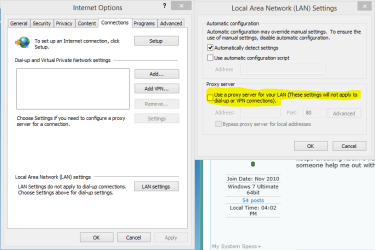
When entering Internet properties -> connection -> LAN settings, the box named "Use a proxy server for your LAN" keeps checking itself! I have to constantly un-check this box while surfing to make sure that all sites load. Could someone help me out with this issue?
 

My Computer

Computer Manufacturer/Model Number
Custom built desktop
OS
Windows 7 Ultimate 64bit
CPU
Intel Core i5 3570K @ 3.40GHz
Motherboard
MSI B75MA-P45 (MS-7798)
Memory
4,00 GB Dual-Channel DDR3 @ 665MHz (9-9-9-24)
Graphics Card(s)
NVIDIA GeForce GTX 560 SE
Screen Resolution
1280x1024
Hard Drives
466GB Seagate ST3500320AS ATA Device (SATA)
Cooling
Standard air
I'm not sure where you are seeing this proxy setting to uncheck it?

Is the proxy setting uncheck in Internet Explorer "or which ever browser you are using"?
 

Attachments

  • Uncheck Proxy Server Explorer.PNG
    Uncheck Proxy Server Explorer.PNG
    18.4 KB · Views: 2

My Computer

Computer type
PC/Desktop
Computer Manufacturer/Model Number
Home built
OS
Windows 7 Ult, Windows 8.1 Pro,
CPU
Q9650-4.275GHz, E8600 4.5GHz, E6750-3.8GHz
Motherboard
Evga 780i FTW
Memory
G.Skill PC2 9600 1200Mhz 5 5 5 15 2T
Graphics Card(s)
GTX480
Sound Card
Asus Xonar D2
Monitor(s) Displays
HannsG
Screen Resolution
1680X1050
Hard Drives
GSkill Phoenix Pro 120GB SSD
PSU
ThermalTake Toughpower 1000Watt modular
Case
ThermalTake XaserV
Cooling
Xigmatek S1283
Keyboard
Logitech G15
Mouse
Logitech G9
Internet Speed
T1
I have to uncheck it all the time, it keeps checking itself (the box that is highlighted in yellow, yes). I'm using Chrome, but the browser doesn't really matter as these are the internet settings for W7 if I'm not mistaken.
 

My Computer

Computer Manufacturer/Model Number
Custom built desktop
OS
Windows 7 Ultimate 64bit
CPU
Intel Core i5 3570K @ 3.40GHz
Motherboard
MSI B75MA-P45 (MS-7798)
Memory
4,00 GB Dual-Channel DDR3 @ 665MHz (9-9-9-24)
Graphics Card(s)
NVIDIA GeForce GTX 560 SE
Screen Resolution
1280x1024
Hard Drives
466GB Seagate ST3500320AS ATA Device (SATA)
Cooling
Standard air
I have to uncheck it all the time, it keeps checking itself (the box that is highlighted in yellow, yes). I'm using Chrome, but the browser doesn't really matter as these are the internet settings for W7 if I'm not mistaken.

Not sure with Chrome but in IE use the Advanced tab from internet options then hit the Reset button as there could be something overriding the proxy setting.

This problem is fairly common but with many possible causes such as malware, web content filters and a bunch of other installed programs.

LAN Connection settings keep changing back to proxy server after - Microsoft Community
 

My Computer

Computer type
PC/Desktop
Computer Manufacturer/Model Number
Home built
OS
Windows 7 Ult, Windows 8.1 Pro,
CPU
Q9650-4.275GHz, E8600 4.5GHz, E6750-3.8GHz
Motherboard
Evga 780i FTW
Memory
G.Skill PC2 9600 1200Mhz 5 5 5 15 2T
Graphics Card(s)
GTX480
Sound Card
Asus Xonar D2
Monitor(s) Displays
HannsG
Screen Resolution
1680X1050
Hard Drives
GSkill Phoenix Pro 120GB SSD
PSU
ThermalTake Toughpower 1000Watt modular
Case
ThermalTake XaserV
Cooling
Xigmatek S1283
Keyboard
Logitech G15
Mouse
Logitech G9
Internet Speed
T1
I tried to reset IE, but it made no difference. Arent't these W7 settings that apply to every browser? I don't see how changing specific browser settings would change anything.
 

My Computer

Computer Manufacturer/Model Number
Custom built desktop
OS
Windows 7 Ultimate 64bit
CPU
Intel Core i5 3570K @ 3.40GHz
Motherboard
MSI B75MA-P45 (MS-7798)
Memory
4,00 GB Dual-Channel DDR3 @ 665MHz (9-9-9-24)
Graphics Card(s)
NVIDIA GeForce GTX 560 SE
Screen Resolution
1280x1024
Hard Drives
466GB Seagate ST3500320AS ATA Device (SATA)
Cooling
Standard air
I tried to reset IE, but it made no difference. Arent't these W7 settings that apply to every browser? I don't see how changing specific browser settings would change anything.

No those setting only relate to one browser. Other browsers have similar settings.

You don't see how turning off the proxy setting on a browser would turn off an obvious Proxy problem?

This is how is how you turn off Proxy settings unless there is something overriding the setting which in this case is obviously the problem. It's not a Windows problem, something else is in fact overriding the setting.

The link I posted shows the a number of different things can cause this problem, anything from malware to certain installed programs. In the case of malware you would need to run virus scan's.

I would hate to guess which one might apply in your case because it can be many different things causing the problem, many of which are highlighted in the link I posted earlier. I suggest you look them over and try the suggestions mentioned in the link.
 

My Computer

Computer type
PC/Desktop
Computer Manufacturer/Model Number
Home built
OS
Windows 7 Ult, Windows 8.1 Pro,
CPU
Q9650-4.275GHz, E8600 4.5GHz, E6750-3.8GHz
Motherboard
Evga 780i FTW
Memory
G.Skill PC2 9600 1200Mhz 5 5 5 15 2T
Graphics Card(s)
GTX480
Sound Card
Asus Xonar D2
Monitor(s) Displays
HannsG
Screen Resolution
1680X1050
Hard Drives
GSkill Phoenix Pro 120GB SSD
PSU
ThermalTake Toughpower 1000Watt modular
Case
ThermalTake XaserV
Cooling
Xigmatek S1283
Keyboard
Logitech G15
Mouse
Logitech G9
Internet Speed
T1
Solution

Hey guys, I know this thread has been inactive for a while but I wanted to post a solution.

I've been having this problem for a few weeks and I finally got fed up with un-checking that stupid little box, so I decided to look into it. I tried everything and got so frustrated I started sifting through my running processes to find that HotSpot Shield was running. Apparently it runs on startup and even when you're not connected to the proxy it will change your ProxyEnable value in the registry.

Uninstall Hotspot shield and you should be good to go! If you don't have hotspot shield installed trying to run a Malwarebytes scan: https://www.malwarebytes.org/mwb-download/ and running and adwcleaner scan: https://toolslib.net/downloads/viewdownload/1-adwcleaner/ might help you find out whats going on.
 

My Computer

OS
Windows 7 Home x64
Same problem here. Suspect that this is the reason why my Dropbox wont sync anymore when in the dropbox setting proxy settings are set to 'Automatic'.
Firefox has proxy set to off and is the default browser, but still this is worrying me since I sufferd a adware infection recently and this may be a leftover oddity which the malware could exploit.
Ran adwcleaner, ccleaner, malwarebytes, superspyware. These all state the system is clean now.
I dont have a process running called HotSpot Shield.
Maybe someone else has similar experiences and did find another solution?
 

My Computer

Computer Manufacturer/Model Number
Home built
OS
Win7 Ultimate x64
CPU
i7 2600K
Motherboard
ASUS P8Z68 DeLuxe /Gen3
Memory
Corsair Vengeance DDR3 - 1600MHz-8GB
Graphics Card(s)
Sapphire HD6850
Sound Card
Integrated
Monitor(s) Displays
Dell U2412M
Hard Drives
OCZ-AGILITY3 120GB
WD Caviar Green 3TB (WD30EZRX)
PSU
Corsair Gold AX 850W
Case
Antec Performance One P183 V3
Cooling
Scythe Mugen 2 revB
Found some suggestions elsewhere:
Go restart into Windows Safe mode, change the settings in IE (they will stick). And restart in normal Windows mode.
Or, in normal Windows mode start IE as an administrator (right click on the IE-logo from the Start menu and select 'Run as administrator') and then change the proxy settings in IE, then the changes will stick.
Both these suggestions worked for a lot of people, but not for me, unfortunately.
 
Last edited:

My Computer

Computer Manufacturer/Model Number
Home built
OS
Win7 Ultimate x64
CPU
i7 2600K
Motherboard
ASUS P8Z68 DeLuxe /Gen3
Memory
Corsair Vengeance DDR3 - 1600MHz-8GB
Graphics Card(s)
Sapphire HD6850
Sound Card
Integrated
Monitor(s) Displays
Dell U2412M
Hard Drives
OCZ-AGILITY3 120GB
WD Caviar Green 3TB (WD30EZRX)
PSU
Corsair Gold AX 850W
Case
Antec Performance One P183 V3
Cooling
Scythe Mugen 2 revB

My Computer

Computer Manufacturer/Model Number
Home built
OS
Win7 Ultimate x64
CPU
i7 2600K
Motherboard
ASUS P8Z68 DeLuxe /Gen3
Memory
Corsair Vengeance DDR3 - 1600MHz-8GB
Graphics Card(s)
Sapphire HD6850
Sound Card
Integrated
Monitor(s) Displays
Dell U2412M
Hard Drives
OCZ-AGILITY3 120GB
WD Caviar Green 3TB (WD30EZRX)
PSU
Corsair Gold AX 850W
Case
Antec Performance One P183 V3
Cooling
Scythe Mugen 2 revB
Back
Top