
taralmehta15
New member
- Local time
- 1:40 PM
- Messages
- 15
Hi,
My system specs: i5-2320
Motherboard: Dh61WW
RAM: 4 GB
I recently updated my Bios from 0048 to 0099. After update my pc dint start (many users had problem of boot failure after update to 0099). So then i updated it to 0109. Pc now works but since then my PS/2 Keyboard is not working partially.Tried updating to 0111 and 0113(latest at present) but still problem is same
When I start Pc, I can enter Bios menu by pressing the key, but once Bios opens, I cannot use my keyboard (surprisingly, usb mouse works in bios,vich, before update dint used to work.). Same with boot sequence menu,i can enter but cannot select nething as keyboard stops working. If I dont enter Bios or boot menu, I come to a screen where i ve to select the os vich i want to start (I ve windows 7 and ubuntu dual boot options) I can use keyboard to select an option i.e keyboard works at this point. If i go to ubuntu, keyboard works perfectly fine. But if i select windows 7, Keyboard stops working. In device manager, the keyboard option isnt seen only..
if i update Bios, Keyboard will work when it restarts 1st time after bios update, but if I shut down or restart again, It wont work. So,if i want to use a keyboard, I ve to update bios everytime i start pc( doesnt matter even if i install same version of bios).
Also, I tried resetting bios configuration via battery removal, jumper reset method but dint help. Installing windows 7 or windows 8 doesnt work.I already tried it.Also,i cant go back to old bios.
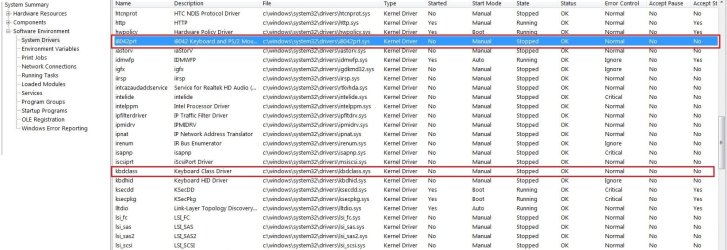
In system info,it shows dat keyboard drivers are not running.(pic attached)
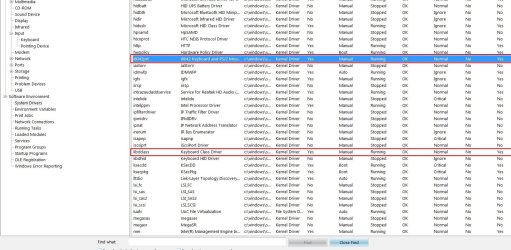
(when i start pc 1st time after bios update,they r runnin,but they are shown to be manually started - pic attached)
plz help me guys.(m tired of using on screen keyboard )
)
Thanx in advance.
My system specs: i5-2320
Motherboard: Dh61WW
RAM: 4 GB
I recently updated my Bios from 0048 to 0099. After update my pc dint start (many users had problem of boot failure after update to 0099). So then i updated it to 0109. Pc now works but since then my PS/2 Keyboard is not working partially.Tried updating to 0111 and 0113(latest at present) but still problem is same
When I start Pc, I can enter Bios menu by pressing the key, but once Bios opens, I cannot use my keyboard (surprisingly, usb mouse works in bios,vich, before update dint used to work.). Same with boot sequence menu,i can enter but cannot select nething as keyboard stops working. If I dont enter Bios or boot menu, I come to a screen where i ve to select the os vich i want to start (I ve windows 7 and ubuntu dual boot options) I can use keyboard to select an option i.e keyboard works at this point. If i go to ubuntu, keyboard works perfectly fine. But if i select windows 7, Keyboard stops working. In device manager, the keyboard option isnt seen only..
if i update Bios, Keyboard will work when it restarts 1st time after bios update, but if I shut down or restart again, It wont work. So,if i want to use a keyboard, I ve to update bios everytime i start pc( doesnt matter even if i install same version of bios).
Also, I tried resetting bios configuration via battery removal, jumper reset method but dint help. Installing windows 7 or windows 8 doesnt work.I already tried it.Also,i cant go back to old bios.
In system info,it shows dat keyboard drivers are not running.(pic attached)
(when i start pc 1st time after bios update,they r runnin,but they are shown to be manually started - pic attached)
plz help me guys.(m tired of using on screen keyboard
)Thanx in advance.
Attachments
My Computer
At a glance
windows 7 ultimateintel core2duo e45004 gb DDR2nvidia geforce 6400 1 gb
- OS
- windows 7 ultimate
- CPU
- intel core2duo e4500
- Motherboard
- gigabyte 945gcm-s2c
- Memory
- 4 gb DDR2
- Graphics Card(s)
- nvidia geforce 6400 1 gb


