Solved Device Manager - PS/2 Mouse & PS/2 Keyboard

BobSki

New member
Local time
8:50 AM
Messages
4
Hope someone can help me with this. Second time I've installed Windows 7 64 bit, and have received the same error in Device Manager. I use a USB Logitech G502 Mouse & a USB Logitech G710+ Keyboard.
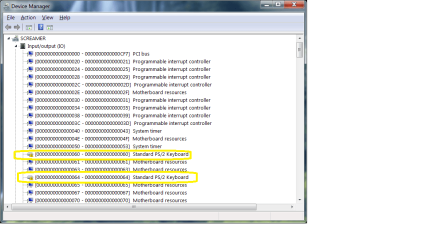
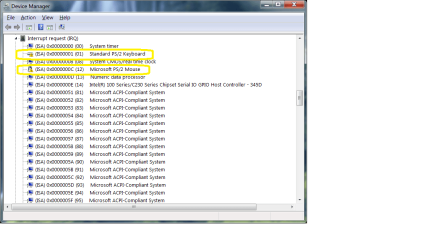
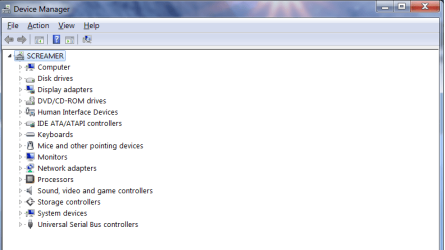
I have 3 files attached showing my Device Manager, Resources by Type (I/O) and (IRQ) indicating yellow flags for the PS/2 Keyboard and PS/2 Mouse. When I update the driver, Windows indicates the driver is up to date. Under Properties, and the General Tab it indicates that "This device is not present, is not working properly, or does not have all its drivers installed. (Code 24)". I've also tried to uninstall the device and reboot. It just reappears the same way.

Anyone have any ideas on how this can be corrected?

*Also checked my bios to see if PS/2 could be disabled, unfortunately there is nothing there to disable.
 

Attachments
  • #1.png
    #1.png
    19.7 KB · Views: 1
  • #2.png
    #2.png
    25.3 KB · Views: 2
  • #3.png
    #3.png
    25.5 KB · Views: 4
Last edited:

My Computer My Computer

Computer type
PC/Desktop
Computer Manufacturer/Model Number
My Build - Corsair Obsidian 750D Case
OS
Windows 7 Ultimate x64
CPU
Intel 7 6700K
Motherboard
MSI Z170A XPOWER Titanium Edition
Memory
Corsair Vengence LPX 32GB DDR4 3200MHz
Graphics Card(s)
2 MSI GeForce GTX980 4GB GDDR5 PCE Express Video Cards
Hard Drives
2 - Samsung 850 PPO 512GB Sata SSD Drives
1 - SanDisk Extreme PRO 480GB Sata SSD Drive

POWER SUPPLY: Enermax Revolution87+ 1000 Watt.
Antivirus
McAffe Multi Access - Total Protection
Browser
Windows Explorer 11
Hi BobSki and welcome to Sevenforums! :)

Have you downloaded and installed the Logitech Gaming Software, if not here is the latest release:
Logitech Gaming Software - Logitech Support

You will need to choose your OS on the left side and then the right bit version from the dropdown.

At least when I installed my Logitech G502 gaming mouse/Logitech G910 gaming keyboard, I had to download the LGS and not until it had done its business could I use the mouse.

Cheers! /Boris :)
 

My Computer My Computer

Computer type
PC/Desktop
Computer Manufacturer/Model Number
Custom build
OS
Windows 7 Home Premium
CPU
i5-3570k
Motherboard
ASUS Sabertooth z77
Memory
16 GB DDR3 G Skill Sniper
Graphics Card(s)
GIGABYTE GeForce GTX 970 GV-N970WF3OC-4GD
Monitor(s) Displays
ASUS ROG PG278Q
Screen Resolution
2560x1440@60Hz/120Hz/144Hz
Hard Drives
56GB KINGSTON SVP200S37A60G
512GB Crucial MX100
1863GB Seagate ST2000DM001-1CH164
2795GB Seagate ST3000DM001-9YN166
PSU
Corsair GS800
Case
Storm Trooper Stryker White
Keyboard
Logitech G910 Orion Spark
Mouse
Logitech G502
Antivirus
MSE
Browser
Firefox/Chrome
Other Info
Logitech G633
Logitech Mouse Matt
Yes I did, and the software was installed. But those devices are a USB Mouse and Keyboard. PS/2 are the mini 6 pin dim connectors that are used for the older mouse and keyboards.
 
Last edited:

My Computer My Computer

Computer type
PC/Desktop
Computer Manufacturer/Model Number
My Build - Corsair Obsidian 750D Case
OS
Windows 7 Ultimate x64
CPU
Intel 7 6700K
Motherboard
MSI Z170A XPOWER Titanium Edition
Memory
Corsair Vengence LPX 32GB DDR4 3200MHz
Graphics Card(s)
2 MSI GeForce GTX980 4GB GDDR5 PCE Express Video Cards
Hard Drives
2 - Samsung 850 PPO 512GB Sata SSD Drives
1 - SanDisk Extreme PRO 480GB Sata SSD Drive

POWER SUPPLY: Enermax Revolution87+ 1000 Watt.
Antivirus
McAffe Multi Access - Total Protection
Browser
Windows Explorer 11
Yes I did, and the software was installed. But those devices are a USB Mouse and Keyboard. PS/2 are the mini 6 pin dim connectors that are used for the older mouse and keyboards.
So this is something that you doesn't have plugged in rather something device manager is giving the exclamation marks for?
 

My Computer My Computer

Computer type
PC/Desktop
Computer Manufacturer/Model Number
Custom build
OS
Windows 7 Home Premium
CPU
i5-3570k
Motherboard
ASUS Sabertooth z77
Memory
16 GB DDR3 G Skill Sniper
Graphics Card(s)
GIGABYTE GeForce GTX 970 GV-N970WF3OC-4GD
Monitor(s) Displays
ASUS ROG PG278Q
Screen Resolution
2560x1440@60Hz/120Hz/144Hz
Hard Drives
56GB KINGSTON SVP200S37A60G
512GB Crucial MX100
1863GB Seagate ST2000DM001-1CH164
2795GB Seagate ST3000DM001-9YN166
PSU
Corsair GS800
Case
Storm Trooper Stryker White
Keyboard
Logitech G910 Orion Spark
Mouse
Logitech G502
Antivirus
MSE
Browser
Firefox/Chrome
Other Info
Logitech G633
Logitech Mouse Matt
That's correct Boris. The PS/2 Connection is on the back of my case and is part of the motherboard. There is nothing that is plugged into that connection. Also, what I understand PS/2 is part of Windows 7 operating system, so it cannot be deleted.

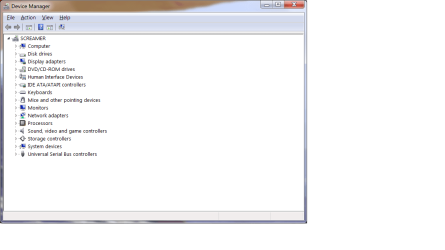
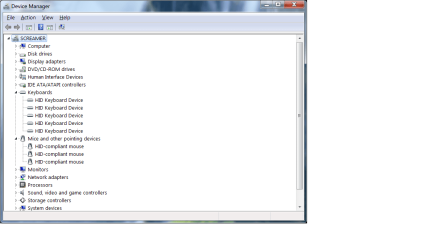
As you can see I have no yellow triangles on the main Device Manager. The first one under properties is a HID Keyboard, and indicates that its working properly. The second HID Keyboard is the same as the first. The third under properties shows its a Logitech Virtual HID Device. The fourth under properties is a Logitech Gaming Virtual Keyboard. The fifth under properties indicates its a standard keyboard and that its working properly.

Mice and other pointing devices. The first under properties is a HID Compliant Mouse, and it indicates that its working properly. The second under properties is a Logitech Virtual HID Device. The third under properties is a Logitech Virtual Gaming Mouse.

I've tried deleting the ones that have nothing to do with the Logitech Mouse and Keyboard, but after doing that my Logitech Mouse and Keyboard no longer work.

Under Properties on the Main Page of the Device Manager nothing indicates there's a problem with any of the devices. It only indicates the problem under "Resources by Type".

I've tried to Google this problem, but haven't found anything that could help me with this.
 

Attachments

  • Device Manager.png
    Device Manager.png
    21.7 KB · Views: 0
  • Device Manager.1.png
    Device Manager.1.png
    25.3 KB · Views: 0

My Computer My Computer

Computer type
PC/Desktop
Computer Manufacturer/Model Number
My Build - Corsair Obsidian 750D Case
OS
Windows 7 Ultimate x64
CPU
Intel 7 6700K
Motherboard
MSI Z170A XPOWER Titanium Edition
Memory
Corsair Vengence LPX 32GB DDR4 3200MHz
Graphics Card(s)
2 MSI GeForce GTX980 4GB GDDR5 PCE Express Video Cards
Hard Drives
2 - Samsung 850 PPO 512GB Sata SSD Drives
1 - SanDisk Extreme PRO 480GB Sata SSD Drive

POWER SUPPLY: Enermax Revolution87+ 1000 Watt.
Antivirus
McAffe Multi Access - Total Protection
Browser
Windows Explorer 11

My Computer My Computer

Computer type
PC/Desktop
Computer Manufacturer/Model Number
Custom build
OS
Windows 7 Home Premium
CPU
i5-3570k
Motherboard
ASUS Sabertooth z77
Memory
16 GB DDR3 G Skill Sniper
Graphics Card(s)
GIGABYTE GeForce GTX 970 GV-N970WF3OC-4GD
Monitor(s) Displays
ASUS ROG PG278Q
Screen Resolution
2560x1440@60Hz/120Hz/144Hz
Hard Drives
56GB KINGSTON SVP200S37A60G
512GB Crucial MX100
1863GB Seagate ST2000DM001-1CH164
2795GB Seagate ST3000DM001-9YN166
PSU
Corsair GS800
Case
Storm Trooper Stryker White
Keyboard
Logitech G910 Orion Spark
Mouse
Logitech G502
Antivirus
MSE
Browser
Firefox/Chrome
Other Info
Logitech G633
Logitech Mouse Matt
Boris . . . All I have to say is Thank You! Wasn't aware of the Bios Update, but in the back of my mind I wondered it this problem was related to the Bios. It was, and after updating, the problem is gone.

Again, thanks for the heads up!

Bob
 

My Computer My Computer

Computer type
PC/Desktop
Computer Manufacturer/Model Number
My Build - Corsair Obsidian 750D Case
OS
Windows 7 Ultimate x64
CPU
Intel 7 6700K
Motherboard
MSI Z170A XPOWER Titanium Edition
Memory
Corsair Vengence LPX 32GB DDR4 3200MHz
Graphics Card(s)
2 MSI GeForce GTX980 4GB GDDR5 PCE Express Video Cards
Hard Drives
2 - Samsung 850 PPO 512GB Sata SSD Drives
1 - SanDisk Extreme PRO 480GB Sata SSD Drive

POWER SUPPLY: Enermax Revolution87+ 1000 Watt.
Antivirus
McAffe Multi Access - Total Protection
Browser
Windows Explorer 11
Boris . . . All I have to say is Thank You! Wasn't aware of the Bios Update, but in the back of my mind I wondered it this problem was related to the Bios. It was, and after updating, the problem is gone.

Again, thanks for the heads up!

Bob
No problem, happy to help :)
 

My Computer My Computer

Computer type
PC/Desktop
Computer Manufacturer/Model Number
Custom build
OS
Windows 7 Home Premium
CPU
i5-3570k
Motherboard
ASUS Sabertooth z77
Memory
16 GB DDR3 G Skill Sniper
Graphics Card(s)
GIGABYTE GeForce GTX 970 GV-N970WF3OC-4GD
Monitor(s) Displays
ASUS ROG PG278Q
Screen Resolution
2560x1440@60Hz/120Hz/144Hz
Hard Drives
56GB KINGSTON SVP200S37A60G
512GB Crucial MX100
1863GB Seagate ST2000DM001-1CH164
2795GB Seagate ST3000DM001-9YN166
PSU
Corsair GS800
Case
Storm Trooper Stryker White
Keyboard
Logitech G910 Orion Spark
Mouse
Logitech G502
Antivirus
MSE
Browser
Firefox/Chrome
Other Info
Logitech G633
Logitech Mouse Matt
Back
Top