PS2 to USB mouse freezes randomly

perfection

New member
Local time
5:55 AM
Messages
22
I have a PS2 mouse but no PS2 port at the back of [COLOR=#000096! important][COLOR=#000096! important]my [COLOR=#000096! important]PC[/COLOR][/COLOR][/COLOR] cabinet - instead they have provided for a [COLOR=#000096! important][COLOR=#000096! important]USB [COLOR=#000096! important]port[/COLOR][/COLOR][/COLOR] for the mouse.

I have however noticed that the mouse freezes randomly and i need to unplug the USB and replug it in to wake it up

I run OS Win 7

Any advise or feedback to prevent this or explain this​
 

My Computer My Computer

OS
Windows 7 Ultimate 32 bit
1. You may be using a faulty USB port so look in Device Manager to check for any problems there.

2. You may have a faulty USB to PS2 adapter.

3. You may have a faulty mouse or the trackball is sticking and wants cleaning.

4. Have you tried a different mouse or USB port?

5. Have you tried updating your mouse driver?
 

My Computer My Computer

Computer Manufacturer/Model Number
HP Pavilion Elite 495UK
OS
Windows 7 Ultimate SP1 64-Bit
CPU
Intel Core i7 870 @ 2.93GHz
Motherboard
MSI 2A9C (CPU1)
Memory
8Gb Dual-Channel DDR3 @ 664MHz
Graphics Card(s)
nVidia GeForce GTX 460 1024MB dedicated RAM
Sound Card
Realtek HD Audio
Monitor(s) Displays
HP2310i
Screen Resolution
1920 x 1080
Hard Drives
1x1954GB Hitachi HDS22020ALA 330 (RAID), 1x1954GB Hitachi External for backup and storage
PSU
460W
Case
HP Elite
Cooling
Air cooled
Keyboard
Logitech K750 solar-powered keyboard
Mouse
Logitech Wireless M180 mouse
Internet Speed
2Mb
Other Info
Pure Avanti Flow Internet Radio with iPod Dock, 64Gb iPod, HP USB Speakers, Sony MDR-V500 Headphones, Sony Vaio F-Series Laptop
I have a PS2 mouse but no PS2 port at the back of [COLOR=#000096! important][COLOR=#000096! important]my [COLOR=#000096! important]PC[/COLOR][/COLOR][/COLOR] cabinet - instead they have provided for a [COLOR=#000096! important][COLOR=#000096! important]USB [COLOR=#000096! important]port[/COLOR][/COLOR][/COLOR] for the mouse.

I have however noticed that the mouse freezes randomly and i need to unplug the USB and replug it in to wake it up

I run OS Win 7

Any advise or feedback to prevent this or explain this​

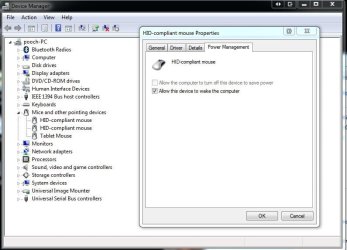
Go to Device Manager.
Start orb:orb: type Device Manager select it from the list.
Scroll down to the Mice section and double click it to open, double click on your device, select the Power Management tab and make sure there is no tick in the box "Allow the computer to turn off this device to save power"
click on OK close Device Manager and restart your PC
 

Attachments

  • Capture.JPG
    Capture.JPG
    58.1 KB · Views: 72

My Computer My Computer

Computer Manufacturer/Model Number
Something I threw together
OS
Windows 7 Ultimate x64
CPU
Intel Core i7-2600K
Motherboard
Asus P8P67
Memory
16 GB G Skill F3-10666 CL9D-4GBRL
Graphics Card(s)
ATI Radeon HD 6870
Sound Card
ATI Radeon HDMI / Realtek ALC892
Monitor(s) Displays
2 x 22" standard monitors / LG32LC56v TV to watch films
Screen Resolution
1920 x1080
Hard Drives
2 x OCZ Vertex2 111.79GB
3 x Samsung103SJ
1 x Samsung103UJ
1 x WD3200BEVT
1 x Hitachi5K320-160
PSU
Thermaltake Toughpower Cable Management 750W
Case
Antec 300
Cooling
Noctua NH-U12P SE2 and 5 120mm Case fans
Keyboard
Microsoft Comfort Curve Keyboard 2000
Mouse
Hama M3110 / Logitech M305
Internet Speed
16000
Other Info
I have also used Fedora, Suse, Ubuntu Linux
And all other Windows from 95 to date except ME
...but the option you mentioned under "Power Management" tab is unavailable and greyed out
 

My Computer My Computer

OS
Windows 7 Ultimate 32 bit
Not very helpfull then lol :(
Scroll down to and open the USB section of Device Manager, right click on each Hub and under the Power Management tabs remove the tick as suggested above.
 

My Computer My Computer

Computer Manufacturer/Model Number
Something I threw together
OS
Windows 7 Ultimate x64
CPU
Intel Core i7-2600K
Motherboard
Asus P8P67
Memory
16 GB G Skill F3-10666 CL9D-4GBRL
Graphics Card(s)
ATI Radeon HD 6870
Sound Card
ATI Radeon HDMI / Realtek ALC892
Monitor(s) Displays
2 x 22" standard monitors / LG32LC56v TV to watch films
Screen Resolution
1920 x1080
Hard Drives
2 x OCZ Vertex2 111.79GB
3 x Samsung103SJ
1 x Samsung103UJ
1 x WD3200BEVT
1 x Hitachi5K320-160
PSU
Thermaltake Toughpower Cable Management 750W
Case
Antec 300
Cooling
Noctua NH-U12P SE2 and 5 120mm Case fans
Keyboard
Microsoft Comfort Curve Keyboard 2000
Mouse
Hama M3110 / Logitech M305
Internet Speed
16000
Other Info
I have also used Fedora, Suse, Ubuntu Linux
And all other Windows from 95 to date except ME
Thinking about this issue I think you'll find that as you're using a PS2 to USB adapter, I'll lay odds that Windows is installing a USB driver for what is essentially a PS2 keyboard.

Change to a USB keyboard and you'll have no further problems.
 

My Computer My Computer

Computer Manufacturer/Model Number
HP Pavilion Elite 495UK
OS
Windows 7 Ultimate SP1 64-Bit
CPU
Intel Core i7 870 @ 2.93GHz
Motherboard
MSI 2A9C (CPU1)
Memory
8Gb Dual-Channel DDR3 @ 664MHz
Graphics Card(s)
nVidia GeForce GTX 460 1024MB dedicated RAM
Sound Card
Realtek HD Audio
Monitor(s) Displays
HP2310i
Screen Resolution
1920 x 1080
Hard Drives
1x1954GB Hitachi HDS22020ALA 330 (RAID), 1x1954GB Hitachi External for backup and storage
PSU
460W
Case
HP Elite
Cooling
Air cooled
Keyboard
Logitech K750 solar-powered keyboard
Mouse
Logitech Wireless M180 mouse
Internet Speed
2Mb
Other Info
Pure Avanti Flow Internet Radio with iPod Dock, 64Gb iPod, HP USB Speakers, Sony MDR-V500 Headphones, Sony Vaio F-Series Laptop
I had the same problem with a standard Logitech mouse on a USB port of an ASUS board with Windows 7 running.
This problem with USB mice seems to be very frequent, because I found many reports about that in many forums.
I tried all the software solutions poposed in these forums but to absolutely no avail. On the contrary, the mouse freezing for some seconds with the "USB device connect/disconnect" sounds happened more and more frequently.

Finally I found the very simple solution:
It is a simple hardware problem and had nothing to do with software:

The Logitech mice (and their various similarly constructed clones) have an extremely cheap cable connection. The relative thin and cheap cable has no antikink device at all. The only strain relief is an S-shaped channel through which the cable is lead into mouse case. Obviously the isolations of the wires inside the cable are chafed in the kinks of the S-shaped channel after longer use so thin, that tottering short circuits happen between the wires in the cable, which appear to the system like connecting and disconnecting the USB device.

I screwed the mouse encasement open and took the cable out of the S-shaped channel and bend it straight thus removing all kinks in it. Then I shoved the cable one inch into the case. so that I could lay a "fresh" (= unkinked before) section of the cable into the S-shaped channel.

I did that 2 weeks ago. I had no problems since then anymore.

Werner

P.S.: Be careful opening the mouse case:
Remove the single screw which holds the case closed.
Then lay the mouse on a table while you take off the cover of the case and keep it lying on the table while you do the above described operations with cable and close the case again before you lift it off the table.

By this you prevent that the mouse wheel falls out of its position, cause it is a lot of enervating hustle to put the wheel and the 2 spring wires holding it back into correct position, if you don't know how to do it. So better keep it untouched in its position while you do the cable operations.

 

My Computer My Computer

OS
Windows 7 ultimate 64bit
CPU
Intel i7
Motherboard
Asus
Memory
8 GB
Graphics Card(s)
Intel on MB
Sound Card
Realtek on MB
Monitor(s) Displays
NEC
Back
Top