PSU problem

The Apathetic

New member
Member
VIP
Local time
5:27 PM
Messages
167
Location
Tanta, Egypt
Hello,

I previously posted that my new OCZ 600W broke down my old MB, once I plugged everything and started up, the MB LEDs started shaking, the CPU and GPU fan went crazy (they were much much faster than usual) and finally 3 ram slots died...

I changed the PSU with an identical 1, bought a new MB, bought a new GPU card, plugged everything in and.... the LEDs were shaking, the CPU and GPU fans went crazy.. luckily nothing died on the new MB..

Before I bought the PSU, I saw it working with my own eyes on a different PC (however it should be noted that that PC was much more powerful compared to mine, specs were High)

So, could some1 explain to me why this PSU is acting like this with my pc?
 

My Computer

Computer Manufacturer/Model Number
Custom
OS
Windows 7 Ultimate x64
CPU
AMD Phenom II x4 B50
Motherboard
GA-MA770T-UD3P
Memory
2x4 G.skill DDR3 CL9 @1600
Graphics Card(s)
Powercolor HD 6950 2G GDDR5
Sound Card
Built in + Creative T6200 5.1 sub system
Monitor(s) Displays
LG FLATRON W1934S
Screen Resolution
1440x900
Hard Drives
2 1T WD Blacks (No Raid), 1 2T WD Green
PSU
NZXT HALE90 1000W 80Gold+
Case
HAF 932
Cooling
5 Fans
Keyboard
Upgrading~
Mouse
Upgrading~
Internet Speed
ADSL 2mb
Explain? Not really, based on the limited information.

Sounds like it may be time to test the motherboard outside of the case, using minimal components (RAM, graphics card, one HD, one optical drive, no additional USB devices, etc.)

It could be something as simple as a short circuit to ground due to an error in placing one of the motherboard's mounting standoffs.
 

My Computer

Computer Manufacturer/Model Number
homegrown
OS
Windows 7 Pro X64 SP1
CPU
Intel Core I7-3930k
Motherboard
Asus P9X79 Pro
Memory
16 GB Gskill DDR3-2133
Graphics Card(s)
eVGA GTX680
Sound Card
Creative X-Fi Titanium
Monitor(s) Displays
As PA246Q
Screen Resolution
1920 X 1200
Hard Drives
Corsair Force GT, 120 GB
WDC 1.5TB Caviar Black
PSU
PCP&C Silencer 750 Crossfire
Case
Silverstone FT02
Cooling
Noctua NH-D14
Keyboard
cheap Logitech USB
Mouse
Microsoft Intellimouse Explorer (old optical) USB
Internet Speed
6Mb cable
Other Info
Pioneer BDR-205
Samsung SH-203B
Monsoon 5.1 speakers
Done, same result..

If the info are not enough, please let me know what else should I add :)..
 

My Computer

Computer Manufacturer/Model Number
Custom
OS
Windows 7 Ultimate x64
CPU
AMD Phenom II x4 B50
Motherboard
GA-MA770T-UD3P
Memory
2x4 G.skill DDR3 CL9 @1600
Graphics Card(s)
Powercolor HD 6950 2G GDDR5
Sound Card
Built in + Creative T6200 5.1 sub system
Monitor(s) Displays
LG FLATRON W1934S
Screen Resolution
1440x900
Hard Drives
2 1T WD Blacks (No Raid), 1 2T WD Green
PSU
NZXT HALE90 1000W 80Gold+
Case
HAF 932
Cooling
5 Fans
Keyboard
Upgrading~
Mouse
Upgrading~
Internet Speed
ADSL 2mb
Done, same result..

If the info are not enough, please let me know what else should I add :)..

Sorry to hear that.

I guess you might have to go further: disconnect all drives, install only 1 stick of RAM, and see if you can get into the BIOS settings.

Is there a chance that your CPU was fried, along with the first motherboard?
 

My Computer

Computer Manufacturer/Model Number
homegrown
OS
Windows 7 Pro X64 SP1
CPU
Intel Core I7-3930k
Motherboard
Asus P9X79 Pro
Memory
16 GB Gskill DDR3-2133
Graphics Card(s)
eVGA GTX680
Sound Card
Creative X-Fi Titanium
Monitor(s) Displays
As PA246Q
Screen Resolution
1920 X 1200
Hard Drives
Corsair Force GT, 120 GB
WDC 1.5TB Caviar Black
PSU
PCP&C Silencer 750 Crossfire
Case
Silverstone FT02
Cooling
Noctua NH-D14
Keyboard
cheap Logitech USB
Mouse
Microsoft Intellimouse Explorer (old optical) USB
Internet Speed
6Mb cable
Other Info
Pioneer BDR-205
Samsung SH-203B
Monsoon 5.1 speakers
Bob:

I was on the OP's original thread. He seems to think he has 3 dead RAM slots, but I don't know if that has been confirmed. I asked him to try memtest. Two PSUs yielding the same behavior would imply motherboard or RAM.

Wannabe: are you satisfied all of the connections from PSU to motherboard are proper and intact??

Are you satisfied that you have the right RAM for that board---particularly that the RAM is the correct voltage?

Have you been attempting an overclock?
 

My Computer

Computer type
PC/Desktop
Computer Manufacturer/Model Number
Ignatz Special; 4 speed manual gearbox; factory air conditioning; one of one
OS
Windows 7 Home Premium SP1, 64-bit
CPU
Intel Skylake i5-6600K, not overclocked
Motherboard
AsRock Z170M Extreme 4, micro ATX
Memory
8 GB HyperX DDR4-2666 (2 x 4 GB)
Graphics Card(s)
none; graphics are integrated on CPU
Sound Card
onboard: Realtek ALC1150; external: USB Behringer UF0-202
Monitor(s) Displays
Dell S2340M 23 inch IPS
Screen Resolution
1600 x 900
Hard Drives
System: Crucial MX100 series SSD, 128 GB;
Data: Samsung Spinpoint 103SJ, 1 TB;
Backup: WD Caviar Green WD30EZRX-00D8PB0, 3 TB
PSU
Rosewill SilentNight 500 watt fanless, semi-modular
Case
Antec Solo II
Cooling
Noctua NH-U12S; Noctua F12 intake, Noctua S12A exhaust
Keyboard
Microsoft 200 6JH-00001 USB
Mouse
Dell or Microsoft optical wired; USB
Antivirus
Microsoft Security Essentials and Malwarebytes Premium
Browser
Pale Moon
Other Info
All fans PWM; speeds at idle: CPU circa 500 rpm; intake circa 600 rpm; exhaust circa 600 rpm; CPU temps 27 idle and 47 C load in a warm room (27 C/81 F) when running Intel Extreme Tuning Utility stress test.
Done, same result..

If the info are not enough, please let me know what else should I add :)..

Sorry to hear that.

I guess you might have to go further: disconnect all drives, install only 1 stick of RAM, and see if you can get into the BIOS settings.

Is there a chance that your CPU was fried, along with the first motherboard?
No, thank God, the CPU is still intact..

I tried connecting only 1 RAM and still the same result, nothing shows on the screen, all fans are going crazy fast, etc...

--------------
Bob:

I was on the OP's original thread. He seems to think he has 3 dead RAM slots, but I don't know if that has been confirmed. I asked him to try memtest. Two PSUs yielding the same behavior would imply motherboard or RAM.

Wannabe: are you satisfied all of the connections from PSU to motherboard are proper and intact??

Are you satisfied that you have the right RAM for that board---particularly that the RAM is the correct voltage?

Have you been attempting an overclock?
I tried different RAMs on that motherboard (my original Microns and 2 others) still nothing..

Everything was installed correctly, I'm 99% sure.

And this is all the info of my RAMs that I use on my current MB (which also acted crazy after connecting it with the PSU but thanks to God, nothing happened to it)

ram1b.jpg


ram2y.jpg


ramm1.jpg


ramm2c.jpg


Never tried to OC on the old MB.
 

My Computer

Computer Manufacturer/Model Number
Custom
OS
Windows 7 Ultimate x64
CPU
AMD Phenom II x4 B50
Motherboard
GA-MA770T-UD3P
Memory
2x4 G.skill DDR3 CL9 @1600
Graphics Card(s)
Powercolor HD 6950 2G GDDR5
Sound Card
Built in + Creative T6200 5.1 sub system
Monitor(s) Displays
LG FLATRON W1934S
Screen Resolution
1440x900
Hard Drives
2 1T WD Blacks (No Raid), 1 2T WD Green
PSU
NZXT HALE90 1000W 80Gold+
Case
HAF 932
Cooling
5 Fans
Keyboard
Upgrading~
Mouse
Upgrading~
Internet Speed
ADSL 2mb
2 different mobo's,2 different psu's, same problem? sounds like user error somewhere along the way, double or triple check all power connections ,check for shorts etc i know of one person who actually cut off the location tab on a connector because it would'nt fit the way he wanted it to!!!
 

My Computer

Computer type
PC/Desktop
Computer Manufacturer/Model Number
self build
OS
win 7 ultimate32bit, Win8.1pro wmc 32bit
CPU
amd phenom x4 9600
Motherboard
asus m2n32-sli deluxe
Memory
corsair twinxs 2x2gb
Graphics Card(s)
2x nvidia 1gb 8500gt
Sound Card
onboard
Monitor(s) Displays
23" PB Viseo 233d
Screen Resolution
1920x1080
Hard Drives
maxtor sata 500gb
maxtor sata 320gb
fujitsu sata200gb
PSU
oryxx tornado 750w
Case
thermaltake xaser lll
Cooling
artic freezer64 pro + 7 case fans
Yeah, I think pebbly is on the right track.

Wannabe:

Identify a stick of RAM that you know is good. Don't attempt to use the other sticks. Set them aside.

Here is your manual if you don't have it:

GA-EP41-UD3L (rev. 1.0) - GIGABYTE - Support&Download - Motherboard - Manual


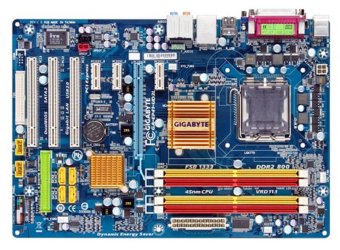
Here is a picture of your board.

Tell us where you are connecting your cables from the PSU to the board.

Tell us what single slot you are attempting to use with your known good RAM stick.
 

Attachments

  • mb_productimage_ga-ep41-ud3l_big.jpg
    mb_productimage_ga-ep41-ud3l_big.jpg
    106.5 KB · Views: 15

My Computer

Computer type
PC/Desktop
Computer Manufacturer/Model Number
Ignatz Special; 4 speed manual gearbox; factory air conditioning; one of one
OS
Windows 7 Home Premium SP1, 64-bit
CPU
Intel Skylake i5-6600K, not overclocked
Motherboard
AsRock Z170M Extreme 4, micro ATX
Memory
8 GB HyperX DDR4-2666 (2 x 4 GB)
Graphics Card(s)
none; graphics are integrated on CPU
Sound Card
onboard: Realtek ALC1150; external: USB Behringer UF0-202
Monitor(s) Displays
Dell S2340M 23 inch IPS
Screen Resolution
1600 x 900
Hard Drives
System: Crucial MX100 series SSD, 128 GB;
Data: Samsung Spinpoint 103SJ, 1 TB;
Backup: WD Caviar Green WD30EZRX-00D8PB0, 3 TB
PSU
Rosewill SilentNight 500 watt fanless, semi-modular
Case
Antec Solo II
Cooling
Noctua NH-U12S; Noctua F12 intake, Noctua S12A exhaust
Keyboard
Microsoft 200 6JH-00001 USB
Mouse
Dell or Microsoft optical wired; USB
Antivirus
Microsoft Security Essentials and Malwarebytes Premium
Browser
Pale Moon
Other Info
All fans PWM; speeds at idle: CPU circa 500 rpm; intake circa 600 rpm; exhaust circa 600 rpm; CPU temps 27 idle and 47 C load in a warm room (27 C/81 F) when running Intel Extreme Tuning Utility stress test.
Well, the only thing that I noticed when the guy at the store was trying the PSU on their computer was that he plugged in both 4-pin CPU cables into their MB, my MB only needs 1..

Could that be possibly the problem?
 

My Computer

Computer Manufacturer/Model Number
Custom
OS
Windows 7 Ultimate x64
CPU
AMD Phenom II x4 B50
Motherboard
GA-MA770T-UD3P
Memory
2x4 G.skill DDR3 CL9 @1600
Graphics Card(s)
Powercolor HD 6950 2G GDDR5
Sound Card
Built in + Creative T6200 5.1 sub system
Monitor(s) Displays
LG FLATRON W1934S
Screen Resolution
1440x900
Hard Drives
2 1T WD Blacks (No Raid), 1 2T WD Green
PSU
NZXT HALE90 1000W 80Gold+
Case
HAF 932
Cooling
5 Fans
Keyboard
Upgrading~
Mouse
Upgrading~
Internet Speed
ADSL 2mb
Refer to your motherboard manual for proper connections.

The connections required on the store's motherboard has nothing to do with your situation unless that board was identical to yours and I assume it was not.
 

My Computer

Computer type
PC/Desktop
Computer Manufacturer/Model Number
Ignatz Special; 4 speed manual gearbox; factory air conditioning; one of one
OS
Windows 7 Home Premium SP1, 64-bit
CPU
Intel Skylake i5-6600K, not overclocked
Motherboard
AsRock Z170M Extreme 4, micro ATX
Memory
8 GB HyperX DDR4-2666 (2 x 4 GB)
Graphics Card(s)
none; graphics are integrated on CPU
Sound Card
onboard: Realtek ALC1150; external: USB Behringer UF0-202
Monitor(s) Displays
Dell S2340M 23 inch IPS
Screen Resolution
1600 x 900
Hard Drives
System: Crucial MX100 series SSD, 128 GB;
Data: Samsung Spinpoint 103SJ, 1 TB;
Backup: WD Caviar Green WD30EZRX-00D8PB0, 3 TB
PSU
Rosewill SilentNight 500 watt fanless, semi-modular
Case
Antec Solo II
Cooling
Noctua NH-U12S; Noctua F12 intake, Noctua S12A exhaust
Keyboard
Microsoft 200 6JH-00001 USB
Mouse
Dell or Microsoft optical wired; USB
Antivirus
Microsoft Security Essentials and Malwarebytes Premium
Browser
Pale Moon
Other Info
All fans PWM; speeds at idle: CPU circa 500 rpm; intake circa 600 rpm; exhaust circa 600 rpm; CPU temps 27 idle and 47 C load in a warm room (27 C/81 F) when running Intel Extreme Tuning Utility stress test.
can you try a wired kb and mouse just to eliminate cross channel interference just a thought?
 

My Computer

Computer type
PC/Desktop
Computer Manufacturer/Model Number
self build
OS
win 7 ultimate32bit, Win8.1pro wmc 32bit
CPU
amd phenom x4 9600
Motherboard
asus m2n32-sli deluxe
Memory
corsair twinxs 2x2gb
Graphics Card(s)
2x nvidia 1gb 8500gt
Sound Card
onboard
Monitor(s) Displays
23" PB Viseo 233d
Screen Resolution
1920x1080
Hard Drives
maxtor sata 500gb
maxtor sata 320gb
fujitsu sata200gb
PSU
oryxx tornado 750w
Case
thermaltake xaser lll
Cooling
artic freezer64 pro + 7 case fans
Yeah, I think pebbly is on the right track.

Wannabe:

Identify a stick of RAM that you know is good. Don't attempt to use the other sticks. Set them aside.

Here is your manual if you don't have it:

GA-EP41-UD3L (rev. 1.0) - GIGABYTE - Support&Download - Motherboard - Manual


Here is a picture of your board.

Tell us where you are connecting your cables from the PSU to the board.

Tell us what single slot you are attempting to use with your known good RAM stick.
My EP41 is the 1 that didn't have any damage, the 1 that was damaged is GA-P31, the only DIMM that is working is DIMM4.

I highlighted where I connected the PSU and the working DIMM in the following picture>>
motherboardproductimage.jpg
 

My Computer

Computer Manufacturer/Model Number
Custom
OS
Windows 7 Ultimate x64
CPU
AMD Phenom II x4 B50
Motherboard
GA-MA770T-UD3P
Memory
2x4 G.skill DDR3 CL9 @1600
Graphics Card(s)
Powercolor HD 6950 2G GDDR5
Sound Card
Built in + Creative T6200 5.1 sub system
Monitor(s) Displays
LG FLATRON W1934S
Screen Resolution
1440x900
Hard Drives
2 1T WD Blacks (No Raid), 1 2T WD Green
PSU
NZXT HALE90 1000W 80Gold+
Case
HAF 932
Cooling
5 Fans
Keyboard
Upgrading~
Mouse
Upgrading~
Internet Speed
ADSL 2mb
Refer to your motherboard manual for proper connections.

The connections required on the store's motherboard has nothing to do with your situation unless that board was identical to yours and I assume it was not.
Everything was connected correctly, I didn't force in any cables or anything, everything just went into the MB smoothly like how it's supposed to be..


@peb Actually I don't even use the WL KB+M anymore, I'm all wired now, better go update my specs.
 

My Computer

Computer Manufacturer/Model Number
Custom
OS
Windows 7 Ultimate x64
CPU
AMD Phenom II x4 B50
Motherboard
GA-MA770T-UD3P
Memory
2x4 G.skill DDR3 CL9 @1600
Graphics Card(s)
Powercolor HD 6950 2G GDDR5
Sound Card
Built in + Creative T6200 5.1 sub system
Monitor(s) Displays
LG FLATRON W1934S
Screen Resolution
1440x900
Hard Drives
2 1T WD Blacks (No Raid), 1 2T WD Green
PSU
NZXT HALE90 1000W 80Gold+
Case
HAF 932
Cooling
5 Fans
Keyboard
Upgrading~
Mouse
Upgrading~
Internet Speed
ADSL 2mb
If I understand you correctly:

You have the model 41 board and as far as you know it is not damaged?

Does your manual say you made the correct connections as shown in your diagram?
 

My Computer

Computer type
PC/Desktop
Computer Manufacturer/Model Number
Ignatz Special; 4 speed manual gearbox; factory air conditioning; one of one
OS
Windows 7 Home Premium SP1, 64-bit
CPU
Intel Skylake i5-6600K, not overclocked
Motherboard
AsRock Z170M Extreme 4, micro ATX
Memory
8 GB HyperX DDR4-2666 (2 x 4 GB)
Graphics Card(s)
none; graphics are integrated on CPU
Sound Card
onboard: Realtek ALC1150; external: USB Behringer UF0-202
Monitor(s) Displays
Dell S2340M 23 inch IPS
Screen Resolution
1600 x 900
Hard Drives
System: Crucial MX100 series SSD, 128 GB;
Data: Samsung Spinpoint 103SJ, 1 TB;
Backup: WD Caviar Green WD30EZRX-00D8PB0, 3 TB
PSU
Rosewill SilentNight 500 watt fanless, semi-modular
Case
Antec Solo II
Cooling
Noctua NH-U12S; Noctua F12 intake, Noctua S12A exhaust
Keyboard
Microsoft 200 6JH-00001 USB
Mouse
Dell or Microsoft optical wired; USB
Antivirus
Microsoft Security Essentials and Malwarebytes Premium
Browser
Pale Moon
Other Info
All fans PWM; speeds at idle: CPU circa 500 rpm; intake circa 600 rpm; exhaust circa 600 rpm; CPU temps 27 idle and 47 C load in a warm room (27 C/81 F) when running Intel Extreme Tuning Utility stress test.
clear the cmos by using the correct mobo jumper ,load bios defaults and see what happens , you could place a sheet of A4 paper between mobo and outer case to eliminate shorts
 

My Computer

Computer type
PC/Desktop
Computer Manufacturer/Model Number
self build
OS
win 7 ultimate32bit, Win8.1pro wmc 32bit
CPU
amd phenom x4 9600
Motherboard
asus m2n32-sli deluxe
Memory
corsair twinxs 2x2gb
Graphics Card(s)
2x nvidia 1gb 8500gt
Sound Card
onboard
Monitor(s) Displays
23" PB Viseo 233d
Screen Resolution
1920x1080
Hard Drives
maxtor sata 500gb
maxtor sata 320gb
fujitsu sata200gb
PSU
oryxx tornado 750w
Case
thermaltake xaser lll
Cooling
artic freezer64 pro + 7 case fans
Confusion:

You say in post 12 that only slot 4 is working.

What makes you think that is true?? How can you prove that? What makes you think you have ANY good slots?
 

My Computer

Computer type
PC/Desktop
Computer Manufacturer/Model Number
Ignatz Special; 4 speed manual gearbox; factory air conditioning; one of one
OS
Windows 7 Home Premium SP1, 64-bit
CPU
Intel Skylake i5-6600K, not overclocked
Motherboard
AsRock Z170M Extreme 4, micro ATX
Memory
8 GB HyperX DDR4-2666 (2 x 4 GB)
Graphics Card(s)
none; graphics are integrated on CPU
Sound Card
onboard: Realtek ALC1150; external: USB Behringer UF0-202
Monitor(s) Displays
Dell S2340M 23 inch IPS
Screen Resolution
1600 x 900
Hard Drives
System: Crucial MX100 series SSD, 128 GB;
Data: Samsung Spinpoint 103SJ, 1 TB;
Backup: WD Caviar Green WD30EZRX-00D8PB0, 3 TB
PSU
Rosewill SilentNight 500 watt fanless, semi-modular
Case
Antec Solo II
Cooling
Noctua NH-U12S; Noctua F12 intake, Noctua S12A exhaust
Keyboard
Microsoft 200 6JH-00001 USB
Mouse
Dell or Microsoft optical wired; USB
Antivirus
Microsoft Security Essentials and Malwarebytes Premium
Browser
Pale Moon
Other Info
All fans PWM; speeds at idle: CPU circa 500 rpm; intake circa 600 rpm; exhaust circa 600 rpm; CPU temps 27 idle and 47 C load in a warm room (27 C/81 F) when running Intel Extreme Tuning Utility stress test.
on the ocz 600 the main 20+4 connector, are you using the correct 4 pin connector there a 3 different 4 pin connectors on that psu all should be identified
 

My Computer

Computer type
PC/Desktop
Computer Manufacturer/Model Number
self build
OS
win 7 ultimate32bit, Win8.1pro wmc 32bit
CPU
amd phenom x4 9600
Motherboard
asus m2n32-sli deluxe
Memory
corsair twinxs 2x2gb
Graphics Card(s)
2x nvidia 1gb 8500gt
Sound Card
onboard
Monitor(s) Displays
23" PB Viseo 233d
Screen Resolution
1920x1080
Hard Drives
maxtor sata 500gb
maxtor sata 320gb
fujitsu sata200gb
PSU
oryxx tornado 750w
Case
thermaltake xaser lll
Cooling
artic freezer64 pro + 7 case fans
Pebbly:

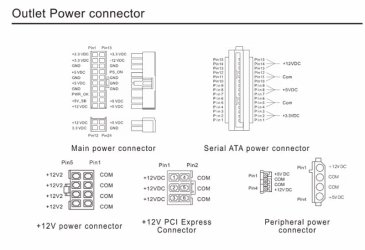
I think that may be it. He needs to connect the 20 of the 20/4 to the only 20 pin port on the board and to connect the square 4 of the 20/4 to the only square 4 pin port on the board. I hope he is simply using the wrong lead from the PSU.

I looked at the OCZ manual and it doesn't show the cables--only the connections on a mobo. So if there is another similar looking square 4 pin leading out of the PSU, that may be what he has mistakenly used.

But I don't know yet why the OP thinks he has good or bad RAM or good or bad slots.

The mobo manual says a single stick should go in one of the yellow slots (1 or 3)
 

My Computer

Computer type
PC/Desktop
Computer Manufacturer/Model Number
Ignatz Special; 4 speed manual gearbox; factory air conditioning; one of one
OS
Windows 7 Home Premium SP1, 64-bit
CPU
Intel Skylake i5-6600K, not overclocked
Motherboard
AsRock Z170M Extreme 4, micro ATX
Memory
8 GB HyperX DDR4-2666 (2 x 4 GB)
Graphics Card(s)
none; graphics are integrated on CPU
Sound Card
onboard: Realtek ALC1150; external: USB Behringer UF0-202
Monitor(s) Displays
Dell S2340M 23 inch IPS
Screen Resolution
1600 x 900
Hard Drives
System: Crucial MX100 series SSD, 128 GB;
Data: Samsung Spinpoint 103SJ, 1 TB;
Backup: WD Caviar Green WD30EZRX-00D8PB0, 3 TB
PSU
Rosewill SilentNight 500 watt fanless, semi-modular
Case
Antec Solo II
Cooling
Noctua NH-U12S; Noctua F12 intake, Noctua S12A exhaust
Keyboard
Microsoft 200 6JH-00001 USB
Mouse
Dell or Microsoft optical wired; USB
Antivirus
Microsoft Security Essentials and Malwarebytes Premium
Browser
Pale Moon
Other Info
All fans PWM; speeds at idle: CPU circa 500 rpm; intake circa 600 rpm; exhaust circa 600 rpm; CPU temps 27 idle and 47 C load in a warm room (27 C/81 F) when running Intel Extreme Tuning Utility stress test.
Pebbly:

I think that may be it. He needs to connect the 20 of the 20/4 to the only 20 pin port on the board and to connect the square 4 of the 20/4 to the only square 4 pin port on the board. I hope he is simply using the wrong lead from the PSU.

I looked at the OCZ manual and it doesn't show the cables--only the connections on a mobo. So if there is another similar looking square 4 pin leading out of the PSU, that may be what he has mistakenly used.

But I don't know yet why the OP thinks he has good or bad RAM or good or bad slots.

The mobo manual says a single stick should go in one of the yellow slots (1 or 3)
hi ignatz , he does need to connect all 24 pins ,the 4 pin connectors should be identified as power,cpu and pci-e they also should have foolproof configurations to suit the different 12v power rails
 

My Computer

Computer type
PC/Desktop
Computer Manufacturer/Model Number
self build
OS
win 7 ultimate32bit, Win8.1pro wmc 32bit
CPU
amd phenom x4 9600
Motherboard
asus m2n32-sli deluxe
Memory
corsair twinxs 2x2gb
Graphics Card(s)
2x nvidia 1gb 8500gt
Sound Card
onboard
Monitor(s) Displays
23" PB Viseo 233d
Screen Resolution
1920x1080
Hard Drives
maxtor sata 500gb
maxtor sata 320gb
fujitsu sata200gb
PSU
oryxx tornado 750w
Case
thermaltake xaser lll
Cooling
artic freezer64 pro + 7 case fans
Pebbly:

Here is a pic from OCZ site for a 600 watt PSU. As far as I can tell, it is the ONLY 600 watt unit they make, so I hope this is it:
 

Attachments

  • Untitled-1.jpg
    Untitled-1.jpg
    37.8 KB · Views: 6

My Computer

Computer type
PC/Desktop
Computer Manufacturer/Model Number
Ignatz Special; 4 speed manual gearbox; factory air conditioning; one of one
OS
Windows 7 Home Premium SP1, 64-bit
CPU
Intel Skylake i5-6600K, not overclocked
Motherboard
AsRock Z170M Extreme 4, micro ATX
Memory
8 GB HyperX DDR4-2666 (2 x 4 GB)
Graphics Card(s)
none; graphics are integrated on CPU
Sound Card
onboard: Realtek ALC1150; external: USB Behringer UF0-202
Monitor(s) Displays
Dell S2340M 23 inch IPS
Screen Resolution
1600 x 900
Hard Drives
System: Crucial MX100 series SSD, 128 GB;
Data: Samsung Spinpoint 103SJ, 1 TB;
Backup: WD Caviar Green WD30EZRX-00D8PB0, 3 TB
PSU
Rosewill SilentNight 500 watt fanless, semi-modular
Case
Antec Solo II
Cooling
Noctua NH-U12S; Noctua F12 intake, Noctua S12A exhaust
Keyboard
Microsoft 200 6JH-00001 USB
Mouse
Dell or Microsoft optical wired; USB
Antivirus
Microsoft Security Essentials and Malwarebytes Premium
Browser
Pale Moon
Other Info
All fans PWM; speeds at idle: CPU circa 500 rpm; intake circa 600 rpm; exhaust circa 600 rpm; CPU temps 27 idle and 47 C load in a warm room (27 C/81 F) when running Intel Extreme Tuning Utility stress test.
Back
Top