
Public Folders - Restore

How to Restore Public Folders in Windows 7

   Information
This tutorial will show you how to restore any missing or moved Windows 7 Public folders located at C:\Users\Public.

You will need to be logged in as an administrator to be able to do the steps in this tutorial.

   Note
The hidden Favorites, Libraries, and nonhidden Public Recorded TV public folders are not included in this tutorial.


EXAMPLE: Public folders
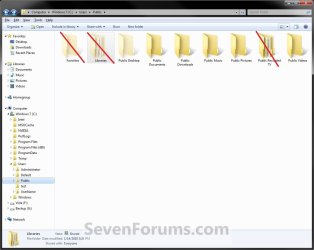
Public_Folders.jpg


Here's How:

   Warning
If you have any duplicate public folders, or public folders that do not have a Location properties tab, then you will need to:
  • Backup only the folder's contents to another location to be safe.
  • Now proceed with the steps below


1. To Restore Default Public Desktop FolderA) Click on the Download button below to download the file below.Restore_Default_Public_Desktop_Folder.reg


Download


2. To Restore Default Public Documents FolderA) Click on the Download button below to download the file below.Restore_Default_Public_Documents_Folder.reg


Download


3. To Restore Default Public Downloads FolderA) Click on the Download button below to download the file below.Restore_Default_Public_Downloads_Folder.reg


Download


4. To Restore Default Public Music FolderA) Click on the Download button below to download the file below.Restore_Default_Public_Music_Folder.reg


Download


5. To Restore Default Public Pictures FolderA) Click on the Download button below to download the file below.Restore_Default_Public_Pictures_Folder.reg


Download


6. To Restore Default Public Videos FolderA) Click on the Download button below to download the file below.Restore_Default_Public_Videos_Folder.reg


Download


7. Click on Save, and save the .reg file to the Desktop.

8. Right click on the downloaded .reg file and click on Merge.

9. Click on Run, Yes, Yes, and OK when prompted.

10. Open the C:\Users\Public folder. If a public folder is missing, then create a New Folder and rename it with the name below for each missing specific public folder.Public Folders Names


NOTE: The names in red are hidden system folders.
  • Libraries
  • Desktop
  • Documents
  • Downloads
  • Music
  • Pictures
  • Recorded TV
  • Videos

11. Open an elevated command prompt (Right click -> Run as administrator).

12. In the elevated command prompt, Copy and Paste the command below for the public folder, and press Enter. This will restore the default attributes for the public folder. (see table below)

Public FolderCommand
Librariesattrib +h +r -s %Public%\Libraries /S /D
Desktopattrib +h +r -s %Public%\Desktop /S /D
Documentsattrib +r -s -h %Public%\Documents /S /D
Downloadsattrib +r -s -h %Public%\Downloads /S /D
Musicattrib +r -s -h %Public%\Music /S /D
Picturesattrib +r -s -h %Public%\Pictures /S /D
Videosattrib +r -s -h %Public%\Videos /S /D


13. You may need to log off and log on, or restart the computer, to finish restoring the default public folder location.
NOTE: Sometimes you may need to restart more than once for the changes to be applied.

14. When done, you can delete the downloaded .reg file(s) on the desktop if you like.


That's it,
Shawn Brink


Attachments

Last edited:
Nice, good work Brink.
 

My Computer

Computer Manufacturer/Model Number
* BFK Customs *
OS
W 7 64-bit Ultimate
CPU
Intel Q9550 Yorkfield
Motherboard
ASUS P5Q Pro
Memory
8GB Dominator 8500C5D
Graphics Card(s)
ATI : XFX 5870
Sound Card
Realtek HD Audio 7-1
Monitor(s) Displays
1x 47" LCD HDMI & 3x 26" LCD HDMI
Screen Resolution
1920x1080P & 1920x1200
Hard Drives
1x 80GB Intel X25-M G2 SSD : 1x 500GB & 1x 640GB WD Caviar Black(s)
PSU
Corsair 620HX
Case
Cooler Master RC-690
Cooling
Tuniq Tower 120, 2x 140mm and 3x 120mm case fans
Keyboard
Microsoft 500
Mouse
Razer Diamondback 3G
Internet Speed
14 Mb/s
Other Info
1x Koutech 3Gb/s SATA HDD Hot Swap Rack
Thank you Ted. :)
 

My Computer

Computer type
PC/Desktop
Computer Manufacturer/Model Number
Self built custom
OS
64-bit Windows 11 Pro for Workstations
CPU
Intel i7-8700K OC'd to 5 GHz
Motherboard
ASUS ROG Maximus XI Formula Z390
Memory
64 GB (4x16GB) G.SKILL TridentZ RGB DDR4 3600 MHz
Graphics Card(s)
ASUS ROG-STRIX-GTX1080TI-O11G-GAMING
Sound Card
Integrated
Monitor(s) Displays
2 x Samsung Odyssey G7 27"
Screen Resolution
2560x1440
Hard Drives
1TB Samsung 990 PRO M.2,
4TB Samsung 990 PRO PRO M.2,
TerraMaster F8 SSD Plus NAS
PSU
Seasonic Prime Titanium 850W
Case
Thermaltake Core P3
Cooling
Corsair Hydro H115i
Keyboard
Logitech wireless K800
Mouse
Logitech MX Master 4
Internet Speed
2 Gb/s Download and 100 Mb/s Upload
Antivirus
Malwarebyte Anti-Malware Premium
Browser
Google Chrome
Other Info
Logitech Z625 speaker system,
Logitech BRIO 4K Pro webcam,
HP Color LaserJet Pro MFP M477fdn,
APC SMART-UPS RT 1000 XL - SURT1000XLI,
Galaxy S23 Plus phone
restore public/desktop

I lost my public desktop folder,Or I uninstalled. I read your post on how to restore it, and restared about 5 times and still i8cant get my folder bakc
Is there anything else thatcould be done
Thanks:sarc:
 

My Computer

OS
windows 7
Hello Wschw2, and welcome to Seven Forums.

You can do a system restore using a restore point dated before it was deleted.

Hope this helps,
Shawn
 

My Computer

Computer type
PC/Desktop
Computer Manufacturer/Model Number
Self built custom
OS
64-bit Windows 11 Pro for Workstations
CPU
Intel i7-8700K OC'd to 5 GHz
Motherboard
ASUS ROG Maximus XI Formula Z390
Memory
64 GB (4x16GB) G.SKILL TridentZ RGB DDR4 3600 MHz
Graphics Card(s)
ASUS ROG-STRIX-GTX1080TI-O11G-GAMING
Sound Card
Integrated
Monitor(s) Displays
2 x Samsung Odyssey G7 27"
Screen Resolution
2560x1440
Hard Drives
1TB Samsung 990 PRO M.2,
4TB Samsung 990 PRO PRO M.2,
TerraMaster F8 SSD Plus NAS
PSU
Seasonic Prime Titanium 850W
Case
Thermaltake Core P3
Cooling
Corsair Hydro H115i
Keyboard
Logitech wireless K800
Mouse
Logitech MX Master 4
Internet Speed
2 Gb/s Download and 100 Mb/s Upload
Antivirus
Malwarebyte Anti-Malware Premium
Browser
Google Chrome
Other Info
Logitech Z625 speaker system,
Logitech BRIO 4K Pro webcam,
HP Color LaserJet Pro MFP M477fdn,
APC SMART-UPS RT 1000 XL - SURT1000XLI,
Galaxy S23 Plus phone
I did a previous restore acct I had a program that i could delete, and the last date that I can restore to is 10 March 2010, i know the public desktop folder disappered long beforte that':mad:

Or is there a way to restore way before that.
Thanks
 

My Computer

OS
windows 7
Wschw,

In that case you can do a repair install without losing anything.
 

My Computer

Computer type
PC/Desktop
Computer Manufacturer/Model Number
Self built custom
OS
64-bit Windows 11 Pro for Workstations
CPU
Intel i7-8700K OC'd to 5 GHz
Motherboard
ASUS ROG Maximus XI Formula Z390
Memory
64 GB (4x16GB) G.SKILL TridentZ RGB DDR4 3600 MHz
Graphics Card(s)
ASUS ROG-STRIX-GTX1080TI-O11G-GAMING
Sound Card
Integrated
Monitor(s) Displays
2 x Samsung Odyssey G7 27"
Screen Resolution
2560x1440
Hard Drives
1TB Samsung 990 PRO M.2,
4TB Samsung 990 PRO PRO M.2,
TerraMaster F8 SSD Plus NAS
PSU
Seasonic Prime Titanium 850W
Case
Thermaltake Core P3
Cooling
Corsair Hydro H115i
Keyboard
Logitech wireless K800
Mouse
Logitech MX Master 4
Internet Speed
2 Gb/s Download and 100 Mb/s Upload
Antivirus
Malwarebyte Anti-Malware Premium
Browser
Google Chrome
Other Info
Logitech Z625 speaker system,
Logitech BRIO 4K Pro webcam,
HP Color LaserJet Pro MFP M477fdn,
APC SMART-UPS RT 1000 XL - SURT1000XLI,
Galaxy S23 Plus phone
how do I make a repair install?
Thanks

sorry about how to do it I just found the item, Thanks I'll let you know how it goes
By the way you guys/girls are great Thanks
 

My Computer

OS
windows 7
i tried a repair install and got the following message below: (I'M using a 64 bit)
The following issues are preventing Windows from upgrading. Cancel the upgrade, complete each task, and then restart the upgrade to continue.


  • [*]You can’t upgrade 64-bit Windows to a 32-bit version of Windows. To upgrade, obtain a 64-bit version of the installation disc, or go online to see how to install Windows 7 and keep your files and settings.
 

My Computer

OS
windows 7
Do you have a "retail" 64-bit Windows 7 installed and using a 64-bit installation DVD?
 

My Computer

Computer type
PC/Desktop
Computer Manufacturer/Model Number
Self built custom
OS
64-bit Windows 11 Pro for Workstations
CPU
Intel i7-8700K OC'd to 5 GHz
Motherboard
ASUS ROG Maximus XI Formula Z390
Memory
64 GB (4x16GB) G.SKILL TridentZ RGB DDR4 3600 MHz
Graphics Card(s)
ASUS ROG-STRIX-GTX1080TI-O11G-GAMING
Sound Card
Integrated
Monitor(s) Displays
2 x Samsung Odyssey G7 27"
Screen Resolution
2560x1440
Hard Drives
1TB Samsung 990 PRO M.2,
4TB Samsung 990 PRO PRO M.2,
TerraMaster F8 SSD Plus NAS
PSU
Seasonic Prime Titanium 850W
Case
Thermaltake Core P3
Cooling
Corsair Hydro H115i
Keyboard
Logitech wireless K800
Mouse
Logitech MX Master 4
Internet Speed
2 Gb/s Download and 100 Mb/s Upload
Antivirus
Malwarebyte Anti-Malware Premium
Browser
Google Chrome
Other Info
Logitech Z625 speaker system,
Logitech BRIO 4K Pro webcam,
HP Color LaserJet Pro MFP M477fdn,
APC SMART-UPS RT 1000 XL - SURT1000XLI,
Galaxy S23 Plus phone
It looks like a clean install then. :(
 

My Computer

Computer type
PC/Desktop
Computer Manufacturer/Model Number
Self built custom
OS
64-bit Windows 11 Pro for Workstations
CPU
Intel i7-8700K OC'd to 5 GHz
Motherboard
ASUS ROG Maximus XI Formula Z390
Memory
64 GB (4x16GB) G.SKILL TridentZ RGB DDR4 3600 MHz
Graphics Card(s)
ASUS ROG-STRIX-GTX1080TI-O11G-GAMING
Sound Card
Integrated
Monitor(s) Displays
2 x Samsung Odyssey G7 27"
Screen Resolution
2560x1440
Hard Drives
1TB Samsung 990 PRO M.2,
4TB Samsung 990 PRO PRO M.2,
TerraMaster F8 SSD Plus NAS
PSU
Seasonic Prime Titanium 850W
Case
Thermaltake Core P3
Cooling
Corsair Hydro H115i
Keyboard
Logitech wireless K800
Mouse
Logitech MX Master 4
Internet Speed
2 Gb/s Download and 100 Mb/s Upload
Antivirus
Malwarebyte Anti-Malware Premium
Browser
Google Chrome
Other Info
Logitech Z625 speaker system,
Logitech BRIO 4K Pro webcam,
HP Color LaserJet Pro MFP M477fdn,
APC SMART-UPS RT 1000 XL - SURT1000XLI,
Galaxy S23 Plus phone
Nice work man!, uhm but there are some problems@me, because, when i run those .reg files, than it works, but than also starts a process ( regedit ), and after that, when i typ in the run box: "shell:Common Desktop" he said that he cant find it. Are the .reg files to make te public folder? because i had remove it, last week, and also removed the recycle bin. I just havn't the public folder. But i have dutch language so PLS can you help me out with this? i would really appricicate :) thanks in advance
 

My Computer

Computer Manufacturer/Model Number
Acer
OS
Windows 7 32 bit
CPU
2.33 x4
Memory
4 gig
Graphics Card(s)
ATI radeon 8550hd or something
Monitor(s) Displays
Dell Ultrasharp and Samsung Syncmaster 24inc
Hard Drives
640 gb ?
Hello Tomiejie, and welcome to Seven Forums.

The REG files are to restore the public folder for the one used by restoring the default locations of it in the registry.

It will not always be found though when you type in the "shell:Common Desktop". If not then you just need to continue to step 11 and restart the computer (possibly a few times) before the public folder is restored automatically.

NOTE: This is to see if it will open the public folder, and is restored to the C:\Users\Public location. If so, then you can skip step 11 and go to step 12

Hope this helps,
Shawn
 

My Computer

Computer type
PC/Desktop
Computer Manufacturer/Model Number
Self built custom
OS
64-bit Windows 11 Pro for Workstations
CPU
Intel i7-8700K OC'd to 5 GHz
Motherboard
ASUS ROG Maximus XI Formula Z390
Memory
64 GB (4x16GB) G.SKILL TridentZ RGB DDR4 3600 MHz
Graphics Card(s)
ASUS ROG-STRIX-GTX1080TI-O11G-GAMING
Sound Card
Integrated
Monitor(s) Displays
2 x Samsung Odyssey G7 27"
Screen Resolution
2560x1440
Hard Drives
1TB Samsung 990 PRO M.2,
4TB Samsung 990 PRO PRO M.2,
TerraMaster F8 SSD Plus NAS
PSU
Seasonic Prime Titanium 850W
Case
Thermaltake Core P3
Cooling
Corsair Hydro H115i
Keyboard
Logitech wireless K800
Mouse
Logitech MX Master 4
Internet Speed
2 Gb/s Download and 100 Mb/s Upload
Antivirus
Malwarebyte Anti-Malware Premium
Browser
Google Chrome
Other Info
Logitech Z625 speaker system,
Logitech BRIO 4K Pro webcam,
HP Color LaserJet Pro MFP M477fdn,
APC SMART-UPS RT 1000 XL - SURT1000XLI,
Galaxy S23 Plus phone
Hey thanks for the reply man! but yesterday i had some help by a friend, en after that i did a system restore, and set the point on 3 days ago :) and everyting helps so i am out of my problems and ready :)

Thanks,
 

My Computer

Computer Manufacturer/Model Number
Acer
OS
Windows 7 32 bit
CPU
2.33 x4
Memory
4 gig
Graphics Card(s)
ATI radeon 8550hd or something
Monitor(s) Displays
Dell Ultrasharp and Samsung Syncmaster 24inc
Hard Drives
640 gb ?
You're welcome Tomiejie. I'm just happy to hear that you got it sorted. :)
 

My Computer

Computer type
PC/Desktop
Computer Manufacturer/Model Number
Self built custom
OS
64-bit Windows 11 Pro for Workstations
CPU
Intel i7-8700K OC'd to 5 GHz
Motherboard
ASUS ROG Maximus XI Formula Z390
Memory
64 GB (4x16GB) G.SKILL TridentZ RGB DDR4 3600 MHz
Graphics Card(s)
ASUS ROG-STRIX-GTX1080TI-O11G-GAMING
Sound Card
Integrated
Monitor(s) Displays
2 x Samsung Odyssey G7 27"
Screen Resolution
2560x1440
Hard Drives
1TB Samsung 990 PRO M.2,
4TB Samsung 990 PRO PRO M.2,
TerraMaster F8 SSD Plus NAS
PSU
Seasonic Prime Titanium 850W
Case
Thermaltake Core P3
Cooling
Corsair Hydro H115i
Keyboard
Logitech wireless K800
Mouse
Logitech MX Master 4
Internet Speed
2 Gb/s Download and 100 Mb/s Upload
Antivirus
Malwarebyte Anti-Malware Premium
Browser
Google Chrome
Other Info
Logitech Z625 speaker system,
Logitech BRIO 4K Pro webcam,
HP Color LaserJet Pro MFP M477fdn,
APC SMART-UPS RT 1000 XL - SURT1000XLI,
Galaxy S23 Plus phone
Trying to restore Public folders

Some months ago, only having recently acquired the new PC with Windows 7, I attempted to rename the public music, videos and pictures folders to 'Public Music' etc. in order to make them easier to distinguish from the other users' folders of similar names when they were both added to libraries. Occasionally afterwards, I noticed Windows seems to have created (or re-created) a 'Public Music' folder (etc.). As this was leading to more confusion, I attempted to rename them back. However, I seem to be getting in a mess. The folders did not seem to have a location tab. Nor did they have the restore default button on the properties dialog box. I was getting funny results with files not appearing in Windows Media Player and the Windows backup failed with messages such as 'Backup encountered a problem while backing up file C:\Users\Public\Public Music. Error:(The system cannot find the file specified. (0x80070002))'. How I'd like to be able to go back and start again armed with a bit more knowledge this time.

I've now, in desperation, deleted the public folders and followed the instructions in this post. However, after a number of restarts, there is still no sign of the public folders being restored. Am I right in thinking that Windows will recreate the missing folders at some point? (After all, it seems to have done so in the past). Is there anything else that I need to do?

Hope someone can help.

BR
 

My Computer

Computer Manufacturer/Model Number
Dell XPS 7100
OS
Windows 7 Home Premium 64 bit
CPU
AMD
Motherboard
unknown
Memory
4GB
Graphics Card(s)
unknown
Sound Card
unknown
Monitor(s) Displays
BenQ
Hard Drives
500GB
PSU
unknown
Case
unknown
Cooling
unknown
Hello BR, and welcome to Seven Forums.

Using the tutorial below, set to show your hidden system files to see if they may have been just hidden. If so, then you can just unhide the ones that not suppose to be hidden (faded) like the screenshot below.
http://www.sevenforums.com/tutorials/394-hidden-files-folders-show-hide.html
If not, and after you have already deleted the Public folders that have REG files in the tutorial and merged the REG files, see if creating new folders with the exact same name as in the tutorial may help. You may need to restart the computer afterwards.
 
Last edited:

My Computer

Computer type
PC/Desktop
Computer Manufacturer/Model Number
Self built custom
OS
64-bit Windows 11 Pro for Workstations
CPU
Intel i7-8700K OC'd to 5 GHz
Motherboard
ASUS ROG Maximus XI Formula Z390
Memory
64 GB (4x16GB) G.SKILL TridentZ RGB DDR4 3600 MHz
Graphics Card(s)
ASUS ROG-STRIX-GTX1080TI-O11G-GAMING
Sound Card
Integrated
Monitor(s) Displays
2 x Samsung Odyssey G7 27"
Screen Resolution
2560x1440
Hard Drives
1TB Samsung 990 PRO M.2,
4TB Samsung 990 PRO PRO M.2,
TerraMaster F8 SSD Plus NAS
PSU
Seasonic Prime Titanium 850W
Case
Thermaltake Core P3
Cooling
Corsair Hydro H115i
Keyboard
Logitech wireless K800
Mouse
Logitech MX Master 4
Internet Speed
2 Gb/s Download and 100 Mb/s Upload
Antivirus
Malwarebyte Anti-Malware Premium
Browser
Google Chrome
Other Info
Logitech Z625 speaker system,
Logitech BRIO 4K Pro webcam,
HP Color LaserJet Pro MFP M477fdn,
APC SMART-UPS RT 1000 XL - SURT1000XLI,
Galaxy S23 Plus phone
Restoring public folders

Brink,
many thanks for the prompt reply. Before I proceed, I'd like to confirm something. Am I correct in thinking that the names of the folders under the public user should, in fact, be 'Music', 'Pictures' and 'Videos' rather than 'Public Music', 'Public Pictures' and 'Public Videos'? Or do you really mean the 'exact same name as the ones in the screenshot '? (I assume that Windows 'helpfully' adds the 'Public' just as it adds 'My'). It was trying to rename them with the actual 'Public' prefix that seemed to have started the problem - which is why I felt it safer to try to go back to the Windows default names.

I now wonder whether the backup utility had problems finding the folder 'C:\Users\Public\Public Music' or did it really mean 'C:\Users\Public\Music'. If the former, where would it be trying to get the name from?

Thanks again.
 

My Computer

Computer Manufacturer/Model Number
Dell XPS 7100
OS
Windows 7 Home Premium 64 bit
CPU
AMD
Motherboard
unknown
Memory
4GB
Graphics Card(s)
unknown
Sound Card
unknown
Monitor(s) Displays
BenQ
Hard Drives
500GB
PSU
unknown
Case
unknown
Cooling
unknown
Back
Top