Solved public tv folder read only? mythtv needs read write persmissions

sdowney717

New member
Power User
VIP
Local time
4:57 AM
Messages
705
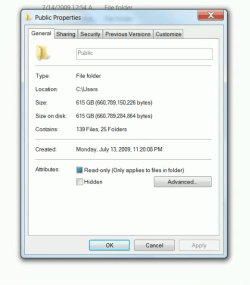
I tried unchecking read only.
When apply and look it is back to read only.

How can I make this read and write permission?
 

Attachments

  • Screenshot from 2014-02-26 16:25:25.png
    Screenshot from 2014-02-26 16:25:25.png
    364 KB · Views: 1

My Computer My Computer

OS
Windows 7 Ultimate x64
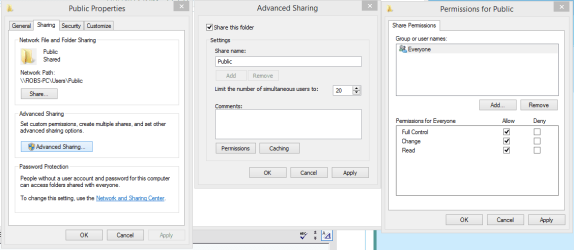
You can do this by going into the C:>Users>Public folder properties, click the Sharing tab then click on the Advanced Sharing button showing in the first picture.

Click the box to share the folder like in the second picture, at that point the Permissions button will light up.

Click the permissions button, Add check marks for full control "third picture" then hit the Apply button, on all windows click Ok etc.

At this point the Public folder and it's subfolder will have read/write access. :)
 

Attachments

  • Public File Sharing Enable read and write access.PNG
    Public File Sharing Enable read and write access.PNG
    18 KB · Views: 1

My Computer My Computer

Computer type
PC/Desktop
Computer Manufacturer/Model Number
Home built
OS
Windows 7 Ult, Windows 8.1 Pro,
CPU
Q9650-4.275GHz, E8600 4.5GHz, E6750-3.8GHz
Motherboard
Evga 780i FTW
Memory
G.Skill PC2 9600 1200Mhz 5 5 5 15 2T
Graphics Card(s)
GTX480
Sound Card
Asus Xonar D2
Monitor(s) Displays
HannsG
Screen Resolution
1680X1050
Hard Drives
GSkill Phoenix Pro 120GB SSD
PSU
ThermalTake Toughpower 1000Watt modular
Case
ThermalTake XaserV
Cooling
Xigmatek S1283
Keyboard
Logitech G15
Mouse
Logitech G9
Internet Speed
T1
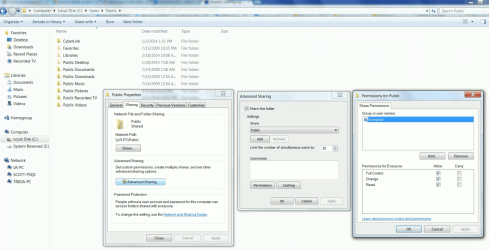
Hi thanks, got a little further, but still read only shows up.

I did everything you said
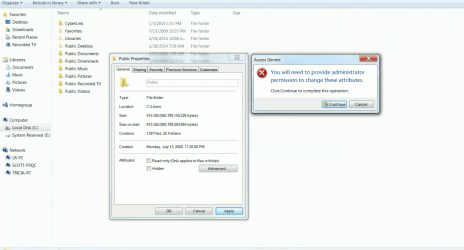
after, I rechecked and it said was read only, I unchecked and it gave the admin warning, I authorized.

When recehecked it said read only
pics
 

Attachments

  • share1.png
    share1.png
    187.3 KB · Views: 3
  • share2.png
    share2.png
    136.8 KB · Views: 3
  • share3.png
    share3.png
    47 KB · Views: 10

My Computer My Computer

OS
Windows 7 Ultimate x64
The attribute is read only and has nothing to do with the permission settings, there is no need to mess with the attributes at this point, it's the sharing tab you need to be concerned with.

You shouldn't be having any problems with read/write access for all the public folders after making those adjustments to the sharing settings.

I even tested this from another machine and I have full control over everything placed into any of the Public folders so the settings we changed through the sharing tab definitely had the desired effect.

I'm sure you can test for full access as well from one of your other machines,. although you may be having other problems with the mythTV access which I'm not familiar with.

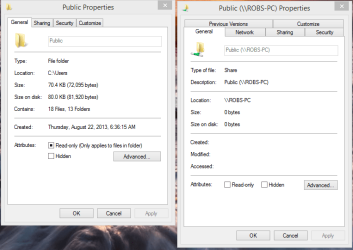
It may help to change the path used when you mapped from the myth TV, there are two different paths to this folder from the network, one works while the other won't.

The pictures show that one is shared and the other does not show this. You need to map to the Network folder \\User-PC\Public when you set up the Myth TV.

Also be sure and turn on Public file sharing in the Advanced Sharing settings via the Network and Sharing Center.
 

Attachments

  • Public folders different path to same folder.PNG
    Public folders different path to same folder.PNG
    26.7 KB · Views: 1
Last edited:

My Computer My Computer

Computer type
PC/Desktop
Computer Manufacturer/Model Number
Home built
OS
Windows 7 Ult, Windows 8.1 Pro,
CPU
Q9650-4.275GHz, E8600 4.5GHz, E6750-3.8GHz
Motherboard
Evga 780i FTW
Memory
G.Skill PC2 9600 1200Mhz 5 5 5 15 2T
Graphics Card(s)
GTX480
Sound Card
Asus Xonar D2
Monitor(s) Displays
HannsG
Screen Resolution
1680X1050
Hard Drives
GSkill Phoenix Pro 120GB SSD
PSU
ThermalTake Toughpower 1000Watt modular
Case
ThermalTake XaserV
Cooling
Xigmatek S1283
Keyboard
Logitech G15
Mouse
Logitech G9
Internet Speed
T1
Thanks, your right.
I was focused on that read only attrib for the folder.
The files are read write.
I can modify the folder.

mythtv in ubuntu is not easy to configure for samba.
I think I have to mount this folder in fstab to get a path.
I was using the mount command to get a workable path for mythtv, but that gives it only access for root.
So mythbackend chokes saying it cant write to the folder.
 

My Computer My Computer

OS
Windows 7 Ultimate x64
Thanks, your right.
I was focused on that read only attrib for the folder.
The files are read write.
I can modify the folder.

mythtv in ubuntu is not easy to configure for samba.
I think I have to mount this folder in fstab to get a path.
I was using the mount command to get a workable path for mythtv, but that gives it only access for root.
So mythbackend chokes saying it cant write to the folder.

Yes at this point using the correct path should work but I'm not sure about the details for setting this all up.

I did find the following link explaining how to run myth TV in Windows using a Linux virtual machine.
http://www.techwandering.com/2007/01/03/how-to-run-mythtv-on-windows/
 

My Computer My Computer

Computer type
PC/Desktop
Computer Manufacturer/Model Number
Home built
OS
Windows 7 Ult, Windows 8.1 Pro,
CPU
Q9650-4.275GHz, E8600 4.5GHz, E6750-3.8GHz
Motherboard
Evga 780i FTW
Memory
G.Skill PC2 9600 1200Mhz 5 5 5 15 2T
Graphics Card(s)
GTX480
Sound Card
Asus Xonar D2
Monitor(s) Displays
HannsG
Screen Resolution
1680X1050
Hard Drives
GSkill Phoenix Pro 120GB SSD
PSU
ThermalTake Toughpower 1000Watt modular
Case
ThermalTake XaserV
Cooling
Xigmatek S1283
Keyboard
Logitech G15
Mouse
Logitech G9
Internet Speed
T1
I solved it, finally got it to work.

[SOLVED] Got the samba cifs share working in mythtv!

mount has to performed using fstab

but, long file names that WMC uses, makes a series look all the same, no way to tell without playing each one:huh:

Glad you have it working now.

That didn't look like an easy set up with Linux running in a VM in order for it to work not to mention the required mount path. Thanks for posting solutions as others will find this handy in the future.
 

My Computer My Computer

Computer type
PC/Desktop
Computer Manufacturer/Model Number
Home built
OS
Windows 7 Ult, Windows 8.1 Pro,
CPU
Q9650-4.275GHz, E8600 4.5GHz, E6750-3.8GHz
Motherboard
Evga 780i FTW
Memory
G.Skill PC2 9600 1200Mhz 5 5 5 15 2T
Graphics Card(s)
GTX480
Sound Card
Asus Xonar D2
Monitor(s) Displays
HannsG
Screen Resolution
1680X1050
Hard Drives
GSkill Phoenix Pro 120GB SSD
PSU
ThermalTake Toughpower 1000Watt modular
Case
ThermalTake XaserV
Cooling
Xigmatek S1283
Keyboard
Logitech G15
Mouse
Logitech G9
Internet Speed
T1
I modified my mount so that mythtv has them in a subfolder at

/mnt/recorded tv

This way videos from one drive are kept separate from videos on the win7 pc.
Ideally, I would want both isolated to a folder so when mythtv loads, you see two folders are pick one.

So did this
Code:
#windows lr pc for recorded tv shows
//192.168.1.7/users/public/Recorded\040Tv /mnt/recorded\040tv  cifs   guest,uid=1000,iocharset=utf8  0  0

and as root created a new folder in /mnt called recorded tv

So when you load mythtv, you see all the vhs movies, then click recorded tv folder and just see all the wmc recorded shows.

What I need is maybe to link one directory holding the vhs movies on another already locally mounted drive to the directory at /mnt/vhs movies
 

My Computer My Computer

OS
Windows 7 Ultimate x64
Back
Top