Solved PUM.Dns re-director found with RogueKiller

NicabarP

New member
Local time
8:44 AM
Messages
3
I have been finding this on several machines lately using RogueKiller. (Third one today)

¤¤¤ Registry : 4 ¤¤¤
[PUM.Dns] (X64) HKEY_LOCAL_MACHINE\System\CurrentControlSet\Services\Tcpip\Parameters | DhcpNameServer : 10.0.0.1 [(Private Address) (XX)] -> Found
[PUM.Dns] (X64) HKEY_LOCAL_MACHINE\System\ControlSet001\Services\Tcpip\Parameters | DhcpNameServer : 10.0.0.1 [(Private Address) (XX)] -> Found
[PUM.Dns] (X64) HKEY_LOCAL_MACHINE\System\CurrentControlSet\Services\Tcpip\Parameters\Interfaces\{B5D00FF2-C635-4597-A707-DEE7ED712F33} | DhcpNameServer : 10.0.0.1 [(Private Address) (XX)] -> Found
[PUM.Dns] (X64) HKEY_LOCAL_MACHINE\System\ControlSet001\Services\Tcpip\Parameters\Interfaces\{B5D00FF2-C635-4597-A707-DEE7ED712F33} | DhcpNameServer : 10.0.0.1 [(Private Address) (XX)] -> Found

The Private address is sometimes different but is always a class A private address.

After rebooting the entries return. Webpages are timing out on multiple browsers and ping returns >50% packet loss.

Suggestions online are to run the standard arsenal: Malewarebytes, AV cleaners, Combofix (Win 7), ESET, ect. None of these are finding the infection.

I have tried all of these and I am still receiving same findings from RogueKiller. It is persistent even when booting to safe mode.

The only solution I have found thus far has been to Refresh the OS.

I am hoping someone finds a less intrusive solution. Any help would be appreciated.
 

My Computer My Computer

At a glance

Cross PlatformIntel(R) Core(TM) i7-4700MQ CPU @ 2.4Ghz 2.40...12064 MB DDR3Intel(R) HD Graphics 4600
Computer type
PC/Desktop
Computer Manufacturer/Model Number
HP
OS
Cross Platform
CPU
Intel(R) Core(TM) i7-4700MQ CPU @ 2.4Ghz 2.40 Ghz
Motherboard
Hewlett-Packard 1962 ENVY 15-J SERIES LAPTOP 720568-501
Memory
12064 MB DDR3
Graphics Card(s)
Intel(R) HD Graphics 4600
Hard Drives
1TB HHD 2.5 Sata (Multiple partition formats) HGST HTS541010A9E680
Antivirus
Avast (Current Version)
Browser
Multiple
Update: Windows 7 Home 64 refresh via inserting Win 7 Install Disk > Upgrade option.

Entry in original post still shows up in RogueKiller. Ping no longer show packet loss. I will do some more testing to see if internet browsers are showing any problems.

I am wondering if this is caused by a feature in Windows or supporting software. If it is a remnant of an infection, I am hoping to find out what keeps rewriting this entry to the registry.

The entry did not show up after a Refresh on a Windows 8.1 machine.
 

My Computer My Computer

At a glance

Cross PlatformIntel(R) Core(TM) i7-4700MQ CPU @ 2.4Ghz 2.40...12064 MB DDR3Intel(R) HD Graphics 4600
Computer type
PC/Desktop
Computer Manufacturer/Model Number
HP
OS
Cross Platform
CPU
Intel(R) Core(TM) i7-4700MQ CPU @ 2.4Ghz 2.40 Ghz
Motherboard
Hewlett-Packard 1962 ENVY 15-J SERIES LAPTOP 720568-501
Memory
12064 MB DDR3
Graphics Card(s)
Intel(R) HD Graphics 4600
Hard Drives
1TB HHD 2.5 Sata (Multiple partition formats) HGST HTS541010A9E680
Antivirus
Avast (Current Version)
Browser
Multiple
Monitor Registry Changes

Well I'm not expert at monitoring what process created registry changes but since there are no other replies here's some ideas.

You can run MJRegWatcher to monitor registry changes but it won't tell you what process was responsible for the change. It will give you the option to allow or block each registry change. I run this application on boot and never shut it down. Running it on boot is tricky - for me it involves creating an Elevated Shortcut and launching the application delayed once other security software has loaded. This might not be the best approach for you so you could try running it on demand only.

MJRegWatcher.jpg

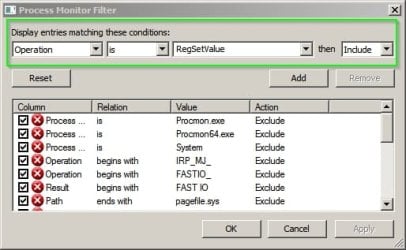
It monitors a preset list of important registry locations including your problem area. You'll get a prompt to block or allow the change if anything tries to modify that registry key. If you can spot any pattern and work out roughly when these changes will occur you can use Process Monitor to log the changes and filter the events log to display only events where Operation is RegSetValue.

Process Monitor Filter.jpg

If you think the problem happens on boot you can configure Process Monitor to create a boot log.

If you need to create a boot log here's a guide:

Enable System Boot Time Logging using Process Monitor

You can filter the boot log in the same way as before.

Edit:

Also that registry location appears to be mapped to network cards here HKEY_LOCAL_MACHINE\SOFTWARE\Microsoft\Windows NT\CurrentVersion\NetworkCards as well as relating to both physical and software driven network adapters.

Based on that I'd say you that you need a Networking expert - that's not something I'm good at!

Note: Not sure that it's an infection. RogueKiller might just be notifying on registry keys that could potentially have been modified by malware or non standard entries but that doesn't mean that the machine is infected.
 
Last edited:

My Computer My Computer

At a glance

Microsoft Windows 7 Home Premium 64-bit 7601 ...AMD C-60 APU with Radeon(tm) HD Graphics4.00 GBAMD Radeon HD 6290 Graphics
Computer type
Laptop
Computer Manufacturer/Model Number
ASUS
OS
Microsoft Windows 7 Home Premium 64-bit 7601 Multiprocessor Free Service Pack 1
CPU
AMD C-60 APU with Radeon(tm) HD Graphics
Motherboard
ASUSTeK COMPUTER INC. X501U
Memory
4.00 GB
Graphics Card(s)
AMD Radeon HD 6290 Graphics
Sound Card
(1) AMD High Definition Audio Device (2) Realtek High Defi
Screen Resolution
1366 x 768 x 32 bits (4294967296 colors) @ 60 Hz
Hard Drives
Hitachi HTS545050A7E380 SATA Disk Device
Antivirus
Comodo CIS & FW, SecureAplus App Whitelisting, Threatfire
Browser
Cyberfox 64bit, Opera 64bit, Airfox
Other Info
Spy-The-Spy, HitmanPro.Alert, Norton Connect Safe, MJRegWatcher, BitDefender TrafficLight, Voodoo Shield, Zemana AntiMalware
Thank you for your response, Callender. I also thank you for the new tool. I will definitely add MJRegWatcher to my toolkit.

Unfortunately I was unable to match up the process that was making the entry with those in Process Monitor's dump files.

I was able to tell that the entry was being written during the boot process. For the sake of efficiency, thought, I am going to reload the OS on this particular machine this time. If I run into the problem again I will try to do some more research.

Thank you for your time.
 

My Computer My Computer

At a glance

Cross PlatformIntel(R) Core(TM) i7-4700MQ CPU @ 2.4Ghz 2.40...12064 MB DDR3Intel(R) HD Graphics 4600
Computer type
PC/Desktop
Computer Manufacturer/Model Number
HP
OS
Cross Platform
CPU
Intel(R) Core(TM) i7-4700MQ CPU @ 2.4Ghz 2.40 Ghz
Motherboard
Hewlett-Packard 1962 ENVY 15-J SERIES LAPTOP 720568-501
Memory
12064 MB DDR3
Graphics Card(s)
Intel(R) HD Graphics 4600
Hard Drives
1TB HHD 2.5 Sata (Multiple partition formats) HGST HTS541010A9E680
Antivirus
Avast (Current Version)
Browser
Multiple
The next time you see the issue, consider taking these steps:

Disable each network adapter.
(Network & Sharing Center > Change adapter settings > Select/Disable each adapter)

Open regedit and look for one of the undesired entries.
Close regedit without collapsing anything in the left pane.

Allow RogueKiller to remove the undesired entries.

Restart the computer.

Open regedit. (It should open to the last location.)

If the undesired entries are there, then you can give up on these steps.

If the undesired entries are not there, then:

Start Process monitor.
Filter on: Operation > Contains > RegSet > Include
(That should display RegSetValue, RegSetInfoKey, RegSetKeyValue, RegSetValueEx...)
Also filter on: Path > Contains > Tcpip\Parameters > Include

Enable one network adapter.

See if Process Monitor shows the offending app.
 

My Computer My Computer

At a glance

W7 Pro SP1 64biti78GBIntel HD Graphics
Computer type
Laptop
Computer Manufacturer/Model Number
Employer provided Dell Latitude
OS
W7 Pro SP1 64bit
CPU
i7
Memory
8GB
Graphics Card(s)
Intel HD Graphics
Hard Drives
crappy SSD
Antivirus
Employer mandated Symantec Endpoint Protection
Browser
Pale Moon 64bit, IE11 64bit & Chrome 64bit
Not sure if this might be useful for you, however I have the exact same issue. But i think its related to my ISP and using cable modem. Im not quite an expert at networking. But individually checking these registry keys seems to matchup with my Optus IP addresses (I have three listed, not just 10.0.0.1). Doesn't seem too suspicious. Could this be a false positive from RogueKiller?
 

My Computer My Computer

At a glance

Win7x64
Computer type
PC/Desktop
OS
Win7x64
Back
Top