PUP's in flash scan at Malwarebytes

petrox

New member
Member
Local time
3:51 PM
Messages
69
Location
Ontario Canada
Hi Forum members, a question please. I have Malware bytes pro one option is to scan memory and start up items. Today it found 98 items in those locations. They are PUP seach ui in files as well as in registry. I am wondering why Microsoft Security essentials lets them through as well as the Windows firewall and Windows defender. Any ideas? If I need another security tool please tell me and I will install whichever one is appropriate. Regards Peter
 

My Computer

Computer type
PC/Desktop
Computer Manufacturer/Model Number
Custom
OS
win 7 home premium
CPU
Intel I-5-6400 Skylake
Motherboard
MSI H110 M Pro VD
Memory
8 gig
Graphics Card(s)
Radeon RX 470
Sound Card
onboard
Monitor(s) Displays
Samsung 245T
Screen Resolution
1920X1200
Hard Drives
WD 500 Gig X2, 1 SSD 250 GB ( OS) plus 1External WD 1 tera byte
PSU
750 Watts
Case
Thermal Take
Keyboard
Microsoft net keyboard
Mouse
Microsoft optical wireless
Internet Speed
10 mps
Antivirus
Avast
Browser
Fire Fox
PUP's

Hi,

A PUP is a Potentially Unwanted Program. That could be a toolbar or something similar. MSE and other security programs don't block them unless they're malicious. Some users even want to use these toolbars.

Some security products might have the option to alert on PUP's if you look for it in the settings.

Malwarebytes detects these PUP's as they might have been installed without the user's knowledge.

https://helpdesk.malwarebytes.org/e...-are-they-threats-and-should-they-be-deleted-

Malwarebytes classifies the following as PUP's.

Malwarebytes : PUP Reconsideration Information
 

My Computer

Computer type
Laptop
Computer Manufacturer/Model Number
ASUS
OS
Microsoft Windows 7 Home Premium 64-bit 7601 Multiprocessor Free Service Pack 1
CPU
AMD C-60 APU with Radeon(tm) HD Graphics
Motherboard
ASUSTeK COMPUTER INC. X501U
Memory
4.00 GB
Graphics Card(s)
AMD Radeon HD 6290 Graphics
Sound Card
(1) AMD High Definition Audio Device (2) Realtek High Defi
Screen Resolution
1366 x 768 x 32 bits (4294967296 colors) @ 60 Hz
Hard Drives
Hitachi HTS545050A7E380 SATA Disk Device
Antivirus
Comodo CIS & FW, SecureAplus App Whitelisting, Threatfire
Browser
Cyberfox 64bit, Opera 64bit, Airfox
Other Info
Spy-The-Spy, HitmanPro.Alert, Norton Connect Safe, MJRegWatcher, BitDefender TrafficLight, Voodoo Shield, Zemana AntiMalware
MSE is one of the worst AVs you can be using.
 

My Computer

Computer type
PC/Desktop
Computer Manufacturer/Model Number
Custom Build
OS
Win 7 Ultimate 64 bit
CPU
Intel i7-3930K
Motherboard
ASUS P9X79 WS
Memory
Kingston HyperX Genesis 32GB Kit (8x4GB Modules) 1600MHz DDR
Graphics Card(s)
MSI R7850 Twin Frozr 2GD5/OC Radeon HD 7850 2GB 256-bit GDDR
Sound Card
Asus Xonar Essence STX
Monitor(s) Displays
3x Asus VG248QE 24", Vizio 32" TV
Screen Resolution
1920 x 1080, ?
Hard Drives
Samsung 128GB 840 Pro SSD (1),
Samsung 4TB 850 EVO SSDs (4)
Samsung 4TB 850 EVO SSDs (16) external backup drives used in 2.5" hot swap bays in the computer.
PSU
Corsair HX750w
Case
Antec Two Hundred v2 (modified)
Cooling
Cooler Master GeminII S524 120mm (fan replaced with a 140mm)
Keyboard
Logitech G510s
Mouse
Logitech M525 (two in use)
Internet Speed
=< 32Mbps down, 8Mbps up
Antivirus
AVAST!, MBAM, SAS, Spybot S&D (all but MBAM free) Glary Util
Browser
IE11
Other Info
LSI 9211-8i HBA card (8 SATA III ports), 2.5" & 3.5" Hot Swap Bays, HooToo HT-CR001 PCI-E to USB 3.0 Internal Hub + 6 Slot Card Reader, and LG Model CH12LS28 BD-ROM Optical Drive. Also, ScanSnap S1500 ADF duplexing scanner, Canon 9000F flat bed scanner, Corsair SP2500 2.1 speakers, Samsung CLP 415nw laser color printer, Cyberpower PP2200SW UPS
Thank you Callender for your reply. Also Lady Fitzgerald.I do understand it better now. I will search for a better Anti Virus. Some people think MSE is not that bad. Regards Peter
 
Last edited:

My Computer

Computer type
PC/Desktop
Computer Manufacturer/Model Number
Custom
OS
win 7 home premium
CPU
Intel I-5-6400 Skylake
Motherboard
MSI H110 M Pro VD
Memory
8 gig
Graphics Card(s)
Radeon RX 470
Sound Card
onboard
Monitor(s) Displays
Samsung 245T
Screen Resolution
1920X1200
Hard Drives
WD 500 Gig X2, 1 SSD 250 GB ( OS) plus 1External WD 1 tera byte
PSU
750 Watts
Case
Thermal Take
Keyboard
Microsoft net keyboard
Mouse
Microsoft optical wireless
Internet Speed
10 mps
Antivirus
Avast
Browser
Fire Fox
MSE is one of the worst AVs you can be using.
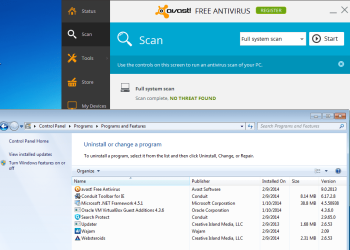
Please do not take this the wrong way. The info presented below is as much for your benefit as it is for the OP. I agree that MSE could be a lot better. You have probably seen my rants about MSE's lack of heuristics. That said, in the context of preventing PUPs from installing on a computer, AVAST might be just as bad as MSE. AVAST happily allowed the Conduit toolbar (and the apps that its installer offered) to be installed. Other antivirus tools flagged these apps.

avast-pup1.png

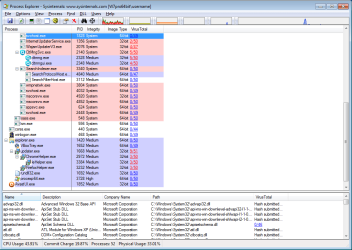
avast-pup2.png


Using Process Explorer...

avast-pup3.png


Picking two of the worst offenders:

https://www.virustotal.com/en/file/...27c0f473520a66aa5acc9cd6/analysis/1391980609/
avast-pup4.png


https://www.virustotal.com/en/file/...1b109070470ed66ffb4f8e8d/analysis/1391980611/
avast-pup5.png
You might notice that there are ten findings, but the initial screenshot showed 9 findings. That is because the initial report was based on data that was 6 days old. I resubmitted the EXE for evaluation.

I know that you rely on Malwarebytes Pro to keep these PUPs off of your computer(s), but again, in the context of this thread, moving away from MSE is not going to help the OP to stay free of PUPs (unless the OP picks an antivirus tool that does a better job than AVAST).

I wonder why more antivirus tools don't add more PUPs to the list of things that they watch for?
 

My Computer

Computer type
Laptop
Computer Manufacturer/Model Number
Employer provided Dell Latitude
OS
W7 Pro SP1 64bit
CPU
i7
Memory
8GB
Graphics Card(s)
Intel HD Graphics
Hard Drives
crappy SSD
Antivirus
Employer mandated Symantec Endpoint Protection
Browser
Pale Moon 64bit, IE11 64bit & Chrome 64bit

My Computer

Computer type
Laptop
Computer Manufacturer/Model Number
Employer provided Dell Latitude
OS
W7 Pro SP1 64bit
CPU
i7
Memory
8GB
Graphics Card(s)
Intel HD Graphics
Hard Drives
crappy SSD
Antivirus
Employer mandated Symantec Endpoint Protection
Browser
Pale Moon 64bit, IE11 64bit & Chrome 64bit
[/QUOTE]I wonder why more antivirus tools don't add more PUPs to the list of things that they watch for?[/QUOTE]

I'd say that the answer here is probably about right:

Why isn't a program malware if it installs additional, unwanted software? | PCWorld

Except that some software bundles PUP's with no chance for the user to opt out of installation!

I keep looking for a current list of executable file names for the installers or setup files for these programs but so far I've never come across a full list that is kept up to date!

If there were such a list it would be very useful to me as I block installation of this stuff by detecting the installer process running and then when that happens I've set up a method of automatically launching another safe file to run in it's place.
 

My Computer

Computer type
Laptop
Computer Manufacturer/Model Number
ASUS
OS
Microsoft Windows 7 Home Premium 64-bit 7601 Multiprocessor Free Service Pack 1
CPU
AMD C-60 APU with Radeon(tm) HD Graphics
Motherboard
ASUSTeK COMPUTER INC. X501U
Memory
4.00 GB
Graphics Card(s)
AMD Radeon HD 6290 Graphics
Sound Card
(1) AMD High Definition Audio Device (2) Realtek High Defi
Screen Resolution
1366 x 768 x 32 bits (4294967296 colors) @ 60 Hz
Hard Drives
Hitachi HTS545050A7E380 SATA Disk Device
Antivirus
Comodo CIS & FW, SecureAplus App Whitelisting, Threatfire
Browser
Cyberfox 64bit, Opera 64bit, Airfox
Other Info
Spy-The-Spy, HitmanPro.Alert, Norton Connect Safe, MJRegWatcher, BitDefender TrafficLight, Voodoo Shield, Zemana AntiMalware
I don't think that I was clear. I was not suggesting that installers that offer other apps should be classified as malware. The installer for AVAST and CCleaner would fit into that category. I was saying that apps like Conduit, Search Protect and the like should be highlighted to the user as a PUP by MSE, AVAST and the like. There is no reason to have AV tools look for one level of malware and Malwarebytes looks for another level of malware.

I'm well aware of the need for layered protection and that no one tool catches all forms of malware - but my question stands: why do so many AV tools set the bar so low when it comes to PUPs? Many AV tools simply ignore that entire class of software. I realize that putting software into the PUP category is a subjective decision; but come on, Conduit!

Trovi bought Conduit and here is what you agree to during the install:
Information Trovi Collects and Receives. There are several types of data being collected from you as detailed herein.
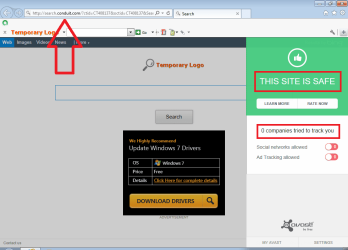
AVAST thinks the Conduit toolbar and website is just fine:

avast-pup6.png


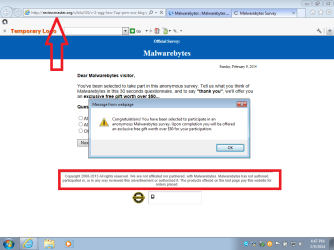
I could not even get to the Malwarebytes website without being blessed with an endless offer scam from the adware that AVAST allowed.

avast-pup7.png


Most of those 293 items shown below are just snake oil*. They are harmless registry entries. Should they be cleaned? Yes. But they should not be listed in big bold red letters. Those bold red letters should be reserved for items that can cause something to actually happen on your computer.

avast-pup8.png

*The more items found, the better the user feels about Malwarebytes. The same can be said about UniBlue's registry tool. It will find more things "wrong" with the registry than the conservative CCleaner tool will.


Don't get me wrong, Malwarebytes is an excellent tool...
...but it still uses the same tactics (perhaps unintentionally) used by Uniblue.
 

My Computer

Computer type
Laptop
Computer Manufacturer/Model Number
Employer provided Dell Latitude
OS
W7 Pro SP1 64bit
CPU
i7
Memory
8GB
Graphics Card(s)
Intel HD Graphics
Hard Drives
crappy SSD
Antivirus
Employer mandated Symantec Endpoint Protection
Browser
Pale Moon 64bit, IE11 64bit & Chrome 64bit
Malwarebytes Anti Malware finds lot of PUP's for me and I don't really care what color they use to indicate them.
To me no PUP is a good PUP. If I wanted it downloaded I would of ask for it up front.
Many anti virus let PUP through because they are not considered virus at this time in the anti virus world, and they are not. For what ever reason some people like some of the little free goodies that slip in. I consider them malware and Malwarebytes does to.
Eset Free Online Scanner will also find PUP's along with viruses ect.
If PUP's were nice to have then send they to me through the front door and not the backdoor of my system.

Many wiser that me have posted: Their is no one program that does it all and I do agree.
 

My Computer

Computer type
PC/Desktop
Computer Manufacturer/Model Number
Home made Desktop
OS
Windows 10 Pro. 64/ version 1709 Windows 7 Pro/64
CPU
Intel i7-6800K @ 4.3
Motherboard
ASUS X-99 Deluxe II
Memory
Corsair Platinum 16 gig @2400
Graphics Card(s)
EVGA GTX 1070 OC
Monitor(s) Displays
Asus 27" LED LCD/VE278Q
Screen Resolution
1920-1080 or 1280-720 HDMI
Hard Drives
INTEL SSD 730-240 Gb Sata 3.0/
PSU
EVGA Platium 1200W
Case
Phanteks Luxe Tempered Glass 8 fans/ one radiator
Cooling
XSPC/ Water Cooled CPU
Keyboard
Das 4 Professional
Mouse
Logitech M705/MX Anywhere 2-S
Internet Speed
100 mbits
Antivirus
Microsoft Security Essentials/ Malwarebytes Premium 3.0/ SAS
Browser
I.E. 11 default/Firefox/ ISP Time Warner Cable/Spectrum
Other Info
LG BluRay Burner/
Sound system-KLipsch-THX/
Icy Dock ssd Hot Swap bays.
Malwarebytes Anti Malware finds lot of PUP's for me and I don't really care what color they use to indicate them.
To me no PUP is a good PUP. If I wanted it downloaded I would of ask for it up front.
~~~
If PUP's were nice to have then send they to me through the front door and not the backdoor of my system.
I asked for these installs "up front". The paid version of Malwarebytes Anti Malware might have stopped most of the installs; but Malwarebytes Anti Malware cannot clean what was installed for this tiny test of mine.


....Many anti virus let PUP through because they are not considered virus at this time in the anti virus world, and they are not....
You are correct about these apps not being a virus. I was lamenting/questioning the decision of some antivirus tools not to include PUPs.


...Eset Free Online Scanner will also find PUP's along with viruses ect.
~~~
Many wiser that me have posted: Their is no one program that does it all and I do agree.
I mentioned the multiple program concept too; unfortunately, the concept can mean:
1) use one tool to look for viruses and use another tool to look for PUPs
or
2) use more than one tool to look for all classes of malware and PUPs.
Lots of people here operate under option 1.
(which is better than just using MSE :-)


Not to beat a dead horse, but since I spent the time playing with the Conduit toolbar and the other things that I intentionally did not opt out of - I'll report that none of the tools listed in Lady Fitzgerald's system spec [AVAST!, MBAM, SAS, Spybot S&D (all but MBAM free] have managed to rid the virtual machine of the stuff that was installed. Also, ESET seems to have changed their online scanner to be a one time use.

ESET.png

That is why I wanted the antivirus app to do what it can against PUPs and malwarebytes to do what it can against PUPs and any other tool that I throw against the problem. Then maybe - just maybe - if they all do what they can, the PUP can be eradicated from the computer.

Or maybe I'm just looking at the virus/malware/PUP issue all wrong.
I've been known to do that :-(

 

My Computer

Computer type
Laptop
Computer Manufacturer/Model Number
Employer provided Dell Latitude
OS
W7 Pro SP1 64bit
CPU
i7
Memory
8GB
Graphics Card(s)
Intel HD Graphics
Hard Drives
crappy SSD
Antivirus
Employer mandated Symantec Endpoint Protection
Browser
Pale Moon 64bit, IE11 64bit & Chrome 64bit
UsernameIssues you are doing a fine experiment.
You have to download Eset Free Scan every time you use it. I don't take but a couple of minutes.
I also recommend when your done with Eset you uninstall it.

I wish Malwarebytes made a AIO. Anti virus, anti malware plus PUP and anti spyware. I would buy it.
 

My Computer

Computer type
PC/Desktop
Computer Manufacturer/Model Number
Home made Desktop
OS
Windows 10 Pro. 64/ version 1709 Windows 7 Pro/64
CPU
Intel i7-6800K @ 4.3
Motherboard
ASUS X-99 Deluxe II
Memory
Corsair Platinum 16 gig @2400
Graphics Card(s)
EVGA GTX 1070 OC
Monitor(s) Displays
Asus 27" LED LCD/VE278Q
Screen Resolution
1920-1080 or 1280-720 HDMI
Hard Drives
INTEL SSD 730-240 Gb Sata 3.0/
PSU
EVGA Platium 1200W
Case
Phanteks Luxe Tempered Glass 8 fans/ one radiator
Cooling
XSPC/ Water Cooled CPU
Keyboard
Das 4 Professional
Mouse
Logitech M705/MX Anywhere 2-S
Internet Speed
100 mbits
Antivirus
Microsoft Security Essentials/ Malwarebytes Premium 3.0/ SAS
Browser
I.E. 11 default/Firefox/ ISP Time Warner Cable/Spectrum
Other Info
LG BluRay Burner/
Sound system-KLipsch-THX/
Icy Dock ssd Hot Swap bays.
...Not to beat a dead horse, but since I spent the time playing with the Conduit toolbar and the other things that I intentionally did not opt out of - I'll report that none of the tools listed in Lady Fitzgerald's system spec [AVAST!, MBAM, SAS, Spybot S&D (all but MBAM free] have managed to rid the virtual machine of the stuff that was installed...(

And yet I have no unwanted programs installed on my system (I check every now and then just to make sure nothing "snuck" by). A good dose of common sense and just paying attention, such as reading the boring EULAs, before pushing a key also goes a long ways toward preventing PUPs from being installed. Keep in mind, if you allow a program to be installed, even if it was due to carelessness (or a test or experiment), technically, it's not a PUP anymore. The PUPs that MBAM detects are program installation files that have sneakware that doesn't give one the option to not install, or installers, such as Open Candy, that can install PUPs.

Then there is the ultimate way to get rid of anything, no matter how persistent it may be: restore to an earlier image. I make a fresh image before I install anything or make any other changes. If something goes pear shaped, I can always go back to where I was before I made the change. I also make one image a week, right after running all my full scans and keep all of them for a month. After that, I keep only the first image of each month. Image restoration is far more reliable than System Restore; in fact, I've turned off System Restore.
 

My Computer

Computer type
PC/Desktop
Computer Manufacturer/Model Number
Custom Build
OS
Win 7 Ultimate 64 bit
CPU
Intel i7-3930K
Motherboard
ASUS P9X79 WS
Memory
Kingston HyperX Genesis 32GB Kit (8x4GB Modules) 1600MHz DDR
Graphics Card(s)
MSI R7850 Twin Frozr 2GD5/OC Radeon HD 7850 2GB 256-bit GDDR
Sound Card
Asus Xonar Essence STX
Monitor(s) Displays
3x Asus VG248QE 24", Vizio 32" TV
Screen Resolution
1920 x 1080, ?
Hard Drives
Samsung 128GB 840 Pro SSD (1),
Samsung 4TB 850 EVO SSDs (4)
Samsung 4TB 850 EVO SSDs (16) external backup drives used in 2.5" hot swap bays in the computer.
PSU
Corsair HX750w
Case
Antec Two Hundred v2 (modified)
Cooling
Cooler Master GeminII S524 120mm (fan replaced with a 140mm)
Keyboard
Logitech G510s
Mouse
Logitech M525 (two in use)
Internet Speed
=< 32Mbps down, 8Mbps up
Antivirus
AVAST!, MBAM, SAS, Spybot S&D (all but MBAM free) Glary Util
Browser
IE11
Other Info
LSI 9211-8i HBA card (8 SATA III ports), 2.5" & 3.5" Hot Swap Bays, HooToo HT-CR001 PCI-E to USB 3.0 Internal Hub + 6 Slot Card Reader, and LG Model CH12LS28 BD-ROM Optical Drive. Also, ScanSnap S1500 ADF duplexing scanner, Canon 9000F flat bed scanner, Corsair SP2500 2.1 speakers, Samsung CLP 415nw laser color printer, Cyberpower PP2200SW UPS
UsernameIssues you are doing a fine experiment.
You have to download Eset Free Scan every time you use it. I don't take but a couple of minutes.
I also recommend when your done with Eset you uninstall it.

I wish Malwarebytes made a AIO. Anti virus, anti malware plus PUP and anti spyware. I would buy it.
I've used it for years (http://www.sevenforums.com/system-security/230001-arp-cache-poisoning-attack.html#post1925007) I interpreted the website change wrong. I thought it meant one time use. It did not offer the download a second time. I had to clear IE's cookies to get the download offer to appear again.


~~~
And yet I have no unwanted programs installed on my system (I check every now and then just to make sure nothing "snuck" by).
~~~
I can only state that the apps that I scan with found nothing :-)
Something unwanted could still be there :-(
Infections have gone undetected for years.

I do get to do my experimenting inside virtual machines :-)

Images are a good thing :-)
Images back up undetected infections too :-(
 

My Computer

Computer type
Laptop
Computer Manufacturer/Model Number
Employer provided Dell Latitude
OS
W7 Pro SP1 64bit
CPU
i7
Memory
8GB
Graphics Card(s)
Intel HD Graphics
Hard Drives
crappy SSD
Antivirus
Employer mandated Symantec Endpoint Protection
Browser
Pale Moon 64bit, IE11 64bit & Chrome 64bit

My Computer

Computer type
PC/Desktop
Computer Manufacturer/Model Number
Home Built Desktop By DataTech
OS
Windows 7 Ultimate X64 SP1
CPU
Intel i5-2550K, Differing ~4.4-4.8GHz No built in GPU
Motherboard
ASUS P8Z68-V PRO/GEN3
Memory
16GB G.Skill Sniper 1866MHz @ 2133MHz 2x8GB
Graphics Card(s)
ASUS GTX650TIB-DC2OC-2GD5, (650TI Boost)
Sound Card
Onboard Realtek 5-1
Monitor(s) Displays
Samsung P2570HD
Screen Resolution
1920x1080
Hard Drives
Samsung 840 Pro 256GB SSD for OS, 500GB Seagate Constellation (Enterprise drive) for Data
PSU
Corsair HX650W
Case
Inwin Dragon Rider
Cooling
Hyper 212 EVO w/two Noctua fans, push-pull, @1300 RPM
Keyboard
E-Z Eyes, bright yellow keys with large characters
Mouse
steelseries SENSEI Laser Pro Gaming
Internet Speed
48-51Mbs Mbs down, 11 Mbs up Xfinity Cable
Antivirus
Norton Internet Security 2013
Browser
IE 10, Opera, Pale Moon if needed
Other Info
4 case fans, LG BluRay-RE, ASUS DVD-RW, Mr. Fusion power supply, 1.21 gigawatts.
...
~~~
And yet I have no unwanted programs installed on my system (I check every now and then just to make sure nothing "snuck" by).
~~~
I can only state that the apps that I scan with found nothing :-)
Something unwanted could still be there :-(
Infections have gone undetected for years...(

PUPs and toolbars aren't exactly infections so it would be unfair to expect antimalware programs to detect them. It's quick and easy to find them by manually checking in browsers and in Programs and Features. I very rarely find any because I'm pretty careful to not let the little buggers in.

...Images are a good thing :-)
Images back up undetected infections too :-(

True that. That is why I keep so many old images. I can go back however far I need to get rid of an infection. So far, I haven't had to do that on this machine. I also keep the installation files of all my programs, including older versions, so if I have to go back very far, I can restore any programs I lose.

No one antivirus or anti-malware program is going to catch everything. Nor will they always catch them at first. That's why I have multiple programs and run daily quick scans and weekly full scans. I very rarely find anything (maybe once or twice in the past year) other than occasional tracking super cookies that are most likely harmless but are still intruders none the less.

MBAM will hit on the installation file for FreeFileSync because it contains Open Candy, a PUP that runs only when installing the program who's installation file it is hitchhiking on and will install various other PUPs, such as the delightful Ask toolbar, Chrome browser, Google toolbar, etc. (it varies). Open Candy doesn't get installed and the PUPs it tries to install are easily defeated by deselecting them during program installation (granted, you do have to pay close attention). I just added .disable to FreeFileSync's installation file's filename to temporarily disable the file so MBAM won't keep hitting on that one file without disabling MBAM's ability to pick up on any other intrusions of Open Candy.
 

My Computer

Computer type
PC/Desktop
Computer Manufacturer/Model Number
Custom Build
OS
Win 7 Ultimate 64 bit
CPU
Intel i7-3930K
Motherboard
ASUS P9X79 WS
Memory
Kingston HyperX Genesis 32GB Kit (8x4GB Modules) 1600MHz DDR
Graphics Card(s)
MSI R7850 Twin Frozr 2GD5/OC Radeon HD 7850 2GB 256-bit GDDR
Sound Card
Asus Xonar Essence STX
Monitor(s) Displays
3x Asus VG248QE 24", Vizio 32" TV
Screen Resolution
1920 x 1080, ?
Hard Drives
Samsung 128GB 840 Pro SSD (1),
Samsung 4TB 850 EVO SSDs (4)
Samsung 4TB 850 EVO SSDs (16) external backup drives used in 2.5" hot swap bays in the computer.
PSU
Corsair HX750w
Case
Antec Two Hundred v2 (modified)
Cooling
Cooler Master GeminII S524 120mm (fan replaced with a 140mm)
Keyboard
Logitech G510s
Mouse
Logitech M525 (two in use)
Internet Speed
=< 32Mbps down, 8Mbps up
Antivirus
AVAST!, MBAM, SAS, Spybot S&D (all but MBAM free) Glary Util
Browser
IE11
Other Info
LSI 9211-8i HBA card (8 SATA III ports), 2.5" & 3.5" Hot Swap Bays, HooToo HT-CR001 PCI-E to USB 3.0 Internal Hub + 6 Slot Card Reader, and LG Model CH12LS28 BD-ROM Optical Drive. Also, ScanSnap S1500 ADF duplexing scanner, Canon 9000F flat bed scanner, Corsair SP2500 2.1 speakers, Samsung CLP 415nw laser color printer, Cyberpower PP2200SW UPS

My Computer

Computer type
PC/Desktop
Computer Manufacturer/Model Number
Home Built Desktop By DataTech
OS
Windows 7 Ultimate X64 SP1
CPU
Intel i5-2550K, Differing ~4.4-4.8GHz No built in GPU
Motherboard
ASUS P8Z68-V PRO/GEN3
Memory
16GB G.Skill Sniper 1866MHz @ 2133MHz 2x8GB
Graphics Card(s)
ASUS GTX650TIB-DC2OC-2GD5, (650TI Boost)
Sound Card
Onboard Realtek 5-1
Monitor(s) Displays
Samsung P2570HD
Screen Resolution
1920x1080
Hard Drives
Samsung 840 Pro 256GB SSD for OS, 500GB Seagate Constellation (Enterprise drive) for Data
PSU
Corsair HX650W
Case
Inwin Dragon Rider
Cooling
Hyper 212 EVO w/two Noctua fans, push-pull, @1300 RPM
Keyboard
E-Z Eyes, bright yellow keys with large characters
Mouse
steelseries SENSEI Laser Pro Gaming
Internet Speed
48-51Mbs Mbs down, 11 Mbs up Xfinity Cable
Antivirus
Norton Internet Security 2013
Browser
IE 10, Opera, Pale Moon if needed
Other Info
4 case fans, LG BluRay-RE, ASUS DVD-RW, Mr. Fusion power supply, 1.21 gigawatts.

My Computer

Computer type
PC/Desktop
Computer Manufacturer/Model Number
Custom assembled by me :}
OS
Win-7-Pro64bit 7-H-Prem-64bit
CPU
i7-5930K 2nd i9-9940x both water blocked VRM's too
Motherboard
ASUS SABERTOOTH X99 2nd ASUS x299 Apex
Memory
Trident-z 3200C14 2nd Trident-z 3600C16
Graphics Card(s)
EVGA 1080ti ftw3 2nd Titan Xp both water blocked
Sound Card
Built-in Realtek
Monitor(s) Displays
1-AOC G2460PG 24"G-Sync 144Hz/ 2nd 1-ASUS VG248QE 24" 144Hz
Screen Resolution
1920 x 1080 144Hz
Hard Drives
2-Samsung M.2 Evo & Evo Plus
2-Samsung 850 EVO 500GB SSD's/ 3-2.5 W.D. Black 1tb-&3-1tb/3-3.5 WD Black 1tb hdd's
PSU
EVGA SuperNOVA 1000-P2 2nd 1200-P2
Case
2-Corsair Obsidian Series 450D Black ATX Mid Tower
Cooling
Custom water loops
Keyboard
Logitech G710+/ 2nd Logitech G910
Mouse
2-RedDragon M901 Perdition 16400 dpi Gaming mouse = wired
Internet Speed
Comcast Ping 19ms 89.31mbps download speed 6.12mbps upload
Antivirus
Malwarebytes Pro/ Superantispyware Pro
Browser
FireFox & Pale moon
Other Info
2nd ASUS X299 Apex/Intel i9-9940x with Custom water loop/7H-Prem-x64/Corsair 450D case/Ram Trident-z 3600C16 4x8gb / Samsung970Evo plus 500gb SSD/Dual ssd EZ swap evo/PSU EVGA SuperNova 1200w-P2 80+Platinum/GPU Titan Xp /8-ML-140 on push-pull on 2-280GTX rads
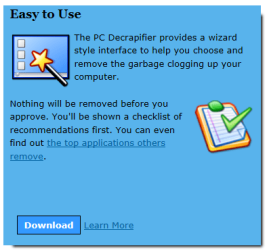
If one of the annoyingly big green download buttons is clicked that is for some "zip opener" crap.
Click the d/l button here,

decrapper.PNG

and this page opens with a big blue d/l button. I got a clean download.
Download | The PC Decrapifier
 

My Computer

Computer type
PC/Desktop
Computer Manufacturer/Model Number
Home Built Desktop By DataTech
OS
Windows 7 Ultimate X64 SP1
CPU
Intel i5-2550K, Differing ~4.4-4.8GHz No built in GPU
Motherboard
ASUS P8Z68-V PRO/GEN3
Memory
16GB G.Skill Sniper 1866MHz @ 2133MHz 2x8GB
Graphics Card(s)
ASUS GTX650TIB-DC2OC-2GD5, (650TI Boost)
Sound Card
Onboard Realtek 5-1
Monitor(s) Displays
Samsung P2570HD
Screen Resolution
1920x1080
Hard Drives
Samsung 840 Pro 256GB SSD for OS, 500GB Seagate Constellation (Enterprise drive) for Data
PSU
Corsair HX650W
Case
Inwin Dragon Rider
Cooling
Hyper 212 EVO w/two Noctua fans, push-pull, @1300 RPM
Keyboard
E-Z Eyes, bright yellow keys with large characters
Mouse
steelseries SENSEI Laser Pro Gaming
Internet Speed
48-51Mbs Mbs down, 11 Mbs up Xfinity Cable
Antivirus
Norton Internet Security 2013
Browser
IE 10, Opera, Pale Moon if needed
Other Info
4 case fans, LG BluRay-RE, ASUS DVD-RW, Mr. Fusion power supply, 1.21 gigawatts.
Yes you confirm the importance of reading the entire page and just not the sponsored adds ;)
Catchy name I have to admit :D
 

My Computer

Computer type
PC/Desktop
Computer Manufacturer/Model Number
Custom assembled by me :}
OS
Win-7-Pro64bit 7-H-Prem-64bit
CPU
i7-5930K 2nd i9-9940x both water blocked VRM's too
Motherboard
ASUS SABERTOOTH X99 2nd ASUS x299 Apex
Memory
Trident-z 3200C14 2nd Trident-z 3600C16
Graphics Card(s)
EVGA 1080ti ftw3 2nd Titan Xp both water blocked
Sound Card
Built-in Realtek
Monitor(s) Displays
1-AOC G2460PG 24"G-Sync 144Hz/ 2nd 1-ASUS VG248QE 24" 144Hz
Screen Resolution
1920 x 1080 144Hz
Hard Drives
2-Samsung M.2 Evo & Evo Plus
2-Samsung 850 EVO 500GB SSD's/ 3-2.5 W.D. Black 1tb-&3-1tb/3-3.5 WD Black 1tb hdd's
PSU
EVGA SuperNOVA 1000-P2 2nd 1200-P2
Case
2-Corsair Obsidian Series 450D Black ATX Mid Tower
Cooling
Custom water loops
Keyboard
Logitech G710+/ 2nd Logitech G910
Mouse
2-RedDragon M901 Perdition 16400 dpi Gaming mouse = wired
Internet Speed
Comcast Ping 19ms 89.31mbps download speed 6.12mbps upload
Antivirus
Malwarebytes Pro/ Superantispyware Pro
Browser
FireFox & Pale moon
Other Info
2nd ASUS X299 Apex/Intel i9-9940x with Custom water loop/7H-Prem-x64/Corsair 450D case/Ram Trident-z 3600C16 4x8gb / Samsung970Evo plus 500gb SSD/Dual ssd EZ swap evo/PSU EVGA SuperNova 1200w-P2 80+Platinum/GPU Titan Xp /8-ML-140 on push-pull on 2-280GTX rads
Back
Top