
pywintypes.com_error when starting Windows

TazCBR1100XX

New member
Local time
6:57 AM
Messages
6
Location
Doncaster UK
Hi all

If this is in the wrong section, then I apologise as I am new to the forum and still finding my feet.

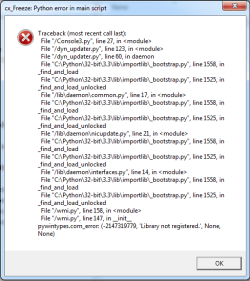
I have a long standing issue with what appears to be a Python error. Let me clarify - I know NOTHING about Python other than I get this error message :)

Some time early last year, or possibly in 2015, I purchased some software which was supposed to uninstall programs fully, including all the temp files and registry entries relating to that particular software etc. Well, it did what it was supposed to do, and also did things it wasn't supposed to do. To cut a long story short, the support team for the product told me to check the logs etc, but it didn't create the log files!! So basically I was stuffed, and tried in vain to find details of how to resolve this error.

Has anyone come across something similar and have a fix, or perhaps has enough knowledge and experience to help me to resolve this issue?

This laptop is used as my primary business tool, so I won't do anything else to it which may jeopardise what I have at the moment as it does at least work in most respects. I can't use some of the features for my DX4000 NAS from Windows 7, but most other stuff seems to be fine.

I've attached a screenshot of the error messages, and would really appreciate it if someone could give me some pointers on how to resolve it.

Thanks in advance
 

Attachments
  • cx_Freeze Error.png
    cx_Freeze Error.png
    12.8 KB · Views: 13

My Computer

Computer type
Laptop
Computer Manufacturer/Model Number
ROCK
OS
Windows 7 Ultimate x64
CPU
Intel Core i7 X990 @ 3.47Ghz 3.46Ghz 6 Cores 12 Logical Proc
Motherboard
Clevo X7200
Memory
24Gb
Graphics Card(s)
NVIDIA GeForce GTX 485M with 2Gb RAM
Hard Drives
ST750LX003-1AC154 (x3 in RAID 5 Array)
Antivirus
F-Secure
Browser
Firefox
Hi Taz,
while were thinking about it create a system image, most here tend to use Macrium (free).
Then we can change things and youve got a good back-up.

Roy

Quick swing at Python FAQ ----- NAS

  • A third-party application installed on the machine might have been written in Python and included a Python installation. There are many such applications, from GUI programs to network servers and administrative scripts.
AFTER you've made your image
i would uninstall/ re-install any NAS related support software.
 

My Computer

Computer type
PC/Desktop
Computer Manufacturer/Model Number
medionl/Aspire 6930G/acer x55a
OS
W7 home premium 32bit/W7HP 64bit/w10 tp insider ring
CPU
E5300 dual core
Motherboard
medion MS7366
Memory
3gb
Graphics Card(s)
Nvidia Geforce 7100 Nforce 630i
Monitor(s) Displays
avixc
Internet Speed
n (isp resticted to 72)
Antivirus
mse/pands
Browser
palemoon
Other Info
Belkin Fd7050 n USB using Railink RT2870 drivers, more upto date
Hi Roy

It might have been Macrium that contributed (in part) to this in the first place as it was one of the programs I had installed around that time and it was probably one of the ones I was trying to eradicate as I didn't get on with it at all. I have 3 x HDDs in a RAID 5 array giving a total storage space of around 1.4Tb with over 1Tb used. I did create a shadow copy to the NAS at some point before the issue arose as I had set up automatic backups to the NAS, but because of this issue I can't get these backups restored as I can't run the UI for the NAS, which means I can't restore the system.

So it looks like I'll have to bite the bullet and try not to screw up the system - at least until I get some work again!

Forgot to add .......... the NAS software has been installed and uninstalled many times since the error arose, but no joy.
 
Last edited:

My Computer

Computer type
Laptop
Computer Manufacturer/Model Number
ROCK
OS
Windows 7 Ultimate x64
CPU
Intel Core i7 X990 @ 3.47Ghz 3.46Ghz 6 Cores 12 Logical Proc
Motherboard
Clevo X7200
Memory
24Gb
Graphics Card(s)
NVIDIA GeForce GTX 485M with 2Gb RAM
Hard Drives
ST750LX003-1AC154 (x3 in RAID 5 Array)
Antivirus
F-Secure
Browser
Firefox
I also have a problem with running the DynDNS utility since this issue arose - runs quite happily on other laptops, just not this one
 

My Computer

Computer type
Laptop
Computer Manufacturer/Model Number
ROCK
OS
Windows 7 Ultimate x64
CPU
Intel Core i7 X990 @ 3.47Ghz 3.46Ghz 6 Cores 12 Logical Proc
Motherboard
Clevo X7200
Memory
24Gb
Graphics Card(s)
NVIDIA GeForce GTX 485M with 2Gb RAM
Hard Drives
ST750LX003-1AC154 (x3 in RAID 5 Array)
Antivirus
F-Secure
Browser
Firefox
Hi Taz,
Didnt realise before but CxFreeze is NOT part of Python, its an Add-on, to run the executable thats written by the user, or possibly in this case by the NAS install files.
From what i understand for the script to complete 3 elements are required
Python, Cxfreeze and C++ ( MS visual basics 2005 or later)

If any are missing then it fails.

Roy
 

My Computer

Computer type
PC/Desktop
Computer Manufacturer/Model Number
medionl/Aspire 6930G/acer x55a
OS
W7 home premium 32bit/W7HP 64bit/w10 tp insider ring
CPU
E5300 dual core
Motherboard
medion MS7366
Memory
3gb
Graphics Card(s)
Nvidia Geforce 7100 Nforce 630i
Monitor(s) Displays
avixc
Internet Speed
n (isp resticted to 72)
Antivirus
mse/pands
Browser
palemoon
Other Info
Belkin Fd7050 n USB using Railink RT2870 drivers, more upto date
Hmmm. So what I really need then is a Python expert :(

As the error message include a mention of dyn_updater.py, it might be DynDNS that causing the error rather than the NAS.

Is there a way for me to monitor what Windows is doing when I boot up and record it in a log or something? If I can see what point it reaches before it throws up the error then I may have a chance of resolving it.

The only other alternative I can see is to trawl the registry and manually remove all references to the NAS software and Dyn Updater after I uninstall them to try and get a clean run at re-installation of those two products.

I've got a handy little tool called JV16 Power Tool which is capable of doing this, but I get quite nervous using things which make potentially damaging changes - but it has a manual mode too which is fine as long as I know what I'm going to delete. I usually make a backup of the registry before I do any of this kind of stuff.
 

My Computer

Computer type
Laptop
Computer Manufacturer/Model Number
ROCK
OS
Windows 7 Ultimate x64
CPU
Intel Core i7 X990 @ 3.47Ghz 3.46Ghz 6 Cores 12 Logical Proc
Motherboard
Clevo X7200
Memory
24Gb
Graphics Card(s)
NVIDIA GeForce GTX 485M with 2Gb RAM
Hard Drives
ST750LX003-1AC154 (x3 in RAID 5 Array)
Antivirus
F-Secure
Browser
Firefox

My Computer

Computer type
PC/Desktop
Computer Manufacturer/Model Number
medionl/Aspire 6930G/acer x55a
OS
W7 home premium 32bit/W7HP 64bit/w10 tp insider ring
CPU
E5300 dual core
Motherboard
medion MS7366
Memory
3gb
Graphics Card(s)
Nvidia Geforce 7100 Nforce 630i
Monitor(s) Displays
avixc
Internet Speed
n (isp resticted to 72)
Antivirus
mse/pands
Browser
palemoon
Other Info
Belkin Fd7050 n USB using Railink RT2870 drivers, more upto date
Thanks for the information Roy. I'm currently in the process of getting rid of dyn_updater and the NAS UI software - including all registry entries. Once I've done that I'll initiate Process Monitor and see what comes up after I reboot

Unfortunately I can't spend too much longer on this today, but I doubt you'll be holding your breath waiting for an update :D
 

My Computer

Computer type
Laptop
Computer Manufacturer/Model Number
ROCK
OS
Windows 7 Ultimate x64
CPU
Intel Core i7 X990 @ 3.47Ghz 3.46Ghz 6 Cores 12 Logical Proc
Motherboard
Clevo X7200
Memory
24Gb
Graphics Card(s)
NVIDIA GeForce GTX 485M with 2Gb RAM
Hard Drives
ST750LX003-1AC154 (x3 in RAID 5 Array)
Antivirus
F-Secure
Browser
Firefox
Back
Top