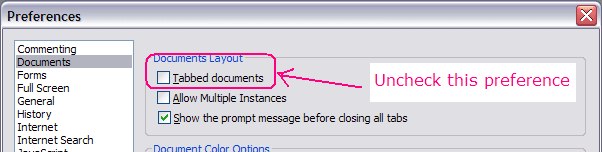
How can I get Foxit Reader v3.31 to display two documents side-by-side (i.e. "tiled"). The Tile choices are greyed out here and I cannot see how to select "Multiple Document interface mode" (or "Single Document interface mode" either).
The Foxit Reader user guide said:Viewing PDF Files - Foxit reader provides three different ways for you to read PDF files: multi-tab browsing, single document interface mode, and multiple document interface mode. The multi-tab browsing feature enables you to open multiple files in a single instance. If you already have a PDF file open and then you double-click another PDF file, it will be opened in the same window. The single document interface mode enables you to open multiple instances of Foxit Reader. Foxit Reader will create a new window when you double-click to open a new PDF file, which is very useful for viewing different files side by side. The multiple document interface mode sets multiple documents under a single parent window, as opposed to all windows being separated from each other (single document interface). In order to view a list of windows open in Foxit Reader, the user typically has to click on the Restore Down button at the top right corner of the Foxit Reader window.
My Computer
- Computer type
- PC/Desktop
- Computer Manufacturer/Model Number
- Scan 3XS P55 liteDAW
- OS
- Windows Home Premium (64)
- CPU
- Intel Core i7 860
- Motherboard
- Gigabyte GA-P55A-UD4
- Memory
- 8GB (4x2GB) Corsair TwinX XMS3
- Graphics Card(s)
- 1GB Gainward 9500 GT
- Sound Card
- M-Audio Delta 66
- Monitor(s) Displays
- Acer v223wBBd
- Screen Resolution
- 1680 x 1050
- Hard Drives
- 1 x 500 GB WD Barracuda (OS+Docs)
2 x 1TB Samsung Spinpoint F3 (Data)
- PSU
- Enermax EMD625AWT II - 625W Enermax Modu82+ II
- Case
- Fractal Design Define R2 Black
- Cooling
- Prolima Megahalems Super 6 Heatpipe Tower Cooler
- Keyboard
- Microsoft Digital Media Pro
- Mouse
- Belkin Optical Ergo
- Internet Speed
- 8 Mbps nominal (14.9 achieved !)
- Other Info
- Digital Audio Workstation