Solved Q9550

scrooge

New member
Guru
VIP
Local time
4:07 PM
Messages
627
hello
i just went from my old E8400 to the Q9550 and when reading the temps i get 3
different readings on the 4 cores. should this be happening ?
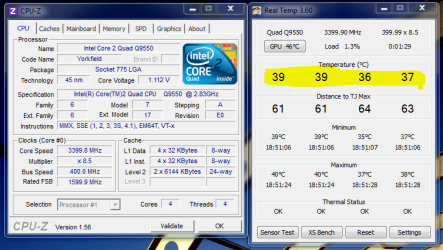
Capture.PNG


thanks scrooge
 

My Computer

Computer Manufacturer/Model Number
home build
OS
win 7 ( 64 bit)
CPU
Intel Core i7-870 Lynnfield 2.93GHz 8MB L3 Cache LGA 1156 95
Motherboard
ASUS P7P55 LX LGA 1156
Memory
G.SKILL Sniper Series 16GB (4 x 4GB) 240-Pin DDR3 SDRAM
Graphics Card(s)
ATI Radeon HD6800 Series
Sound Card
hdmi
Monitor(s) Displays
42" lg 3d tv
Screen Resolution
1920 x 1080
Hard Drives
1 ssd pci-e revodrive
4 seagate 1.5 tb
PSU
Rosewill BRONZE Series RBR1000-M 1000W Continuous@40°C, 80Pl
Case
CoolMaster 922
Cooling
CORSAIR CWCH60 Hydro Series H60 High Performance Liquid CPU
Keyboard
logtech
Mouse
logitect
Internet Speed
5 mbit
found the answer

solved
 

My Computer

Computer Manufacturer/Model Number
home build
OS
win 7 ( 64 bit)
CPU
Intel Core i7-870 Lynnfield 2.93GHz 8MB L3 Cache LGA 1156 95
Motherboard
ASUS P7P55 LX LGA 1156
Memory
G.SKILL Sniper Series 16GB (4 x 4GB) 240-Pin DDR3 SDRAM
Graphics Card(s)
ATI Radeon HD6800 Series
Sound Card
hdmi
Monitor(s) Displays
42" lg 3d tv
Screen Resolution
1920 x 1080
Hard Drives
1 ssd pci-e revodrive
4 seagate 1.5 tb
PSU
Rosewill BRONZE Series RBR1000-M 1000W Continuous@40°C, 80Pl
Case
CoolMaster 922
Cooling
CORSAIR CWCH60 Hydro Series H60 High Performance Liquid CPU
Keyboard
logtech
Mouse
logitect
Internet Speed
5 mbit
Don't know what you found for an answer but there's nothing wrong with those variances. If they were like 8-9 degrees apart, then you might wonder.

Anyways you said you found your answer.

Peace :cool:
 

My Computer

Computer type
PC/Desktop
Computer Manufacturer/Model Number
Custom built by me.
OS
Windows 10 Pro
CPU
Intel Core i7-4770K (3.5Ghz)
Motherboard
Gigabyte G1 Sniper 5 (F10 Bios)
Memory
32 gig Corsair Dominator Platinum (4x8Gig)
Graphics Card(s)
Sapphire Tri-X R9 Fury
Sound Card
Soundblaster ZXR
Monitor(s) Displays
NEC PA242W 24" LCD Monitor
Screen Resolution
1920 x 1200
Hard Drives
Primary - Samsung 850 Pro (512gig), Samsung 840 Pro (256gig), 2TB WD Caviar Black.
PSU
EVGA Supernova 1000 G2
Case
Cooler Master HAF X
Cooling
Corsair H100i with Corsair Air Series SP120 Quiet Fans
Keyboard
Logitech Wireless Wave
Mouse
Logitech Performance MX
Internet Speed
High Speed Cable
Antivirus
Norton Security
Browser
IE11
Other Info
Memory Timings - 1866MHz @ 9-9-9-27-1T @ 1.5 volts
One thing to be aware of, the Q9550 is fairly notorious for having stuck sensors. I have a sensor that never goes below 40. They all work fine when temps go above that, but it's not unusual for that processor to give a wrong reading at idle temps in at least one of the cores.
 

My Computer

Computer type
PC/Desktop
Computer Manufacturer/Model Number
Self build
OS
Windows 10 Home
CPU
Intel Core i5 3550
Motherboard
ASUS P8Z77-V LX (LGA1155)
Memory
Corsair Vengeance DDR3 16GB
Graphics Card(s)
Nvidia GEForce GTX 970 SSC
Monitor(s) Displays
Hanns-G 23.6", Acer 17"
Screen Resolution
1920x1080, 1440x900
Hard Drives
Sandisk SSD 256 GB
WD500GB
WD640GB
Seagage Ultra + 1TB ext.
BWD 800GB
WD 1TB ext
PSU
Antec 650w
Case
Cooler Master Centurion 534
Cooling
COOLER MASTER GeminII S524, 3 120 mm case fans.
Keyboard
Logitech MK300
Mouse
Logitech MK300
Internet Speed
Cable
Antivirus
MSSE, Malwarebytes
Browser
IE 10, Chrome
One thing to be aware of, the Q9550 is fairly notorious for having stuck sensors. I have a sensor that never goes below 40. They all work fine when temps go above that, but it's not unusual for that processor to give a wrong reading at idle temps in at least one of the cores.


I have three stuck idle sensors on my Q9550.

Put that chip under some stress to see if they 'move'.


Even then a few degrees difference per core is normal.
 

My Computer

Computer type
PC/Desktop
Computer Manufacturer/Model Number
Systems by SmartEyeball
OS
8 Pro x64
CPU
i7 3770K 4.6GHz
Motherboard
ASUS P8Z77 WS
Memory
16GB G.Skill Trident X 2666mhz
Graphics Card(s)
x2 EVGA 780 Ti Superclocked SLI
Sound Card
SB X-FI Surround 5.1 PRO USB / ATH-AD900 Headphones
Monitor(s) Displays
x3 Dell U2410 / 58" Samsung
Screen Resolution
5760*1200/ 1920*1200
Hard Drives
2x Intel 520 240GB (RAID 0) * 2x WD Caviar Blacks 2TB (RAID 0) * 2TB WD Caviar Black * Sony Optirac DVD
PSU
Silverstone Strider Evolution 1200W
Case
Thermaltake Level 10 GT Snow Edition
Cooling
Noctua NH-D14
Keyboard
Topre Realforce // Ducky Shine MX Black // Filco Ninja TKL
Mouse
Thermaltake Theron (Highly Recommended) + Razer Imperator
Antivirus
MSE
Browser
IE, FF, WaterFox
Other Info
GT Extreme V2 Sim Racing Cockpit + 40" LCD and K/B Mouse stand ▼
Fanatec CSR Elite Wheel + Clubsport V1 Pedals + CSR shifter/7G-H ▼Saitek X52 Pro ▼ TrackIR 5 Pro
Buttkicker v2 Seat Rumbler with Dedicated 5.1 and Sub Woofer attached to frame ▼
=
Bloody Big Grin
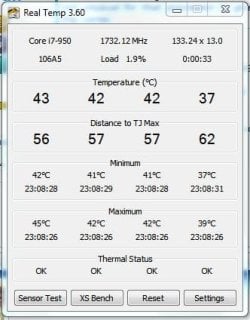
Notice that the processor isn't under load, and that the temps are only 3 degrees apart from highest to lowest. Given that i'd say there's no problem there.

I seen as much as a 6 degree delta and things be fine....

Real Temp readings.JPG
 

My Computer

Computer type
PC/Desktop
Computer Manufacturer/Model Number
Custom built by me.
OS
Windows 10 Pro
CPU
Intel Core i7-4770K (3.5Ghz)
Motherboard
Gigabyte G1 Sniper 5 (F10 Bios)
Memory
32 gig Corsair Dominator Platinum (4x8Gig)
Graphics Card(s)
Sapphire Tri-X R9 Fury
Sound Card
Soundblaster ZXR
Monitor(s) Displays
NEC PA242W 24" LCD Monitor
Screen Resolution
1920 x 1200
Hard Drives
Primary - Samsung 850 Pro (512gig), Samsung 840 Pro (256gig), 2TB WD Caviar Black.
PSU
EVGA Supernova 1000 G2
Case
Cooler Master HAF X
Cooling
Corsair H100i with Corsair Air Series SP120 Quiet Fans
Keyboard
Logitech Wireless Wave
Mouse
Logitech Performance MX
Internet Speed
High Speed Cable
Antivirus
Norton Security
Browser
IE11
Other Info
Memory Timings - 1866MHz @ 9-9-9-27-1T @ 1.5 volts
it seems like it's working ok. i just didn't no about the 3 different readings . i thought maybe the
sensors were stuck and wanted to be sure .
anyways thanks for all the help.....

scrooge
 

My Computer

Computer Manufacturer/Model Number
home build
OS
win 7 ( 64 bit)
CPU
Intel Core i7-870 Lynnfield 2.93GHz 8MB L3 Cache LGA 1156 95
Motherboard
ASUS P7P55 LX LGA 1156
Memory
G.SKILL Sniper Series 16GB (4 x 4GB) 240-Pin DDR3 SDRAM
Graphics Card(s)
ATI Radeon HD6800 Series
Sound Card
hdmi
Monitor(s) Displays
42" lg 3d tv
Screen Resolution
1920 x 1080
Hard Drives
1 ssd pci-e revodrive
4 seagate 1.5 tb
PSU
Rosewill BRONZE Series RBR1000-M 1000W Continuous@40°C, 80Pl
Case
CoolMaster 922
Cooling
CORSAIR CWCH60 Hydro Series H60 High Performance Liquid CPU
Keyboard
logtech
Mouse
logitect
Internet Speed
5 mbit
I have always wondered about mine:
temps.PNG

~Lordbob
 

My Computer

Computer Manufacturer/Model Number
Hera
OS
Windows 7 Ultimate x64, Mint 9
CPU
Intel i5-2500k
Motherboard
ASUS P8P67 Pro
Memory
2x 4Gb Corsair VENGEANCE DDR3-1600
Graphics Card(s)
NVidia GeForce N260GTX Twin Frozr
Sound Card
Realtek HD OnBoard Audio
Monitor(s) Displays
ASUS 24" Monitor
Screen Resolution
1920x1080
Hard Drives
G.SKILL Phoenix Series 60GB SATA II MLC Internal Solid State Drive (SSD)
SAMSUNG Spinpoint F3R 1TB 7200 RPM 32MB Cache SATA II
PSU
Cooler Master Real Power Pro 750W
Case
Cooler Master Haf 932
Cooling
Fans
Keyboard
Razer Tarantula
Mouse
Razer Lachesis
Internet Speed
not fast enough
I've have those as well and found that if the first core is way off like yours is, re-applying the thermo paste may be in order.

Or as some have said, you might have a stuck sensor. You can check it by clicking the sensor check tab.
 

My Computer

Computer type
PC/Desktop
Computer Manufacturer/Model Number
Custom built by me.
OS
Windows 10 Pro
CPU
Intel Core i7-4770K (3.5Ghz)
Motherboard
Gigabyte G1 Sniper 5 (F10 Bios)
Memory
32 gig Corsair Dominator Platinum (4x8Gig)
Graphics Card(s)
Sapphire Tri-X R9 Fury
Sound Card
Soundblaster ZXR
Monitor(s) Displays
NEC PA242W 24" LCD Monitor
Screen Resolution
1920 x 1200
Hard Drives
Primary - Samsung 850 Pro (512gig), Samsung 840 Pro (256gig), 2TB WD Caviar Black.
PSU
EVGA Supernova 1000 G2
Case
Cooler Master HAF X
Cooling
Corsair H100i with Corsair Air Series SP120 Quiet Fans
Keyboard
Logitech Wireless Wave
Mouse
Logitech Performance MX
Internet Speed
High Speed Cable
Antivirus
Norton Security
Browser
IE11
Other Info
Memory Timings - 1866MHz @ 9-9-9-27-1T @ 1.5 volts
I've have those as well and found that if the first core is way off like yours is, re-applying the thermo paste may be in order.

Or as some have said, you might have a stuck sensor. You can check it by clicking the sensor check tab.
Have done both, and it's always been like that.

~Lordbob
 

My Computer

Computer Manufacturer/Model Number
Hera
OS
Windows 7 Ultimate x64, Mint 9
CPU
Intel i5-2500k
Motherboard
ASUS P8P67 Pro
Memory
2x 4Gb Corsair VENGEANCE DDR3-1600
Graphics Card(s)
NVidia GeForce N260GTX Twin Frozr
Sound Card
Realtek HD OnBoard Audio
Monitor(s) Displays
ASUS 24" Monitor
Screen Resolution
1920x1080
Hard Drives
G.SKILL Phoenix Series 60GB SATA II MLC Internal Solid State Drive (SSD)
SAMSUNG Spinpoint F3R 1TB 7200 RPM 32MB Cache SATA II
PSU
Cooler Master Real Power Pro 750W
Case
Cooler Master Haf 932
Cooling
Fans
Keyboard
Razer Tarantula
Mouse
Razer Lachesis
Internet Speed
not fast enough
IIRC, 'core 2' was always my 'accurate' idle sensor. Core 4 was permanently stuck at 47c under idle conditions like yours Dave.

As long as they move under load - there is nothing to worry about.

The CPU (tcase) sensor should remain unaffected by the stuck sensors.


As cato mentioned, the Q9xx series were renowned for sticky/stuck idle sensors.
 

My Computer

Computer type
PC/Desktop
Computer Manufacturer/Model Number
Systems by SmartEyeball
OS
8 Pro x64
CPU
i7 3770K 4.6GHz
Motherboard
ASUS P8Z77 WS
Memory
16GB G.Skill Trident X 2666mhz
Graphics Card(s)
x2 EVGA 780 Ti Superclocked SLI
Sound Card
SB X-FI Surround 5.1 PRO USB / ATH-AD900 Headphones
Monitor(s) Displays
x3 Dell U2410 / 58" Samsung
Screen Resolution
5760*1200/ 1920*1200
Hard Drives
2x Intel 520 240GB (RAID 0) * 2x WD Caviar Blacks 2TB (RAID 0) * 2TB WD Caviar Black * Sony Optirac DVD
PSU
Silverstone Strider Evolution 1200W
Case
Thermaltake Level 10 GT Snow Edition
Cooling
Noctua NH-D14
Keyboard
Topre Realforce // Ducky Shine MX Black // Filco Ninja TKL
Mouse
Thermaltake Theron (Highly Recommended) + Razer Imperator
Antivirus
MSE
Browser
IE, FF, WaterFox
Other Info
GT Extreme V2 Sim Racing Cockpit + 40" LCD and K/B Mouse stand ▼
Fanatec CSR Elite Wheel + Clubsport V1 Pedals + CSR shifter/7G-H ▼Saitek X52 Pro ▼ TrackIR 5 Pro
Buttkicker v2 Seat Rumbler with Dedicated 5.1 and Sub Woofer attached to frame ▼
=
Bloody Big Grin
IIRC, 'core 2' was always my 'accurate' idle sensor. Core 4 was permanently stuck at 47c under idle conditions like yours Dave.

As long as they move under load - there is nothing to worry about.

The CPU (tcase) sensor should remain unaffected by the stuck sensors.


As cato mentioned, the Q9xx series were renowned for sticky/stuck idle sensors.
Alright, good to know.

~Lordbob
 

My Computer

Computer Manufacturer/Model Number
Hera
OS
Windows 7 Ultimate x64, Mint 9
CPU
Intel i5-2500k
Motherboard
ASUS P8P67 Pro
Memory
2x 4Gb Corsair VENGEANCE DDR3-1600
Graphics Card(s)
NVidia GeForce N260GTX Twin Frozr
Sound Card
Realtek HD OnBoard Audio
Monitor(s) Displays
ASUS 24" Monitor
Screen Resolution
1920x1080
Hard Drives
G.SKILL Phoenix Series 60GB SATA II MLC Internal Solid State Drive (SSD)
SAMSUNG Spinpoint F3R 1TB 7200 RPM 32MB Cache SATA II
PSU
Cooler Master Real Power Pro 750W
Case
Cooler Master Haf 932
Cooling
Fans
Keyboard
Razer Tarantula
Mouse
Razer Lachesis
Internet Speed
not fast enough
I've got a Q9550 and I always have a few degrees difference between all of my cores. Totally normal.
 

My Computer

Computer Manufacturer/Model Number
Self-Built in July 2009
OS
Windows 7 Ultimate x64
CPU
Intel Q9550 2.83Ghz OC'd to 3.40Ghz
Motherboard
Gigabyte GA-EP45-UD3R rev. 1.1, F12 BIOS
Memory
8GB G.Skill PI DDR2-800, 4-4-4-12 timings
Graphics Card(s)
EVGA 1280MB Nvidia GeForce GTX570
Sound Card
Realtek ALC899A 8 channel onboard audio
Monitor(s) Displays
23" Acer x233H
Screen Resolution
1920x1080
Hard Drives
Intel X25-M 80GB Gen 2 SSD
Western Digital 1TB Caviar Black, 32MB cache. WD1001FALS
PSU
Corsair 620HX modular
Case
Antec P182
Cooling
stock
Keyboard
ABS M1 Mechanical
Mouse
Logitech G9 Laser Mouse
Internet Speed
15/2 cable modem
Other Info
Windows and Linux enthusiast. Logitech G35 Headset.
IIRC, 'core 2' was always my 'accurate' idle sensor. Core 4 was permanently stuck at 47c under idle conditions like yours Dave.

As long as they move under load - there is nothing to worry about.

The CPU (tcase) sensor should remain unaffected by the stuck sensors.


As cato mentioned, the Q9xx series were renowned for sticky/stuck idle sensors.

I have a feeling it's my core2 sensor on my 9550 that's the stuck one. It's abnormally lower than the other 3. Though the CPU fan does need a clean, so it could just be the others are higher than normal at the moment. I just cba taking it out though.
 

My Computer

Computer type
PC/Desktop
Computer Manufacturer/Model Number
Custom Built
OS
Windows 8.1 Pro x64
CPU
Intel Core i7 4790k
Motherboard
MSI Z97S Krait Edition
Memory
8GB Corsair Dominator 1600MHz
Graphics Card(s)
MSI TwinFrozr GeForce GTX770
Sound Card
ASUS Xonar DX/XD 7.1
Monitor(s) Displays
Dell 24" S2409W + Dell 20" E207WFP
Screen Resolution
1920x1080 + 1680x1050
Hard Drives
1x 120GB OCZ Agility 3, 1x 750GB Western Digital Caviar Black, 1x 1TB Western Digital Caviar Blue
PSU
Corsair HX850 modular
Case
Fractal Design Define R4
Cooling
Corsair H60 w/ twin Corsair SP120 fans
Keyboard
Logitech G510S Keyboard
Mouse
Logitech G500S Laser Mouse
Internet Speed
40Mbps
Antivirus
Microsoft Security Essentials
Browser
Google Chrome
Other Info
LG Blu-Ray player
My 9650 has a stuck idle sensor as well.


But, like I always say ... see what it shows under load.
If load temps are good, ignore the idle readings. Load is all that really matters anyway IMO.
 

My Computer

Computer Manufacturer/Model Number
Custom (Self Build)
OS
Windows 7 Home Premium 64bit
CPU
Intel Core i7 2700k
Motherboard
eVGA P67 SLI
Memory
8GB Mushkin Redline Ridgebacks @1866
Graphics Card(s)
EVGA GTX570 SC
Sound Card
XiFi Titanium HD
Monitor(s) Displays
LG W2453V
Screen Resolution
1920x1080
Hard Drives
Intel 320 80GB -- Intel X25-V 40GB --WD Black 1TB x2 -- WD Blue 640GB
PSU
Seasonic x750
Case
Corsair 600T SE White
Cooling
eVGA Superclocked CPU Cooler
Keyboard
Saitek Cyborg
Antivirus
Kaspersky
Browser
IE
Other Info
LG BD/DVD
Back
Top