QPI/VTT Voltage - Can't find in bios (Random freezes) +Pictures

TimM95

New member
Local time
11:49 AM
Messages
6
Ive had random freezes in windows 7 for a while now and have tried every possible fix Ive found on the internet. The freezes happened after I upgraded my cpu, gpu and ram. There is a suggestion to change the ram voltages and cpu voltages, I have changed the ram voltages in the bios but for changing the QPI/VTT Voltage I am not able to find an option. The available options are attached in a photo of the bios: View image: 10638025 10152247684780308 1463585580 n .

PLEASE help me fix this problem its really annoying having random freezes, the audio stutters and a hard boot is required. I have run memtest for 10 hours + with no errors and have swapped the ram for the old and new with freezes following.

CPU: intel i5
gpu: NVIDIA 750ti
ram: 2x4GB

PLEASE reply with any information you need to help fix the problem, thanks!
 

My Computer My Computer

At a glance

Windows 7 home premium 64 bitintel i5-35708gb (2x4gb)Nvidia Geforce GTX 750ti 2gb
Computer type
PC/Desktop
Computer Manufacturer/Model Number
Asus
OS
Windows 7 home premium 64 bit
CPU
intel i5-3570
Motherboard
asus p8h77-m
Memory
8gb (2x4gb)
Graphics Card(s)
Nvidia Geforce GTX 750ti 2gb
Antivirus
Norton Internet Security
Browser
Chrome
Tim mate have you checked out the PSU yet and temps as well see this for checking the PSU

Using HW Info PSU

Download HW Info and pick the right bit version - HWiNFO, HWiNFO32/64 -Download -(copy and paste thissite into the search bar) If you do not need the running information in thesmaller right hand panel close it. In the left hand window click on the + forthe individual device groupings and they will open out to the variouscomponents.

Go on opening out further until you get to the device itself. click on it andit will highlight. In the right hand window there will be a very detaileddescription of that device as in brand, speeds model number etc etc These arevery detailed and are just what is needed for searching for drivers etc.

See my pic for an example - in this I have shown my power but it is a laptopand a desktop will show more details if you scroll down that listing. You will come to a section which lists the rails and for a reference for them see this Power Supply 101: A Reference Of Specifications - Power Supplies Page 2 also gives a good idea of how the Power_Good signak works at pin 8 (grey cable 24 pin socket)
Another way to check the volts is this http://www.sevenforums.com/tutorials/301799-psu-test-dc-output-voltage.html but please do not use an analogue meter as it injects volts - typically 9v into a circuit to test it and doing that to a 5v rail doesn't take a rocket scientist to work out what would happen because all the rails have to be within +/- 5% of the stated value.

Run Speccy for the temps Speccy - Download
 

Attachments

  • HW PSU VOLTS.PNG
    HW PSU VOLTS.PNG
    37.1 KB · Views: 4

My Computer My Computer

At a glance

Desk1 7 Home Prem / Desk2 10 Pro / Main lap A...Desk1 i5 3750K / Laptop i7 GTX 860M / Desk2 i...Desk1 8GB (1866) / Desk2 16GB (1333) / Laptop...Desk 1& 2NVidia GTX 650 & Laptops on board Intel
Computer type
PC/Desktop
Computer Manufacturer/Model Number
Own build (new) Desk1 / Asus ROG Win 7 / Desk2 1st build
OS
Desk1 7 Home Prem / Desk2 10 Pro / Main lap Asus ROG 10 Pro 2 laptop Toshiba 7 Pro Asus P2520 7 & 10
CPU
Desk1 i5 3750K / Laptop i7 GTX 860M / Desk2 i5 2500
Motherboard
Desk1 Asus P877-V / Desk2 Gigabyte H67 UD3H / Laptop ?
Memory
Desk1 8GB (1866) / Desk2 16GB (1333) / Laptop 8Gb DDR3
Graphics Card(s)
Desk 1& 2NVidia GTX 650 & Laptops on board Intel
Sound Card
Desk 1 & 2 -XONAR DG Realtek High Def audio Laptop
Monitor(s) Displays
Desk 1 Benq HD 2450 / Desk2 Philips 24" / Laptop 17.5"
Screen Resolution
1920x1080 D1 & D2 & Laptop 1
Hard Drives
Desk1 Samsung 120GB 830 SSD
Asus ROG 256GB 850 Pro SSD
Desk2 Samsung 840 256 SSD
Toshiba 120GB EVO
PSU
Desk 1 Corsair HX 1050/ Laptop ? / Desk 2 Corsair HX 650
Case
Desk 1 Cooler HAF XM ? Toshiba laptop / Desk2 Coolermaster
Cooling
Fans on all Desk1 -2 Desk2 - all Coolermasters 5 Laptop ?
Keyboard
Desk 1 MS Sidewinder X6 Desk 2 MS Sidewinder X 4
Mouse
Desk 1&2 - Gigabyte MS 900 gamer - laptop - Logitec wireless
Internet Speed
ADSL2+
Other Info
One other Desktop (tester) and spare Toshba laptop both with SSD's
Running Kaspersky 2016 ISS on all machines config'd identically
Logitec audio stereo systems on each machine (x3)
Canon MG5250MFC
Router/modem TP-Link running WPA2SK
Slightly different

Tim mate have you checked out the PSU yet and temps as well see this for checking the PSU

Using HW Info PSU

Download HW Info and pick the right bit version - HWiNFO, HWiNFO32/64 -Download -(copy and paste thissite into the search bar) If you do not need the running information in thesmaller right hand panel close it. In the left hand window click on the + forthe individual device groupings and they will open out to the variouscomponents.

Go on opening out further until you get to the device itself. click on it andit will highlight. In the right hand window there will be a very detaileddescription of that device as in brand, speeds model number etc etc These arevery detailed and are just what is needed for searching for drivers etc.

See my pic for an example - in this I have shown my power but it is a laptopand a desktop will show more details if you scroll down that listing. You will come to a section which lists the rails and for a reference for them see this Power Supply 101: A Reference Of Specifications - Power Supplies Page 2 also gives a good idea of how the Power_Good signak works at pin 8 (grey cable 24 pin socket)
Another way to check the volts is this http://www.sevenforums.com/tutorials/301799-psu-test-dc-output-voltage.html but please do not use an analogue meter as it injects volts - typically 9v into a circuit to test it and doing that to a 5v rail doesn't take a rocket scientist to work out what would happen because all the rails have to be within +/- 5% of the stated value.

Run Speccy for the temps Speccy - Download

I used CPUID HWMONITOR which was already on my system and got these results, what do you think?

View image: hwinfo2

Thanks for any further help
 

My Computer My Computer

At a glance

Windows 7 home premium 64 bitintel i5-35708gb (2x4gb)Nvidia Geforce GTX 750ti 2gb
Computer type
PC/Desktop
Computer Manufacturer/Model Number
Asus
OS
Windows 7 home premium 64 bit
CPU
intel i5-3570
Motherboard
asus p8h77-m
Memory
8gb (2x4gb)
Graphics Card(s)
Nvidia Geforce GTX 750ti 2gb
Antivirus
Norton Internet Security
Browser
Chrome
Tim if you scroll down that list of voltages you will get to a section titled Fintec that is the section you want to see - I was remiss because my Ivy Bridge is an Asus board and it is the brand marked on the board listing.

Sometimes though HW can be out of whack and the only real tried and true way is that tutorial. The meters can be bought very cheaply and will not cause any harm. It could just be the PSU cannot handle your new components mate or e going south - just what is the PSU?

To post shots here mate the easiest way is this

How to Use the Snipping Tool in Vista
 

My Computer My Computer

At a glance

Desk1 7 Home Prem / Desk2 10 Pro / Main lap A...Desk1 i5 3750K / Laptop i7 GTX 860M / Desk2 i...Desk1 8GB (1866) / Desk2 16GB (1333) / Laptop...Desk 1& 2NVidia GTX 650 & Laptops on board Intel
Computer type
PC/Desktop
Computer Manufacturer/Model Number
Own build (new) Desk1 / Asus ROG Win 7 / Desk2 1st build
OS
Desk1 7 Home Prem / Desk2 10 Pro / Main lap Asus ROG 10 Pro 2 laptop Toshiba 7 Pro Asus P2520 7 & 10
CPU
Desk1 i5 3750K / Laptop i7 GTX 860M / Desk2 i5 2500
Motherboard
Desk1 Asus P877-V / Desk2 Gigabyte H67 UD3H / Laptop ?
Memory
Desk1 8GB (1866) / Desk2 16GB (1333) / Laptop 8Gb DDR3
Graphics Card(s)
Desk 1& 2NVidia GTX 650 & Laptops on board Intel
Sound Card
Desk 1 & 2 -XONAR DG Realtek High Def audio Laptop
Monitor(s) Displays
Desk 1 Benq HD 2450 / Desk2 Philips 24" / Laptop 17.5"
Screen Resolution
1920x1080 D1 & D2 & Laptop 1
Hard Drives
Desk1 Samsung 120GB 830 SSD
Asus ROG 256GB 850 Pro SSD
Desk2 Samsung 840 256 SSD
Toshiba 120GB EVO
PSU
Desk 1 Corsair HX 1050/ Laptop ? / Desk 2 Corsair HX 650
Case
Desk 1 Cooler HAF XM ? Toshiba laptop / Desk2 Coolermaster
Cooling
Fans on all Desk1 -2 Desk2 - all Coolermasters 5 Laptop ?
Keyboard
Desk 1 MS Sidewinder X6 Desk 2 MS Sidewinder X 4
Mouse
Desk 1&2 - Gigabyte MS 900 gamer - laptop - Logitec wireless
Internet Speed
ADSL2+
Other Info
One other Desktop (tester) and spare Toshba laptop both with SSD's
Running Kaspersky 2016 ISS on all machines config'd identically
Logitec audio stereo systems on each machine (x3)
Canon MG5250MFC
Router/modem TP-Link running WPA2SK
Tim if you scroll down that list of voltages you will get to a section titled Fintec that is the section you want to see - I was remiss because my Ivy Bridge is an Asus board and it is the brand marked on the board listing.

Sometimes though HW can be out of whack and the only real tried and true way is that tutorial. The meters can be bought very cheaply and will not cause any harm. It could just be the PSU cannot handle your new components mate or e going south - just what is the PSU?

To post shots here mate the easiest way is this

How to Use the Snipping Tool in Vista

The screenshot I posted is everything from the program I used so i cant scroll down to the "fintec" so i guess I need to try your way some other time if i can get the proper meters in. However my PSU is only 450W (450W Quiet 80 PLUS Dual Rail PSU + 120mm Case Fan as described by pc specialist) but i dont believe im rocking too much equipment that it would be a power supply issue, and it only happens every 1 or 2 days after about maybe 8-9 hours of being on (it can vary a lot).
 

My Computer My Computer

At a glance

Windows 7 home premium 64 bitintel i5-35708gb (2x4gb)Nvidia Geforce GTX 750ti 2gb
Computer type
PC/Desktop
Computer Manufacturer/Model Number
Asus
OS
Windows 7 home premium 64 bit
CPU
intel i5-3570
Motherboard
asus p8h77-m
Memory
8gb (2x4gb)
Graphics Card(s)
Nvidia Geforce GTX 750ti 2gb
Antivirus
Norton Internet Security
Browser
Chrome

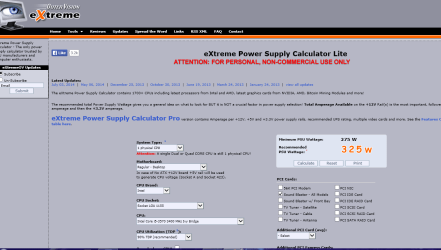
Tim another way of finding out what size PSU you need or what you have is tocalculate the requirements of your system using a program like this http://extreme.outervision.com/psucalculatorlite.jsp justfill it in and it will give the actual usage and then a recommended size (onethat gives you some extra wattage should the system be pushed hard).


The only other test for volts is that tutorial one mate it cannot be wrong -it is safe and sounds complicated but take your time and it will give youactual volts that are not just sensor generated.


If you can open the case and just see if you can make out the brand of thatPSU it will have a label on it that will state the voltage rail/s currents seepic (only an example).

I have done a very rough calculation on theinfo you have given and the calculator has come up with what is in my pic yourtry might be different.

having said that brands do vary from top class stuff like Corsair down to some of the really crappy stuff - I won't mention names plus the brands do have different companies make the models they put out.
 

Attachments

  • XTREME.PNG
    XTREME.PNG
    36.8 KB · Views: 1

My Computer My Computer

At a glance

Desk1 7 Home Prem / Desk2 10 Pro / Main lap A...Desk1 i5 3750K / Laptop i7 GTX 860M / Desk2 i...Desk1 8GB (1866) / Desk2 16GB (1333) / Laptop...Desk 1& 2NVidia GTX 650 & Laptops on board Intel
Computer type
PC/Desktop
Computer Manufacturer/Model Number
Own build (new) Desk1 / Asus ROG Win 7 / Desk2 1st build
OS
Desk1 7 Home Prem / Desk2 10 Pro / Main lap Asus ROG 10 Pro 2 laptop Toshiba 7 Pro Asus P2520 7 & 10
CPU
Desk1 i5 3750K / Laptop i7 GTX 860M / Desk2 i5 2500
Motherboard
Desk1 Asus P877-V / Desk2 Gigabyte H67 UD3H / Laptop ?
Memory
Desk1 8GB (1866) / Desk2 16GB (1333) / Laptop 8Gb DDR3
Graphics Card(s)
Desk 1& 2NVidia GTX 650 & Laptops on board Intel
Sound Card
Desk 1 & 2 -XONAR DG Realtek High Def audio Laptop
Monitor(s) Displays
Desk 1 Benq HD 2450 / Desk2 Philips 24" / Laptop 17.5"
Screen Resolution
1920x1080 D1 & D2 & Laptop 1
Hard Drives
Desk1 Samsung 120GB 830 SSD
Asus ROG 256GB 850 Pro SSD
Desk2 Samsung 840 256 SSD
Toshiba 120GB EVO
PSU
Desk 1 Corsair HX 1050/ Laptop ? / Desk 2 Corsair HX 650
Case
Desk 1 Cooler HAF XM ? Toshiba laptop / Desk2 Coolermaster
Cooling
Fans on all Desk1 -2 Desk2 - all Coolermasters 5 Laptop ?
Keyboard
Desk 1 MS Sidewinder X6 Desk 2 MS Sidewinder X 4
Mouse
Desk 1&2 - Gigabyte MS 900 gamer - laptop - Logitec wireless
Internet Speed
ADSL2+
Other Info
One other Desktop (tester) and spare Toshba laptop both with SSD's
Running Kaspersky 2016 ISS on all machines config'd identically
Logitec audio stereo systems on each machine (x3)
Canon MG5250MFC
Router/modem TP-Link running WPA2SK

Tim another way of finding out what size PSU you need or what you have is tocalculate the requirements of your system using a program like this http://extreme.outervision.com/psucalculatorlite.jsp justfill it in and it will give the actual usage and then a recommended size (onethat gives you some extra wattage should the system be pushed hard).


The only other test for volts is that tutorial one mate it cannot be wrong -it is safe and sounds complicated but take your time and it will give youactual volts that are not just sensor generated.


If you can open the case and just see if you can make out the brand of thatPSU it will have a label on it that will state the voltage rail/s currents seepic (only an example).

I have done a very rough calculation on theinfo you have given and the calculator has come up with what is in my pic yourtry might be different.

having said that brands do vary from top class stuff like Corsair down to some of the really crappy stuff - I won't mention names plus the brands do have different companies make the models they put out.

I purchased a new Corsair 500W PSU today and have installed it, I hope this fixes any problems! My old PSU was a poor quality one i believe with no brand so after 3 years it might have died a bit so hopefully this one fixes the problem
 

My Computer My Computer

At a glance

Windows 7 home premium 64 bitintel i5-35708gb (2x4gb)Nvidia Geforce GTX 750ti 2gb
Computer type
PC/Desktop
Computer Manufacturer/Model Number
Asus
OS
Windows 7 home premium 64 bit
CPU
intel i5-3570
Motherboard
asus p8h77-m
Memory
8gb (2x4gb)
Graphics Card(s)
Nvidia Geforce GTX 750ti 2gb
Antivirus
Norton Internet Security
Browser
Chrome
Ok Tim good choice on brand mate now it does depend on the series of course and I don't want to be the party pooper but the RM series I think it was we were discussing a while ago and there were not many who thought much of that series.

The VS series I don't know but the rest are all good, and I use Corsairs on all my builds and as the old saying goes you get what you pay for.


Anyway like I said I don't want to be seen as a old grunge and you have done well to do what you have please keep us updated.
John
 

My Computer My Computer

At a glance

Desk1 7 Home Prem / Desk2 10 Pro / Main lap A...Desk1 i5 3750K / Laptop i7 GTX 860M / Desk2 i...Desk1 8GB (1866) / Desk2 16GB (1333) / Laptop...Desk 1& 2NVidia GTX 650 & Laptops on board Intel
Computer type
PC/Desktop
Computer Manufacturer/Model Number
Own build (new) Desk1 / Asus ROG Win 7 / Desk2 1st build
OS
Desk1 7 Home Prem / Desk2 10 Pro / Main lap Asus ROG 10 Pro 2 laptop Toshiba 7 Pro Asus P2520 7 & 10
CPU
Desk1 i5 3750K / Laptop i7 GTX 860M / Desk2 i5 2500
Motherboard
Desk1 Asus P877-V / Desk2 Gigabyte H67 UD3H / Laptop ?
Memory
Desk1 8GB (1866) / Desk2 16GB (1333) / Laptop 8Gb DDR3
Graphics Card(s)
Desk 1& 2NVidia GTX 650 & Laptops on board Intel
Sound Card
Desk 1 & 2 -XONAR DG Realtek High Def audio Laptop
Monitor(s) Displays
Desk 1 Benq HD 2450 / Desk2 Philips 24" / Laptop 17.5"
Screen Resolution
1920x1080 D1 & D2 & Laptop 1
Hard Drives
Desk1 Samsung 120GB 830 SSD
Asus ROG 256GB 850 Pro SSD
Desk2 Samsung 840 256 SSD
Toshiba 120GB EVO
PSU
Desk 1 Corsair HX 1050/ Laptop ? / Desk 2 Corsair HX 650
Case
Desk 1 Cooler HAF XM ? Toshiba laptop / Desk2 Coolermaster
Cooling
Fans on all Desk1 -2 Desk2 - all Coolermasters 5 Laptop ?
Keyboard
Desk 1 MS Sidewinder X6 Desk 2 MS Sidewinder X 4
Mouse
Desk 1&2 - Gigabyte MS 900 gamer - laptop - Logitec wireless
Internet Speed
ADSL2+
Other Info
One other Desktop (tester) and spare Toshba laptop both with SSD's
Running Kaspersky 2016 ISS on all machines config'd identically
Logitec audio stereo systems on each machine (x3)
Canon MG5250MFC
Router/modem TP-Link running WPA2SK
Back
Top